Dynamic Agent Callbacks
Overview
Step callbacks allow you to hook into various stages of an agent's execution process, enabling you to dynamically modify the internal state of the agent or its steps and inject custom logic or actions to fine-tune the agent's responses.
Step callback lifecycle
After a user makes a query, the agent follows a sequence of steps to respond with a relevant answer. The call lifecycle begins with the initial call step on_call_step_start and ends with on_call_step_end.
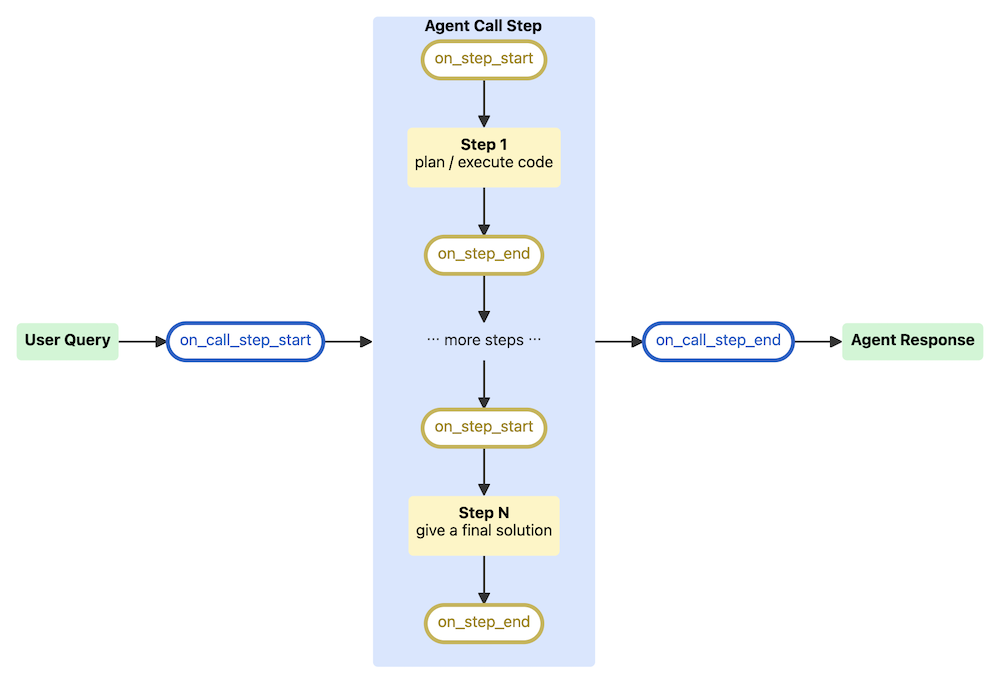
Each step goes through processing and execution. This means that you can monitor and control the agent's behavior at each point.
Callback Types
Callbacks target two different phases: the agent call step and the actual steps the agent takes to get to an answer.
The onCallStepStart is a checkpoint before the agent starts processing and onCallStepEnd is a checkpoint at the end of the processing step.
onCallStep callbacks have access to:
agent: an instance of theDynamicPythonAgentpython classcall_step: an instance of thePythonAgentCallSteppython class
The onStepStart is a checkpoint before a specific step and onStepEnd is a checkpoint after that step.
onStep callbacks have access to:
agent: an instance of theDynamicPythonAgentpython classstep: an instance of thePythonAgentSteppython class
Step callbacks are configured by setting the onStepCallbacksSpec config field in the agent's config.
Genai.Agent.Dynamic.OnStepCallbackSpec is defined as:
  type Genai.Agent.Dynamic.OnStepCallbackSpec {

    onStepStart: [Lambda<function(agent: any, step: any): any> | Genai.Agent.Dynamic.Callback]

    onStepEnd: [Lambda<function(agent: any, step: any): any> | Genai.Agent.Dynamic.Callback]

    onCallStepStart: [Lambda<function(agent: any, call_step: any): any> | Genai.Agent.Dynamic.Callback]

    onCallStepEnd: [Lambda<function(agent: any, call_step: any): any> | Genai.Agent.Dynamic.Callback]
}Create a Lambda Callback
First, make sure you have installed the py-query_orchestrator runtime and initialize an agent instance.
agent = c3.Genai.Agent.Dynamic(name="DynamicAgent_default")
initial_agent_config = agent.config()
To create a callback instance, you can modify the PythonAgentCallStep which is the Python class of the instance that represents the call step.
Next, list all of the pre-built callbacks with:
# List all pre-built callbacks
c3.Genai.Agent.Dynamic.Callback.fetch()
You can see that the description for the 'add_user_context' callback is:
"Ingest user context to the agent's system prompt. This callbacks expect the system prompt has the param named 'USER_CONTEXT' and would replace the param with user's name, first name, last name, id and email. Configurations of this callback are `includeUserId` and `includeUserEmail` both default to `false`."On a high level, this user context callback adds user context (id, name, email) to the system prompt. This system prompt syntax accepted a string and any parameter such as {{FEW SHOT}}. In this example, the callback would replace the {{USER_CONTEXT}} parameter of the system prompt with the user's information, and the system prompt is read by the LLM.
To create a lambda callback that adds more specific user context, you should write a Python function that edits the call step query. This callback definition is a C3 Lambda function. The following code edits the call step query and adds more context about the user.
#  DynamicPythonAgent is the Python class of the agent instance that runs the call step.
def i_like_coffee_on_call_step_start_callback(agent: "DynamicPythonAgent", call_step: "PythonAgentCallStep"):
    original_query = call_step.query
    call_step.query = original_query + " FYI, I like coffee."

    call_step.logs["original_query"] = original_query
    call_step.logs["processed_query"] = call_step.query


i_like_coffee_lambda_callback = c3.Lambda.fromPyFunc(i_like_coffee_on_call_step_start_callback)
Next, reference the user context callback.
# More info about the callback
c3.Genai.Agent.Dynamic.Callback.forId("add_user_context")
Next, set up a Genai.Agent.Dynamic.OnStepCallbackSpec spec to add the lambda callback to the agent.
callback_spec = c3.Genai.Agent.Dynamic.OnStepCallbackSpec(
  onCallStepStart=[
      # Custom lambda callback
      i_like_coffee_lambda_callback,
      # Add user context callback (Persisted)
      c3.Genai.Agent.Dynamic.Callback.forId("add_user_context").withConfigKwargs(
          {"includeUserId": True, "includeUserEmail": True}
      ),
  ],
  onCallStepEnd=[],
  onStepStart=[],
  onStepEnd=[],
)

# Assign the spec to the agent
agent.config().setConfigValue("onStepCallbacksSpec", callback_spec)Run the agent
Re-initialize the agent with the updated configuration.
_ = agent.initialize(True)If you prompt the agent for updated user context, it should return updated information.
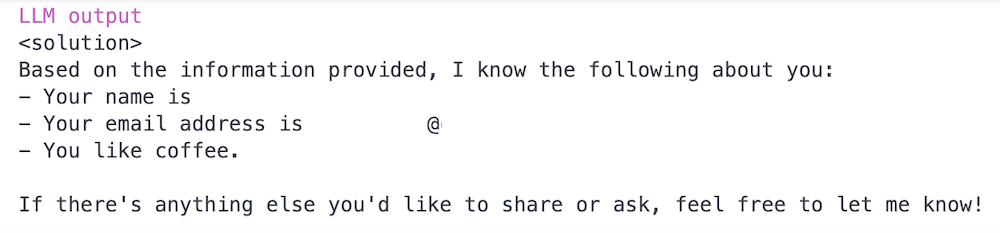
query_string = "List everything you know about me."
query_result = c3.Genai.ChatBot.createInitialGenAiResult(query_string)
query_result = agent.run(query_string, query_result)