GenAI Agent Resources
Overview
What is a Genai.Agent.Resource?
A resource is anything an agent can produce, understand, and represent in a UI.
Examples of resources include: forms, visualizations, generated documents, and even files submitted by users as part of their queries.
The following resources are available out of the box in the application:
- Genai.Agent.Resource.Document - Resource for document outputs from tools, supports polling for live updates and content stored through FileSystem
- Genai.Agent.Resource.Form - Interactive forms that can be dynamically generated and submitted by users with custom validation and processing
- Genai.Agent.Resource.FileInput - Handles uploaded files in GenAI queries, storing metadata and providing content access for agent processing
- Genai.Agent.Resource.PlotlyFigure - Interactive
Plotlyvisualizations with dynamic HTML rendering and canvas view mode - Genai.Agent.Resource.DataFrame - Pandas DataFrame outputs with proper serialization and integrated visualization support
- Genai.Agent.Resource.MatplotlibFigure - Static
matplotlibfigures rendered as images with workflow integration - Genai.Agent.Resource.PILImage - PIL/Pillow image resources for image processing and display workflows
- Genai.Agent.Resource.SimpleText - Basic text content resource for simple string outputs and user edits
- Genai.Agent.Resource.Generic - Flexible resource for arbitrary dill-serializable Python objects
- Genai.Agent.Resource.GenericC3Type - Resource wrapper for any C3 type instance with automatic serialization
- Genai.Agent.Resource.UserInputForm - Workflow-specific forms for collecting structured user input during agent execution
You can quickly create any new resource using the resource framework by following the steps outlined below.
Resource lifecycle at a glance
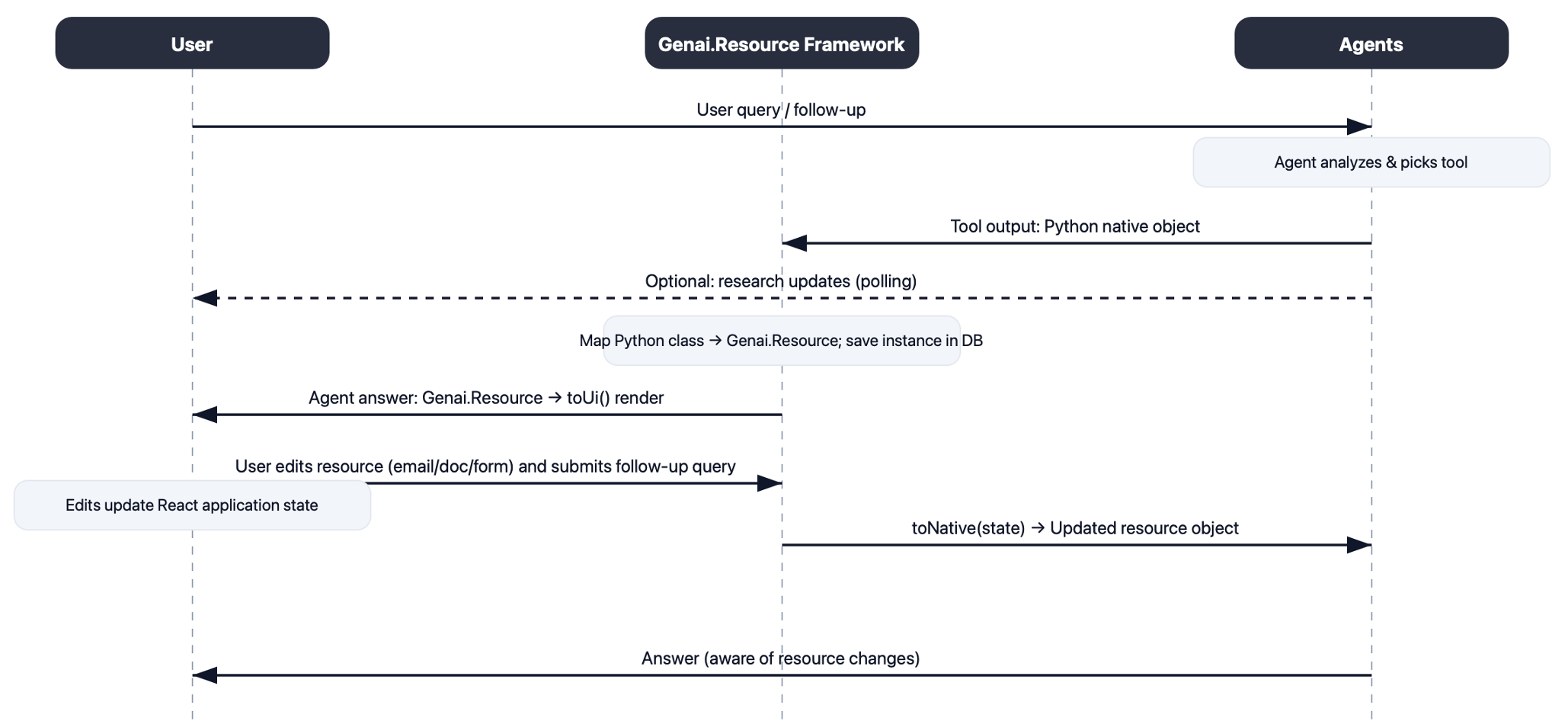
Resources bridge the C3 Type System with the native domains, both for the server (Python) and the UI (SDL React). As a result, they implement methods to handle serialization and de-serialization across these domains:
toNative: Convert the C3 resource instance into a native domain object used by your agent/tool.fromNative: Convert the native object back into aGenai.Agent.Resource(persisted throughmerge/upsert).toUi(implemented injs-rhino): Describe how to render the resource using an SDL-connected React component.fromUi: Apply user edits from the UI back onto the resource.
Example: Text resource
A simple text resource demonstrating how lifecycle methods work.
toNative(this)
- Purpose: Convert the resource into a native (Python) object for agents/tools to consume.
- Why: Agents shouldn't depend on C3 types; they operate on plain, serializable objects.
- What it does:
- Ensures the required fields are loaded.
- Returns a small native object containing only what the agent needs.
TextResource = c3.Genai.Agent.Resource.Text.nativePyCls()

def toNative(this):
    this = this.getMissing({"include": "text"})
return TextResource(text=this.text)fromNative(cls, obj)
- Purpose: Convert a native object back into a persisted
Genai.Agent.Resource. - Why: After tool execution, you often want to surface results to the user and to subsequent agent steps.
- What it does:
- Maps fields from the native object to the resource.
- Persists only the intended fields using
merge(..., returnInclude='this')orupsert.
def fromNative(cls, obj):
return c3.Genai.Agent.Resource.Text(text=obj.text).upsert(returnInclude="this")toUi(this)
- Purpose: Describe how the resource should be rendered in the UI.
- Why: The UI renders based on
UiSdlDynamicComponentMetadata, which points to a React component. - Important: the implementation must be in
js-rhinofor improved performance (bringing up an ephemeral Python process introduces unnecessary latency in the UI) - What it does:
- Loads all required fields.
- Returns a
UiSdlConnected<GenAiUiTextResource>with minimal props (title,text,resourceId).
function toUi(this) {
    this = this.getMissing({include: "id, title, text"});
    return c3.UiSdlDynamicComponentMetadata({
        children: [
            {
                type: "UiSdlConnected<GenAiUiTextResource>",
                id: "GenAiUiTextResource_" + this.id,
                component: {
                    title: this.title,
                    text: this.text,
                    resourceId: this.id,
                },
            }
        ]
    });
}fromUi(this, uiKwargs)
- Purpose: Apply user edits coming from the UI and persist them on the resource.
- Why: Enables incremental edit flows; the next agent run can consume updated values through
toNative. - What it does:
- Reads deltas from
uiKwargs. - Merges only changed fields using
merge(..., returnInclude='this').
- Reads deltas from
def fromUi(this, uiKwargs):
    if not uiKwargs:
        return this
return this.withText(uiKwargs["text"]).merge(mergeInclude="text", returnInclude="this")UI component (React) wiring for onChange
You can define your own component for rendering a GenAI Resource. It's important that this component is a C3 Type UI component, so that it can be rendered dynamically.
Below is an example of a UI component that renders a resource to edit some text. All resources have access to a GenAiUiResourceContext which contains:
conversationId:idof the conversationfeedApplicationStateId:idof the feed application state.resultId:idof the GenAI result the resource belongs to.
import React, { useState, useContext } from 'react';
import { useDispatch } from 'react-redux';
import { onChange } from '@c3/ui/GenAiUiResourceHelpers';
import { GenAiUiResourceContext, GenAiUiResourceContextValue } from '@c3/app/ui/src/genai-react/GenAiUiCanvasResource';

function GenAiUiTextResource({ title, text, resourceId }: { title?: string; text?: string; resourceId: string }) {
  const dispatch = useDispatch();
  const [value, setValue] = useState(text);
  const { conversationId, feedApplicationStateId }: GenAiUiResourceContextValue = useContext(GenAiUiResourceContext);

  const handleChange = (e: React.ChangeEvent<HTMLTextAreaElement>) => {
    const newText = e.target.value;
    setValue(newText);
    onChange({
      dispatch,
      feedApplicationStateId,
      resource: { id: resourceId, text: newText, title },
      conversationId,
    });
  };

  return <textarea value={value} onChange={handleChange} />;
}- What
onChangedoes: It dispatchesaddResourcesActionwithGenAiUiResourceType.AGENT_RESOURCE_EDIT_VALUES, updating the feed app state. Later, the server-sidefromUireadsuiKwargsto persist changes.
import { GenAiUiResourceType, addResourcesAction } from '@c3/ui/GenAiUiFeedResources';
import { Genai, GenAiUiResourceOnChangeSpec } from '@c3/types';

const onChange = (spec: GenAiUiResourceOnChangeSpec) => {
  spec.dispatch(
    addResourcesAction(
      spec.feedApplicationStateId,
      { [spec.resource.id]: spec.resource },
      GenAiUiResourceType.AGENT_RESOURCE_EDIT_VALUES,
      spec.conversationId
    )
  );
};Step-by-step: Build a custom resource
Follow these steps to create a new resource end-to-end.
1) Define your data shape and type
- Decide what the resource represents (for example: note, chart, form, document).
- If content is large or versioned, plan to store it in the
FileSystemand reference throughcontentUrl. - Extend
Genai.Agent.Resource(in.c3typ) if you need additional fields beyond the base.
2) Implement toNative(this)
- Return a native object that your agent/tool consumes (for example: Python class,
Document, or a Python data class).
For custom Python classes, you need to include a custom __reduce__ method that removes C3 builtin references to make objects pickleable across different runtime contexts without C3 dependencies. An example is provided below.
# Define this class within `nativePyCls` within your resource c3typ
class MyNative(BaseModel):
    """
    A basic native class with pickle support for serialization/deserialization.
    """
    value: Any = Field(
        title="Value",
        description="The main value stored in this native object."
    )
    metadata: Dict[str, Any] = Field(
        default_factory=dict,
        title="Metadata",
        description="Additional metadata for the object."
    )

    def __reduce__(self):
        """
        Custom pickle reduction method.
        This method is called when the object is being pickled.
        """
        import types

        def _restore_my_native(*initialization_args):
            """
            Function to restore the object during unpickling.
            This searches for 'c3' in the call stack to get the C3 context.
            """
            import sys

            # Search for c3 in the call stack frames
            try:
                c3 = None
                frame_index = 0
                while c3 is None:
                    c3 = sys._getframe(frame_index).f_globals.get("c3")
                    frame_index += 1
            except ValueError as e:
                raise RuntimeError(
                    "Failed to unpickle this instance as 'c3' is not found in runtime context."
                ) from e

            # Return a new instance using C3's native object creation
            return c3.Genai.Agent.Resource.MyNative.nativePyObj(*initialization_args)

        # Create a restore function with clean globals (no c3 references)
        restore_function = types.FunctionType(
            _restore_my_native.__code__,
            {"__builtins__": __builtins__},
        )

        # Return the restore function and initialization arguments
        initialization_args = (self.value,)
        instance_state = {
            "metadata": self.metadata,
            "value": self.value
        }
        return restore_function, initialization_args, instance_state

    def __setstate__(self, state: Dict[str, Any]):
        """
        Custom pickle state setting method.
        This method is called when the object is being unpickled.
        """
        # Restore the instance state
        self.metadata = state.get("metadata", {})
        self.value = state.get("value")


def nativePyCls(cls):
    return MyNative

def nativePyObj(cls, *args, **kwargs):
    return cls.nativePyCls()(*args, **kwargs)

def toNative(this):
    this = this.getMissing(include="value")
return MyNative(value=this.value)3) Implement fromNative(cls, obj)
- Convert a native result back into the resource instance.
- If content is large, write it to a file and set
contentUrl. - Persist with
merge(..., returnInclude='this')(orupsert).
def fromNative(cls, obj):
    # If small, store inline; if large, write to FileSystem
return cls(value=obj.value).merge(mergeInclude="value", returnInclude="this")4) Implement toUi(this)
- Return
UiSdlDynamicComponentMetadatathat references your React component name throughUiSdlConnected<YourComponent>. - Pass only the props required for rendering.
def toUi(this):
    this = this.getMissing(include="id, value")
    return c3.UiSdlDynamicComponentMetadata(
        children=[
            {
                "type": "UiSdlConnected<GenAiUiMyResource>",
                "id": f"GenAiUiMyResource_{this.id}",
                "component": {
                    "value": this.value,
                    "resourceId": this.id,
                },
            }
        ]
)5) Implement fromUi(this, uiKwargs)
- Apply partial updates from the UI and persist only the changed fields.
def fromUi(this, uiKwargs):
    if not uiKwargs:
        return this
return this.withValue(uiKwargs.get("value")).merge(mergeInclude="value", returnInclude="this")6) Choose the viewMode
- Default is
'feed'(inline). - Set
'canvas'when you want the UI to transition and focus on a larger editor/visualization.
# Example inside fromNative
return cls(..., viewMode="canvas").merge(mergeInclude="..., viewMode", returnInclude="this")7) Track diffs and user actions (optional)
- Provide
computeDiffon the server and store results inlastDiff. - Expose
userActions(this)to summarize changes for audit/history. - Add user actions for resources where users can take actions and you want to convey the same to the agent. For example, submitting forms, editing documents, sending emails, etc.
def userActions(this):
    return [
        c3.Genai.Agent.ResourceAction(
            description="User changed this resource.",
            details="Details about the resource",
        )
]8) Add your resource to the Factory mapping
- Register the native→resource mapping so the platform can convert your native objects into
Genai.Agent.Resourceautomatically. - Remix the type Genai.Agent.Resource.Factory as follows:
remix type Genai.Agent.Resource.Factory {
  nativeResourceToTypeMappings: ~ py
}def nativeResourceToTypeMappings(cls):
resource_mappings = []
try:
MyNative = c3.Genai.Agent.Resource.MyNative.nativePyCls()
resource_mappings.append({"cls": MyNative, "resource": c3.Genai.Agent.Resource.MyNative})
except ImportError:
pass
return resource_mappings9) Validate with tests
You can use Genai.Agent.Dynamic.Test to easily write end-to-end tests for your new resource. You must seed a resource of the type you have created, and reference it through Genai.Agent.Dynamic.Test#queryToResourceListMapping
Polling for live updates
If your resource’s data is produced asynchronously (for example: background research), add a poll(this) function and have toUi decode it.
Example: Research run summaries
- Writes research critic summaries to a file referenced by
contentUrl. poll(this)reads and returns the JSON string;toUiparses and passes to the component.
def toUi(this):
    this = this.getMissing({"include": "id, filename, contentUrl, metadata"})
    thoughts = json.loads(poll(this))
    return c3.UiSdlDynamicComponentMetadata(
        children=[
            {
                "type": "UiSdlConnected<GenAiUiThoughtSummary>",
                "id": "GenAiUiThoughtSummary_" + this.id,
                "component": {
                    "thoughts": thoughts,
                    "resourceId": this.id,
                    "status": this.get("status").status,
                },
            }
        ]
    )

def poll(this):
    this = this.getMissing(include="contentUrl")
return c3.FileSystem.makeFile(this.contentUrl).readString()Troubleshooting / FAQ
- My resource doesn’t show up in Canvas: Ensure
viewModeis'canvas'when returning the resource, and the component name matches inUiSdlConnected<...>. - Edits don’t persist: Verify your component calls
onChange(...)with the correctresource.id, andfromUimerges the corresponding fields. - Content not updating after background work: Implement
poll(this)and havetoUiread and parse the latest data (for example: fromcontentUrl). - Diff is always empty: Make sure you compute against the previously persisted content (see
computeDiffusage inDocument).