C3 Data Lake Snapshot Versioning and Management
Overview
C3 Data Lake tables use the Apache Iceberg storage format, which provides native, immutable versioning for all data operations. Modifications to a table (such as append, overwrite, or merge) automatically create a new snapshot of the table. These snapshots preserve the complete state of the data at each point in time, enabling comprehensive historical visibility, auditability, and reproducibility across workloads.
Features
- Snapshot History: Use
snapshotHistory()to view all snapshots and their metadata. - Time Travel: Use
readArrowIteratorwith asOf parameter to query data at a specific point in time. - Tag Snapshots: Assign descriptive and readable names (tags) for important snapshots. Use
tagSnapshot(),snapshotByTag(),tags(), andremoveTag()to manage named references. - Versioned Reads: Read specific table versions using snapshots, timestamps, or tags. Use
readArrowIterator(filter, projections, batchSize, asOf)for time travel, then call.read_pandas()on the result. - Rollback: Use
rollbackToSnapshot()to restore a previous snapshot.
Snapshots allow you to maintain a complete audit trail. The tag and rollback functions simplify managing and accessing historical states.
Create a C3 Data Lake Table
The following code creates a C3 Data Lake table called versioned_measurements. It prints a confirmation message once the table is successfully created. This table will be used as an example to illustrate how the features in this guide are used.
Input:
catalog = c3.DataLake.Catalog.inst()
schema = c3.ValueType.fromString("{t: datetime, activePower: double, generatorRotationSpeed: double, gearOilTemperature: double, asset: string}")
spec = c3.DataLake.CreateTableSpec.builder().name("versioned_measurements").schema(schema).build()
table = catalog.createTable(spec)
print(f"Created table: {table.name}")
Input:
Start a Spark cluster instance and create a Spark session
cluster = c3.SparkCluster.inst()
ss = cluster.getDataSparkSession()
Snapshot History
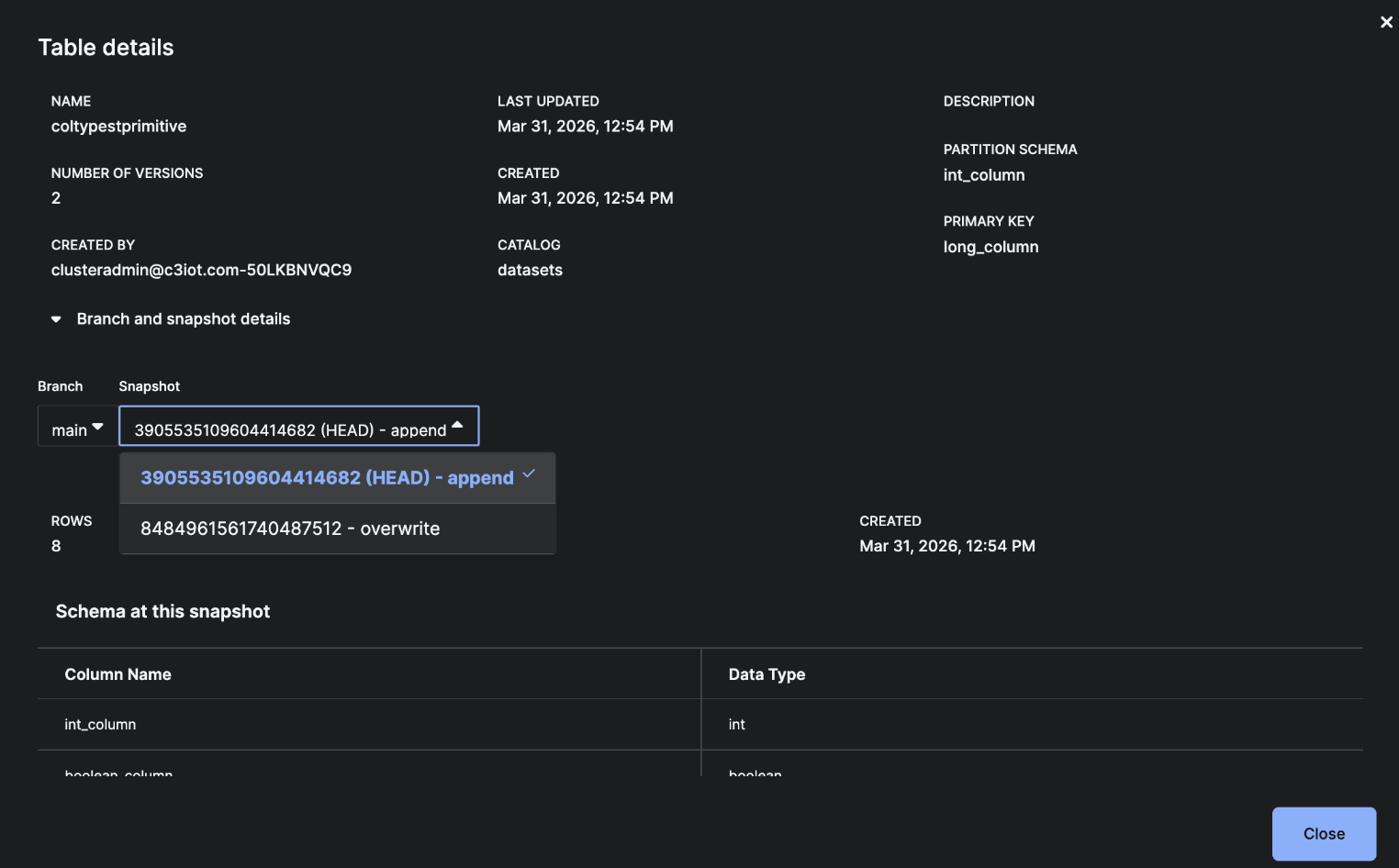
Each write operation creates a new snapshot. See the image below for the Snapshot feature in the UI.
 |
| Snapshot History of a Branch |
Example: Write Multiple Batches and View Snapshot History
The following example illustrates how to create multiple snapshots and navigate snapshot history.
Input: Read two CSV files and append them to a table to create separate snapshots for each write operation.
# Read data from CSV and write to table - creates first snapshot
m1 = ss.read_csv('gcs://c3--datasets/WindTurbine_1000assets_3GB/WindTurbine/CanonicalWindTurbineMeasurement/inbox/measurements-1.csv')
firstSnapshot = m1.write_table(table, mode="append")
print(f"First snapshot ID: {firstSnapshot.snapshotId}")
print(f"First snapshot timestamp: {firstSnapshot.timestampMillis}")
print(f"First snapshot operation: {firstSnapshot.operation}")
print(f"Row count: {firstSnapshot.rowCount}")

# Append more data - creates second snapshot
m2 = ss.read_csv('gcs://c3--datasets/WindTurbine_1000assets_3GB/WindTurbine/CanonicalWindTurbineMeasurement/inbox/measurements-10.csv')
secondSnapshot = m2.write_table(table, mode="append")
print(f"\nSecond snapshot ID: {secondSnapshot.snapshotId}")
print(f"Second snapshot row count: {secondSnapshot.rowCount}")

# Get all snapshots in chronological order
history = table.snapshotHistory()
print(f"\nTotal snapshots: {len(history)}")
for snap in history:
   print(f"  Snapshot {snap.snapshotId}: {snap.operation} at {snap.timestampMillis}, rows: {snap.rowCount}")
Output: Retrieve and display the complete snapshot history (snapshot IDs, timestamps, operations, and row counts).
First snapshot ID: 2431888661795132738
First snapshot timestamp: 1769153437834
First snapshot operation: append
Row count: 518

Second snapshot ID: 1033412224625592251
Second snapshot row count: 15558

Total snapshots: 2
 Snapshot 2431888661795132738: unknown at 1769153437834, rows: 518
 Snapshot 1033412224625592251: unknown at 1769153442633, rows: 15558
The operation field returned by snapshotHistory() may appear as unknown even when a directly accessed snapshot object reports a more specific operation such as append. This reflects differences in how operation metadata is exposed by these APIs.
Time Travel
Use snapshots or timestamps to query a table as it existed at any point in time. Query the data using asOf parameter with readArrowIterator.
Example: Query by Timestamp
Input: Load a historical version of a Data Lake table as it existed at the first snapshot's timestamp.
ss.load_table(table=catalog.table("versioned_measurements"), asOf=c3.DateTime.fromMillis(firstSnapshot.timestampMillis)).shape
Output: Return the table's dimensions (row count and column count).
(518, 5)
Input: Perform a time-travel query on a Data Lake table to compare historical and current data.
# Get timestamp from first snapshot
firstSnapshotTime = c3.DateTime.fromMillis(firstSnapshot.timestampMillis)

# Read table as it existed at first snapshot time using readArrowIterator with asOf
historicalData = table.readArrowIterator("", [], 10000, firstSnapshotTime).read_pandas()
print(f"Data at first snapshot: {len(historicalData)} rows")
print(historicalData.head())

# Read current data (no asOf parameter)
currentData = table.read_pandas()
print(f"\nCurrent data: {len(currentData)} rows")

# Find snapshot at a specific timestamp
snapAtTime = table.snapshotAsOf(firstSnapshotTime)
print(f"\nSnapshot at timestamp (first timestamp): {snapAtTime.rowCount}")
Output:
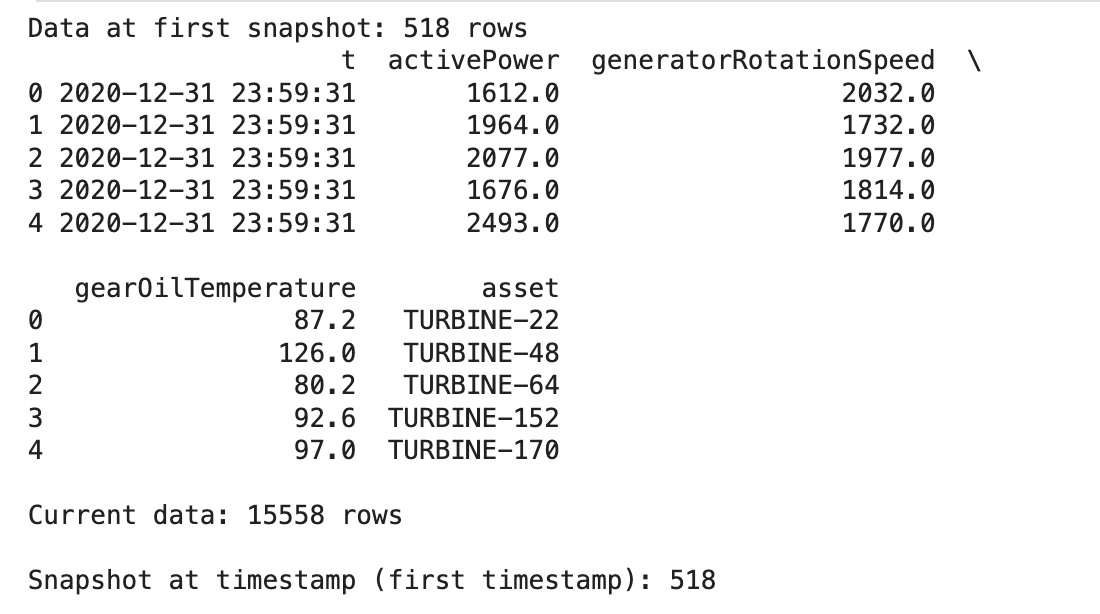 |
| Output Comparing First Snapshot to Current Data in a Table |
Tag Snapshots
Use tags to assign descriptive names for important snapshots. The following are some example tag names:
- release-v1.0
- production-ready
Note: One table can be assigned multiple tags.
Example: Tag Snapshots
Tag snapshots with descriptive names for easier version management. Retrieve snapshots by tag, list all tags, and remove tags when no longer needed.
Input:
# Tag the first snapshot
table.tagSnapshot(firstSnapshot.snapshotId, "initial_load")
print(f"Tagged snapshot {firstSnapshot.snapshotId} as 'initial_load'")

# Get snapshot by tag
snap_by_tag = table.snapshotByTag("initial_load")
print(f"Snapshot for tag 'initial_load': {snap_by_tag.snapshotId}")
print(f"Matches snapshot 1: {snap_by_tag.snapshotId == firstSnapshot.snapshotId}")

# Tag the second snapshot
table.tagSnapshot(secondSnapshot.snapshotId, "with_updates")

# List all tags
allTags = table.tags()
print(f"\nAll tags: {allTags}")
for tagName, snapshotId in allTags.items():
   print(f"  {tagName} -> {snapshotId}")

# Remove a tag
table.removeTag("with_updates")
print(f"\nTags after removal: {table.tags()}")
Output:
Tagged snapshot 2431888661795132738 as 'initial_load'
Snapshot for tag 'initial_load': 2431888661795132738
Matches snapshot 1: True

All tags: {initial_load: 2431888661795132738, main: 1033412224625592251, with_updates: 1033412224625592251}
 initial_load -> 2431888661795132738
 main -> 1033412224625592251
 with_updates -> 1033412224625592251

Tags after removal: {initial_load: 2431888661795132738, main: 1033412224625592251}
Versioned Reads
Use readArrowIterator with asOf parameter for time travel. The following are various methods to read specific table versions:
- Snapshots
- Timestamps
- Tags
Example: Read by Tag
Retrieve a tagged snapshot by its descriptive name rather than using a timestamp or snapshot ID.
Input:
df = ss.load_table(catalog.table("versioned_measurements"), tagName="initial_load")
df.head()
Output:
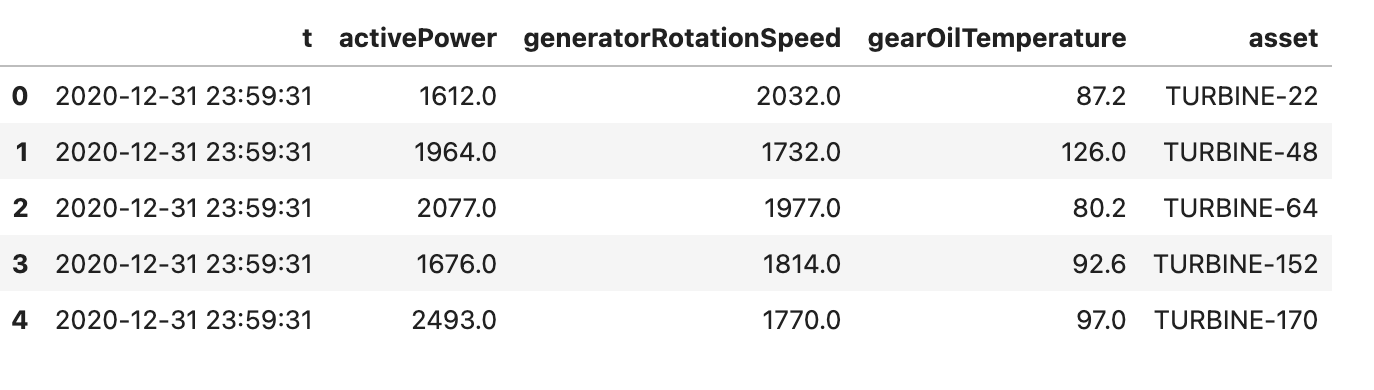 |
| Table Snapshot With Tag Name "initial_load" |
Input: Return the DataFrame dimensions (rows and columns).
df.shape
Output:
(518, 5)
Example: Snapshot Timestamp, Snapshot Tag and Use readArrowIterator with asOf parameter
Input: Access historical data versions by snapshot timestamp, tag, and filtering/projection. This shows the flexibility of Data Lake's time-travel capabilities.
# Read using snapshot's timestamp (time travel)
firstSnapshotTime = c3.DateTime.fromMillis(firstSnapshot.timestampMillis)
data_via_snapshot = table.readArrowIterator("", [], 10000, firstSnapshotTime).read_pandas()
print(f"Read via snapshot timestamp: {len(data_via_snapshot)} rows")

# Read using timestamp (time travel)
data_via_time = table.readArrowIterator("", [], 10000, firstSnapshotTime).read_pandas()
print(f"Read via timestamp: {len(data_via_time)} rows")

# Read using tag - get snapshot by tag, then use its timestamp
tagged_snapshot = table.snapshotByTag("initial_load")
taggedTime = c3.DateTime.fromMillis(tagged_snapshot.timestampMillis)
data_via_tag = table.readArrowIterator("", [], 10000, taggedTime).read_pandas()
print(f"Read via tag: {len(data_via_tag)} rows")

# Read with Arrow iterator using asOf (with filter and projections)
arrow_iter = table.readArrowIterator("asset == 'TURBINE-1'", ["t", "activePower", "asset"], 100, firstSnapshotTime)
count = 0
while arrow_iter.hasNext():
   count += arrow_iter.next().rowCount()
print(f"\nRead via Arrow iterator (asOf with filter): {count} rows")
Output:
Read via snapshot timestamp: 518 rows
Read via timestamp: 518 rows
Read via tag: 518 rows

Read via Arrow iterator (asOf with filter): 0 rows
Rollback
Rollback restores a table to a previous snapshot by creating a new snapshot with the rolled-back state. Use rollbackToSnapshot() to restore a previous snapshot.
Example: Rollback a Snapshot
Input: Retrieve a table named versioned_measurements.
table = catalog.table("versioned_measurements")
Input: Retrieve a table’s full history of snapshots, showing all past versions and changes made to the table.
table.snapshotHistory()
Output: Two Iceberg table snapshots, showing some of the following details:
- snapshot ID
- creation time
- row counts
[
  {
    "type": "DataLake.Table.Snapshot.Iceberg",
    "snapshotId": "2431888661795132738",
    "dataSchema": {
      "named": true,
      "fieldTypes": [
        {
          "name": "t",
          "index": 0,
          "valueType": {
            "type": "DateTimeType",
            "name": "datetime"
          }
        },
        {
          "name": "activePower",
          "index": 1,
          "valueType": {
            "type": "DoubleType",
            "name": "double"
          }
        },
        {
          "name": "generatorRotationSpeed",
          "index": 2,
          "valueType": {
            "type": "DoubleType",
            "name": "double"
          }
        },
        {
          "name": "gearOilTemperature",
          "index": 3,
          "valueType": {
            "type": "DoubleType",
            "name": "double"
          }
        },
        {
          "name": "asset",
          "index": 4,
          "valueType": {
            "type": "StringType",
            "name": "string"
          }
        }
      ]
    },
    "created": "2026-01-23T07:30:37Z",
    "updatedRowCount": 518,
    "rowCount": 518,
    "dataSize": 7416,
    "timestampMillis": 1769153437834,
    "operation": "unknown"
  }
]
Input: Shows the current snapshot of the table. This represents the latest version of the table.
table.currentSnapshot
Output: Iceberg table snapshot that includes its snapshot ID, schema, creation time, row counts, data size, and other metadata.
{
 "type" : "DataLake.Table.Snapshot.Iceberg",
 "snapshotId" : "2431888661795132738",
 "dataSchema" : {
   "named" : true,
   "fieldTypes" : [ {
     "name" : "t",
     "index" : 0,
     "valueType" : {
       "type" : "DateTimeType",
       "name" : "datetime"
     }
   }, {
     "name" : "activePower",
     "index" : 1,
     "valueType" : {
       "type" : "DoubleType",
       "name" : "double"
     }
   }, {
     "name" : "generatorRotationSpeed",
     "index" : 2,
     "valueType" : {
       "type" : "DoubleType",
       "name" : "double"
     }
   }, {
     "name" : "gearOilTemperature",
     "index" : 3,
     "valueType" : {
       "type" : "DoubleType",
       "name" : "double"
     }
   }, {
     "name" : "asset",
     "index" : 4,
     "valueType" : {
       "type" : "StringType",
       "name" : "string"
     }
   } ]
 },
 "created" : "2026-01-23T07:30:37Z",
 "updatedRowCount" : 518,
 "rowCount" : 518,
 "dataSize" : 7416,
 "timestampMillis" : 1769153437834,
 "operation" : "unknown"
}
Input: Rolls the table back to its first snapshot, reads the restored data, and prints the number of rows and the snapshot ID of the new current snapshot.
# Rollback to first snapshot
table.rollbackToSnapshot(firstSnapshot.snapshotId, confirm=True)

rolledBackData = table.read_pandas()
print(f"\nRolled back data rows: {len(rolledBackData)}")

current_snapshot = table.currentSnapshot
print(f"Current snapshot after rollback: {current_snapshot.snapshotId}")
current_snapshot.rowCount
Output:
Rolled back data rows: 518
Current snapshot after rollback: 2431888661795132738