Expose a Connector to Data Integration
A custom connector supports two methods of accessing data from an external system:
- Live queries, through a
VirtualPersistableentity. - Batch data ingestion, through a
VirtualSourceCollection.
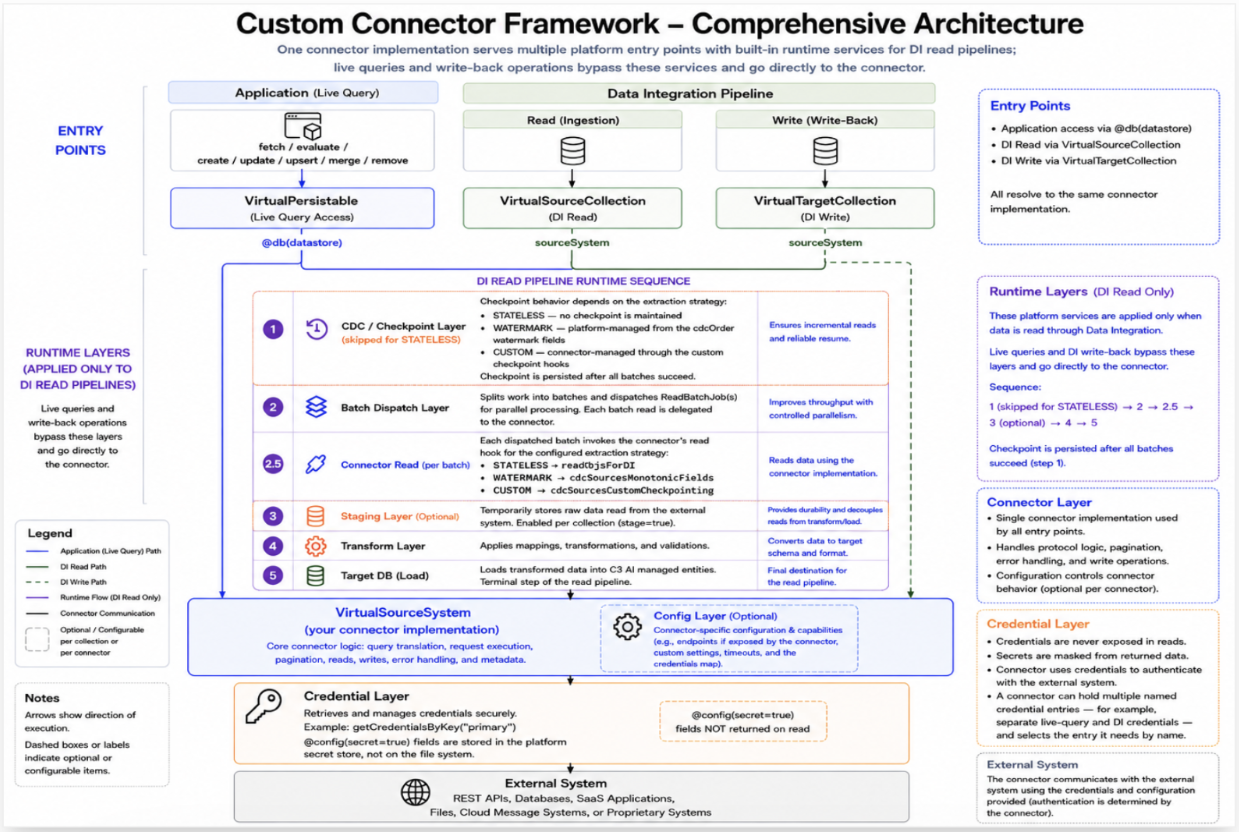
A VirtualSourceCollection exposes the connector to the Data Integration (DI) pipeline. During a DI run, the collection retrieves records from the external system through the connector, passes them through the configured transformation, and loads the transformed data into C3-managed target entities.
Unlike a connector, a VirtualSourceCollection does not contain implementation logic. Instead, it defines how the Data Integration pipeline uses the connector by associating a connector instance, a source type, and an extraction strategy.
External Data, Source Types, and Target Entities
In addition to the VirtualSourceCollection, two types participate when a connector is used with the Data Integration pipeline. For how VirtualSourceCollection relates to the other framework components, see Custom Connector Framework.
| Type | Purpose | Ownership |
|---|---|---|
| Source type | Defines the schema that records retrieved from the connector are deserialized into before transformation. | The schema is defined in C3; the data originates from the external system. |
| Target entity | Stores the transformed data in the C3 platform. | Managed and persisted by C3. |
The source type provides a structured representation of the records returned by the connector, allowing Data Integration transforms to map the source data to one or more target entities.
Watermark-based extraction incrementally retrieves records that are new or have changed since the previous extraction. The source type must include one or more fields whose values increase monotonically as records change, such as a last-modified timestamp or an increasing sequence number. When more than one field is configured, a record is considered new if its value has advanced past the checkpoint in any one of the configured fields.
Before You Begin
Before creating a VirtualSourceCollection, ensure that you have completed the following prerequisites:
- Register a connector instance.
- Attach credentials to the connector instance by calling
setCredentials(). A Data Integration run fails if the connector has no credentials configured. See Custom Connector Framework for the credential model. - Define a source type that mixes
Source. - Create the target entity type.
- Create a Transform that maps the source type to the target entity.
- If you plan to enable file staging, create the
FileSourceCollectionused to store staged files.
Create a VirtualSourceCollection
Create a VirtualSourceCollection by specifying:
- A collection name.
- The source type.
- The registered connector instance.
- An extraction strategy.
If you use the WATERMARK extraction strategy, also specify the source field that acts as the watermark.
Example
var connector = MyConnector.forName("MyConnector", true);

var collection = VirtualSourceCollection.builder()
    .name("MyWidgetCollection")
    .source(WidgetSource)
    .sourceSystem(connector)
    .cdcOrder("updatedAt")
    .build()
    .upsert();

collection.config().setConfigValue(
    "extractionType",
    SourceCollection.ExtractionType.WATERMARK
);
The extraction strategy determines how records are retrieved and how incremental progress is tracked.
Choose an Extraction Strategy
Choose an extraction strategy based on how the external system exposes data and tracks changes.
| Strategy | Read behavior | Checkpoint behavior |
|---|---|---|
| STATELESS | Reads the configured scope of data during every run. | No checkpoint is maintained between runs. |
| WATERMARK | Retrieves only records newer than the previous checkpoint using one or more watermark fields. | The platform automatically updates and persists the checkpoint. |
| CUSTOM | Retrieves records using a collection-defined checkpoint mechanism, such as a cursor or delta token. | The collection generates the next checkpoint from the rows it reads, and the platform persists it. |
Use WATERMARK when the external system provides a reliable field that identifies record changes.
Use CUSTOM when the external system provides its own change-tracking mechanism, such as a cursor or delta token. The VirtualSourceCollection subtype must implement the required custom checkpointing behavior (see Configure Read Execution).
Use STATELESS when every execution should retrieve the same logical scope of data without maintaining a checkpoint.
If the required configuration for the selected strategy is missing, the collection cannot execute successfully.
If an ingestion run does not retrieve any new records, the existing checkpoint is retained for subsequent runs.
Delivery is at least once, so a record can arrive more than once. When a limit is set, a run re-reads the records tied at the checkpoint value. Make your target loads idempotent.
Schema Inference
When source is set on the collection, reads use that type's schema.
inferSourceType2 calls the connector's inferSourceType with the collection's table.
The default inferSourceType samples records with readTupleStream and uses the first tuple's type as the schema. The connector must implement readTupleStream for that default to run. Override inferSourceType when the connector can describe the table directly.
Recommendation: Define the source type explicitly whenever possible. The schema then stays independent of the sampled records.
Enable File Staging
By default, records retrieved from the connector are streamed directly into the Data Integration pipeline for processing.
To improve durability and support asynchronous processing, you can enable file staging. When staging is enabled, each batch of retrieved records is written to staged files before being loaded into the pipeline.
Staged files allow failed loads to be retried without retrieving the data from the external system again.
To enable file staging:
- Set
stagetotrueon the collection configuration. - Set
stageFileSourceCollectionNameto the name of theFileSourceCollectionused to store the staged files.
Configure Read Execution
readSpec controls which rows a Data Integration run reads. Its type is VirtualSourceSystem.Read.Spec, the connector's own request type.
The platform copies a field onto the connector request only when that request type mixes the capability that declares the field. A field the request type does not mix is rejected. Setting readSpec.offset fails when the request type does not mix VirtualSourceSystem.Read.Offsetable.
| Configuration | Purpose |
|---|---|
readSpec.filter | Constrains which rows are read. The request type must mix VirtualSourceSystem.Read.Filterable. |
readSpec.order | Sets the sort order. The request type must mix VirtualSourceSystem.Read.Orderable. |
readSpec.include | Selects the fields to return. The request type must mix VirtualSourceSystem.Read.Includable. |
readSpec.offset | Skips rows before the read. The request type must mix VirtualSourceSystem.Read.Offsetable. |
readSpec.limit | Caps the number of rows. The request type must mix VirtualSourceSystem.Read.Limitable. A null or negative limit reads every row. |
readJobOptions | Sets concurrency, retries, priority, and the node pool for the read job. The platform adjusts retries into the range 1 through 5. Set this field on VirtualSourceCollection.Config, or on VirtualSourceCollection.DISpec for one run. |
For WATERMARK, and for CUSTOM when cdcOrder is set, leave readSpec.order unset. The checkpoint advances in cdcOrder. The platform rejects an order set on the read spec.
The platform rejects a read that splits into more than one batch when any of the following is true:
- The offset is above 0.
- The request is an evaluation.
- The collection or the run sets a limit above 0.
Each batch is read and loaded on its own, so those settings apply to every batch.
A connector implements no Data Integration-specific read hook. The collection turns readSpec into one or more batches and reads each batch through readStream or readTupleStream. The connector's element type R decides what readStream returns. See Read Path: Obj vs. Arrow.
By default, each extraction strategy produces one batch. To split a read, override the batch method for that strategy on the VirtualSourceCollection subtype:
| Extraction strategy | Method |
|---|---|
| STATELESS | batchesForStateless |
| WATERMARK | batchesForWatermark |
| CUSTOM | batchesForCustom (required; the platform has no default) |
Each method takes a VirtualSourceSystem.Read.Spec and returns an array of VirtualSourceSystem.Read.Batch. For WATERMARK, req already selects rows past the prior checkpoint.
When you override a batch method, copy a field only when req.isFieldSet is true for that field. In this example, MyReadSpec is the connector's request type.
var batch = MyReadSpec.make();
if (req.isFieldSet("filter"))
  batch = batch.withField("filter", req.filter);
if (req.isFieldSet("include"))
  batch = batch.withField("include", req.include);
Add the partition predicate to filter on each batch, and return one batch per partition.
A CUSTOM collection also implements updateCheckpointFields, mergeCheckpointAccumulators, and generateCdcCheckpointFields. Those methods fold the rows from each batch into the next checkpoint.
Read Path: Obj vs. Arrow
For STATELESS extraction, the platform reads through readStream when the connector binds R to Arrow. The connector returns columnar Arrow batches, and the platform keeps them in that form. When file staging is enabled, those batches are written to a staged Arrow file.
For WATERMARK and CUSTOM extraction, the checkpoint is accumulated per row. The connector must bind R to Obj and implement readStream, or implement readTupleStream.
Parallel Read Dispatch
A Data Integration read runs as a VirtualSourceCollection.ReadBatchJob. The job is a BatchJob that reads batches across the cluster.
For WATERMARK and CUSTOM extraction, each batch stores its checkpoint state on a VirtualSourceCollection.ReadBatchResult row. The row id is jobId, an underscore, and batchId. If the engine retries a batch, the retry overwrites that row and keeps a single checkpoint value. A STATELESS run writes no per-batch row. It writes only the lease row.
The platform runs one read per collection at a time. It stores a lease row with id lease_<collectionName>. A second run is rejected while that lease is held. The lease is released when the run succeeds or is canceled. If the owning run fails, the next run claims the lease.
The merged checkpoint is persisted in allComplete, after every scheduled batch has a result. Staged files are swept at that same point. If a run fails, the checkpoint is not advanced. The next run resumes from the previous checkpoint.
The platform uses the first dispatch value that is set, in this order:
- The run's
VirtualSourceCollection.DISpec#readJobOptions - The collection's
VirtualSourceCollection.Config#readJobOptions - The connector's
VirtualSourceSystem.Batchable#batchOptions
Run the Integration
Run the collection by calling process() with a DataIntegSpec.
Example
collection.process(
    DataIntegSpec.make()
        .withSynchronous(true)
);
A synchronous execution waits until the ingestion completes before returning. This is useful when validating a connector or testing an ingestion workflow.
To override readSpec or readJobOptions for one run, pass a VirtualSourceCollection.DISpec.
Limitations and Considerations
- During the first
WATERMARKexecution, no checkpoint exists, so the platform reads all available records. If the source dataset is large, consider limiting the initial read by applying an appropriate filter. - A collection using the
CUSTOMextraction strategy must overridebatchesForCustomplus the checkpoint-accumulator methodsupdateCheckpointFields,mergeCheckpointAccumulators, andgenerateCdcCheckpointFields. The platform rejects the configuration up front if any of these are missing. - The platform provides no built-in support for an external read API that submits a job, polls for completion, and then fetches results. Implement that lifecycle in the connector's
readStreamorreadTupleStreammethod. - An extraction strategy must be explicitly configured in
VirtualSourceCollection.Configfor everyVirtualSourceCollection; the platform rejects the configuration up front if it is missing.