Connect C3 AI Application to Apache Kafka
The C3 Agentic AI Platform connector for Apache Kafka allows you to interact with the Apache Kafka messaging system, enabling integration between your C3 AI Applications and an Apache Kafka cluster.
When integrating with Apache Kafka in the context of data integration (consuming data to be persisted in a C3 Agentic AI Platform data store), it is recommended that you use the CloudMessageSourceSystem framework. The CloudMessageSourceSystem framework provides a codeless approach to consuming and ingesting messages from a variety of messaging systems including Azure Event Hubs, AWS Kinesis, and Apache Kafka.
Prerequisites
Before using the Apache Kafka Connector, ensure that you have:
- Access to a running an Apache Kafka cluster with ZooKeeper
- The host names and port numbers of the Kafka brokers serving the data
- The Kafka topics to be used
Register Apache Kafka credentials with the C3 Agentic AI Platform
Simple Authentication and Security Layer (SASL) authentication is supported for Apache Kafka producers and consumers using the following security configuration:
- SASL_SSL PLAIN JAAS
Clients authenticate to the cluster with their own principal. You need to obtain or create these principals as needed.
This topic provides an example that defines and applies the configuration required by the C3 Agentic AI Platform to subscribe to the Orders topic available from an Kafka cluster provisioned on Confluent Cloud.
Begin by defining the Kafka topic name:
var topicName = "Orders";Generate the configuration key from an ApacheKafkaTopic Type instance constructed using the topic name. Then, set the topic name as the configuration value:
var configKey = ApacheKafkaTopic.make({resourceName: topicName}).configKey();
ApacheKafkaTopic.setConfigOrSecretValue(configKey, "resourceName", topicName);
ApacheKafkaTopic.setConfigOrSecretValue(configKey, "external", true);
Finally, authenticate your client with the Apache Kafka cluster and set permissions on the Apache Kafka topic:
var creds = {
  "apiKey":"< API_KEY >",
  "apiSecret":"< API_SECRET >",
};
var endpoint = "< KAFKA_BROKER >:< PORT >";
var apacheCreds = ApacheCredentials.make({"endpoint": endpoint, "apacheApiKeyCredentials": creds});

ApacheKafkaTopic.setCredentialsForResourceName(topicName, apacheCreds, ConfigOverride.APP)Configure an Apache Kafka Consumer
Configuring the C3 Agentic AI Platform to subscribe to an Apache Kafka topic requires the following three (3) steps:
- Configure the Types to model the messages consumed from the topic.
- Configure CloudMessageSourceSystem and CloudMessageSourceCollection Types to register the topic.
- Enable the CloudMessageSourceCollection to receive messages.
Additionally, the CloudInboundMessage Type can be configured to explicitly model an Apache Kafka consumer. CloudInboundMessage is a parametric Type requiring you to specify a Type that represents the messages consumed from the topic. In this example, it is SourceOrdersJSON.
For this example, the messages published to the Orders topic have the following format:
{
  "ordertime": 1507163076488,
  "orderid": 46,
  "itemid": "Item_53",
  "orderunits": 8.553269159575795,
  "address": {
    "city": "City_41",
    "state": "State_83",
    "zipcode": 55197
  }
}Configure the Types to model the messages consumed from the topic
First you must define your C3 AI Types to model the JSON format of the messages to be consumed from the topic. This example has the Types, SourceOrdersJSON and SourceOrdersAddress, to model according to the JSON message above.
/**
 * This type represents the raw order data.
 */
type SourceOrdersJSON mixes Source {

  ordertime: int

  orderid: int

  itemid: string

  orderunits: double

  address: SourceOrdersAddress

}/**
* This type represents the address data for each order.
*/
type SourceOrdersAddress {
city: string
state: string
zipcode: int
}Additional Types, transforms, and application Types may be required to fully capture the message models being consumed.
Configure the CloudMessageSourceSystem and CloudMessageSourceCollection Types to register the topic
A CloudMessageSourceSystem is a means of organizing related CloudMessageSourceCollections.
A CloudMessageSourceSystem is created by specifying its name. For example, you can add the following Kafka.json to the \metadata\CloudMessageSourceSystem directory of your package:
{
    "name": "Kafka"
}
A CloudMessageSourceCollection represents a source collection that references a CloudMessageBroker and its related queue, topic, or stream.
The CloudMessageSourceCollection references a CloudMessageSourceSystem and contains information about how to process data received from that topic, and also information required to connect to the topic.
For example, to model a CloudMessageSourceCollection called OrderDataSource, you can add the following OrderDataKafka.json to the \metadata\CloudMessageSourceCollection directory of your package:
{
    "name": "OrderDataSource",
    "sourceSystem": {
        "type" : "CloudMessageSourceSystem",
        "name" : "Kafka"
    },
    "source": "SourceOrdersJSON",
    "external": true,
    "cloudMessageBrokerName": "Orders",
    "cloudMessageBrokerType": "ApacheKafkaTopic",
    "batchSize": 10,
    "timeoutMillis": 5000
}
You can use the console to further configure the CloudMessageSourceCollection using the SourceCollection.Config mixin. Here, we specify the content type, preferences for archiving records, and the SourceCollectionProcessMode.
var src = CloudMessageSourceCollection.forName("OrderDataSource");
src.config()
.withContentTypeOverride("application/json")
.withDoNotChunk(true)
.withDoNotArchiveStatus(false)
.withDoNotArchiveSources(true)
.withDoNotArchiveFailedSources(false)
.withProcessMode("ON_ARRIVAL")
.setConfig()Enable the CloudMessageSourceCollection to receive messages
The following commands tell the platform to subscribe to the topic and process messages as they arrive, in real time:
src.register()
src.startOnArrivalMode()
To verify that messages are being received, you can create an instance of the ApacheKafkaTopic Type using your topic name and call the receiveMessages() method. Be sure to include the partition from which you want to read messages.
broker = ApacheKafkaTopic.fromResourceName(topicName);
messages = broker.receiveMessages({partition: 0})
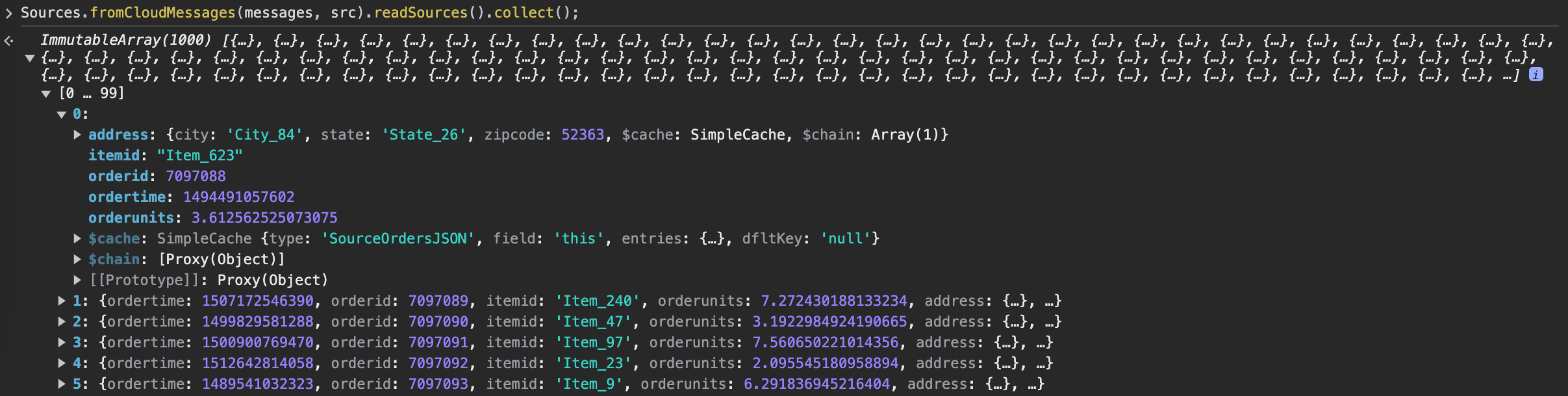
Messages are stored as a JavaScript ArrayBuffer, which can be read as objects by running the following command:
Sources.fromCloudMessages(messages, src).readSources().collect();Note: This only works if sources are not archived. Otherwise, messages are consumed upon receipt and cannot be read.
Configure a CloudInboundMessage Type and link to Kafka topic
To model a Kafka consumer and configure downstream processing, you can create a CloudInboundMessage Type. Mixing in CloudInboundMessage indicates that the Type is a Kafka consumer.
Messages are dispatched to the SourceOrdersInboundQueue.process() method for processing as messages are consumed from the Orders topic.
type SourceOrdersInboundQueue mixes CloudInboundMessage<SourceOrdersJSON> {

  process: ~ js-server

}
Implement the process method in SourceOrdersInboundQueue.js, which persists data to the OrdersData Type.
function process(messages) {

    var array = OrdersData.array();
    var meas;

    messages.forEach(function (msg) {

      meas = OrdersData.make({
        ordertime: msg.ordertime,
        orderid: msg.orderid,
        itemid: msg.itemid,
        orderunits: msg.orderunits,
        city: msg.address.city,
        state: msg.address.state,
        zipcode: msg.address.zipcode
      });

      array.push(meas);

    })

    try {
      OrdersData.createBatch(array);
    } catch (e) {
      log.info(e.message);
    }
  }
Next, associate the SourceOrdersInboundQueue Type with the Orders Kafka topic.
SourceOrdersInboundQueue.setBrokerName(topicName, "ApacheKafkaTopic");
SourceOrdersInboundQueue.setBatchSize(10);
SourceOrdersInboundQueue.setTimeoutMillis(5000);

CloudMessageDispatcherConfig.clearCache();
SourceOrdersInboundQueue.register();
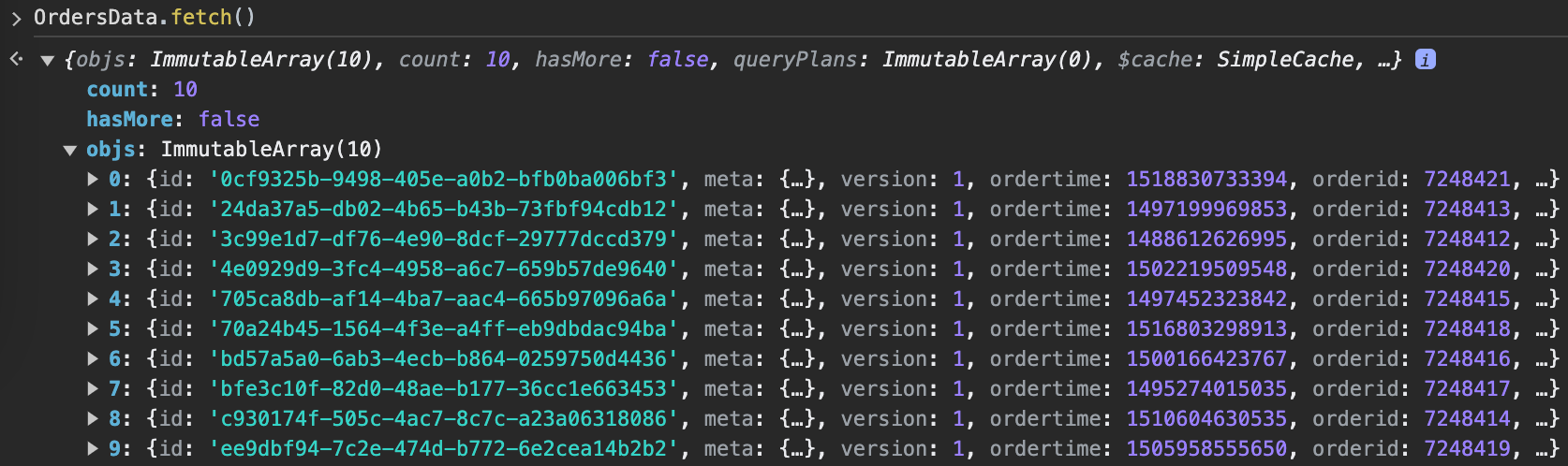
You should now see data populate in the OrdersData Type.
Configuring an Apache Kafka Producer
The steps to configure the C3 Agentic AI Platform to publish to a Kafka topic are almost identical to those for consuming messages from a topic. Reusing the same topic registered above, you can configure a C3 AI CloudOutboundMessage Type to explicitly model a Kafka producer. Additionally, you can publish messages with the same structure as the ones consumed from the topic. This lets you reuse the SourceOrdersJSON Type in the CloudOutboundMessage parametric Type.
Configure a CloudOutboundMessage Type and link to Kafka topic
Mixing in CloudOutboundMessage indicates that the Type is an Apache Kafka producer.
type SourceOrdersOutboundQueue mixes CloudOutboundMessage<SourceOrdersJSON>Next, associate the SourceOrdersOutboundQueue Type with the Orders Kafka topic.
SourceOrdersOutboundQueue.setBrokerName(topicName, "ApacheKafkaTopic");
SourceOrdersOutboundQueue.setBatchSize(10);
Lastly, publish messages to the Orders topic by invoking the SourceOrdersOutboundQueue.sendBatch() method. The following code generates sample data and publishes it to the Orders topic.
function createOrders(startTime, startOrderId) {
  var cAry = C3.ArrayBuilder.fromJson({type: 'ArrayBuilder<SourceOrdersJSON>'});
  var partition = 0;
  var order;
  var time = startTime;
  var orderId = startOrderId;

  for (var i=0; i<10; i++) {
    time += 3.6e6;
    orderId += 1;

    order = SourceOrdersJSON.make({
        ordertime: time,
        orderid: orderId,
        itemid: "Item_"+randomBetween(1, 100),
        orderunits: (1e-6)*randomBetween(1e6, 10e6),
        address: {
          city: "City_"+randomBetween(1, 100),
          state: "State_"+randomBetween(1, 50),
          zipcode: 94502
        }
    });

    cAry.push(order);
  }

  SourceOrdersOutboundQueue.sendBatch(cAry.build(), partition);
}

function randomBetween(min,max)
{
    return Math.floor(Math.random()*(max-min+1)+min);
}

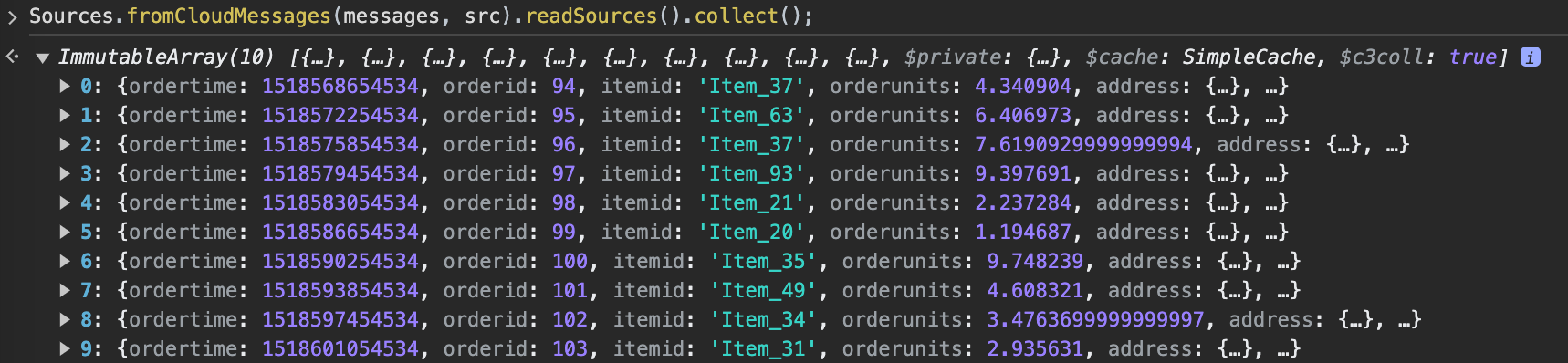
createOrders(1518565054534, 93);
You can verify that the messages were published to the topic.
Configuring an Apache Kafka with SSL enabled
To connect your Kafka cluster using an SSL connection, provide the C3 AI server with your keystore, truststore, and the corresponding passwords.
Step 0. Provide jks files
To load your keystore and truststore, you can either use the console by selecting the Tools button in the upper left corner of your console page and selecting the Load File option from the dropdown menu, or you can place the files in any directory that is accessible by the C3 AI server file system.
Step 1. Create your credentials
Create the necessary credentials for establishing a secure SSL connection to your Kafka cluster. This involves specifying the location of your keystore and truststore files, along with their passwords, and defining the endpoint for the Kafka service. The credentials are then built using the ApacheCredentials builder, ensuring a secure connection to the cluster.
loc = "<the bucket url or local folder you load your jks>" // e.g., gcs://c3--gke/yfngs/app1/attachment/. Make sure it's accessible by c3 server.

sslCredentials ={
    "keystoreLocation": loc+'kafka-client.keystore.jks',
    "keystorePassword": "<your password>",
    "truststoreLocation":loc+'kafka-client.truststore.jks',
    "truststorePassword": "<your password>",
    "endpointIdentificationAlgorithm":""
  }

endpoint = "<accessible endpoint accessible by c3 server>" // e.g., "kafka.confluent.svc.cluster.local:9071", make sure you include the port

credentials = ApacheCredentials.builder().endpoint(endpoint).sslCredentials(sslCredentials).build();
Step 2. Set the credentials
Create the corresponding CloudMessageSourceSystem and CloudMessageSourceCollection in the metadata folder of your package. Ensure that these components are properly defined within the package structure.
cmss=CloudMessageSourceSystem.make({
  "name": "ApacheKafkaTopic"
})

receiveBrokerName = "<your kafka topic name>"

cmsc=CloudMessageSourceCollection.make({
  "name": "<topic name>", // better to make the same as the name of the source type
  "timeoutMillis": 5000,
  "batchSize": 10,
  "cloudMessageBrokerType": "ApacheKafkaTopic",
  "cloudMessageBrokerName": receiveBrokerName,
  "description": "<description>",
  "external": true,
  "sourceSystem": {
    "type" : "CloudMessageSourceSystem",
    "name" : "ApacheKafkaTopic"
  }
})
Run following to set the config for KafkaTopic
cmss=CloudMessageSourceSystem.forName("ApacheKafkaTopic")

cmss.setCredentials(credentials)Step 3. Send/receive your messages (see sections above for how to use kafka producer & consumer)
send/receive your messages by DataIntegrator
// create messages
msg=CloudStreamMessage.make({
  id: "123",
})
DataIntegrator.sendObjs({'type': 'ApacheKafkaTopic', 'resourceName': receiveBrokerName},[msg],{'batchSize': 100, 'contentType': "application/json"})

msgs=DataIntegrator.receiveMessages({'type': 'ApacheKafkaTopic', 'resourceName': receiveBrokerName}, {'type': 'CloudStreamReceiveMessagesSpec', 'partition': "1", 'timeoutMillis': 1108, 'batchSize': 100})