Amazon Kinesis Connector
The C3 Agentic AI Platform connector for Amazon Kinesis enables integration between C3 AI Applications and your Amazon Kinesis service.
When integrating with Amazon Kinesis in the context of data integration (consuming data to be persisted in a C3 Agentic AI Platform data store), it is recommended that you use the CloudMessageSourceSystem framework. The CloudMessageSourceSystem framework provides a codeless approach to consuming and ingesting messages from a variety of messaging systems including Azure Event Hubs, Amazon SQS, Amazon Kinesis, and Apache Kafka.
Prerequisites
Before using the Amazon Kinesis connector, ensure that you have access to an active Kinesis stream.
Register Amazon Kinesis credentials with the C3 Agentic AI Platform
Begin by defining the Kinesis cloud message broker name using the following example code snippet.
var kinesisResourceName = "< KINESIS_STREAM_NAME >"Generate the configuration key from an AwsKinesis Type instance constructed using the broker name. Then, set the broker name as the configuration value:
var configKey = AwsKinesis.make({resourceName: kinesisResourceName}).configKey();
AwsKinesis.setConfigOrSecretValue(configKey, "resourceName", kinesisResourceName);
AwsKinesis.setConfigOrSecretValue(configKey, "external", true);
Finally, set credentials for your Kinesis stream:
var credentials = {
  "type": "AwsCredentials",
  "accessKey": "< ACCESS_KEY >",
  "secretKey": "< SECRET_KEY >",
}

AwsKinesis.setCredentialsForResourceName(kinesisResourceName, credentials, ConfigOverride.APP);Configuring an Amazon Kinesis Consumer
Configuring the C3 Agentic AI Platform to subscribe to an Amazon Kinesis stream requires the following three (3) steps:
- Configure the Types to model the messages consumed from the stream.
- Configure CloudMessageSourceSystem and CloudMessageSourceCollection Types to register the stream.
- Enable the CloudMessageSourceCollection to receive messages.
Additionally, a C3 AI CloudInboundMessage Type can be configured to explicitly model a Kinesis stream. The CloudInboundMessage Type is a parametric Type requiring you to specify a Type that represents the messages consumed from the stream.
An example for how to define and apply the configuration required by the C3 Agentic AI Platform to subscribe to the connectortesting-kinesis stream available from Amazon Kinesis is provided in the next sections.
For the example, assume that the messages published to the connectortesting-kinesis stream have the following format:
{
  "start": "2023-01-01T00:00:00",
  "deviceId": "SMBLB1",
  "power": 60.04,
  "illuminance": 8.553,
  "voltage": 119.04,
  "temperature": 80.34
}Configure the Types to model the messages consumed from the stream
First you must define your C3 AI Types to model the JSON format of the messages to be consumed from the stream. In this example we have one Type, SourceSmartBulbMeasurement, to model according to the JSON message above.
/**
 * This type represents measurement data from a smart bulb.
 */
type SourceSmartBulbMeasurement mixes Source {
  /**
   * This represents the datetime to use for the start of a measurement
   */
  start: datetime

  /**
   * This represents the ID of the smart bulb
   */
  deviceId: string

  /**
   * This represents the watts measurement
   */
  power: double

  /**
   * This represents the lumens measurement
   */
  illuminance: double

  /**
   * This represents the voltage measurement
   */
  voltage: double

  /**
   * This represents the temperature measurement
   */
  temperature: double

}
You may need to apply additional Types, transforms, and Application Types to fully capture the message models being consumed.
Configure the CloudMessageSourceSystem and CloudMessageSourceCollection Types to register the topic
A CloudMessageSourceSystem is a means of organizing related CloudMessageSourceCollections.
A CloudMessageSourceSystem is created by specifying its name. For example, you can add the following Kinesis.json to the \metadata\CloudMessageSourceSystem directory of your package:
{
    "name": "Kinesis"
}
A CloudMessageSourceCollection represents a source collection that references a CloudMessageBroker and its related stream, topic, and stream.
The CloudMessageSourceCollection references a CloudMessageSourceSystem and contains information about how to process data received from that stream, as well as information required to connect to the stream.
For example, to model a CloudMessageSourceCollection called SmartBulbMeasurementSource, you can add the following SmartBulbMeasurementKinesis.json to the \metadata\CloudMessageSourceCollection directory of your package:
{
    "name": "SmartBulbMeasurementSource",
    "sourceSystem": {
        "type" : "CloudMessageSourceSystem",
        "name" : "Kinesis"
    },
    "source": "SourceSmartBulbMeasurement",
    "external": true,
    "cloudMessageBrokerName": "< KINESIS_STREAM_NAME >",
    "cloudMessageBrokerType": "AwsKinesis",
    "batchSize": 10,
    "timeoutMillis": 5000
}
You can use the console to further configure the CloudMessageSourceCollection using the SourceCollection.Config mixin. Here, we specify the content type, preferences for archiving records and the SourceCollectionProcessMode.
  var src = CloudMessageSourceCollection.forName("SmartBulbMeasurementSource");
  src.config()
  .withContentTypeOverride("application/json")
  .withDoNotChunk(true)
  .withDoNotArchiveStatus(false)
  .withDoNotArchiveSources(true)
  .withDoNotArchiveFailedSources(false)
  .withProcessMode("ON_ARRIVAL")
.setConfig()Enable the CloudMessageSourceCollection to receive messages
The following commands tell the C3 Agentic AI Platform to subscribe to the stream and process messages as they arrive, in real time:
src.register()
src.startOnArrivalMode()
To verify that messages are being received, you can create an instance of the AwsKinesis Type using your stream name and call the receiveMessages() method. Be sure to include the Shard of the Kinesis stream from which you wish to read messages.
broker = AwsKinesis.fromResourceName(kinesisResourceName);
messages = broker.receiveMessages({partition: "shardId-000000000001"})
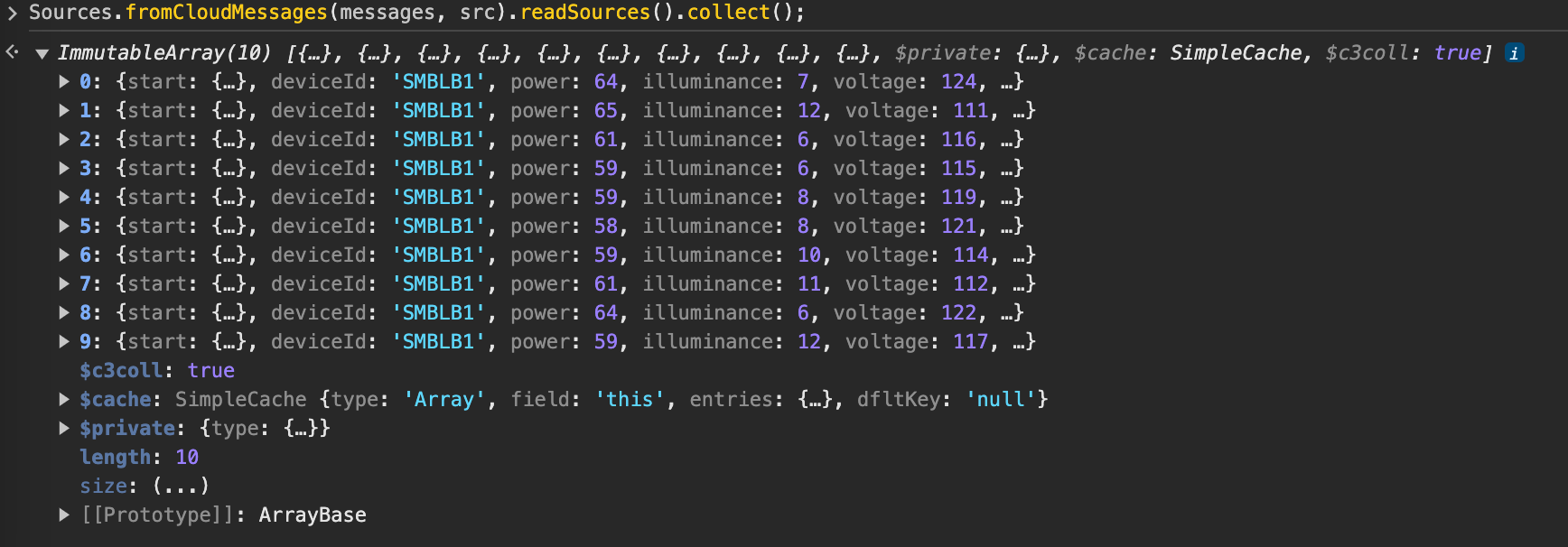
Messages are stored as a JavaScript ArrayBuffer, which can be read as objects by running the following command:
This works if sources are not archived. Otherwise, messages are consumed upon receipt and cannot be read.
Sources.fromCloudMessages(messages, src).readSources().collect();The following is an example of the output from running the above example code snippet.
Configure a CloudInboundMessage Type and link to Kinesis stream
To model a Kinesis consumer and configure downstream processing, you can create a CloudInboundMessage Type. By mixing in CloudInboundMessage, the C3 Agentic AI Platform understands that the Type is a Kinesis consumer.
As messages are consumed from the connectortesting-kinesis stream, they will be dispatched to the SourceSmartBulbMeasurement.process() method for processing.
type SourceSmartBulbMeasurementInboundQueue mixes CloudInboundMessage<SourceSmartBulbMeasurement> {

  process: ~ js-server

}
Implement the process method in SourceSmartBulbMeasurementInboundQueue.js, which persists data to the SmartBulbMeasurement Type.
function process(messages) {

    var array = C3.ArrayBuilder.fromJson({type: 'ArrayBuilder<SmartBulbMeasurement>'});
    var meas;

    messages.each(function (msg) {

      meas = SmartBulbMeasurement.make({
        start: msg.start,
        deviceId: msg.deviceId,
        power: msg.power,
        illuminance: msg.illuminance,
        voltage: msg.voltage,
        temperature: msg.temperature
      });

      array.push(meas);

    })

    try {
      SmartBulbMeasurement.createBatch(array.build());
    } catch (e) {
      log.info(e.message);
    }
  }
Next, associate the SourceSmartBulbMeasurementInboundQueue Type with the connectortesting-kinesis Kinesis stream.
SourceSmartBulbMeasurementInboundQueue.setBrokerName(kinesisResourceName, "AwsKinesis");
SourceSmartBulbMeasurementInboundQueue.setBatchSize(10);
SourceSmartBulbMeasurementInboundQueue.setTimeoutMillis(10000);

CloudMessageDispatcherConfig.clearCache();
SourceSmartBulbMeasurementInboundQueue.register();
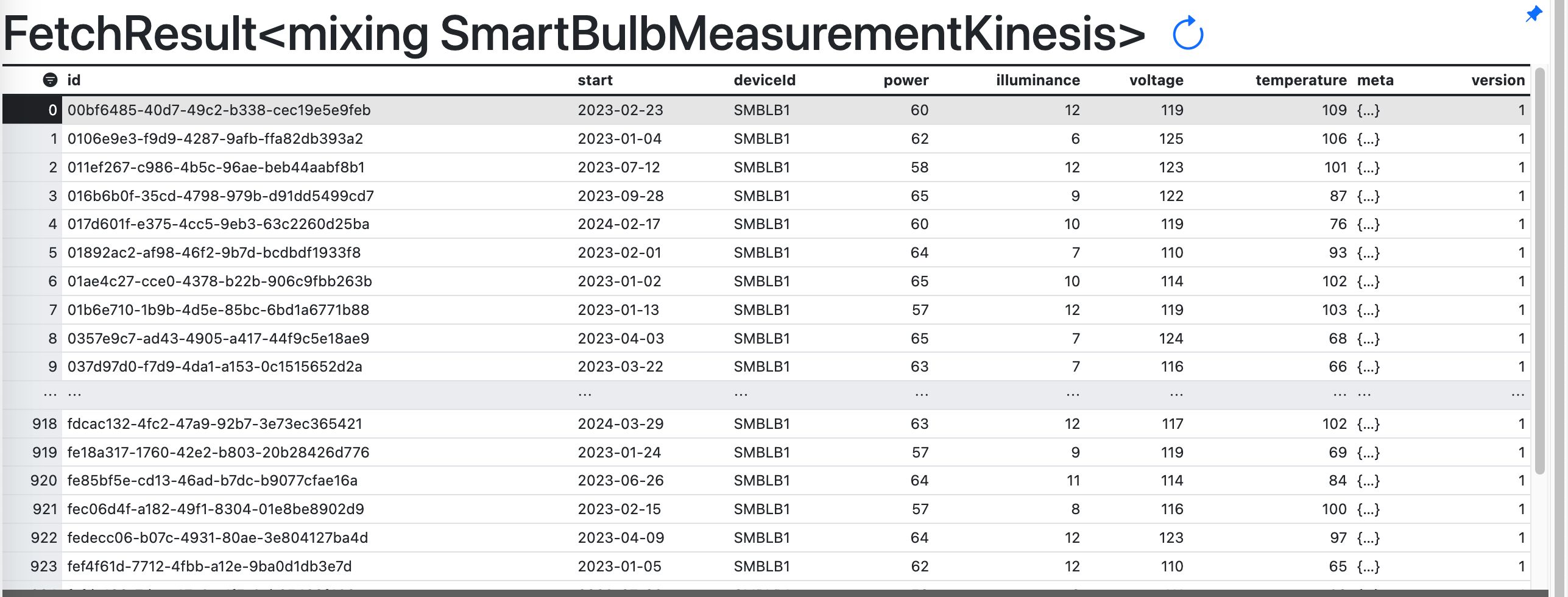
You should now see data populate in the SmartBulbMeasurement Type.
Configuring an Amazon Kinesis Producer
The steps to configure the C3 Agentic AI Platform to publish to a Kinesis stream are nearly identical to those for consuming messages from a stream. Reusing the same stream registered above, we configure a C3 AI CloudOutboundMessage Type to explicitly model a Kinesis producer. Additionally, we publish messages with the same structure as the ones consumed from the stream. This lets us reuse the SourceSmartBulbMeasurement Type in the CloudOutboundMessage parametric Type.
Configure a CloudOutboundMessage Type and link to Kinesis stream
By mixing in CloudOutboundMessage, the C3 Agentic AI Platform understands that the Type is a Kinesis producer.
type SourceSmartBulbMeasurementOutboundQueue mixes CloudOutboundMessage<SourceSmartBulbMeasurement>Next, associate the SourceSmartBulbMeasurementOutboundQueue Type with the connectortesting-kinesis Kinesis stream.
SourceSmartBulbMeasurementOutboundQueue.setBrokerName(kinesisResourceName, "AwsKinesis");
SourceSmartBulbMeasurementOutboundQueue.setBatchSize(10);
Lastly, publish messages to the connectortesting-kinesis stream by invoking the SourceSmartBulbMeasurementOutboundQueue.sendBatch() method. The following code generates sample data and publishes it to the connectortesting-kinesis stream.
function createMeasurements(batchSize) {
  var cAry = C3.ArrayBuilder.fromJson({type: 'ArrayBuilder<SourceSmartBulbMeasurement>'});
  var partition = "factory";
  var meas;
  var time = DateTime.fromString("2023-01-01T00:00:00");
  var deviceId = "SMBLB1";

  for (var i=0; i<batchSize; i++) {

    meas = SourceSmartBulbMeasurement.make({
        start: time,
        deviceId: deviceId,
        power: randomBetween(55, 65),
        illuminance: randomBetween(6, 12),
        voltage: randomBetween(110, 125),
        temperature: randomBetween(65, 110)
      });

    cAry.push(meas);

    time = time.plusDays(1);

  }

  SourceSmartBulbMeasurementOutboundQueue.sendBatch(cAry.build(), partition);
}

function randomBetween(min,max)
{
    return Math.floor(Math.random()*(max-min+1)+min);
}

createMeasurements(10);
In this case, the partition refers to the partition key, which is a string that Kinesis uses to distribute records across shards. It is different from the partition required when calling receiveMessages(), which is the shard ID used to identify the shard itself.
You can verify that the messages were published to the stream.