Map and Transform Source Data
Applications built on the C3 Agentic AI Platform use a canonical data model to define standard formats for deserializing and transforming data. Canonical data models are implemented using Source Types, which model the schema of a data object unique to an enterprise that must be used within a C3 AI Application.
Many C3 AI Applications also include Canonical Types, which have the similar behavior to Source Types. Canonical Types come out-of-the-box with an existing package, allowing you to identify application data that is intended to be fed from an external source. Canonical Types accelerate the time-to-value for C3 AI Applications, allowing systems integrators to identify which enterprise data sources are required for the application to function without having to navigate and understand the nuance and complexity of the application data model. Canonical Types also future-proof an application, allowing the application data model to evolve independently from its integration points.
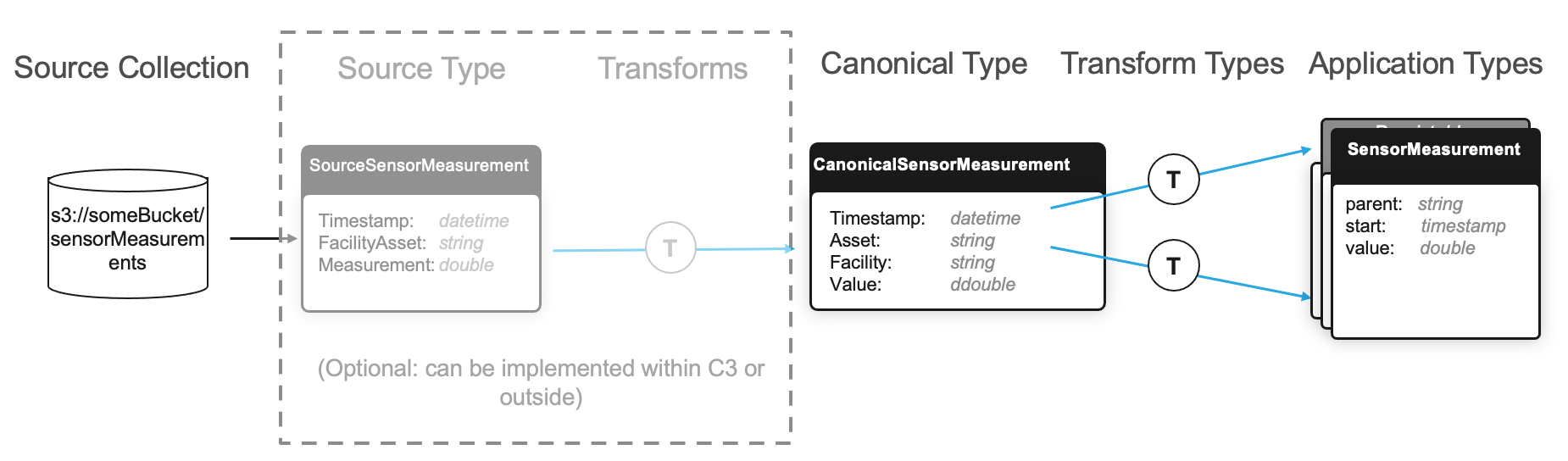
Define a Source Type
Source Types are the inbound interfaces for data that live in an external source system. They provide the C3 Agentic AI Platform with information about the expected structure and format of an external data object.
For example, if you have a process that that writes files containing sensor measurement data to an accessible file system, define a FileSourceCollection instance accordingly.
Source Type example
In this example, each source file is a .csv with the following headers and data types:
Timestamp: A timestamp field for when the measurement value was observed
Facility and Asset: A string field (note the spaces in the field name) containing the asset tag and the facility where the asset is used, separated by a "/"
Measurement: A numeric field containing the value of the sensor measurement
Define the following Source Type in the /src folder of the package as SourceSensorMeasurement.c3typ, and declare SourceSensorMeasurement as follows:
type SourceSensorMeasurement mixes Source {

    Timestamp: datetime

    @ser(name="Facility and Asset")
    FacilityAsset: string

    Measurement: double

}
The @ser annotation allows a field name to be overridden when a file is deserialized or serialized. The field name "Facility and Asset" would have caused syntax errors if it had been defined with the space in the Type file, so the @ser serialization annotation was applied to specify the field name that should be used when the file is serialized by the platform.
Field names of the Source Type are case-sensitive, and should exactly match the name of the field in the source data object unless the field includes the @ser annotation. Always define fields that exist in a Source Type with primitive value types.
By default, any fields in the source data object that are not matched by the Source Type are not parsed at processing time.
- If a field is required on the target entity Type, the upstart to the target Entity Type fails at runtime.
- If a given field is not marked as required on its target Entity Type, it is ignored.
This behavior can be overridden by setting the SourceCollection.Config.failOnExtraFields parameter to true for the corresponding SourceCollection instance. For a comprehensive list of overridable parameters, see the SourceCollection.Config Type.
Define a Canonical Type
Canonical Types are the inbound interfaces for data that is loaded into the platform for use in an application, and are included as part of an application's package. Canonical Types are used when developing an application that relies on data from external sources to accelerate the process of implementing the application in a customer environment.
If you have flexibility to deliver data to the C3 Agentic AI Platform in the format suggested by a Canonical Type, then no additional Source Types and Transform instances are required. You can use the Canonical Type to deserialize the source data directly.
The declaration of a Canonical Type differs slightly from a Source Type. For example, assume that your application data model has one or more Entity Types that rely on sensor measurements which are sourced from an external data source. The following fields are expected to come from an external system:
Timestamp — A timestamp field for when the measurement was recorded
Asset — A string field containing a unique identifier for the asset for which the measurement was recorded
Facility — A string field containing a unique identifier for the facility where the asset lives
Value — A numerical field containing the measurement value
You could define the following Canonical Type as CanonicalSensorMeasurement.c3typ in the /src folder of your package.
type CanonicalSensorMeasurement mixes Canonical<CanonicalSensorMeasurement> {

    Timestamp:  datetime

    Asset:      string

    Facility:   string

    Value:      double

}
Prepend the name Canonical to your Canonical Types (for example, CanonicalMyType.c3typ) so that developers can easily identify these Types when implementing the application.
If the column/field names in the header of the data do not conform to the C3 AI naming conventions, they can be recast using the Ann.Ser notation. See the following example code snippet.
type CanonicalSensorMeasurement mixes Canonical<CanonicalSensorMeasurement> {
  fieldOne : string
  @ser(name='field two')
  fieldTwo : double
}
When ingesting data into a Canonical model, if the data contains headers not in the Canonical, the ingestion might fail. To mitigate this issue, you can either transform the data to match the existing schema or update the Canonical model to include the new headers.
Custom file formats in Canonical Types
For any customer data schema or format outside of the standard Canonical formats, you can either rewrite it into a standard canonical format or directly merge it into the target table using a custom deserialization function. This allows you to process and ingest any data format without needing pre-processing jobs. Follow these steps to achieve this:
- In your
SourceCollection.Config, assign custom deserialization format (my_deser_format)
{
  "contentTypeOverride": "my_deser_format"
}- Create a custom Type for deserialization by mixing
SerDeserinto a custom deserialization Type (MyDeserType)
type MyDeserType mixes SerDeser {

  contentType: ~ py-server

  readObjs: ~ py-server
}- Write custom deserialization functions for
MyDeserType.contentTypeandMyDeserType.readObjs.
// contentType only needs to return the matching string of your deserialization format

def contentType(this):
  return 'my_deser_format'

// readObjs needs to return a stream of YourCanonical

def readObjs(this, content, spec):
  canonical = spec.serType
  canonicalHeader = spec.csvHeader.split(spec.defaultCsvDelimiter)

// Use any read function of content type
  contentLines = content.readLines()

  canonicalArray = []
  while contentLines.hasNext():
      rowData = customFunction(contentLines.next())

      canonicalArray.append(
        canonical.make({k: v for k, v in zip(canonicalHeader, rowData) if v})
)- Process SourceFile
SourceFile.forId('<SourceFileId>').process()This code snippet demonstrates how to create a custom deserialization process using a mixin for SerDeser in the C3 Agentic AI Platform.
Recommendations
To make serialization and deserialization (SerDeser) types more reusable and efficient, use the csvHeader and serType fields from FileObjsOperSpec to avoid hard-coding FileSourceCollection references. This ensures your SerDeser types can be applied to other FileSourceCollections with the same file format. For large files, return a stream so that the platform can chunk the data and process it in batches, improving performance and reducing memory load.
Define transforms
Transform instances are metadata that define a transformation from one source format to another. There are two primary use cases for defining transforms:
Transforming data between a Source Type and a Canonical Type
Transforming data between a Canonical Type and an Entity Type
Transforms are defined in the /metadata/Transform directory of your package in a .json or .js file.
The naming convention for transforms is SourceType-TargetType.[json|js].
Transformers versus projection
Transforms can be implemented with either projections or transformers.
projection- Transforms withprojectionare primarily implemented when there is a direct mapping from source to target fields with minimal custom transformations. For example,JavaScriptdata = { name: "CanonicalFixture-Fixture", target: "Fixture", source: "CanonicalFixture", projection: { id: fixture, installDate: dateTime(installed, "dd/MM/yy"), apartment: {id:split(apartment,'_')[0]} } }Projection style transforms can be equally expressed using JSON syntax as shown below:
JSON{ "name": "CanonicalFixture-Fixture", "target": "Fixture", "source": "CanonicalFixture", "projection": { "id": "fixture", "installDate": "dateTime(installed, 'dd/MM/yy')", "apartment": { "id": "split(apartment,'_')[0]" } } }transformer- Transforms withtransformerare primarily implemented when there is a need for more custom transformations. All helper functions and the requiredtransform()function should be defined in thetransformerfield. Thetransform()should return an object or an array of objects of the target type. See the following example code snippet:JavaScriptdata = { name: "CanonicalABC-ABC", source: "CanonicalABC", target: "ABC", transformer: function(srcObj) { function transform(canonical) { ... return ABC.make({...}); } return transform(srcObj); }, };
transformer transforms require significantly more processing time than projection based (expression engine) transforms. When you build pipelines for large amounts of data, use expression engine transforms to optimize performance.
Transform type example
Assume you are persisting data with an Entity Type SensorMeasurement.c3typ, which is a time series of sensor measurement values containing three fields:
parent- A string field that designates which asset the measurement belongs tostart- A datetime field which indicates the time at which the measurement was takenvalue- A numerical field containing the measurement value
Assume also that there is an Entity Type Sensor.c3typ that serves as the header for the time series and contains the two fields name and facility.
To implement the end-to-end data transformation pipeline, define three transforms - one between the Source Type and Canonical Type, and one between the Canonical Type and each of the two Entity Types:
[
 {
    "name": "SourceSensorMeasurement-CanonicalSensorMeasurement",
    "source": "SourceSensorMeasurement",
    "target": "CanonicalSensorMeasurement",
    "projection": {
        "Timestamp": "Timestamp",
        "Asset": "split(FacilityAsset, '/')[1]",
        "Facility": "split(FacilityAsset, '/')[0]",
        "Value": "Measurement"
    }
 },
 {
    "name": "CanonicalSensorMeasurement-SensorMeasurement",
    "source": "CanonicalSensorMeasurement",
    "target": "SensorMeasurement",
    "projection": {
        "parent": "Asset",
        "start": "Timestamp",
        "value": "Value"
    }
 },
 {
    "name": "CanonicalSensorMeasurement-Sensor",
    "source": "CanonicalSensorMeasurement",
    "target": "Sensor",
    "projection": {
        "name": "Asset",
        "facility": "Facility"
    }
 }
]
This example implements both Source and Canonical Types and their related Transform instances primarily for illustrative purposes. However, when implementing a C3 AI application, usually the base application supplies Canonical Types and any required transforms between Canonical and Entity Types. In most cases, you only need to implement the Source Types required to map the data objects unique to your business and the Transform Types required to map your source data to the application's canonical data model.
The C3 Agentic AI Platform offers a powerful expression library that allows data transformations at varying degrees of complexity. For example, in the code snippet above, the values were split out using a split() function, which split the FacilityAsset field on a \ delimiter, persisting the values of each separately.
To create your own transformations, you can define your transformations in custom JavaScript. However, this can impact runtime performance of data loads, and should be used with caution.
Nested transforms
Nested Transforms in the context of data transformation within the C3 Agentic AI Platform allows for greater flexibility and code reusability by enabling one transformation to invoke another.
The main goal of using nested transforms is to enhance code reusability and modularity. This means that transformation logic can be organized into smaller, reusable pieces that can be called as needed, rather than rewriting the same logic multiple times.
The transform() function is a core method that applies transformations to data. In this context, it is defined in separate JavaScript files, each handling specific transformation tasks.
Calling another transform
The example describes how a transform defined in one file (for example, SourceA-A.js) can call the transform defined in another file (for example, SourceB-B.js).
This is achieved through the following methods:
Transform.forName("SourceB-B").transform(canonical) – This method retrieves the transform associated with SourceB-B and calls its transform function, passing the canonical data object as an argument.
Transform.forName("SourceB-B").transformer.call(canonical) – This approach allows you to call the transform method of SourceB-B while maintaining the context of the canonical data. However, it's important to note that not all transforms have a transformer function. For most scenarios, it is recommended to use a projection in transforms instead of relying on the transformer function, unless the task requires functionality not supported by the expression engine. See Transformers versus projection for more information.
The term "canonical" refers to the standardized format of data that is expected by the transformation functions. By passing this data to another transform, you ensure that the transformations are applied consistently across different modules.
Benefits of nested transforms
Modularity — By breaking transformation logic into smaller pieces, developers can focus on specific tasks, making the code easier to understand and maintain.
Reusability — After a transformation is defined, it can be reused across different parts of the application without duplication of code.
Easier Testing and Debugging — Smaller, modular functions are easier to test individually, which can lead to quicker identification of issues and improved overall quality.
In summary, nested transforms in C3 AI are particularly useful in scenarios where data must be processed through multiple stages of transformation. Nested transforms in C3 AI allow for the invocation of one transformation from another, promoting code reuse and modular design. This approach leads to more organized and maintainable code, enabling developers to create efficient data transformation workflows within their applications.
Transform filtering
Filtering in transforms is a crucial step that enables you to selectively process data based on specific criteria. By applying filtering logic before performing transformations, you can ensure that only relevant records are included in the final output, enhancing the efficiency and accuracy of data processing within the C3 Agentic AI Platform.
The following example defines a configuration object for transforming data from a source entity ("SourceCity") to a target entity ("City"). It includes conditional logic to filter data based on the state abbreviation and specifies the fields that should be projected into the target entity, including the processing of geographic coordinates. You can use a similar structure in your data integration tasks where data must be transformed and mapped according to specific rules and conditions.
data = {
    name: "SourceCity-City",
    target: "City",
    source: "SourceCity",
    condition: stateAbbr =="CA",
    projection: {
      id: id,
      state:state,
      stateAbbreviation: stateAbbr,
      latitude: split(location,'_')[0],
      longitude: split(location,'_')[1]
    }
}Use expression engine functions in transforms
Expression engine functions are highly optimized for runtime performance, and support the vast majority of data cleaning and transformation use cases. Consider the following when using ExpressionEngineFunctions in Transforms:
- Use Expression Engine functions in the
transformerfield withExpr.eval()to take advantage of the JavaScript operations, as JavaScript transformer functions cannot otherwise access the Expression Engine functions directly. - Use Expression Engine functions within the
projectionand other fields without additional modifications.
You can implement Custom Expression Engine functions in a new type that mixes the ExpressionEngineFunction Type and used across multiple transforms. See Custom Expression Engine Function for more information on custom functions.