Permissions in the C3 Agentic AI Platform
In a role based security model, or role based access control (RBAC), a permission refers to the set of rules that define what actions a user, or application, can or cannot perform on a particular resource. This concept is fundamental to the principle of least privilege, which advises that users or applications be given the minimum permissions necessary to complete their tasks, reducing the potential damage they can cause.
Understanding permissions
A permission is a set of rules that determine the allowable interactions with resources. It specifies what actions (like read, write, delete) a user can perform on various system entities like files, databases, services.
In the C3 Agentic AI Platform, you define permissions as strings that include the type of access (allow or deny), a Type name, action group, and specific action. This granular approach allows for precise control over what a user can do.
Relation to users, roles, and groups
Users are assigned to one or more groups, and a group contains a role. Roles define a collection of permissions. Groups are associated with roles, thereby indirectly linking users to specific permissions.
Let's revisit the use case involving the Data Science Department and integrate the concept of permissions into it, aligning with the principles and structure of RBAC as discussed earlier.
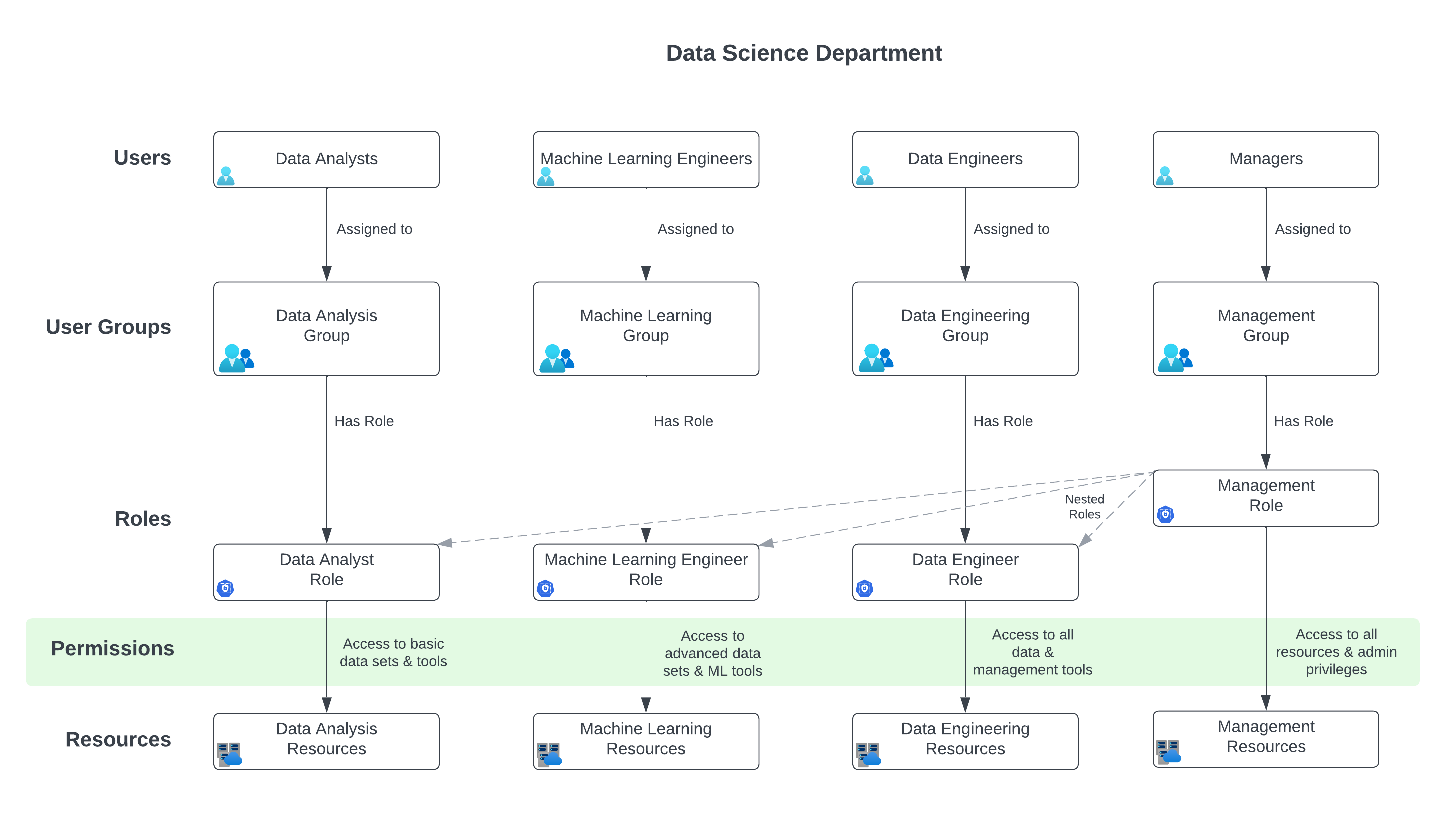
Use case: Data Science department access control
In the Data Science Department, there are various teams like Data Analysis, Machine Learning, Data Engineering, and Management. Each team requires specific levels of access to datasets, tools, and resources.
Roles and permissions
Data Analyst Role
- Assigned the 'Data Analyst Role'.
- Permissions: Access to basic data sets and analytics tools.
- Example permission string
"allow:Dataset:read::(dataCategory == 'basic')"
Machine Learning Engineer Role
- Assigned the 'Machine Learning Engineer Role'.
- Permissions: Access to advanced data sets, machine learning tools, and computational resources.
- Example permission string
"allow:Dataset:read::(dataCategory == 'advanced')", "allow:ComputeResource:use:*"
Data Engineer Role
- Assigned the 'Data Engineer Role'.
- Permissions: Access to all data (raw and processed) and data management tools.
- Example permission string
"allow:Dataset:read::*", "allow:DataTool:use:*"
Manager Role
- Assigned the 'Manager Role'.
- Permissions: Overarching access to all data, tools, plus administrative privileges.
- Nested Roles: Includes permissions of Data Analyst, Machine Learning Engineer, and Data Engineer.
- Example permission string
"allow:*::*"
Implementing permissions
Users in the Data Analysis Group can only access basic datasets, as defined by their role's permissions.
Machine Learning Engineers have permissions to access advanced datasets and computational resources.
Data Engineers have a broader permission set, allowing them to access and manage all types of data.
Managers, with the most comprehensive role, have permissions that encompass all other roles, reflecting their need for wide-ranging access.
Example Scenario: Project-specific access
A special project requires collaboration between select Data Analysts, Machine Learning Engineers, and Data Engineers.
A new group, Special Project Group, is created.
This group is assigned a custom role with specific permissions combining elements from the respective roles of its members, such as access to certain advanced datasets and specific computational resources.
In this use case, permissions are intricately tied to roles and user groups, ensuring that access to data and resources is appropriately controlled. By defining precise permission strings for each role and associating these roles with specific user groups, the Data Science Department can effectively manage access rights, maintain security, and ensure that each team member has the necessary tools and data to perform their tasks efficiently.
Refer to the topic on permissions for more details about creating permission strings.