Trigger Normalization
While normalization generally happens automatically upon data ingestion (default state), it can also be manually triggered to reduce latency on the initial normalization.
When manually normalizing data, you have a few different options: synchronous and asynchronous options that range from individual time series to the environment. See below.
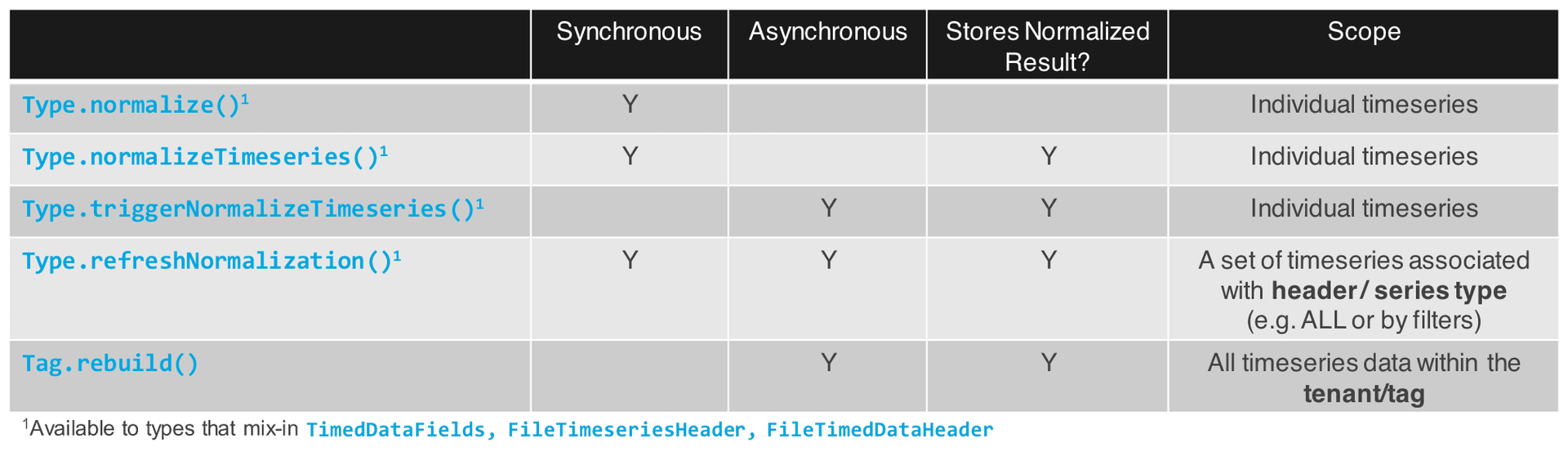
Synchronous normalization
To normalize time series and persist the values to the NormalizedTimeseries Type, you can call TimedDataFields#normalizeTimeseries.
JavaScriptPhysicalMeasurementSeries.normalizeTimeseries(PhysicalMeasurementSeries.make({ id: "<enter id>" }));To normalize time series and return the result without persisting use TimedDataFields#normalize.
JavaScriptPhysicalMeasurementSeries.normalize(PhysicalMeasurementSeries.make({ id: "<enter id>" }));To normalize multiple time series synchronously call TimedDataFields#refreshNormalization with
async:false.JavaScriptPhysicalMeasurementSeries.refreshNormalization({ ids:["<enter comma separated list of ID values>"], async:false });
Asynchronous normalization
To normalize time series and persist the values to the NormalizedTimeseries type, use TimedDataFields#triggerNormalizeTimeseries.
JavaScriptPhysicalMeasurementSeries.triggerNormalizeTimeseries(PhysicalMeasurementSeries.make({ id: "<enter id>" }))To normalize all the time series associated with a time series header asynchronously, you can use TimedDataFields#refreshNormalization.
JavaScriptPhysicalMeasurementSeries.refreshNormalization({ ids:["<enter comma separated list of ID values>"] });You can also fire an asynchronous action to normalize all the time series under a tag
rebuild:JavaScript// Triggers rebuild of the current app tag based on provided spec App.rebuild(Tag.get("YOUR_APP"), AppRebuildSpec.make({ normalizedTimeseries:true });
Note that this normalizes all the time series for all Types that mixin IntervalDataHeader and TimedDataHeader.