Localization and Translation
Localization is the process of translating your application to the language of the end user so that your application can be accessible. You can set the application's locale to a certain region (such as a country) to determine the formatting and parsing of dates, times, numbers, currencies, and measurement units.
This topic covers how to:
- Translate your application by setting your application's locale.
- Translate the text in your application.
Here, we demonstrate how to set up an application that supports English and Russian.
Translate your application
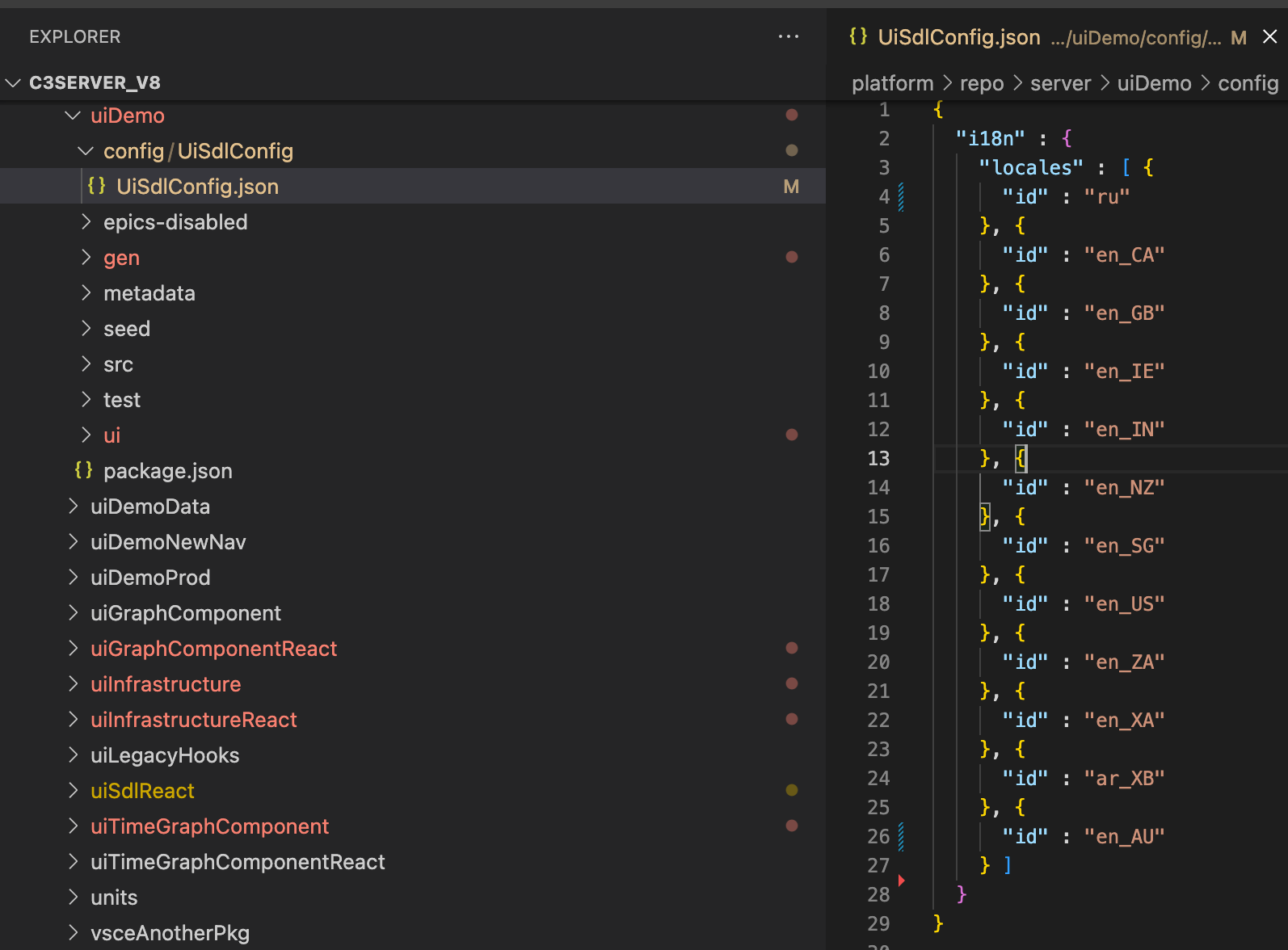
First, specify the locales you would like your application to support.
- Under
{packageName}/config/UiSdlConfig, create a JSON file namedUiSdlConfig.json.- All the locales are nested under the
i18nobject. - The first locale specified is the application's default locale.
- To see available locales that an application can support, see available locales.
- All the locales are nested under the
In the following example, the default locale is set to Russian (ru).
Second, create a seed file for each locale.
- Under
{packageName}/seed/Locale, create a JSON file named{locale}.json.- Each seed file will create a Locale instance for the locale
In the following example, we see the JSON for en_AU, an Australian version of English:
// en_AU.json
{
  "id" : "en_AU",
  "name" : "English (Australia)",
  "language" : "en",
  "region" : "AU"
}
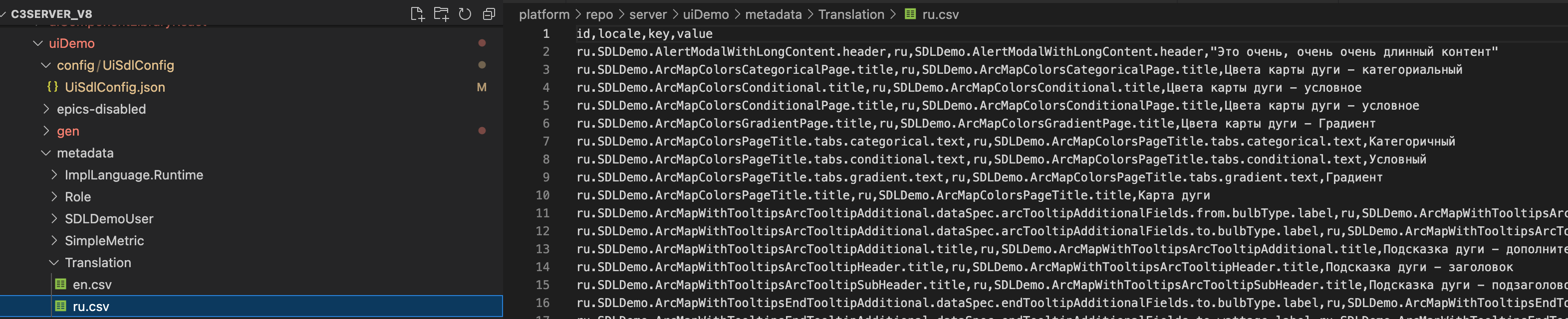
Third, create a translation file for each locale.
- Under
{packageName}/metadata/Translation, create a CSV file named{locale}.csv.- Each translation file must have the following fields:
| Fields | Description |
|---|---|
id | A unique identifier that is a concatenation of the locale and a key joined by a period such as {locale}.{key}. |
locale | The language to translate the text into. It is based on the ISO-639-1 language code. |
key | An identifier for the message to translate. It must consist of only alphanumeric characters (a-z, A-Z, and 0-9) and periods .. |
value | The message to translate. |
In the following example, to support Russian and English translations, there is a ru.csv and en.csv respectively.
Fourth, use the translation message to translate your UI.
- In the JSON component configuration, reference the Translation#key to translate the text.
The framework replaces the text in the title field with the text that is in the Translation#value.
In the following example:
- The text
SDLDemo.Page.title(titlefield in the component configuration) is translated intoPage Title(thevaluefield in the translation file). - The application locale matches the locale in the translation file.
JSON component configuration:
{
  "type": "UiSdlConnected<UiSdlDataGrid>",
  "component": {
    "header": {
      "title": "SDLDemo.Page.title"
     }
  }
}
Translation files:
ru.csv
id,locale,key,value
en.SDLDemo.Page.title,en,SDLDemo.Modal.header,Заголовок страницы
en.csv
id,locale,key,value
en.SDLDemo.Page.title,en,SDLDemo.Page.title,Page TitleInheritance hierarchy for translation
UI translation bundles inherit translations from the parent locales. As a result, an application that supports both English, United States (and in locale en_US) and English, United Kingdom (and in locale en_GB) does not need to provide every text Translation. For text that is not provided, the locale will default back to the parent locale.
The best practice is to provide translations at the "lowest level" possible. For example, most English translations should go in the base language en locale, and only translations which require region-specific spelling or phrasing should go in the region-specific locales (for example en_GB).
Troubleshooting and Debugging
UI Framework supports two pseudo-locales to assist in validating an application's internationalization:
en_XA: English (Pseudo-accents)- Replaces most ASCII characters with Unicode characters containing accents and other diacritic marks.
- Useful for identifying text which does not use localized formatting or Translations.
ar_XB: Arabic (Pseudo-Bidi)- Replaces ASCII letters with "upside-down" letters and inserts bidirectional text markers around the text.
- Useful for identifying styling and other formatting issues when displaying Right-to-Left scripts such as Arabic and Hebrew. To enable these pseudo-locales, add them to the application's
UiSdlI18nConfig.locales, and optionally set the user'sUiSdlUserPreference.preferredLocaleaccordingly.
At this time, only UI translations are automatically generated for pseudo-locales. To include data translations, create the appropriate Translation data and include it in the application package.