Automatic Metadata Extraction
Automatic Metadata Extraction (AME) is a process that automatically identifies, extracts, and organizes metadata from the content of files. AME offers several advantages such as:
- metadata-filtered search: search across unstructured documents which have been tagged with the relevant information
- richer embeddings that allow better contextual retrieval
For more information on unstructured data retrieval, refer to Unstructured Data Ingestion.
Tagging can be done in two modes:
- using seeded categories: the LLM identifies metadata values for pre-defined categories that you specify (recommended)
- allowing discovery of categories: the LLM in the first pass extracts entities, from which categories are inferred and the metadata extracted for those.
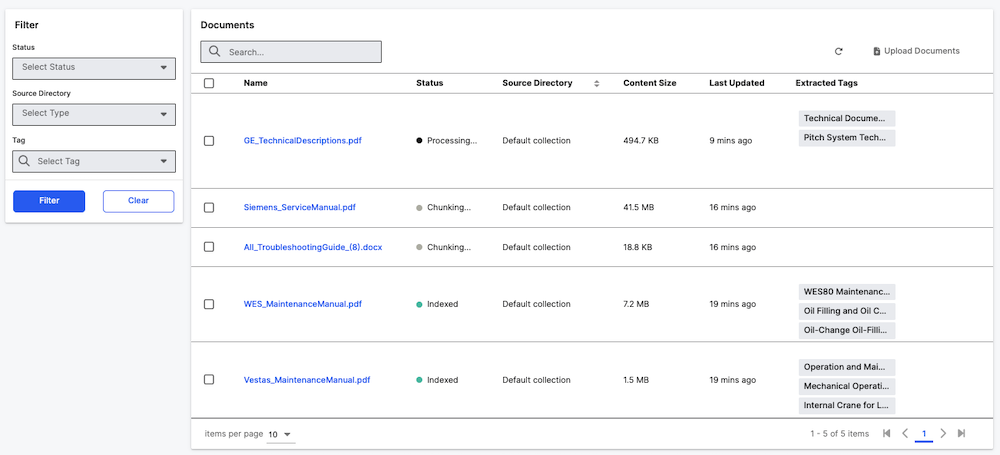
Understanding Keyword vs Title Categories
If you upload a document through the UI, you will see an option to add tags on titles or keywords.
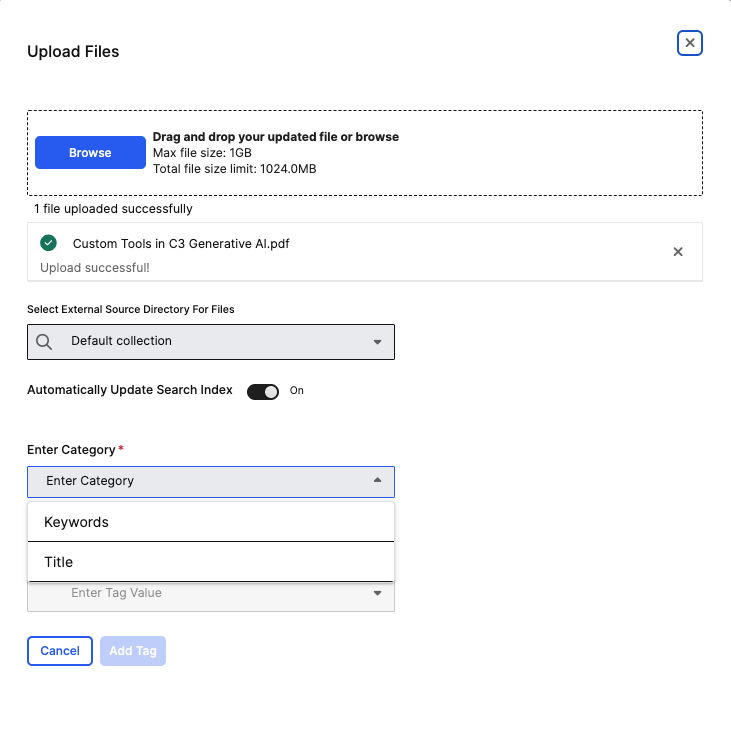
Keywords and Title are different categories of metadata tags that serve distinct purposes:
Title Category:
- Purpose: Represents the document's title or main subject.
- Default Setup:
Titleis automatically configured as a pre-seeded category by Genai.QuickStart#setupAutomaticMetadataTagging. - Usage: Extracts the document's main title or heading.
- Example: For a research paper on "Large Language Models in Healthcare", the title tag could be "Large Language Models in Healthcare".
Keyword Category:
- Purpose: Represents topic-related keywords from the document content
- Usage: Extracts key terms and concepts that describe the document's content.
- Example: For the same research paper, keyword tags might be "machine learning", "medical AI", "natural language processing".
Both categories work together to organize document content: Title tags identify what the document is about (its main subject), while Keyword tags identify the key concepts and topics within the document.
Example for a document about "Wind Turbine Maintenance Guidelines":
- Title tag: "Wind Turbine Maintenance Guidelines".
- Keyword tags: "maintenance", "turbines", "renewable energy", "operations."
Configuring Automatic Metadata Extraction
The configuration is stored in Genai.SourceFile.Metadata.Tagging.DefaultConfig. Tagging will be enabled by default if the app is set up using Genai.QuickStart.
Genai.QuickStart#setupAutomaticMetadataTagging will:
- configure the LLM client specified in the Genai.QuickStart.SetupSpec#llmClientConfigName
- skip previously indexed files for re-tagging
- use Genai.QuickStart.SetupSpec#manualCategories as seeded categories for the first mode described above in addition to a pre-seeded category
Title - make visible a tags grid to view and edit the available and extracted tags for files in the current project.
To change the LLM client, use:
Genai.SourceFile.Metadata.Tagging.Config.setConfigValue(
  'completionClientName',
  <completion_client_name>,
  ConfigOverride.APP
);Additional QuickStart Configuration Options
When using Genai.QuickStart#setupAutomaticMetadataTagging, the following configuration values are automatically set:
Genai.SourceFile.Metadata.Tagging.Config.setConfigValues({
  disableMetadataTagging: false,                    // Enable metadata tagging
  skipPreindexedFilesForTagging: true,             // Skip previously indexed files for performance
  allowRetaggingWithoutReindexing: true,           // Allow tag updates without full reindexing
  allowOverlapInExtractedText: false,              // Enforce strict overlap computation between chunks
  completionClientName: llmClientConfigName        // LLM client for tag extraction
}, ConfigOverride.APP);
These settings provide optimal performance by:
- Avoiding re-computation on previously processed files.
- Enabling efficient metadata updates without requiring full reindexing.
- Controlling text extraction overlap for accuracy vs performance balance.
Additional configuration options
The text that's used for tagging is controlled by Genai.SourceFile.Metadata.Tagging.Config#textExtractionLambda. The user can define custom logic for example specific to file type or size. The user is responsible for specifying the runtime the lambda will execute in and any additional caching that may be required for usage in air-gapped environments.
In the absence of a configured lambda, text from the first and last few passages extracted while chunking will be used, controlled by the following configuration variables:
- numInitialPassages: The number of initial passages to process. The default value is 16.
- numFinalPassages: The number of final passages to process. The default value is 8.
The user can also specify the mechanism by which metadata is to be populated for a set of categories from a given text by setting the Genai.SourceFile.Metadata.Tagging.Config#metadataExtractionLambda.
In the absence of a configured lambda, the behavior will default to querying an LLM using the Genai.SourceFile.Metadata.Tagging.Config#completionClientName using the prompt template in Genai.SourceFile.Metadata.Tagging.Config#metadataExtractionPrompt for Genai.SourceFile.Metadata.Tagging.Config#numTags tags per category.
The configurable flag skipPreindexedFilesForTagging will reduce re-computation load by not extracting categories and tags from files which were previously indexed. allowRetaggingWithoutReindexing enables updating tags on previously indexed files without requiring full reindexing or re-embedding, allowing for more efficient metadata updates. allowOverlapInExtractedText controls whether overlapping chunks are permitted when merging extracted text. Setting it to false enforces strict overlap computation between chunks, which may be more accurate but can impact performance for large inputs. Genai.QuickStart#setup will set the following recommended configuration.
Genai.SourceFile.Metadata.Tagging.Config.setConfigValues({
  skipPreindexedFilesForTagging: true,
  allowRetaggingWithoutReindexing: true,
});Configuration Parameters Reference
The following table shows suggested configuration parameters with their default values and descriptions:
Text Processing Configuration
| Parameter | Default | Description |
|---|---|---|
numInitialPassages | 16 | Number of initial passages to process from document |
numFinalPassages | 8 | Number of final passages to process from document |
numMaxTokens | 2000 | Maximum tokens for text extraction |
nlp | "en_core_web_sm" | NLP model for entity extraction |
Entity and Topic Discovery
| Parameter | Default | Description |
|---|---|---|
numEntities | 5 | Number of entities to extract for topic discovery |
themes | 6 | Number of themes to identify |
examples | 2 | Number of examples per category |
numKeywords | 2 | Number of keywords per topic |
filterEntityCategories | ["DATE", "EVENT", ...] | Entity types to filter during extraction |
Prompt Configuration
The system uses several configurable prompts for different stages:
topicLabelingPrompt: Used for discovering new categories (whenenableTopicLabelingis true).metadataExtractionPrompt: Used for extracting tags from predefined categories.clusteringPrompt: Used for grouping similar entities and topics.
To customize prompts, select the Prompts page in Settings in the application.