Add OAuth Apps
Your users connect C3 Code to outside services by signing in to each service with their own account and approving access. OAuth is the standard behind that sign-in. An OAuth app tells C3 Code how to sign in to one service. It holds the addresses the sign-in uses and the credentials the service issued to C3 Code.
An MCP server connects the C3 Code agent to an outside system. Many MCP servers let C3 Code register an app of its own when a user signs in. Some services accept sign-ins only from apps their owner approved in advance. For those, you register C3 Code with the service and add the result as an OAuth app.
You add an OAuth app in two situations:
- An MCP server accepts only approved apps: users pick your app under Use an app an administrator added when they add the server.
- You want users to connect GitHub with a single approval: Connect via OAuth appears in User Settings only after you add the GitHub OAuth app.
Register C3 Code with the service first, then add the app in C3 Code. When the service's details change, edit the app, or remove it when users no longer need it. Opening the Admin section needs administrator access.
Register C3 Code with the service
Each service has its own page for registering an app, usually in its developer settings. Registering gives you a client ID, which identifies C3 Code to the service, and usually a client secret, which proves the request comes from C3 Code. Collect these details from the service and its documentation:
- Client ID and client secret: issued when you register the app.
- Authorization endpoint and token endpoint: the two addresses C3 Code uses for the sign-in. The service's OAuth documentation lists them.
- Scopes: the names of the permissions C3 Code requests, such as read access to repositories.
The service also asks for a callback URL, the address it sends users back to after they approve access. Every OAuth app in C3 Code uses the same callback URL: the address you open C3 Code at, followed by /index.html. For example, when you open C3 Code at https://<your-domain>/<environment>/studio/genesis, the callback URL is https://<your-domain>/<environment>/studio/genesis/index.html.
Add an OAuth app
The OAuth apps card on the Settings page lists every app your users can sign in with:
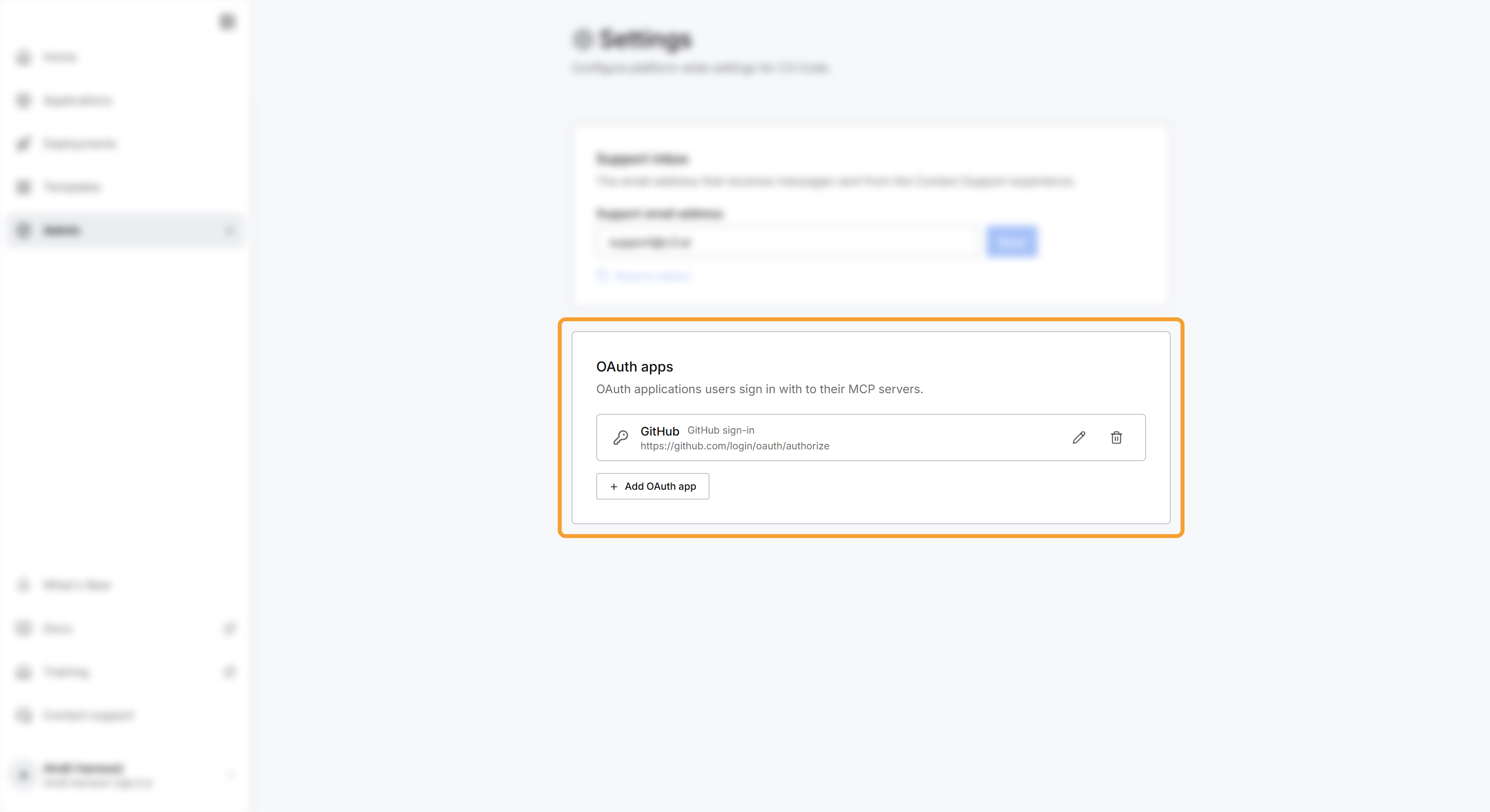
- Open Admin, then select Settings.
- Under OAuth apps, select Add OAuth app.
- Fill in the form with the details from the service, as described in the next table.
- Select Save.
Save stays disabled until you fill in Name, Authorization endpoint, Token endpoint, and Client ID. The other fields are optional or have a default:
| Field | What to enter |
|---|---|
| ID | A permanent identifier for the app. Leave it empty, and C3 Code generates one. Enter GitHub only for the GitHub OAuth app. |
| Name | The name users see when they pick the app, such as the name of the service. |
| Authorization endpoint | The address where users sign in to the service and approve access. |
| Token endpoint | The address where C3 Code exchanges a user's approval for a token, which C3 Code then sends with each request on that user's behalf. |
| Client ID | The client ID the service issued. |
| Client secret | The client secret the service issued. Leave it empty when the service issued none. C3 Code stores the secret and never shows it again. |
| Scopes | The permissions C3 Code requests, separated by spaces or commas. |
| Resource | The address the token is for, when the service asks for one. Leave it empty, and C3 Code sends the address of the MCP server a user signs in to. |
| Token authentication | How C3 Code sends the client ID and secret to the token endpoint: HTTP Basic, the default, or In the request body. Pick the method the service documents. |
The app appears in the card with its name and authorization endpoint. Users who add an MCP server can now select it under Use an app an administrator added.
You set the ID only when you add the app, and the edit form leaves it out. The ID is case-sensitive. Adding an app with an ID already in use replaces that app without a warning, including its client ID and secret.
Set up the GitHub OAuth app
Connect via OAuth, in the Git Providers section of User Settings, lets users connect GitHub by approving C3 Code one time, without creating a token. C3 Code offers it only when an OAuth app with the ID GitHub exists. Without that app, users connect GitHub only with a fine-grained token.
To set up the GitHub OAuth app:
- In GitHub, register a new OAuth App from Developer settings. Enter your C3 Code callback URL as the Authorization callback URL, then generate a client secret.
- In C3 Code, add an OAuth app with these values:
- ID:
GitHub, with a capital G and a capital H. - Name:
GitHub. - Authorization endpoint:
https://github.com/login/oauth/authorize. - Token endpoint:
https://github.com/login/oauth/access_token. - Client ID and Client secret: the values from your GitHub OAuth App.
- Scopes:
repo. - Token authentication: In the request body.
- ID:
- Select Save. The app shows the GitHub sign-in label in the card.
- Open Admin, then select Health. Under Configuration, the GitHub OAuth App card shows your callback URL, and GitHub authorization reads Accepted.
Rejected (misconfigured) under GitHub authorization means GitHub refused the client ID, the client secret, or the callback URL, and the card names which one. Edit the app in C3 Code or the OAuth App in GitHub until the card reads Accepted.
If the card still reads Not configured after you save, the app has a different ID. Remove the app and add it again with the ID GitHub.
Change or remove an OAuth app
Each app in the card has two controls:
- Edit: opens the form, so you can change any field except the ID. The Client secret field opens empty. Leave it empty to keep the saved secret, or enter a new one to replace it.
- Remove: deletes the app right away, with no confirmation.
Removing an app affects the users who sign in with it:
- MCP servers set up with that app can no longer sign in. They show Error with the message "The OAuth app of this MCP server no longer exists. Pick another." Their owners edit each server and pick another app.
- Removing the app with the ID
GitHubturns off Connect via OAuth for every user.
To change the ID of an app, remove it and add it again with the new ID. Users with MCP servers set up with the old app then edit each server and pick the new one.