Model Context Protocol (MCP) Overview
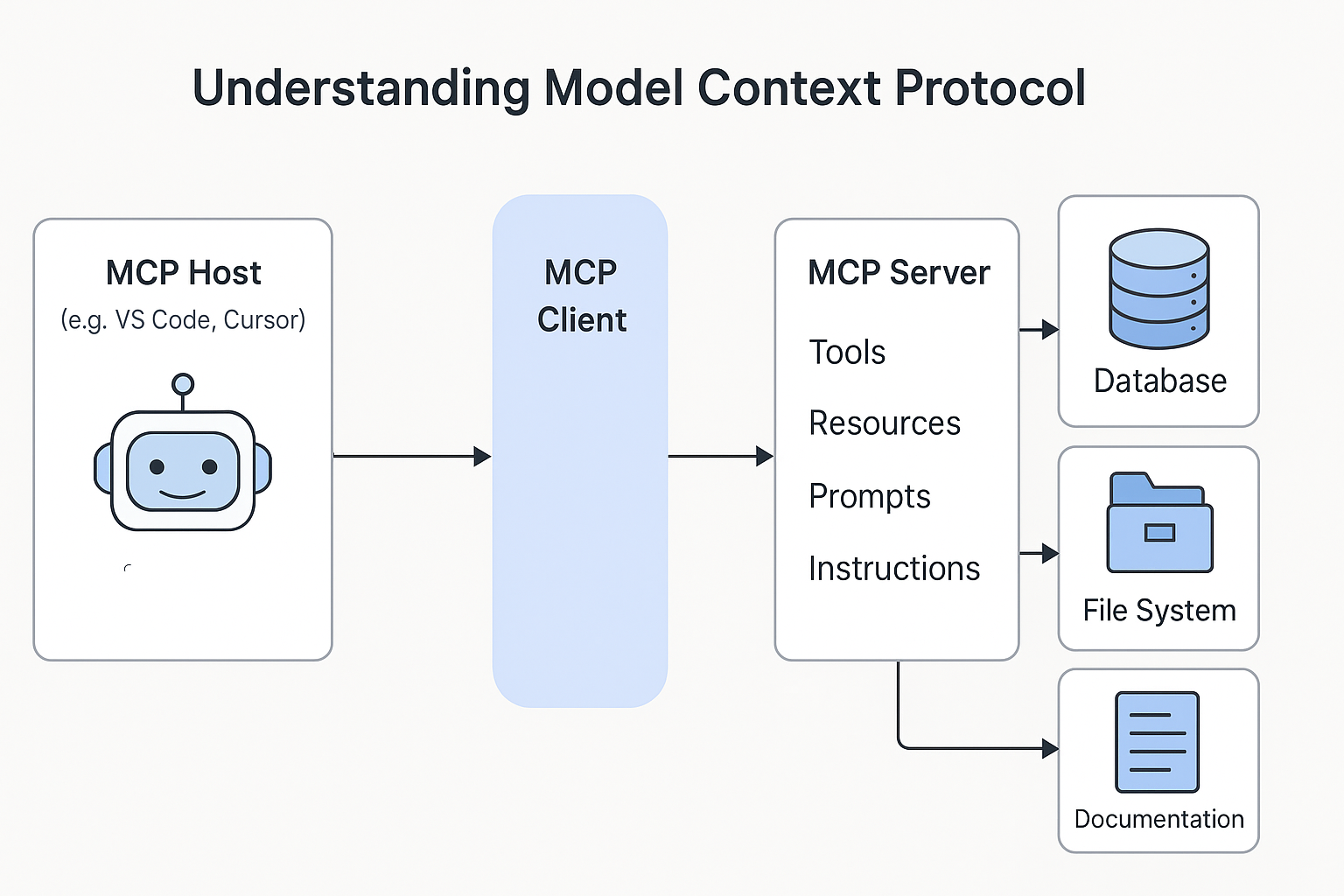
The Model Context Protocol (MCP) is an open framework that connects AI coding assistants with external tools, data sources, and services. It defines a common format for structured requests and responses, allowing coding assistants to act on real system data.
C3 AI uses MCP in two ways:
- C3 Central MCP Server: Provides C3 platform tools to all developers.
- Application MCP Servers: C3 applications that include the
mcpServerpackage to expose custom business tools.
Architecture
- MCP Host: Your code editor application (VS Code or Cursor).
- MCP Client: The protocol layer inside your editor that sends structured requests to MCP servers.
- MCP Server: Any server that implements the MCP protocol. This includes the C3 Central MCP Server and any C3 application with the
mcpServerpackage.
C3 Central MCP Server
The C3 Central MCP Server is a server that C3 AI maintains for all developers. You connect to it to get C3 platform help.
Capabilities
The C3 Central MCP Server provides C3 platform tools to all developers learning or building C3 applications.
- Search C3 documentation
- Generate C3 Types and Transforms
- Get C3 best practices
- Answer C3 platform questions
Connect to Central MCP
See Connect to the C3 Central MCP Server for step-by-step instructions.
Application MCP Servers
An Application MCP Server is your C3 application when it includes the mcpServer package. This exposes custom business logic as tools that your coding assistant can access.
The mcpServer package provides Mcp.Server (REST endpoint) and Mcp.Engine (tool call handler), and requires the genaiPlatform package. When your app is running, it automatically exposes the following MCP endpoints:
| Endpoint | URL | Purpose |
|---|---|---|
| VS Code installer | https://<cluster>/<env>/<app>/mcp/vscode | Opens VS Code and auto-configures the MCP server connection |
| Cursor installer | https://<cluster>/<env>/<app>/mcp/cursor | Opens Cursor and auto-configures the MCP server connection |
| JSON config | https://<cluster>/<env>/<app>/mcp/json | Returns raw JSON config for project-scoped or manual setup |
| MCP server | https://<cluster>/<env>/<app>/mcp/server | The actual MCP protocol endpoint your IDE connects to (do not open this in a browser) |
Example custom tools
- Check inventory levels for SKU-123
- Calculate supply chain risk score
- Analyze sensor data for anomalies
Prerequisites
- Your app declares a dependency on the
mcpServerpackage - Your app is running
Create and enable tools
It is strongly recommended your app exposes at least one tool so the MCP server provides useful functionality.
# Create a custom tool
inventory_tool = c3.GenaiCore.Tool.C3Method.createFromMethodName(
    c3.InventoryManager,
    "checkStockLevels"
)

# Enable it for MCP
inventory_tool.withEnabledInMcpServer(True).upsert()
To connect your coding assistant to your Application MCP Server, follow the same steps in Connect to the C3 Central MCP Server.
Connect to multiple servers
Connect to both C3 Central MCP and your Application MCP when you need:
- C3 platform guidance (from Central MCP)
- Custom business tools (from your Application MCP)
Your coding assistant aggregates tools from both servers and calls whichever tool makes sense for your request..