Install on Google Cloud Platform
C3 AI deployment options: guidance for enterprise customers
C3 AI offers flexible deployment models to meet the diverse needs of enterprise customers. Selecting the appropriate deployment option is a critical decision that impacts project timelines, service-level agreements (SLAs), and roles and responsibilities (RACI). This document outlines each option, highlights key considerations, and underscores the benefits of the C3 AI SaaS/PaaS Subscription, which is the recommended approach for most organizations.
1. C3 AI SaaS / PaaS subscription (preferred standard option)
The standard C3 AI SaaS/PaaS (Software as a Service / Platform as a Service) subscription is the most typical deployment option to leverage the C3 AI Platform and Applications. It is a fully hosted and managed service by C3 AI in Google Cloud Platform (GCP). Customers may select their preferred GCP region for data residency.
Key Features and Benefits:
- Lower Total Cost of Ownership (TCO): Standardized technologies and processes enable rapid deployment, streamlined support, and efficient issue resolution. C3 AI maintains specific enterprise SLAs to deliver an industry-leading service with lower TCO.
- Reduced Operational Burden: Internal teams can focus on leveraging AI applications for business value, rather than managing infrastructure setup and maintenance.
- Scalability: The SaaS/PaaS model supports seamless scaling as business needs evolve. C3 AI manages all scaling needs and capacity planning required to ensure consistently available platform and applications.
- Security and Compliance: C3 AI employs industry standard cybersecurity and access control practices to safeguard customer applications and data. C3 AI holds and maintains critical compliance attestations like SOC2, ISO27001, and FedRAMP.
Why Choose SaaS/PaaS?
This model is the fastest, most cost-effective way to realize value from C3 AI products and generate AI-driven insights. It is recommended for organizations seeking minimal operational overhead and maximum agility.
2. Customer-hosted, C3 AI-managed deployment
For organizations with non-standard data residency, security, or governance requirements, C3 AI supports deployments within a customer's own Google Cloud Virtual Private Cloud (VPC). C3 AI Operations manages the deployment, maintenance, and support within the customer's environment. Your organization will have responsibility for portions of the infrastructure to ensure C3 AI Operations can successfully deploy and manage C3 AI Products. Coordination with C3 AI Operations will be required for future upgrades, change and incident management activities. Additional charges may apply to support a customer-hosted deployment.
Key Considerations:
- Customer Responsibilities:
- Provide a dedicated GCP project for the C3 AI cluster with Owner access for C3 AI Operations members. C3 AI Operations provisions the VPC via Terraform by default. Provide timely and required access to C3 AI Operations for installation and ongoing support.
- Manage and troubleshoot infrastructure changes outside C3 AI's control that may affect availability or performance.
- Assume all infrastructure hosting costs within the customer's cloud account.
- If the Kubernetes endpoint is private, provision and maintain a bastion host for C3 AI Operations (see Google Cloud access requirements for specifications).
- Control and Access: Customers retain greater control and thus greater responsibility over their GCP subscription and can limit permissions granted to C3 AI.
When to Choose This Option:
This model is suitable for organizations with:
- Internal processes requiring direct control over cloud resources.
- Policies with non-standard local data residency, security, or governance requirements.
Summary table
| Deployment Model | Managed By | Hosted In | Customer Responsibilities | Recommended For |
|---|---|---|---|---|
| SaaS/PaaS Subscription (Preferred) | C3 AI | C3 AI GCP Cloud | Minimal | Most organizations |
| Customer-Hosted, C3 AI-Managed | C3 AI | Customer Google Cloud Virtual Private Cloud (VPC) | GCP project, bastion host, access, infra costs | Regulated/controlled industries |
Selecting the right deployment option is essential for project success. C3 AI strongly recommends the SaaS/PaaS Subscription for most enterprises, as it maximizes value, reduces risk, and accelerates time to insight.
If you have questions or require a tailored recommendation, please reach out to your C3 AI representative.
Customer-hosted install requirements: checklist
Summary
For C3 AI to operate in customer-hosted GCP Cloud accounts, your organization must meet the following requirements consistently throughout the contract term. Deviations from the installation requirements incur additional operational fees.
You agree that your organization will allow C3 AI Operations to deploy all infrastructure required to support the C3 AI applications and platform per this specification and utilizes C3 AI deployment automation. This checklist only applies to customer hosted installations.
Naming conventions
Several identifiers throughout this guide -- the GCP project, the C3 AI cluster, and related resources -- must follow the same set of naming rules. The rules apply consistently; any place in this guide that asks for a project name or cluster name refers back to this section.
- Environment prefix:
- For Dev and QA clusters: <stg><cloud><customerabbreviation>; where <cloud> is gke. For example, stggkecust.
- For Production clusters: <prd><cloud><customerabbreviation>; where <cloud> is gke. For example, prdgkecust.
- Character rules: Lowercase letters and numbers only. No hyphens, special characters, or diacritics (accented letters). Must start with a letter.
- Length: Fewer than 15 characters total.
Terraform reference: These rules are enforced by the project_name variable, which includes a validation block that rejects values that do not conform.
Pre-flight checklist
Before C3 AI Operations can deploy a customer-hosted cluster, complete each of the items below. Requirements that were historically spread across several sections are consolidated here for a single-page review.
For C3 AI Operations to deploy a cluster in a customer-hosted deployment, you must provide the following access, network setup, and infrastructure to C3 AI:
Provide C3 Ops with owner access to the GCP Project. C3 AI requires owner privileges to the project to set up an IAM policy and create a role that allows C3 AI Operations to perform installation, setup, and deployment tasks. You can remove owner access after initial setup. You must grant owner access again for new product releases and for any subsequent infrastructure changes, because owner privileges are required to read current infrastructure state.
Terraform reference: The bootstrap module creates this role automatically. See 1.1 Run the bootstrap module.
An IAM role called C3.Ops with access to your dedicated GCP project.
Terraform reference: The bootstrap module creates the delegated operations role ({project_name}c3dopsrole-01). Assign members via the delegated_iam_role_members variable.
If your firewall settings prevent C3 AI Operations from configuring access to required endpoints, you must allow access to the following:
- Routing to and from the C3 AI network so C3 AI can receive metrics, logs, and observability data to operate the deployment.
- Connectivity to endpoints that allow C3 AI product functionality.
Terraform reference: Outbound access is provided via NAT by default. If your organization applies egress filtering, see Endpoint access for the full list of required domains and IPs.
New VPC and subnet with at least 1024 IP address (/22) available for C3 deployment. Each subnet must be across three availability zones.
Terraform reference: Set gke_cidr_block (default: 10.0.0.0/22). The network module creates the VPC and subnets automatically.
Static DNS entry for C3 AI URL (for example, c3project.customer.com).
Public certificate with the complete chain and the private key. Certificates issued by a public or an internal Certificate Authority are supported. Coordinate with the C3 AI Center of Excellence if you plan to use self-signed or internal-CA certificates so that the required trust chain can be pre-staged in the cluster.
Bastion host provisioned and reachable by C3 AI Operations (required only if the Kubernetes endpoint is private and C3 AI Operations cannot deploy the cluster directly). The bastion must have the following software installed:
- RedHat 8
- gcloud CLI (latest version)
- kubectl v1.34
- Helm v3.12+
- Helmfile plugin
- HashiCorp Terraform >= 1.13.0
- TFSwitch
- Python 3.12
- Docker
- yq
- jq
- openssl
Note: Bastion host provisioning is a customer responsibility and is not included in the C3 AI Terraform modules. See Google Cloud access requirements for the authoritative specification.
C3 AI Operations IP allowlist received from your C3 AI account team. The allowlist CIDR blocks must be populated in the ip_allowlist variable on the c3cluster module so that the firewall policy admits inbound traffic from C3 AI Operations. See Endpoint access for the current list.
CORS domains list received from the C3 AI Center of Excellence (CoE). Required if the installation includes C3 AI Ex Machina. Populate via the gcs_cors_domains variable on the c3cluster module. See Implement CORS policy for C3 AI Ex Machina.
Remote state backend bucket created (recommended). Before running Terraform for the first time, create a GCS bucket to hold remote state for each module. See State management for the recommended backend configuration.
C3 AI installation requirements for Google Cloud Platform
The C3 Agentic AI Platform integrates with core Google Cloud services such as Google Compute Engine, Virtual Private Network (VPC), and IAM, enabling cohesive security and infrastructure management.
The C3 Agentic AI Platform requires specific Google Cloud Platform (GCP) cloud services and infrastructure for successful deployment, as well as specific access requirements for C3 AI Operations to install, administer, and upgrade the C3 Agentic AI Platform and C3 AI Applications.
Install and upgrade requirements including Bill of Materials (BOM) details can be reviewed on the documentation site https://docs.c3.ai/versions-and-compatibility/upgrade-requirements/8.11.
The following sections describe the specific services and access needs, including network configurations and subnet requirements, security group egress and ingress rules, and subnet-level access control lists (ACLs).
Required Google cloud services
The table below describes the GCP Cloud infrastructure services required by the C3 Agentic AI Platform. You are required to provide the services below configured to C3 AI specifications as documented in the HashiCorp Terraform scripts.
| Google Cloud Platform Service | Version | Description | Terraform Variable |
|---|---|---|---|
| Kubernetes Engine (GKE) | 1.34 | Operating environment responsible for the deployment, scaling, and management of the C3 Agentic AI Platform and C3 AI Applications. | gke_version |
| Cloud Key Management Service | Current version | Scalable, centralized, fast cloud key management. | use_gcp_managed_keys (set false to provision KMS) |
| Cloud SQL for PostgreSQL | 15 | Relational data required for internal operations of the C3 Agentic AI Platform. See the GCP Cloud SQL database version policies website for specific minor version supported. | postgres_version (default: POSTGRES_15) |
| Cloud Storage | Current version | Reliable and secure object storage used for the management of application and platform configuration, and other ancillary tasks. | gcs_buckets |
| Identity and Access Management (IAM) | Current version | Fine-grained access control and visibility for centrally managing cloud service account resources. You must create a role called C3.Ops in your GCP deployment. Add the GCP roles defined in the HashiCorp Terraform scripts so that the C3.Ops role inherits their permissions. | service_accounts |
| Virtual Private Cloud (VPC) | Current version | Dedicated, isolated network for inter-C3Cluster communication. | existing_network_configuration (set null to create new VPC) |
Google Cloud access requirements
The table below describes the access requirements for C3 AI Operations to install, administer, and upgrade the C3 AI Applications and C3 Agentic AI Platform.
To ensure security, operational excellence, and customer trust, C3 AI leverages an industry standard privileged access management (PAM) for infrastructure access and authentication. All access by our C3 AI Operations team to customer hosted deployments will be managed exclusively through this PAM solution. This approach ensures every interaction with the systems is secure, fully auditable, and aligned with industry best practices.
Why PAM and what this means for you:
- Centralized Access Control: All infrastructure access is managed through a single, secure platform, reducing complexity and risk.
- Enhanced Security: PAM enforces strong authentication and zero-trust principles, ensuring only authorized personnel can access your systems.
- Full Auditability: Every session and command is logged, providing complete visibility for compliance and security reviews.
- Rapid Access Revocation: Access can be granted or revoked instantly, minimizing exposure during personnel changes or incident response.
- Operational Efficiency: Our Operations team benefits from streamlined workflows, reducing time to resolution for support and maintenance tasks.
- Industry Best Practices: PAM aligns with leading security frameworks and compliance standards, reinforcing trust and reliability.
Requirements of the PAM solution:
- One time use of Service Account role to deploy the cluster and for select infrastructure upgrades
- Service account created in your SSO / Active Directory used to manage the C3 AI Platform
- An additional /28 CIDR IP block for the C3 Software-Defined Perimeter/Management (SDM) peered VPC
C3 AI Operations will deploy and install the PAM solution. You can request an audit log of user access by contacting C3 AI Customer Support.
| Access Requirements | Description |
|---|---|
| A dedicated GCP project | When creating the project, C3 AI requires: (1) Project identifier, (2) Cloud region. |
| Secure internet access to the GCP project | Secure, remote access via internet (VPN access is acceptable) to a bastion host from which C3 AI Operations personnel can administer cloud infrastructure and C3 AI services. |
| GCP service accounts | C3 AI Operations requires access to the GCP service accounts and Kubernetes workload identities provisioned by Terraform during cluster deployment. Terraform reference: the service_accounts variable and workload_identities.tf define the default service accounts and their Kubernetes workload identity bindings. |
| A bastion host accessible by C3 AI Operations to manage the cluster | The bastion host is used by C3 AI Operations to administer the C3 AI Applications and C3 Agentic AI Platform. Deploy the bastion host in a private subnet of the C3 AI cluster VPC; C3 AI Operations connects to it through the PAM solution, so no public IP is required. Software utilities required on the bastion host must include: RedHat 8, Google Cloud Command-Line Interface (gcloud CLI) latest version or greater, kubectl v1.34, Helm v3.12+, HashiCorp Terraform (>= 1.13.0), Python 3.12, Docker, and openssl. Note: Bastion host provisioning is a customer responsibility and is not included in the C3 AI Terraform modules. |
| Access to C3 AI and third-party library and image repositories | Access to C3 AI and third-party repositories for the container images, Python libraries, NodeJS libraries, and runtime billing data collection. If connecting to remote C3 AI, Python, and NodeJS artifact repositories violates security standards, the C3 Agentic AI Platform can be configured to connect to local artifact repositories such as GCP Artifact Registry, JFrog, and Anaconda Enterprise. |
| X.509 certificate for terminating network encryption | A fully qualified domain name for C3 AI Cluster ingress configuration (for example, c3project.customer.com). You are responsible for providing the public certificate with the complete chain and the private key to C3 AI. These are placed in a Kubernetes secret and used by C3 AI cluster ingress controller. Certificates issued by a public or an internal Certificate Authority are supported; coordinate with the C3 AI Center of Excellence if you plan to use self-signed or internal-CA certificates so that the required trust chain can be pre-staged in the cluster. |
Network configuration
By default, C3 AI Operations provisions the VPC via Terraform following the requirements in the VPC requirements section below. If your organization must pre-provision the VPC per internal policy, coordinate with the C3 AI Center of Excellence. This is a special-case scenario. Terraform reference: If your organization must use existing network resources rather than having the Terraform modules create new ones, set the existing_network_configuration variable. For details, refer to examples/existing_network/README.md in the Terraform module documentation.
VPC requirements
Your VPC must meet the requirements described in this section to host a C3 AI cluster.
VPC region
The GCP region where the deployment will occur. Refer to GCP documentation for a list of available regions.
Terraform variable: c3_region
VPC sizing
The C3 Agentic AI Platform requires six (6) CIDR blocks.
| IP Address Range | Association | Terraform Variable | Default |
|---|---|---|---|
| 10.0.0.0/22 | Private IPs that are routable to a public-facing Internet Gateway; used by Cloud SQL (Postgres), GKE Cluster, and node pools. | gke_cidr_block | 10.0.0.0/22 |
| 172.16.0.0/18 | Used for GKE services | gke_svc_secondary_cidr_block | 172.16.0.0/18 |
| 172.20.0.0/14 | Used for GKE pods | gke_pod_secondary_cidr_block | 172.20.0.0/14 |
| 10.0.6.16/28 | Used for the GKE control plane | gke_master_ipv4_cidr_block | 10.0.6.16/28 |
| 10.0.5.0/24 | Used as a proxy subnet | network_proxy_cidr_block | 10.0.5.0/24 |
| 10.0.6.48/28 | Used by subnet dedicated to PSC NAT | network_psc_cidr_block | 10.0.6.48/28 |
The VPC must have DNS hostnames and DNS resolution enabled.
Subnets
The Terraform module creates the following subnets within the VPC for each cluster:
| Subnet | Default CIDR | Prefix | Purpose |
|---|---|---|---|
| GKE | 10.0.0.0/22 | /22 | Primary GKE node subnet; includes secondary ranges for services (/18) and pods (/14); Cloud SQL (Postgres) also attaches here |
| Proxy-only | 10.0.5.0/24 | /24 | Regional internal load balancer proxy |
| PSC NAT | 10.0.6.48/28 | /28 | Private Service Connect NAT |
| Control Panel | 10.0.6.16/28 | /28 | GKE control plane (master); Terraform variable gke_master_ipv4_cidr_block |
VPC Networks
The VPC should have a custom static route to apply a specific 0.0.0.0/0 route and network tags to desired subnets.
Additional networking requirements
- Workloads/Resources must be private.
- Subnets must have outbound access to the public network using a cloud native NAT gateway and internet gateway.
- The NAT gateway must be set up in its own subnet that routes quad-zero (0.0.0.0/0) traffic to an internet gateway.
Terraform reference: The network module provisions the NAT gateway automatically with manual IP allocation. Configure additional NAT addresses via network_extra_nat_address_count. Port allocation is controlled by nat_min_ports_per_vm, nat_max_ports_per_vm, and nat_enable_dynamic_port_allocation.
Firewall policies
C3 AI must have access to at least one GCP firewall policy and no more than five policies. You can reuse existing policies rather than creating new ones.
Firewall policies must follow the following rules.
Terraform reference: The firewall module is configured via firewall.tf at the root level. The ip_allowlist variable controls which external CIDRs can reach the cluster on port 443. Additional security policies can be added via firewall_extra_security_policies.
Endpoint access
If your firewall settings prevent C3 AI Operations from configuring endpoint access, you must allow outbound access to the following endpoints to allow C3 AI product functionality. These endpoints provide access to container registries, language-runtime package repositories (Python, NodeJS, Anaconda), C3 AI artifact servers, and the vault that secures platform credentials. Blocking any of them prevents platform installation, upgrades, or runtime operations. Contact the C3 AI Center of Excellence for a per-endpoint justification if required for security review.
- conda.anaconda.org - Package repository for Conda environments and dependencies
- files.pythonhosted.org - File hosting service for Python packages distributed via PyPI
- github.com - Source code hosting and version control platform
- c3ai.grafana.net - C3 AI's Grafana-hosted monitoring and observability dashboards
- huggingface.co - Repository for pre-trained machine learning models and datasets
- jfrog.c3.ai - C3 AI's internal JFrog Artifactory instance for artifact and package management
- nodejs.org - Official Node.js runtime downloads and documentation
- npmjs.org - Package registry for Node.js/JavaScript dependencies
- prdgkemis.c3.ai - C3 AI endpoint for MIS (Management Information System) access (if required)
- pypi.org - Primary Python package index for installing Python libraries
- pypi.python.org - Legacy Python package index mirror, an alias for PyPI
- registry.c3.ai - C3 AI's private container and artifact registry
- repo.anaconda.com - Anaconda's repository for curated data science packages
- repo.continuum.io - Legacy Continuum Analytics (now Anaconda) package repository
- telemetry.c3.ai - C3 AI endpoint for collecting platform telemetry and usage data
- vault.c3iot.io - C3 AI's HashiCorp Vault instance for secrets and credentials management.
You must allow outbound access to the following endpoints for C3 AI Monitoring. These IP addresses collect standard operational metrics:
- fleet-management-prod-014.grafana.net
- prometheus-prod-36-prod-us-west-0.grafana.net
- logs-prod-021.grafana.net
You must allow inbound access to the following C3 AI Operations endpoints to operate the deployment:
- 12.226.154.130/32
- 13.214.249.29/32
- 18.136.19.189/32
- 34.231.113.223/32
- 34.232.23.54/32
- 34.238.215.224/32
- 34.82.144.175/32
- 52.48.79.190/32
- 54.76.64.220/32
- 70.35.33.244/32
Terraform reference: Add C3 AI Operations IPs to the ip_allowlist variable so that firewall rules permit inbound access. For example:
ip_allowlist = [
  { cidr_block = "34.82.144.175/32", display_name = "C3 AI Operations" }, # ... add all required IPs
]
Outbound access is provided via NAT by default. If your organization applies egress filtering, ensure the endpoints and monitoring IPs listed above are reachable.
Egress (outbound)
- Allow all TCP and UDP access to the workspace security group (for internal traffic)
- Allow TCP access to 0.0.0.0/0 for these ports:
- 443: for C3 AI infrastructure, cloud data sources, and library repositories
Ingress (inbound)
- Allow all TCP and UDP access to the workspace firewall policy (for internal traffic)
- 443: for C3 AI application access
- 22: for SSH access to a bastion host
Subnet-level network ACLs
Subnet-level network ACLs must not deny ingress or egress to any traffic.
- ALLOW ALL from Source 0.0.0.0/0. This rule must be prioritized.
- Egress:
- Allow all traffic to the C3 AI cluster VPC CIDR, for internal traffic.
- Allow TCP access to 0.0.0.0/0 for these ports:
- 443: for C3 AI infrastructure, cloud data sources, and library repositories.
HashiCorp Terraform configuration
HashiCorp Terraform is a popular open-source tool for creating safe and predictable cloud infrastructure across several cloud providers. Terraform scripts are used to create the cloud infrastructure required by the C3 Agentic AI Platform and automate the deployment of the C3 Agentic AI Platform in your Google Cloud Platform (GCP).
For C3 AI customer-managed deployments, any customization performed on the Terraform scripts must be reapplied with each version of the Terraform scripts from C3 AI.
State management
By default, terraform init stores state on the local filesystem where the command was run. For production customer-hosted deployments, C3 AI strongly recommends configuring a remote state backend on Google Cloud Storage (GCS). A GCS backend provides server-side state locking, encryption at rest, and object versioning, which together prevent concurrent-apply corruption and allow recovery from accidental state changes.
Recommended backend configuration:
terraform {
  backend "gcs" {
    bucket = "TFSTATE_BUCKET"
    prefix = "c3/bootstrap"
  }
}
Guidance:
- Create TFSTATE_BUCKET in advance -- the bucket must already exist before you run terraform init. A common pattern is to create one state bucket per GCP project and use prefix to separate module state.
- Use a distinct prefix for each Terraform module (for example, c3/bootstrap and c3/c3cluster) so state files do not collide.
- Enable Object Versioning on the bucket so prior state revisions can be restored after an accidental state change.
- Restrict IAM on the bucket to the Terraform service account and C3 AI Operations only.
For short-lived development or throwaway experimentation, local state is acceptable. For any customer-hosted production deployment, a lost or corrupted local state file typically requires a full redeployment; remote state avoids this class of outage.
Getting started
In this section, you install and configure requirements to use Terraform. You then configure Terraform authentication. Following completion of this section, go to "Installation Steps" section below to deploy and configure the cloud infrastructure required by the C3 Agentic AI Platform.
Requirements
To use Terraform to create cloud infrastructure resources required by the C3 Agentic AI Platform in your GCP organization / project, you must have the following:
A Google Cloud organization. A Google Cloud project in the account. The GCP project name must follow the rules in Naming conventions.
Terraform reference: Set via project_name. The variable includes a validation rule enforcing the 15 character maximum.
Privileges to deploy, operate, and delete the infrastructure services. See the README.md file in the downloaded Registry folder for the most up-to-date information.
On your local development machine, you must have:
- The HashiCorp Terraform CLI. See Install Terraform on the Terraform website to download the binary of the required Terraform version specified in the main.tf file example in the "Installation Steps" section below. Select AMD64 or ARM64 depending on the which matches the client hardware from which you will run the Terraform scripts.
- The gcloud CLI. See Install the gcloud CLI on the Google Cloud website.
- The gcloud CLI, signed in through the gcloud auth application-default login command to obtain user access credentials via a web flow and put them in the well-known location for Application Default Credentials (ADC).
gcloud --project="<project-id>" auth application-default loginNOTE: Replace:
- <project-id> with the specific Google Cloud project ID to use for this deployment. If omitted, then the current project is assumed.
For more details, see Installing Google Cloud SDK and Authorize the gcloud CLI on the Google Cloud website.
Terraform state file placement. Store the Terraform state file in a secure remote backend rather than on a local workstation. Typical placements include a Google Cloud Storage bucket with object versioning enabled and state locking via the gcs Terraform backend. For custom, FieldOps, or Fed deployments, coordinate with C3 AI FieldOps on state-file location and backend configuration. Losing or corrupting the state file complicates subsequent upgrades and cluster teardown.
Installation steps
Installation of the C3 Agentic AI Platform on the Google Cloud Platform (GCP) is a multi-step process due to limitations of HashiCorp Terraform and GCP-specific configuration requirements. The installation process is the following:
- Enable the VPC and required GCP services.
- Validate the configuration of the VPC and required GCP services and provide C3 AI Operations access to the cluster.
- C3 AI Operations completes the installation of the C3 Agentic AI Platform.
- Environment teardown, if required (for example, rebuild, decommission, or disaster recovery).
To create a VPC, C3 AI requires the use of HashiCorp Terraform and will provide a set of Terraform scripts to assist you in the creation of the VPC and required GCP Services.
See the "HashiCorp Terraform Requirements" section above to ensure all requirements are met prior to completing the installation steps below.
A description of the Terraform modules is below. See the README.md file in the downloaded Registry folder for the most up-to-date information.
| Terraform Module | Description | Key Terraform Variables |
|---|---|---|
| bootstrap | Configures the necessary Identity and Access Management (IAM) roles and policies to allow a Terraform orchestrator to deploy all services required for C3 Agentic AI Platform on GCP. | project_id, project_name, delegated_iam_role_members |
| c3cluster | Coordinates the execution of all other Terraform modules. | project_id, project_name, c3_region, ip_allowlist, gcs_cors_domains |
| gke-cluster | Configures GCP Kubernetes Engine (GKE), including VPC configuration, endpoint access, authorized IP addresses, and the version of Kubernetes used by the cluster. | gke_version, gke_master_ipv4_cidr_block, gke_release_channel |
| gke- nodepool | Configures the GKE node groups, including default instance size, required subnet, and permissions assigned to each node. | gke_default_node_pools, gke_extra_node_pools, gke_custom_node_pools |
| Firewall policies | Configures ingress and egress security rules. | ip_allowlist, firewall_extra_security_policies, waf_rate_based_rules |
| iam | Configures the required IAM roles and policies. | service_accounts |
| kms | Configures the GCP Key Management service. | use_gcp_managed_keys, kms_key_ring_name, kms_crypto_key_name |
| network | Configures the VPC, including public and private subnets, internet gateway, CIDR blocks, DHCP, and NAT. | gke_cidr_block, gke_pod_secondary_cidr_block, gke_svc_secondary_cidr_block, network_proxy_cidr_block |
| postgres | Creates a GCP Cloud SQL database (PostgreSQL) and assigns the database to the database subnet. | postgres_version, postgres_instances, postgres_default_instance_type, postgres_default_disk_size |
| gke-sa | Configures the workflow identity to be used by the C3 AI cluster. | service_accounts |
| gcs | This module configures the GCP cloud storage resources to be used with the C3 AI cluster. | gcs_buckets, gcs_cors_domains, gcs_default_storage_class |
In addition to the required tools listed in the "HashiCorp Terraform Requirements" section, install TFSwitch, which is a tool used to switch easily between Terraform versions.
See Install TFSwitch and TFSwitch Quick Start on the TFSwitch website for more information.
1. Enable the VPC and required GCP services
This guide shows you how to create the cloud infrastructure services required by the C3 Agentic AI Platform using HashiCorp Terraform on GCP.
1.1 Run the bootstrap module
This module creates the necessary IAM roles and policies to configure the VPC and required GCP services. Configure a new main.tf file below, replacing the CAPITALIZED variable names with your values.
The project name must follow the rules in Naming conventions.
For more configuration options, download the Terraform modules from the C3 AI Registry folder provided by C3 AI, and view the "Inputs" section in the main README.md file.
module "bootstrap" {
  source       = "<c3_url>/tf-registry__c3/gcp/c3//modules/bootstrap"
  version      = ">=VERSION_NUMBER"
  project_id   = "GCP_PROJECT_ID"
  project_name = "GCP_PROJECT_NAME" # Optional : Only when project name is different than project id
  ## PROVIDE BELOW VARIABLES ONLY WHEN YOU ARE CREATING THE PROJECT AND LINKING IT TO A BILLING ACCOUNT ##
  folder_id       = "GCP_PROJECT_FOLDER_ID"
  billing_account = "GCP_BILLING_ACCOUNT"
  is_org_admin    = true
}

provider "google" {}

terraform {
  required_version = ">= 1.13.0"
}
NOTE: Replace:
- GCP_PROJECT_NAME with the name of the C3 AI cluster. The cluster name must follow the rules in Naming conventions.
- VERSION_NUMBER with the version of the bootstrap module listed on the C3 AI BOM for the release version.
1.2 Run Terraform commands
After configuring the main.tf file, run the following Terraform commands from the same directory:
tfswitch
terraform init
terraform plan --out out.plan
Review the plan output before applying. Before you run terraform apply, read through the plan and confirm:
- The resource count matches your expectations. For a new bootstrap deployment, no resources should be destroyed.
- No unexpected resource destroys appear in the plan. If the plan shows destroys you did not intend, stop and investigate before applying.
- The target project ID and region match the deployment you intend.
- Module source and version references point to the approved C3 AI registry values.
Once the plan is reviewed and accepted, apply it:
terraform apply "out.plan"If you receive a "Command not found: Terraform" after running the commands above, the terraform binary might not be in your path. See the Get Started in GCP - Install Terraform page on the HashiCorp Terraform website for more information.
1.3 Run the c3cluster module
This module coordinates execution of all other Terraform modules. Configure a new main.tf in a separate directory from the bootstrap module, replacing the CAPITALIZED variable names with your values. Note that you must assume the role created by bootstrap module.
Contact your account manager for the list of IP addresses required by C3 AI. These values will be used to update the ip_allowlist section below.
C3 AI requires a set of CIDR blocks to be whitelisted for C3 AI Operations to deploy the C3 Agentic AI Platform.
C3 AI infrastructure Terraform modules create a new VPC and subnets. If your organization must separately create these network artifacts, the Terraform module can be modified to utilize them rather than create new ones. For details, refer to the examples/existing_network/README.md file contained in the Terraform module documentation.
module "c3cluster" {
  source       = "<c3_url>/tf-registry__c3/gcp/c3"
  version      = ">VERSION_NUMBER"
  c3_region    = "us-west1"
  project_id   = "GCP_PROJECT_ID"
  project_name = "GCP_PROJECT_NAME" # Only use it when project name is different than project id

  # Please reach out to C3 CoE to obtain C3 control IPs
  ip_allowlist = [
    {
      cidr_block   = "CIDR_TO_WHITELIST",
      display_name = "WHITELISTED_CIDR_NAME"
    },
  ]

  # Please reach out to C3 CoE to obtain the list of Domains to whitelist for CORS
  gcs_cors_domains = ["http://*.DOMAIN_NAME"]
}

provider "google" {}

terraform {
  required_version = ">= 1.13.0"
  required_providers {
    google = {
      source  = "hashicorp/google"
      version = "7.15.0"
    }
  }
}- GCP_PROJECT_NAME with the name of the C3 AI cluster. The cluster name must follow the rules in Naming conventions.
- VERSION_NUMBER with the version of the c3cluster module listed on the C3 AI BOM for the release version.
Additional c3cluster configuration options
The following optional variables can be set on the c3cluster module to customize the deployment:
| Variable | Description | Default |
|---|---|---|
| gke_version | GKE Kubernetes version | 1.34 |
| postgres_version | Cloud SQL PostgreSQL version | POSTGRES_15 |
| use_gcp_managed_keys | Use GCP-managed encryption keys instead of customer-managed KMS | false |
| enable_delete_protection | Enable deletion protection on resources (GKE, Cloud SQL, GCS). Must be set to false before terraform destroy. | true |
| gke_default_node_pools | Override machine types and counts for the 8 default node pools | See README.md |
| gke_extra_node_pools | Add node pools on top of the defaults | {} |
| gke_custom_node_pools | Replace all default node pools with custom definitions | {} |
| vertexai_enabled | Enable Vertex AI API and related service accounts | true |
| existing_network_configuration | Use existing VPC/subnet instead of creating new ones | null |
See the main README.md in the Terraform module for the complete list of inputs.
1.3.1 Implement CORS policy for C3 AI Ex Machina
If the installation of the C3 Agentic AI Platform includes C3 AI Ex Machina, setting the C3 AI CORS domain is all that is necessary. The CORS policy facilitates file uploads for C3 AI Ex Machina.
See gcs_cors_domains in the main.tf example above.
Also, see the cors_rules.tf template example in the Terraform modules for more configuration details.
Terraform variable: gcs_cors_domains -- a list of domain patterns (for example, ["http://*.example.com"]).
After configuring the main.tf file, run the example below from the same directory as the new main.tf file:
tfswitch
terraform init
terraform plan --out out.plan
Review the plan output before applying. As with the bootstrap module, confirm the resource count, check for unexpected destroys, and verify the target project and region. Then apply:
terraform apply "out.plan"2. Validate and provide access to the cluster
Validate the configuration of the VPC and required GCP services and provide C3 AI Operations access to the cluster.
After the VPC and required cloud services are configured, you are required to execute the C3 AI Cluster Validation Utility and provide the results to C3 AI. If all checks performed by the C3 AI Cluster Validation Utility pass, the VPC is suitable for C3 AI Operations to deploy the C3 Agentic AI Platform on the Kubernetes cluster.
If the cluster validation utility fails, you must remediate all exceptions. All checks must pass for C3 AI Operations to be able to deploy the C3 Agentic AI Platform on your Kubernetes cluster. See the next section for details.
Once the checks are successfully completed, provide C3 AI Operations access to the cluster. Refer to the subsequent section for more information.
2.1 C3 AI Cluster Validation Utility
Run the C3 AI Cluster Validation Utility and provide results to C3 AI Operations.
Run the C3 AI Cluster Validation Utility to determine whether the infrastructure requirements are fulfilled to allow the C3 AI Operations to deploy the C3 Agentic AI Platform.
If the C3 AI Cluster Validation Utility indicates the VPC is ready for C3 AI Operations to deploy the C3 Agentic AI Platform on the Kubernetes cluster, provide the output to C3 AI Operations.
If the output indicates the VPC is not ready, remediate all exceptions and rerun the C3 AI Cluster Validation Utility.
Checks performed by the utility
The Cluster Validation Utility verifies the following areas. You can pre-validate many of these checks before running the utility by inspecting your environment directly.
| Area | Checks |
|---|---|
| VPC and subnets | VPC CIDR ranges match gke_cidr_block, network_proxy_cidr_block, and the GKE secondary pod and service ranges. Each subnet is in a different availability zone. Subnets are private (no public routes). |
| GKE cluster | Cluster uses a supported GKE version (matching gke_version). Node pool configuration -- machine types, counts, labels -- matches the c3cluster module defaults or the overrides you supplied. |
| Cloud SQL | GKE subnets can reach the Cloud SQL private endpoint on port 5432. Cloud SQL version matches postgres_version. |
| Outbound connectivity | NAT gateway is reachable from the GKE subnet. Outbound requests to the endpoints listed in Endpoint access succeed through the firewall and NAT. |
| IAM | Required C3 AI service accounts (c3aiops, c3server) exist. The c3-privileged GCP service account is mapped to the Kubernetes service account via Workload Identity. The C3.Ops role has the expected role bindings. |
| Firewall and allowlist | ip_allowlist admits the C3 AI Operations CIDR blocks on port 443. Monitoring IPs are permitted outbound. |
Contact the C3 AI Center of Excellence (CoE) for more information and to obtain the C3 AI Cluster Validation Utility.
2.2 Provide C3 AI Operations access to the cluster
In addition to the output of the C3 AI Cluster Validation Utility, you must provide C3 AI Operations with the following.
| Title | Description |
|---|---|
| C3 AI Operations credentials | Credentials for C3 AI Operations team members. |
| GKE cluster name | The name of the GKE cluster where the C3 Agentic AI Platform will be installed. NOTE: The cluster name must follow the rules in Naming conventions. |
| Region | The GCP region of the GKE cluster. |
| Cloud SQL Postgres endpoint | Endpoint value for the instance. From GCP Console, select your project, go to SQL and look for the SQL resource <C3_CLUSTERNAME>-pg-shared. Get the "Private IP address" and share it with C3 AI Operations. |
| Cloud SQL Postgres credentials | Credentials required for the C3 Agentic AI Platform to connect to PostgreSQL. From GCP Console, select your project, go to SQL and look for SQL resource <C3_CLUSTERNAME>-pg-shared. Then, click Users and click three (3) dots (...) next to Postgres user and change the password. Share this with C3 AI Operations securely. |
| Service Account Names | From GCP Console, go to the desired GCP project, navigate to Cloud IAM dashboard, then select Service Accounts. Get the principal of the service account starting with c3aiops and c3server and share it with C3 AI Operations. |
| GCP Bucket Name | Within the created project in the GCP Console, go to the Cloud Storage Buckets page. There should be only one bucket listed. |
| Domain name | A fully qualified domain name for C3 AI cluster ingress configuration (for example, c3project.customer.com). |
| Public and private key | The public certificate with the complete chain and the private key. This will be required for ingress configuration. |
It is recommended that the sharing of Postgres credential and certificates occur using GCP Vault.
To grant C3 AI Operations GKE cluster administration permissions to the GCP project, run the following code snippet:
gcloud auth login
gcloud projects add-iam-policy-binding PROJECT_ID \
--member=user:USER \
--role=projects/{PROJECT_ID}/roles/{project_name}-c3dopsrole-01
NOTE: Replace:
- PROJECT_ID with the ID of the project or fully qualified identifier for the project
- USER with the principal to add the binding for. Should be of the form user:email.
3. Complete installation
C3 AI Operations completes the installation of the C3 Agentic AI Platform. With the infrastructure properly configured and GKE node pool configuration updated, C3 AI Operations will continue with the installation of the C3 Agentic AI Platform.
At the conclusion of the VPC creation and the deployment of the C3 Agentic AI Platform, the Google Cloud Platform (GCP) environment will resemble the following.
GKE Subnet -- C3 AI Application Namespace:
- Cluster Leader
- AI Studio
- Nginx Ingress Controller
- Cassandra Operator
- Application Leader
- Application Task
- Jupyter
- Prometheus
GKE Subnet -- C3 AI Administration Namespace:
- C3 AI Operator
- Grafana
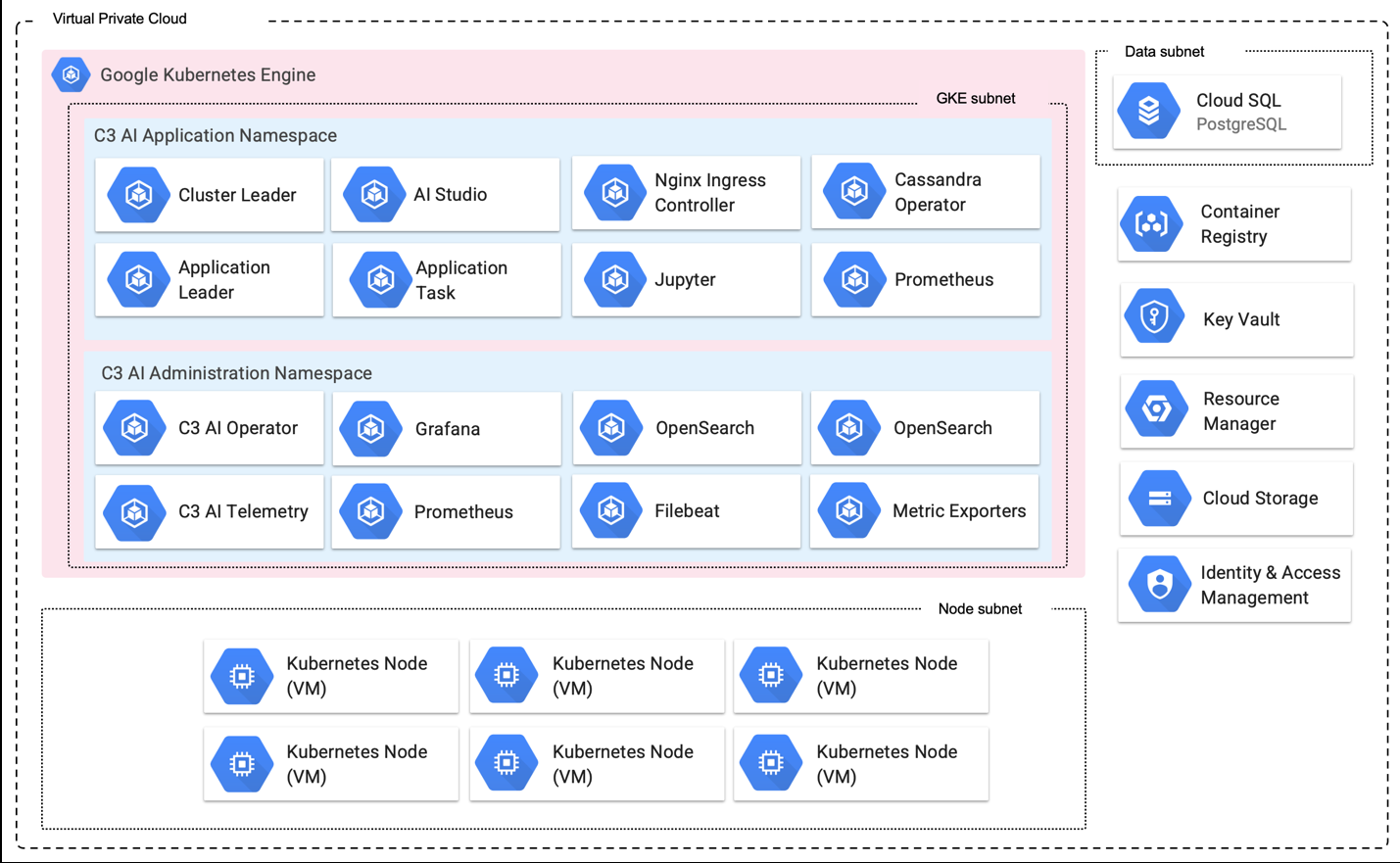
- OpenSearch (x2)
- C3 AI Telemetry
- Prometheus
- Filebeat
- Metric Exporters
Data Subnet:
- Cloud SQL PostgreSQL
External Services:
- Key Vault
- Resource Manager
- Cloud Storage
- Identity & Access Management
Node Subnet:
- Kubernetes Node VMs (6+)
4. Environment teardown
If you need to tear down the environment -- for example, to rebuild a development cluster, destroy a test cluster, recover from a corrupt deployment, or decommission a customer-hosted cluster -- follow the order below. Terraform destroy operations must be run in the reverse order of the initial apply: destroy the c3cluster module first, then the bootstrap module.
Before you start:
- Confirm the teardown with your C3 AI account team. Teardown of a production cluster is irreversible.
- Back up any data you must retain -- Cloud SQL exports, GCS object contents, and cluster configuration files.
4.1 Disable delete protection
The default c3cluster deployment sets enable_delete_protection = true on GKE clusters, Cloud SQL instances, and GCS buckets. Delete protection must be turned off before terraform destroy can remove these resources. Update the c3cluster module input to enable_delete_protection = false, then run:
terraform plan --out out.plan
terraform apply "out.plan"
Review the plan to confirm that the only changes are the delete-protection flags, then apply.
4.2 Destroy the c3cluster module
From the c3cluster module directory:
terraform plan -destroy --out destroy.plan
terraform apply "destroy.plan"
Review the destroy plan carefully before approving. This step removes the GKE cluster and node pools, the Cloud SQL instance, GCS buckets, IAM bindings, and network resources (VPC, subnets, firewall rules, NAT). Any data not backed up in advance is lost.
4.3 Destroy the bootstrap module
From the bootstrap module directory:
terraform plan -destroy --out destroy.plan
terraform apply "destroy.plan"
This step removes the IAM roles created by bootstrap (including C3.AdminOps and the delegated operations role) along with any remaining project-level bindings.
4.4 Clean up remote state
If you configured a remote state backend (see State management), the GCS state bucket and its objects are not destroyed by the steps above. Delete the state objects and, if no other environments use the bucket, the bucket itself, once you no longer need the state history.
If a destroy plan shows resources you did not expect -- for example, resources that were created outside of Terraform, or resources that depend on artifacts in another project -- stop and reconcile before applying. Do not force-delete resources unless you are certain they are not in use.