Data Exploration with Apache Spark on C3 Agentic AI Platform
The C3 Agentic AI Platform offers an additional data execution engine choice: Spark. The scope of this integration includes data exploration on Spark. Spark provides you with a scalable, distributed execution engine for big data processing. You can now do the following:
- Start and terminate Spark clusters.
- Create remote Spark sessions and use Spark APIs to execute queries on the Spark cluster from JupyterLab or any external IDE.
- Run Data Lakehouse queries from the C3 AI Studio SQL Editor against the same clusters.
The C3 Agentic AI Platform offers a SparkCluster Type to manage the Spark cluster and Data.Spark subtypes that provide PySpark API access. A SparkSession serves as an entry point, offering two ways to interact with it. Both point to the remote Spark cluster.
Spark Connect SparkSession— Use supported PySpark APIs. Check the official API reference for more details. Find supported APIs using the Supports Spark Connect label.c3 Data SparkSession— A C3 Type that represents a native Spark Session, which provides APIs that target Pandas API on Spark with C3 extensions.
Before interacting with a Spark cluster, you must first set it up. You can spin up a Spark cluster endpoint with your custom configuration. Manage Spark clusters with the SparkCluster Type and define the cluster with the SparkClusterSpec Type.
This document shows how to set up the Spark Cloud Service and conduct data exploration on the platform.
Managed clusters (recommended for user workflows)
The SparkCluster.Managed subtype provides a per-user cluster that hibernates after an idle window and resumes when a query arrives. Managed clusters are the default surface in the C3 AI Studio Data Lakehouse SQL Editor and Visual Notebooks in 8.11.
Use the Managed.* APIs from a user notebook or from C3 AI Studio for user workflows. The operator-level SparkCluster.create() API documented lower in this topic is deprecated and scheduled for removal — use SparkCluster.Managed.createForMe() for user-facing cluster provisioning, and platform setup tooling for environment-wide deployments.
Inspect your managed cluster
c3.SparkCluster.Managed.infoForMe()The call returns an SparkCluster.Managed.Info record with the cluster name, status, memory limit, idle timeout, and the last activity timestamp.
Start your managed cluster
c3.SparkCluster.Managed.startForMe()A managed cluster in Hibernated status moves to Pending, then to Running. The C3 AI Studio cluster selection modal refreshes by polling infoForMe() so the status pill stays current; verify the exact polling interval against your platform build.
Stop your managed cluster
c3.SparkCluster.Managed.stopForMe()The cluster hibernates: configuration is preserved, but compute resources are released. The next call to startForMe() resumes from the hibernated state.
Create a new managed cluster
spec = c3.SparkCluster.Managed.CreateSpec.make({
    "clusterName": "my-cluster",
    "memoryLimit": "16G",
    "idleTimeMinutes": 60,
    "isPublic": False,
})
c3.SparkCluster.Managed.createForMe(spec)
Set isPublic to True to allow other users in the application to attach to the cluster. The default is per-user (False). The SparkCluster.Managed.CreateSpec fields default to memoryLimit="32G" and idleTimeMinutes=30 when not specified.
Operator path: SparkCluster.create (deprecated)
c3.SparkCluster.create is deprecated and scheduled for removal. Use SparkCluster.Managed.createForMe() for user-facing cluster provisioning. The sections below are retained for operator and platform setup paths that have not yet migrated.
To start a default Spark cluster from the legacy operator API, run the following code in Jupyter:
cluster = c3.SparkCluster.create()Customize the configuration
By default, the C3 server image uses the latest version of Spark. To use a specific version, you must provision to configure it using a command like the following:
cluster = c3.SparkCluster.create({
    "numOfExecutors": 2,
    "executorMemory": "16G",
    "timeout": 10
})
Do not set executorMemory below 16GB, because it reduces the driver core count below 4. The driver core defines resources given to the driver pod. Giving this piece of the cluster less than 4 cores compromises its functionality.
Executor settings control resources given to Spark Executors running the main processes. To start a larger cluster, increase numOfExecutors. See SparkClusterSpec for the list of all available configurations.
SparkClusterSpec includes an additionalConfig field that allows users to specify configurations that are not included by default. Specify any Spark application properties as a key-value pair in this field. The following code snippet shows example properties you could add.
cluster = c3.SparkCluster.create({
    "additionalConfig": {"spark.app.name": "app", "spark.driver.maxResultSize": "2g"}
})Monitor the status of a C3 Spark cluster
Run the following code snippet in Jupyter to get the status of the Spark cluster:
cluster.statusSparkCluster includes the following statuses:
- pending: The service is starting up.
- available: The service is ready to use. (It may take a few minutes for the service to become available.)
When the service becomes available, proceed to the next step to start data exploration. For the user-facing monitoring page in C3 AI Studio, see Monitor and Maintain the Data Lakehouse.
List running Spark clusters
An AppAdmin can access the list of running Spark Clusters in the current app through the listForApp method.
c3.SparkCluster.listForApp()Terminate a C3 Spark Cloud Service
When finished with the Spark cluster, use the following command to terminate the service:
cluster.terminate(True)To hibernate the cluster without dropping its configuration, use cluster.stop() instead.
Use C3 Spark Connect
Spark Connect allows remote connectivity to Spark clusters using the DataFrame API. The C3 Agentic AI Platform supports the Spark Connect protocol in Jupyter to allow you to interact with a Spark cluster. For more information about Spark Connect, refer to Apache's Spark Connect Overview.
Prerequisites
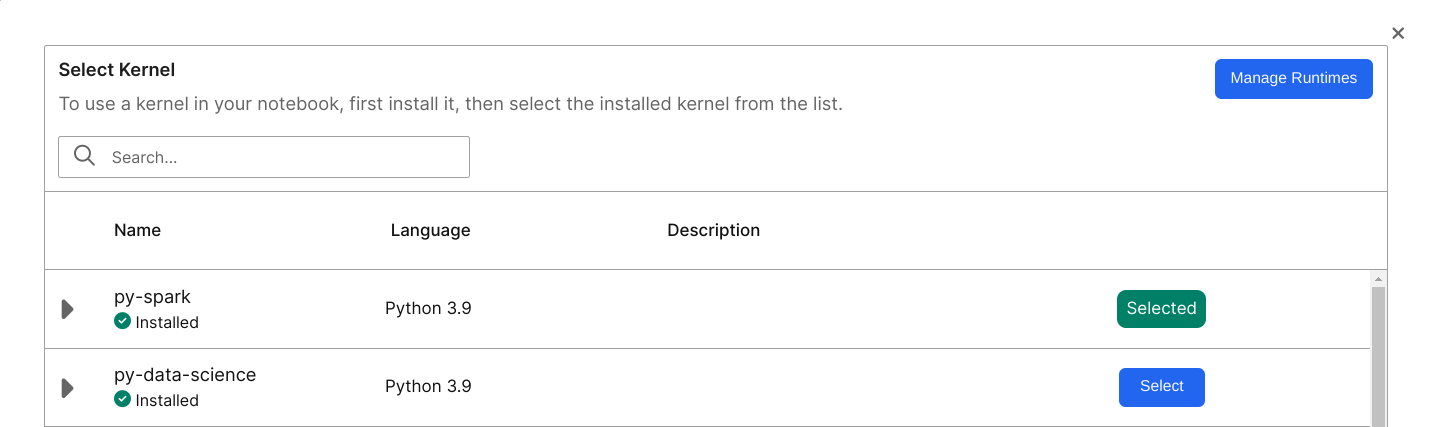
Before you run Spark Connect you must install extra dependencies in the Jupyter runtime. Jupyter includes a ready-to-use runtime called py-spark to run Spark Connect.
If you decide to instead create your own runtime for pyspark, you must run the following command:
pip install pyspark[connect]==4.1.3This version of pyspark includes all necessary dependencies for Spark Connect.
In your JupyterLab environment, select Kernel > Change Kernel and choose an adequate runtime. You can alternatively select the name of your current Kernel to update your runtime.
Create a Spark Connect session
Use the sparkConnectSession method to create a Spark Connect Session from the cluster.
spark = cluster.sparkConnectSession()To create a more customized Spark Connect Session, you can create a SparkSession using sparkConnectUrl.
from pyspark.sql import SparkSession
spark = (
    SparkSession.builder
    .remote(cluster.sparkConnectUrl())
    .config("c3.auth.token", c3.userSessionToken().signedToken)
    .getOrCreate()
)
spark is a native Python object that points to the remote Spark Cluster through the sparkConnectUrl.
Start exploration with PySpark APIs
Now that you are connected to a SparkSession, you can start exploration with any Spark Connect supported PySpark APIs. The following code snippet offers some examples.
from datetime import datetime, date
from pyspark.sql import Row

df = spark.createDataFrame([
    Row(a=1, b=2., c='string1', d=date(2000, 1, 1), e=datetime(2000, 1, 1, 12, 0)),
    Row(a=2, b=3., c='string2', d=date(2000, 2, 1), e=datetime(2000, 1, 2, 12, 0)),
    Row(a=4, b=5., c='string3', d=date(2000, 3, 1), e=datetime(2000, 1, 3, 12, 0))
])
df.show()

df.filter('a == 1').show(1)Integration between Spark Connect and the C3 Agentic AI Platform
You may need to know the following implementation details of the Spark Connect integration on the C3 Agentic AI Platform:
- You can ingest data from the server into a native Spark DataFrame without needing to install any custom packages.
- You can use the standard Spark reader API supplying a special format string and additional parameters to execute fetch or evalMetrics operations from native Spark.
- The
batchsizelimit is larger than the default of 2000 for scalability of testing. - During the execution of a fetch operation, Spark executors run multiple fetch requests to the C3 server.
- You must provide a FetchSpec for fetch and an EvalMetricsSpec for evalMetrics. You do not need to filter the data in
spec. The following code snippet models how to add a FetchSpec before running a fetch command.
include = 'location,power,manufacturer.name'
spec = c3.Data.SparkFetchSpec.builder().include(include).build()
fetch_df = (
    spark.read.format("c3.spark.c3source.C3TableProvider")
    .option("typeName", "WindTurbine")
    .option("spec", spec.toJsString())
    .option("action", "fetch")
    .load()
)Spark Connect limitations
- Since C3 Spark Connect runs on Apache Spark Connect, it offers the same APIs. However, Apache Spark Connect does not support all Spark DataFrame APIs.
- Currently C3 Spark Connect runs through an internal IP address. You cannot access the Spark cluster from outside of the host Kubernetes cluster.
C3 Data Spark
C3 Data Spark targets provide the same interface as Pandas API on Spark 3.5.0. Unlike Spark Connect, C3 Data Spark does not include extra dependencies. Any runtime can use C3 Data Spark. You can use C3 Data Spark with the Data.SparkSession Type, which logically corresponds to the Spark Connect SparkSession.
Create a c3.Data.SparkSession
Call the dataSparkSession method to create a Data.SparkSession from the cluster.
sparkSession = cluster.dataSparkSession()Read data into Spark
You can read data into C3 Data Spark using two different methods:
- Read flat files on a remote file system.
- Read data from an application data model.
C3 Server uses read-only paths. See Data.SparkSession for the list of supported APIs. Below are some example usages:
# read data from a remote file system; only paths that c3server has access to are readable
df1 = sparkSession.read_csv("gs://path-to-file")

# directly pass manually constructed data
df2 = sparkSession.DataFrame({'a': [1, 2, 3], 'b': [4, 5, 6]})

# This is logically equivalent to c3.WindTurbine.fetch(include = 'location,power,manufacturer.name')
include = 'location,power,manufacturer.name'
spec = c3.Data.SparkFetchSpec.builder().include(include).build()
df3 = sparkSession.fetch(typeName="WindTurbine", spec=spec)Reading feature sets from Feature Store
Use the C3 Data Spark API to load data from C3 Feature Store. The following code snippet shows how to load a data frame with the feature set ID feature_set_id to be manipulated with the C3 Data Spark API.
df = sparkSession.readFeatureSet(feature_set_id, batchSize=1000, flatten=True)Use the same batch size that you used for feature set materialization.
If the flatten flag is True, then the new data frame flattens the timeseries data.
Start data exploration with Pandas API on Spark
After reading data into Spark, you can perform Pandas operations like the following example:
data2 = df.rename(columns={"variety": "Species"}).drop(["sepalLength"], axis=1).fillna(method='ffill')
data3 = data2.groupby("Species")
data4 = data3.mean()
print(data4)Convert between Data Spark, Spark, and Pandas
The to_spark API allows you to convert a Data.Spark.DataFrame Type to a native Spark Connect DataFrame. The client and Spark cluster do not transfer data. Instead, the Data.Spark.DataFrame Type converts execution plans from C3 Data Spark format to the native execution plan for Spark.
You must first establish a Spark Connect SparkSession before calling to_spark.
Similarly, the to_pandas API converts a Data.Spark.DataFrame Type to a native Pandas DataFrame. The call invokes to_spark internally, which means you must first establish a Spark Connect SparkSession.
Differences between Spark Connect and C3 Data Spark
- Spark Connect uses prebuilt PySpark API to define query plans, which requires your runtime to include PySpark and Spark Connect as dependencies. It is difficult to extend to integrate with the C3 Agentic AI Platform.
- C3 Data Spark provides a custom implementation for creating query plans. It targets Pandas API on Spark, which itself mirrors Pandas API. Developing with this API requires additional effort while allowing you to avoid dependencies on specific runtimes. It also offers more control and the ability to add custom API extensions like Metrics evaluation and Feature Store integration.