Install on Microsoft Azure
C3 AI deployment options: guidance for enterprise customers
C3 AI offers flexible deployment models. Choosing one affects project timelines, service-level agreements (SLAs) and roles and responsibilities (RACI). C3 AI recommends the SaaS/PaaS subscription for most organizations.
1. C3 AI SaaS / PaaS subscription (preferred standard option)
A fully hosted and managed service run by C3 AI in Microsoft Azure. You select the Azure region for data residency.
- Lower total cost of ownership: standardized technology and processes enable rapid deployment and efficient support.
- Reduced operational burden: your teams focus on AI applications rather than infrastructure.
- Scalability: C3 AI manages scaling and capacity planning.
- Security and compliance: industry-standard cybersecurity and access controls; C3 AI maintains SOC 2, ISO 27001 and FedRAMP attestations.
Recommended for organizations that want minimal operational overhead and maximum agility.
2. Customer-hosted, C3 AI-managed deployment
For organizations with non-standard data residency, security or governance requirements. C3 AI deploys into your own Azure Virtual Network (VNet); C3 AI Operations manages deployment, maintenance and support in your environment. Additional charges may apply.
Your responsibilities:
- Grant C3 AI Operations Owner access to a dedicated Azure subscription, or provision a secure VNet using the C3 AI Terraform module and grant access to C3 AI Operations as described in 2. Validate and provide access to the cluster. A resource-group-scoped deployment (Owner on the resource group only) is possible when the Azure AI Platform (Azure AI Foundry / Cognitive Services, enable_ai_platform) is not used and delete protection is turned off. This path gives up delete protection; see 1.1 Run the bootstrap module.
- Manage and troubleshoot infrastructure changes outside C3 AI's control that may affect availability or performance.
- Pay all infrastructure hosting costs in your cloud account.
You retain greater control, and therefore greater responsibility, over your subscription and can limit permissions granted to C3 AI.
Choose this option if you have internal processes requiring direct control over cloud resources, or policies with non-standard local data residency, security or governance requirements.
Summary table
| Deployment Model | Managed By | Hosted In | Customer Responsibilities | Recommended For |
|---|---|---|---|---|
| SaaS/PaaS subscription (preferred) | C3 AI | C3 AI Azure cloud | Minimal | Most organizations |
| Customer-hosted, C3 AI-managed | C3 AI | Customer Azure VNet | Azure subscription, access, infrastructure costs | Regulated/controlled industries |
Reference architecture
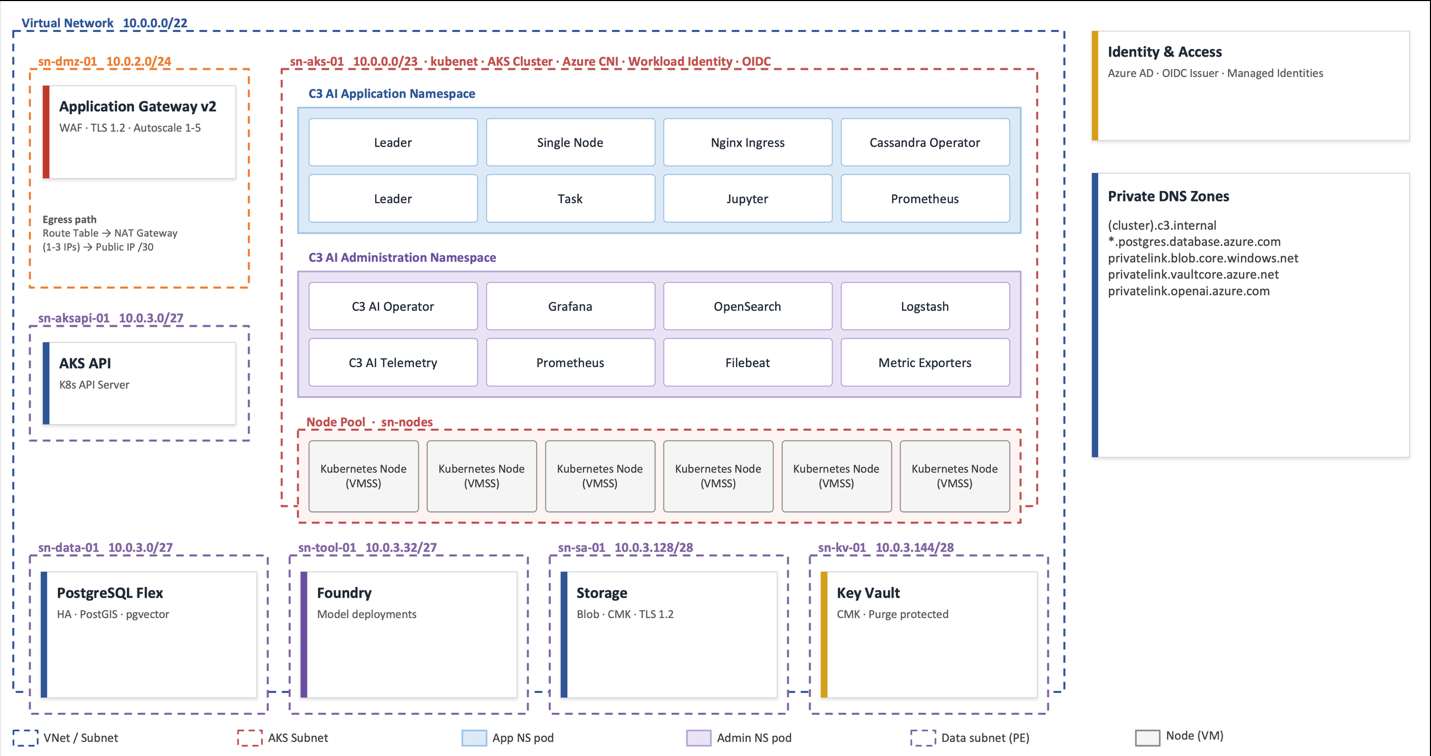
Default layout (VNet 10.0.0.0/22): DMZ 10.0.2.0/24 (Application Gateway v2, WAF, TLS 1.2, autoscale 1-5); AKS 10.0.0.0/23; AKS API 10.0.3.160/28; data 10.0.3.0/27 (PostgreSQL Flexible, PostGIS, pgvector; HA opt-in via pg_ha); tool 10.0.3.32/27 (AI Platform / Foundry private endpoint); storage 10.0.3.128/28 (Blob, CMK, TLS 1.2); Key Vault 10.0.3.144/28 (CMK, purge protected). Egress goes through a NAT gateway with 1-3 public IPs from a /30 prefix. By default the storage account and Key Vault allow public network access, so their subnets hold private endpoints only when that is disabled.
Questions, or a tailored recommendation (for example customer-managed VNet provisioning)? Contact your C3 AI representative.
Pre-installation preparation
Before beginning the installation process, you must gather the following items from C3 AI. Failure to obtain these in advance will cause delays during infrastructure deployment.
Contact your C3 AI account manager and the C3 AI Center of Excellence (CoE) to obtain:
- IP Address Allowlist -- The set of C3 AI Operations IP addresses that must be allowed in your firewall and network security group rules (the ip_allowlist variable). These are required for C3 AI to access and operate your deployment.
- CORS Domain List -- If your installation includes C3 AI Ex Machina, you will need a list of domains to allow for CORS (the storage_cors_domains variable). This enables file upload functionality.
- C3 AI Cluster Validation Utility -- A validation tool you will run after infrastructure deployment to confirm your environment meets all C3 AI requirements. Obtain this from the CoE before beginning installation.
- Terraform Module Version -- Confirm the correct version number from the C3 AI Bill of Materials (BOM) for your release.
- Microsoft Partner ID -- Required by the azurerm provider (partner_id). Contact the C3 AI CoE if you do not know it.
You must also determine the following before starting:
- Cluster Name -- Your cluster name must follow a specific naming convention. See Appendix A: Default resource naming convention for full details.
- Dev/QA clusters: stgaz{customerabbreviation} (e.g., stgazcust)
- Production clusters: prdaz{customerabbreviation} (e.g., prdazcust)
- Lowercase letters and numbers, must start with a letter, 15 characters or fewer total (only the length is enforced by the module).
- Azure Region -- The Azure region where the deployment will occur.
- Azure Subscription ID and Tenant ID -- The dedicated Azure subscription for the C3 AI deployment, and the Microsoft Entra ID tenant that owns it.
- Object ID of the deploying identity -- The user, group or service principal that assumes the infrastructure creation role (the setup_role_principal_id variable of the bootstrap module).
Customer-hosted install requirements: checklist
Summary
For C3 AI to operate in a customer-hosted Azure account, your organization must meet these requirements for the duration of the contract term. Deviations incur additional operational fees. You agree to let C3 AI Operations deploy all required infrastructure using C3 AI deployment automation. This checklist applies only to customer-hosted installations.
Installation and operational management checklist
Temporary Owner access on a dedicated Azure subscription for the bootstrap module. Bootstrap uses it to create the custom roles, managed identities, role assignments and delete-protection policy. One of those roles is the infrastructure creation role ({cluster_name}-c3icrole-01): a custom role scoped to the cluster resource group and assigned to setup_role_principal_id, which the c3cluster module runs as. You may remove these grants after initial setup, but must restore them for new product releases and any later infrastructure change, because the c3cluster module needs the infrastructure creation role to read current state.
Three managed identities for ongoing infrastructure management, created by the bootstrap module with the required role assignments:
Managed Identity Purpose {cluster_name}-c3-mi-01 C3 AI application workloads {cluster_name}-c3privileged-mi-01 Privileged C3 AI application workloads {cluster_name}-kube-mi-01 Kubernetes and kubelet operations Role assignments, all scoped to the cluster resource group (see the modules/bootstrap/iam_account.tf file contained in the Terraform module documentation):
- c3-mi-01 and c3privileged-mi-01: Storage Account Contributor, Storage Blob Data Contributor, Storage Queue Data Contributor, Monitoring Reader, {cluster_name} FlexPG and {cluster_name} Application Gateway, plus Cognitive Services Contributor and Cognitive Services OpenAI Contributor when enable_ai_platform = true.
- kube-mi-01: Managed Identity Operator, Network Contributor, Virtual Machine Contributor, Key Vault Crypto User, Key Vault Contributor and {cluster_name} DiskEncryptionSet.
Firewall access. If your firewall prevents C3 AI Operations from configuring endpoint access, allow:
- routing to and from the C3 AI network so metrics, logs and observability data can be received;
- connectivity to endpoints that enable product functionality (see Endpoint access).
A new VNet with at least 1024 IP addresses (/22). The Terraform module creates the VNet and all subnets. AKS node pools are deployed across three availability zones by default (zones = [1, 2, 3]).
A static DNS entry for the C3 AI Platform and the deployed Applications (for example cluster.c3.customer.com, application.c3.customer.com).
A public certificate with the complete chain, and its private key. Certificates from a public or internal CA are supported. Coordinate with the C3 AI Center of Excellence (CoE) if you use self-signed or internal-CA certificates so the trust chain can be pre-staged in the cluster.
C3 AI installation requirements for Azure
The C3 Agentic AI Platform integrates with core Azure services such as VMs, VNet and IAM. Install and upgrade requirements, including the Bill of Materials (BOM), are on the documentation site: https://docs.c3.ai/versions-and-compatibility/upgrade-requirements/8.12.
Required Microsoft Azure cloud services
Configure these to C3 AI specifications as defined in the HashiCorp Terraform scripts.
| Azure Service | Version | Description |
|---|---|---|
| Azure Kubernetes Service (AKS) | 1.35 | Runs and scales the C3 Agentic AI Platform and applications. |
| Azure Key Vault | Current | Secrets, keys and certificates. |
| Azure Database for PostgreSQL (Flexible Server) | 15 | Relational data for internal platform operations. Extensions enabled by default: PostGIS (incl. topology, tiger geocoder), pgvector, fuzzystrmatch, pg_stat_statements. |
| Azure Blob Storage | Current | Application and platform configuration and ancillary storage. |
| Azure IAM | Current | Managed identities and custom roles, created by the bootstrap module. |
| AzureRM Terraform provider | 4.57.0 | Creates and manages Azure resources. |
| Azure Virtual Network | Current | Isolated network for inter-cluster communication. |
| Azure Virtual Machine Scale Sets | Current | AKS node pools. |
| Azure Application Gateway v2 (WAF) | Current | Default public ingress (enable_application_gateway = true). |
| NAT Gateway and Public IP Prefix | Current | Outbound access (1-3 IPs, /30 prefix by default). |
| Azure Private DNS | Current | Private endpoint zones ({cluster_name}.c3.internal, blob, Key Vault, OpenAI, PostgreSQL). |
| Azure AI Services (Foundry / Azure OpenAI) | Current | Optional. Model deployments; account kind AIServices supports multiple model families. |
| Microsoft.OperationalInsights | Current | Log Analytics workspaces. |
| Microsoft.CognitiveServices | Current | Resource provider for the AI accounts above. |
| Microsoft.Authorization | Current | RBAC role assignments, definitions and policy assignments. |
Microsoft Azure cloud access requirements
C3 AI Operations accesses customer-hosted deployments exclusively through a privileged access management (PAM) solution: centralized control, zero-trust authentication, full session and command audit, instant grant and revocation. C3 AI Operations deploys and installs the PAM solution. You can request an audit log of access from C3 AI Customer Support.
PAM requirements:
- One-time use of an Azure service principal role to deploy the cluster and for select infrastructure upgrades.
- A service account in your SSO / Active Directory used to manage the platform.
- Azure Lighthouse role assignments for designated C3 AI Operations personnel.
- An additional /28 CIDR block for the C3 Software-Defined Perimeter/Management (SDM) peered VNet.
| Access Requirement | Description |
|---|---|
| Dedicated Azure subscription | At project creation C3 AI needs the subscription identifier and cloud region. |
| Secure internet access to the subscription | Remote access (VPN acceptable) to a bastion host from which C3 AI Operations administers the cloud infrastructure. |
| Bastion host | A VM deployed in a private subnet of the cluster VNet; reached through PAM, so no public IP is required. The module does not create it or a subnet for it: AzureBastionSubnet is reserved for Azure's managed Bastion service, and the Tool, Storage and Key Vault subnets allow only port 443. Add a small dedicated subnet, for example from the unallocated 10.0.3.176-10.0.3.255 range of the default /22. Required software: RedHat 8, Azure CLI (latest), kubectl v1.35 (match AKS), Helm v3.12, Helmfile plugin, Terraform >= 1.13.0, TFSwitch, Python 3.12, npm >= 11, nodejs >= 24, Docker, yq, jq, openssl. |
| Access to C3 AI and third-party repositories | Container images, Python and Node.js libraries, and runtime billing data collection. If remote repositories violate your policy, the platform can use local repositories such as Azure Container Registry, JFrog or Anaconda Enterprise. |
| X.509 certificate | A fully qualified domain name for ingress and the certificate's private and public key and chain, stored in a Kubernetes secret used by the ingress controller. |
Azure subscription
Register these resource providers before deployment:
az provider register --namespace Microsoft.Compute
az provider register --namespace Microsoft.DBforPostgreSQL
az provider register --namespace Microsoft.Network
az provider register --namespace Microsoft.ManagedIdentity
az provider register --namespace Microsoft.KeyVault
az provider register --namespace Microsoft.Storage
az provider register --namespace Microsoft.ContainerService
az provider register --namespace Microsoft.CognitiveServices
az provider register --namespace Microsoft.OperationalInsights
az provider register --namespace Microsoft.Authorization
az provider register --namespace Microsoft.Insights
az provider register --namespace Microsoft.Quota
Verify registration before deploying (each namespace must report Registered):
az provider list --query "[?registrationState=='Registered'].namespace" -o tsv | sortRegistering a provider needs Contributor or Owner on the subscription. Microsoft.Resources is registered by default on every subscription, so it is not listed. Registration is per subscription, not per resource group, so a deployment scoped to a single resource group still needs a subscription administrator to register any missing namespace.
Microsoft.Insights is not in the published list; the bootstrap custom roles grant Microsoft.Insights/DiagnosticSettings/* and the Application Gateway log/metric definitions (see the modules/bootstrap/iam_custom_roles.tf file contained in the Terraform module documentation). Microsoft.Sql appears in the module only as a subnet service-endpoint name, not as a provider to register.
Microsoft.Quota is retained from the published list; no module in this repository references it, so it is a platform/operations prerequisite rather than a Terraform one. The azure-policy module (called by bootstrap) creates a policy definition and a resource-group policy assignment, which fall under Microsoft.Authorization.
Enable encryption at host (the module sets system_pool_host_encryption and user_pool_host_encryption to true by default, and per-pool enable_host_encryption is available):
az feature register --name EncryptionAtHost --namespace Microsoft.ComputeNetwork configuration
The VNet is created by the Terraform module following these requirements. To use an existing network instead, refer to the examples/existing_network/README.md file contained in the Terraform module documentation.
VNet requirements
The VNet design must cover: subscription, region, sizing, IP ranges, DNS, subnets, security groups.
VNet region
The Azure region of the deployment (c3_region). Refer to Azure documentation for available regions.
VNet sizing
Provision a separate VNet per cluster. Sharing a VNet across clusters in the same subscription is not supported.
VNet IP address ranges
C3 AI does not impose strict netmask limits; the following are highly recommended. The primary VNet defaults to a /22 (vnet_address_space_cidr = ["10.0.0.0/22"]). AKS also needs private CIDRs that do not overlap the VNet. Defaults for the default kubenet network profile (network_profile):
| Network | Default CIDR | Size |
|---|---|---|
| Kubernetes pod network | 172.18.0.0/15 | 131,072 IPs |
| Kubernetes service network | 172.16.0.0/18 | 16,384 IPs |
| DNS service IP | 172.16.0.10 | -- |
These ranges are internal to Kubernetes and are not carved out of the /22. For Azure CNI Overlay (new clusters only), see the examples/aks-overlay-cni example in the Terraform module documentation.
DNS
The VNet uses Azure-provided DNS. Private DNS zones created by default: {cluster_name}.c3.internal, {cluster_name}-flex-01.postgres.database.azure.com (PostgreSQL), privatelink.blob.core.windows.net, privatelink.vaultcore.azure.net, privatelink.openai.azure.com.
Subnets
| Subnet | Default Name | Default CIDR | Variable | Purpose |
|---|---|---|---|---|
| AKS | {cluster_name}-sn-aks-01 | 10.0.0.0/23 | subnet_aks_prefix | AKS nodes |
| DMZ | {cluster_name}-sn-dmz-01 | 10.0.2.0/24 | subnet_dmz_prefix | Application Gateway |
| Data | {cluster_name}-sn-data-01 | 10.0.3.0/27 | subnet_data_prefix | PostgreSQL (private) |
| Tool | {cluster_name}-sn-tool-01 | 10.0.3.32/27 | subnet_tool_prefix | AI Platform private endpoint |
| Bastion | AzureBastionSubnet | 10.0.3.64/26 | subnet_bastion_prefix | Reserved for Azure Bastion (the module creates the subnet, not a Bastion host) |
| Storage account | {cluster_name}-sn-sa-01 | 10.0.3.128/28 | subnet_sa_prefix | Storage private endpoints (only for accounts with public_access = false; the default account is public) |
| Key Vault | {cluster_name}-sn-kv-01 | 10.0.3.144/28 | subnet_kv_prefix | Key Vault private endpoint (only when key_vault_public_network_access = false; default true) |
| AKS API | {cluster_name}-sn-aksapi-01 | 10.0.3.160/28 | subnet_aksapi_prefix | API server VNet integration (aks_virtual_network_integration_enabled, default false; keep false in eastus2) |
Public IP prefix required. The network module always creates a Public IP Prefix (pip_prefix_length, default /30). The NAT gateway's public IPs (natgw_public_ip_count, 1-3) are allocated from it, and so is the Application Gateway's public IP when enable_application_gateway = true (the default). Using the nginx-based private load balancer instead of the Application Gateway does not remove the prefix. Where policy forbids a public IP prefix, obtain an exception or coordinate with the C3 AI CoE before deployment, and raise this with C3 AI FieldOps during VNet planning.
Additional subnets may be required depending on whether the deployment is C3 AI-managed or customer-managed. Contact the C3 AI CoE.
Subnet route table
The route table ({cluster_name}-rt-01) is associated with the DMZ, AKS, Data, Tool, Storage Account and Key Vault subnets. The module creates it without routes: outbound internet traffic uses the NAT gateway, and with the default kubenet plugin AKS writes the pod routes, so the AKS identity must be able to update this route table and those routes must not be removed by network maintenance. A 0.0.0.0/0 route to a network appliance would take precedence over the NAT gateway; forced tunneling through a firewall needs a different AKS outbound type, so coordinate with the C3 AI CoE.
Additional subnet requirements
- Subnets need outbound public access through the NAT gateway ({cluster_name}-natgw-01; 1-3 public IPs via natgw_public_ip_count).
- The NAT gateway is associated with the AKS, Data, Tool, Storage Account and Key Vault subnets.
Security groups
| NSG | Default Name | Subnet | Variable |
|---|---|---|---|
| DMZ | {cluster_name}-nsg-dmz-01 | DMZ | dmz_nsg_rules |
| AKS | {cluster_name}-nsg-aks-01 | AKS | aks_nsg_rules |
| Data | {cluster_name}-nsg-data-01 | Data | data_nsg_rules |
| Tool | {cluster_name}-nsg-tool-01 | Tool | tool_nsg_rules |
| Storage account | {cluster_name}-nsg-sa-01 | Storage | sa_nsg_rules |
| Key Vault | {cluster_name}-nsg-kv-01 | Key Vault | kv_nsg_rules |
| AKS API | {cluster_name}-nsg-aksapi-01 | AKS API | aksapi_nsg_rules |
Default platform-required inbound rules include:
| NSG | Ports | Protocol | Reason |
|---|---|---|---|
| DMZ | 65200-65535 | Any | Application Gateway v2 infrastructure |
| AKS | 9000, 10250 | TCP | Node/kubelet |
| AKS | 1194 | UDP | Tunnel |
| AKS | 30000-32767 | Any | NodePort range |
| AKS | 53, 123 | UDP | DNS / NTP |
| AKS API | 443, 4443 (from VirtualNetwork) | TCP | Cluster to API server |
| AKS API | 9988 (from AzureLoadBalancer) | TCP | Health probes |
Contact the C3 AI CoE for the rule set required for your deployment.
Endpoint access
If your firewall prevents C3 AI Operations from configuring endpoint access, allow outbound access to the following. Blocking any prevents installation, upgrades or runtime operations. Contact the CoE for per-endpoint justification.
- conda.anaconda.org - Conda packages
- files.pythonhosted.org - Python packages (PyPI)
- github.com - source hosting
- c3ai.grafana.net - C3 AI Grafana monitoring
- huggingface.co - pre-trained models and datasets
- jfrog.c3.ai - C3 AI Artifactory
- nodejs.org - Node.js runtime
- npmjs.org - Node.js packages
- prdgkemis.c3.ai - MIS access (if required)
- pypi.org, pypi.python.org - Python package index
- registry.c3.ai - C3 AI private container and artifact registry
- repo.anaconda.com, repo.continuum.io - Anaconda repositories
- telemetry.c3.ai - platform telemetry
- vault.c3iot.io - C3 AI HashiCorp Vault
C3 AI Monitoring (standard operational metrics) additionally needs outbound access to:
- fleet-management-prod-014.grafana.net
- prometheus-prod-36-prod-us-west-0.grafana.net
- logs-prod-021.grafana.net
Inbound access must be allowed from these C3 AI Operations addresses:
- 12.226.154.130/32
- 13.214.249.29/32
- 18.136.19.189/32
- 34.231.113.223/32
- 34.232.23.54/32
- 34.238.215.224/32
- 34.82.144.175/32
- 38.77.68.228/32
- 52.48.79.190/32
- 54.76.64.220/32
- 70.35.33.244/32
Egress (outbound)
- The module adds no outbound NSG rules, so Azure's default AllowVnetOutBound and AllowInternetOutBound rules apply. Keep TCP 443 to 0.0.0.0/0 open (C3 AI infrastructure, cloud data sources, library repositories).
Ingress (inbound)
- 443: C3 AI application access through the Application Gateway. The DMZ NSG allows 80 and 443 from the ip_allowlist CIDRs and the cluster's public IP prefix.
- Traffic within the VNet is allowed by Azure's default AllowVnetInBound rule, except on the Tool, Storage and Key Vault subnets, whose NSGs allow only 443 from VirtualNetwork.
- 22: SSH to the bastion VM, if you deploy one. The module creates no rule for it.
HashiCorp Terraform configuration
Terraform scripts create the cloud infrastructure required by the C3 Agentic AI Platform and automate its deployment in your Azure subscription.
For customer-managed deployments, any customization of the Terraform scripts must be reapplied with each new version of the scripts from C3 AI.
Requirements
- An Azure subscription. Terraform provisions the resource group; you do not need to create one in advance (unless you use existing_resource_group_name).
- A user with the Owner role on the subscription for initial deployment. For a deployment that does not use the AI Platform, Owner on the resource group only is sufficient when the bootstrap module sets existing_resource_group_name, enable_ai_platform = false and enable_delete_protection = false, and the c3cluster module sets resource_group_name to the same resource group and enable_ai_platform = false. This deployment has no delete-protection policy.
- On the machine that runs Terraform:
- HashiCorp Terraform CLI >= 1.13.0 (AMD64 or ARM64 to match the client), plus TFSwitch to switch versions.
- Azure CLI, signed in with az login as a user with Owner rights.
- The Azure resource providers listed in Azure subscription registered on the subscription, and the EncryptionAtHost feature enabled.
- Privileges to deploy, operate and delete the infrastructure services: see the docs/SETUP_PRIVILEGES.md file contained in the Terraform module documentation.
- Network access from the Terraform machine to Azure Resource Manager and to the Terraform registry or private registry that hosts the module (the examples use jfrog.c3.ai).
Best practice: for automation, sign in with az login using an Azure AD service principal.
Terraform state placement. Store state in a secure remote backend, not on a workstation, for example an Azure Storage Account container with state locking. For custom, FieldOps or Fed deployments, coordinate with C3 AI FieldOps on location and backend configuration. Losing or corrupting state complicates upgrades and teardown.
For known issues during upgrades or first apply, see Troubleshooting.
Provider pin used by all modules: hashicorp/azurerm 4.57.0.
Installation steps
Installation is multi-step because of HashiCorp Terraform and Azure-specific constraints:
- Create the VNet and required Azure services (bootstrap module, then c3cluster module).
- Validate the configuration and provide C3 AI Operations access to the cluster (2. Validate and provide access to the cluster).
- C3 AI Operations completes the installation of the C3 Agentic AI Platform.
Scope of this guide. It covers the cloud infrastructure side only: the Azure resources created with Terraform and the access C3 AI Operations needs. Installing the C3 Agentic AI Platform and applications on the cluster (the Helm side) is performed by C3 AI Operations afterwards and is not described here.
Contact your C3 AI account manager for estimated durations and responsibilities for each stage.
Complete the Terraform requirements in HashiCorp Terraform configuration first, and make sure you have obtained everything listed in Pre-installation preparation.
The Terraform module version is separate from the C3 AI Platform version. Obtain the correct module version from the C3 AI Bill of Materials (BOM) for your release. Platform version 8.12 requires module version 3.0.21 or later, whose default AKS version is 1.35.
1. Create the VNet and required Azure services
1.1 Run the bootstrap module
The bootstrap module creates the IAM roles, custom roles, managed identities and policies needed to configure the VNet and services. Create a new main.tf, replacing CAPITALIZED values.
Cluster naming rules:
- Starts with a lowercase letter; lowercase letters and numbers only (no hyphens, special characters or diacritics).
- At most 15 characters. The module validates length only; the character rules are guidance you must follow.
- Dev/QA: <stg><cloud><customerabbreviation>, for example stgazcust (cloud = az).
- Production: <prd><cloud><customerabbreviation>, for example prdazcust.
module "bootstrap" {
  source                  = "<c3_url>/tf-registry__c3/azure/c3//modules/bootstrap"
  version                 = "VERSION_NUMBER"
  cluster_name            = "CLUSTER_NAME"
  region                  = "REGION"
  setup_role_principal_id = "IDENTITY_OBJECT_ID"

  # Optional. Use an existing resource group instead of creating one.
  # existing_resource_group_name = "EXISTING_RG"

  # Resource-group-scoped deployments (Owner on the RG only) that do not use the
  # AI Platform must also set both of these (each defaults to true):
  # - enable_ai_platform = false skips the subscription-scoped "Purge Cognitive Services" role.
  # - enable_delete_protection = false skips the delete-protection policy definition,
  #   which Azure stores at subscription scope.
  # enable_ai_platform       = false
  # enable_delete_protection = false
}

provider "azurerm" {
  features {}
  partner_id      = "AZURE_PARTNER_ID"
  tenant_id       = "AZURE_TENANT_ID"
  subscription_id = "AZURE_SUBSCRIPTION_ID"
}

terraform {
  required_version = ">= 1.13.0"
  required_providers {
    azurerm = {
      source  = "hashicorp/azurerm"
      version = "4.57.0"
    }
  }
}
Replace the following:
| Variable | Description |
|---|---|
| CLUSTER_NAME | Name of the C3 AI cluster; follow the naming rules above. |
| VERSION_NUMBER | Bootstrap module version listed on the C3 AI BOM for the release. |
| REGION | Azure region for the deployment. |
| IDENTITY_OBJECT_ID | Object ID of the user/principal that assumes the infrastructure creation role ({cluster_name}-c3icrole-01); find it in Microsoft Entra ID. |
| AZURE_PARTNER_ID | Microsoft partner ID. Contact the C3 AI CoE. |
| AZURE_TENANT_ID | Tenant where the platform will be deployed. |
| AZURE_SUBSCRIPTION_ID | Subscription ID. |
What the bootstrap module creates:
| Resource | Default Name |
|---|---|
| Resource group | {cluster_name}-rsgp-c3-01 |
| Infrastructure creation role | {cluster_name}-c3icrole-01 |
| C3 application managed identity | {cluster_name}-c3-mi-01 |
| C3 privileged managed identity | {cluster_name}-c3privileged-mi-01 |
| Kubernetes managed identity | {cluster_name}-kube-mi-01 |
| FlexPG custom role | {cluster_name} FlexPG |
| Application Gateway custom role | {cluster_name} Application Gateway |
| DiskEncryptionSet custom role | {cluster_name} DiskEncryptionSet |
| Purge Cognitive Services custom role | {cluster_name} Purge Cognitive Services (skipped when enable_ai_platform = false) |
| Delete-protection Azure Policy (definition and resource-group assignment) | {cluster_name}-resource-policy, {cluster_name}-resource-policy-assignment (skipped when enable_delete_protection = false) |
Custom role names contain a space (for example {cluster_name} FlexPG).
1.2 Run Terraform commands
From the same directory:
tfswitch
terraform init
terraform plan --out out.plan
terraform apply "out.plan"
If you see "Command not found: terraform", the binary is not on your PATH; see HashiCorp's Azure install guide.
1.3 Run the c3cluster module
The root module coordinates the runtime modules (network, AKS, node pools, PostgreSQL, storage, Key Vault, AI Platform, Log Analytics, firewall). Use a separate directory from the bootstrap module and log in as the principal you set as setup_role_principal_id. Ask your account manager for the C3 Control IPs to replace CIDR_TO_WHITELIST.
module "c3cluster" {
  source       = "<c3_url>/tf-registry__c3/azure/c3"
  version      = "VERSION_NUMBER"
  c3_region    = "REGION"
  cluster_name = "CLUSTER_NAME"

  # Pin the supported versions explicitly so they do not follow the module defaults.
  aks_version = "1.35"
  pg_version  = "15"

  ip_allowlist = [
    "CIDR_TO_WHITELIST",
  ]

  storage_cors_domains = ["https://*.DOMAIN_NAME"]

  # "Default" only for first-time provisioning. Later applies must use "Update" (the module default).
  pg_create_mode = "Default"

  # Optional. Set at creation only (changing it replaces the AKS cluster). Use when
  # MC_<resource_group>_<cluster>_<region> would exceed Azure's 90-character limit.
  # node_resource_group = "rg-short-name"

  # Resource-group-scoped deployments only (bootstrap used existing_resource_group_name):
  # resource_group_name = "EXISTING_RG" # must match bootstrap's existing_resource_group_name
  # enable_ai_platform  = false         # root-module flag, separate from bootstrap's
}

provider "azurerm" {
  features {}
  partner_id      = "AZURE_PARTNER_ID"
  tenant_id       = "AZURE_TENANT_ID"
  subscription_id = "AZURE_SUBSCRIPTION_ID"
}

terraform {
  required_version = ">= 1.13.0"
  required_providers {
    azurerm = {
      source  = "hashicorp/azurerm"
      version = "4.57.0"
    }
  }
}
Replace the following:
| Variable | Description |
|---|---|
| CLUSTER_NAME | Same name used for bootstrap. |
| VERSION_NUMBER | c3cluster module version on the BOM. |
| REGION | Azure region. |
| CIDR_TO_WHITELIST | Required C3 AI IP addresses. |
| DOMAIN_NAME | CORS domain for C3 AI Ex Machina file uploads. |
C3 AI requires these CIDR blocks to be allowlisted for C3 AI Operations to deploy the platform.
The module creates a new VNet and subnets. To use existing ones, refer to the examples/existing_network/README.md file contained in the Terraform module documentation.
1.3.1 Implement CORS policy for C3 AI Ex Machina
If the installation includes C3 AI Ex Machina, setting storage_cors_domains is all that is needed; it enables file uploads. See the cors_rules.tf template example in the Terraform modules. Then run:
tfswitch
terraform init
terraform plan --out out.plan
terraform apply "out.plan"Optional features
Private AKS cluster (private_aks_cluster), API-server VNet integration, GPU node pools, regional replication, no PostgreSQL, storage-account hardening, and disabling storage/OpenAI access keys are covered in the examples/ folder contained in the Terraform module documentation.
Delete protection is on by default (enable_delete_protection = true on the bootstrap module). Its Azure Policy denies deleting the resource group, AKS cluster, storage accounts and containers, Key Vault and PostgreSQL servers, so terraform destroy fails until you disable it. See the DELETE_PROTECTION.md file contained in the Terraform module documentation for teardown steps.
2. Validate and provide access to the cluster
After the VNet and services are configured, run the C3 AI Cluster Validation Utility and give the results to C3 AI. All checks must pass before C3 AI Operations can deploy the platform; remediate every exception and rerun.
2.1 Run the C3 AI Cluster Validation Utility
Contact the C3 AI CoE to obtain the utility. Run it to confirm the infrastructure requirements are met and send the output to C3 AI Operations. If it reports the VNet is not ready, remediate and rerun.
2.2 Provide C3 AI Operations access to the cluster
In addition to the validation output, provide:
| Item | Description |
|---|---|
| C3 AI Operations credentials | Credentials for C3 AI Operations team members. |
| Subscription ID, Tenant ID | Values used when running the Terraform scripts. |
| Resource group name | Default {cluster_name}-rsgp-c3-01. |
| AKS cluster name | Default {cluster_name}-kube-01; confirm under Kubernetes services. |
| Region | AKS cluster -> Overview -> Location. |
| PostgreSQL endpoint | Azure Database for PostgreSQL servers -> {cluster_name}-pg-shared -> Server name. |
| PostgreSQL credentials | Set with "Reset password" on {cluster_name}-pg-shared. |
| C3 managed identity client IDs | Client ID of {cluster_name}-c3-mi-01 and {cluster_name}-c3privileged-mi-01. Map c3privileged-mi-01 to the Kubernetes service account c3-privileged. |
| Storage account keys | Only if access keys are enabled. Storage accounts -> resource group {cluster_name}-rsgp-c3-01 -> Access keys -> share key1. Not applicable when access keys are disabled (see examples/disable-storage-account-accesskey). |
| Domain name | FQDN for ingress (for example c3project.customer.com). |
| Public and private key | Private key, public key and chain of the X.509 certificate. |
Share PostgreSQL credentials and certificates using Azure Key Vault.
To grant C3 AI Operations AKS administration, assign the Azure Kubernetes Service Cluster Admin Role:
az login
az role assignment create \
  --assignee <OBJECT_ID_OF_THE_USER> \
  --role "Azure Kubernetes Service Cluster Admin Role" \
  --scope /subscriptions/<SUBSCRIPTION_ID>/resourceGroups/<C3_CLUSTER_RESOURCE_GROUP>
Replace the following:
| Variable | Description |
|---|---|
| <OBJECT_ID_OF_THE_USER> | User, group or service principal (object ID, sign-in name or SPN). |
| <SUBSCRIPTION_ID> | Subscription identifier. |
| <C3_CLUSTER_RESOURCE_GROUP> | Cluster resource group (default {cluster_name}-rsgp-c3-01). |
This role lets the assignee download the cluster-admin kubeconfig, which requires local accounts (enabled by default, aks_local_account_disabled = false). If local accounts are disabled, assign Azure Kubernetes Service Cluster User Role instead, and grant cluster-admin through an aks_aad_access_control.admin_group_object_ids group or, with Azure RBAC enabled, the Azure Kubernetes Service RBAC Cluster Admin role.
Troubleshooting
First terraform apply of the c3cluster module fails creating PostgreSQL
Cause: pg_create_mode defaults to Update, which only works on an existing server.
Solution: Set pg_create_mode = "Default" for the first apply. Switch back to Update (or remove it) for every later apply.
Command not found: terraform
Cause: The binary is not on PATH.
Solution: Install Terraform per HashiCorp's Azure guide, then run tfswitch.
Plan fails with "The cluster_name must be at most 15 characters long."
Cause: Cluster name too long.
Solution: Shorten it. Also use lowercase letters and numbers only (guidance, not validated).
AKS creation fails with a resource-group name error
Cause: Azure names the node resource group MC_<resource_group><cluster><region>, limited to 90 characters.
Solution: Set node_resource_group to a shorter name at creation. Changing it later replaces the cluster.
Service accounts cannot authenticate to Azure with workload identity
Cause: Federated credentials were not created, usually because the OIDC issuer is disabled on the cluster.
Solution: The c3cluster module creates them (aks-sa module) from the cluster's OIDC issuer URL. Confirm enable_oidc_issuer is true (the default), then re-apply the c3cluster module.
Deployment blocked when creating the public IP prefix
Cause: Policy forbids a public IP prefix. The network module always creates one, and the NAT gateway's public IPs (and the Application Gateway's, by default) come from it.
Solution: Request an exception, or contact the C3 AI CoE before deployment. Switching to the nginx-based private load balancer removes only the Application Gateway's IP, not the prefix.
EncryptionAtHost errors creating node pools
Cause: Feature not registered on the subscription.
Solution: Run az feature register --name EncryptionAtHost --namespace Microsoft.Compute, then re-register Microsoft.Compute.
Bootstrap fails with an authorization error on roleDefinitions/write or policyDefinitions/write
Cause: Principal lacks subscription-level permission (resource-group-only Owner). The Purge Cognitive Services role and the delete-protection policy definition are both subscription-scoped.
Solution: If the AI Platform is not used, set existing_resource_group_name, enable_ai_platform = false and enable_delete_protection = false. Otherwise use a subscription Owner.
Plan or apply fails with AuthorizationFailed (403) after initial setup
Cause: The {cluster_name}-c3icrole-01 assignment for setup_role_principal_id was removed, or Terraform is signed in as a different principal.
Solution: Sign in as setup_role_principal_id. If the assignment is gone, re-apply the bootstrap module as a subscription Owner to restore it.
Appendix A: Default resource naming convention
Resources follow {cluster_name}-{component}-{sequence}. Defaults can be overridden with Terraform input variables.
| Resource | Default Name Pattern | Note |
|---|---|---|
| Resource group | {cluster_name}-rsgp-c3-01 | |
| AKS cluster | {cluster_name}-kube-01 | |
| AKS DNS prefix | {cluster_name}-kube-01-dns | |
| Virtual network | {cluster_name}-vnet-01 | |
| AKS / DMZ / Data / Tool subnets | {cluster_name}-sn-aks-01, -sn-dmz-01, -sn-data-01, -sn-tool-01 | |
| Bastion subnet | AzureBastionSubnet | Azure-required name |
| Storage account / Key Vault / AKS API subnets | {cluster_name}-sn-sa-01, -sn-kv-01, -sn-aksapi-01 | |
| NSGs | {cluster_name}-nsg-{dmz,aks,data,tool,sa,kv,aksapi}-01 | |
| Route table | {cluster_name}-rt-01 | |
| NAT gateway / public IP | {cluster_name}-natgw-01 / {cluster_name}-natgw-pip-01 | additional IPs -pip-02, -pip-03 |
| Public IP prefix | {cluster_name}-pipfx-01 | |
| WAF policy | {cluster_name}-waf-pol-01 | |
| Application Gateway / public IP | {cluster_name}-agw-kube-01 / {cluster_name}-agw-pip-01 | |
| Key Vault | {cluster_name}-kv-01 | Override with key_vault_name. (The standalone kms module default is -keyvault; the root module passes -kv-01.) |
| Disk encryption set | {cluster_name}-disk-encrypt-01 | |
| PostgreSQL server | {cluster_name}-pg-shared | Root module name (the postgres module standalone default is -flex-pg-01) |
| Storage account | {c3_owner}{cluster_name} (non-alphanumerics removed; c3_owner defaults to c3) | Override with storage_accounts. |
| Cognitive Services account | {cluster_name}-openai-01 | |
| Log Analytics workspace | {cluster_name}-log-ws-01 | |
| Private DNS zone | {cluster_name}.c3.internal | |
| C3 managed identity | {cluster_name}-c3-mi-01 | |
| C3 privileged managed identity | {cluster_name}-c3privileged-mi-01 | |
| Kubernetes managed identity | {cluster_name}-kube-mi-01 | |
| Infrastructure creation role | {cluster_name}-c3icrole-01 | |
| Custom roles | {cluster_name} FlexPG, {cluster_name} Application Gateway, {cluster_name} DiskEncryptionSet, {cluster_name} Purge Cognitive Services | Names contain a space, as in my3cluster FlexPG. Override with custom_role_names. |
| Azure Policy | {cluster_name}-resource-policy, {cluster_name}-resource-policy-assignment |
Appendix B: Terraform module reference
See each module directory under modules/ for inputs and outputs.
| Terraform Module | Description | Called by Root? |
|---|---|---|
| bootstrap | IAM roles, custom roles, managed identities and policies for the Terraform orchestrator. | No, run first and separately |
| aks-cluster | AKS cluster: VNet configuration, endpoint access, authorized IPs, Kubernetes version. | Yes |
| aks-nodepool | AKS node pools: instance size, subnet, permissions. | Yes |
| aks-sa | Managed identity for the cluster via workload identity federation. | Yes |
| network | VNet, subnets, NAT gateway, route table, public IP prefix, Application Gateway and WAF, private DNS. | Yes |
| firewall | Ingress and egress NSG rules. | Yes |
| iam | IAM roles, managed identities and role assignments. | No (used by bootstrap) |
| delegated-iam | Roles and assignments for delegated access to the cluster. | No |
| kms | Key Vault and encryption keys for disk and storage encryption. | Yes |
| postgres | PostgreSQL Flexible Server on the data subnet. | Yes |
| storage-account | Storage account(s) for the cluster. | Yes |
| resource-group | Resource group lifecycle. | No |
| ai-platform | Azure AI Services (Foundry / Azure OpenAI) and model deployments. | Yes |
| log-analytics | Log Analytics workspace for PostgreSQL query insights and storage blob logging. | Yes |
| azure-policy | Azure Policy assignments for delete protection and governance. | No (called by bootstrap) |
The root module (referred to as c3cluster in the deployment steps) is the top-level entry point for the runtime modules. It does not call every module above; bootstrap (which also calls azure-policy) and the IAM/resource-group modules are applied separately.
Support and escalation
For questions during installation:
- Contact the C3 AI Center of Excellence (CoE). Obtain contact details from your C3 AI account manager.
For critical installation blockers:
- Contact your assigned C3 AI account manager directly.
For post-installation platform issues:
- Contact C3 AI Customer Support. Obtain portal access details from your C3 AI account manager.