Install on Google Cloud Platform
C3 AI deployment options: guidance for enterprise customers
C3 AI offers flexible deployment models to meet the needs of enterprise customers. The deployment option you choose affects project timelines, service-level agreements (SLAs), and roles and responsibilities (RACI). This chapter outlines each option and the key considerations.
1. C3 AI SaaS / PaaS subscription (preferred standard option)
The standard C3 AI SaaS/PaaS subscription is the most typical way to use the C3 AI Platform and Applications. It is a fully hosted and managed service run by C3 AI in Google Cloud Platform (GCP). You may select your preferred GCP region for data residency.
Key features and benefits:
- Lower total cost of ownership (TCO): Standardized technologies and processes enable rapid deployment, streamlined support, and efficient issue resolution. C3 AI maintains enterprise SLAs for an industry-leading service at lower TCO.
- Reduced operational burden: Your teams focus on using AI applications for business value rather than managing infrastructure.
- Scalability: C3 AI manages all scaling and capacity planning so the platform and applications stay available as demand grows.
- Security and compliance: C3 AI applies industry-standard cybersecurity and access controls and holds compliance attestations including SOC 2, ISO 27001, and FedRAMP.
Why choose SaaS/PaaS? It is the fastest, most cost-effective way to realize value from C3 AI products. It is recommended for organizations that want minimal operational overhead and maximum agility.
2. Customer-hosted, C3 AI-managed deployment
For organizations with non-standard data residency, security, or governance requirements, C3 AI supports deployments inside the customer's own Google Cloud project and VPC. C3 AI Operations manages deployment, maintenance, and support within your environment. Your organization is responsible for portions of the infrastructure so that C3 AI Operations can deploy and manage the C3 AI products. Coordination with C3 AI Operations is required for upgrades, change management, and incident management. Additional charges may apply.
Customer responsibilities:
- Provide a dedicated GCP project for the C3 AI cluster. C3 AI Operations members need the access described in Customer-hosted install requirements: checklist and Installation steps. Allow C3 AI Operations to provision the VPC with Terraform (the default), or provide an existing network that meets the requirements in this guide. Provide timely access for installation and ongoing support.
- Manage and troubleshoot infrastructure changes made outside C3 AI's control that may affect availability or performance.
- Assume all infrastructure hosting costs in your cloud account.
- If you restrict the Kubernetes API endpoint further than the module default (for example, by removing the public endpoint or by policy), provision and maintain a bastion host for C3 AI Operations. See Customer-hosted install requirements: checklist.
Control and access: You retain greater control, and therefore greater responsibility, over your GCP subscription and can limit the permissions granted to C3 AI.
When to choose this option: organizations with internal processes requiring direct control over cloud resources, or with non-standard local data residency, security, or governance policies.
Summary table
| Deployment Model | Managed By | Hosted In | Customer Responsibilities | Recommended For |
|---|---|---|---|---|
| SaaS/PaaS subscription (preferred) | C3 AI | C3 AI GCP cloud | Minimal | Most organizations |
| Customer-hosted, C3 AI-managed | C3 AI | Customer Google Cloud VPC | GCP project, bastion (if applicable), access, infrastructure costs | Regulated / controlled industries |
Reference architecture
The platform runs on Google Kubernetes Engine (GKE) inside a customer VPC. A Cloud Load Balancer terminates inbound traffic. Cloud SQL for PostgreSQL is reached over private IP through Private Services Access. Cloud Storage, Cloud KMS, and IAM are Google-managed services.
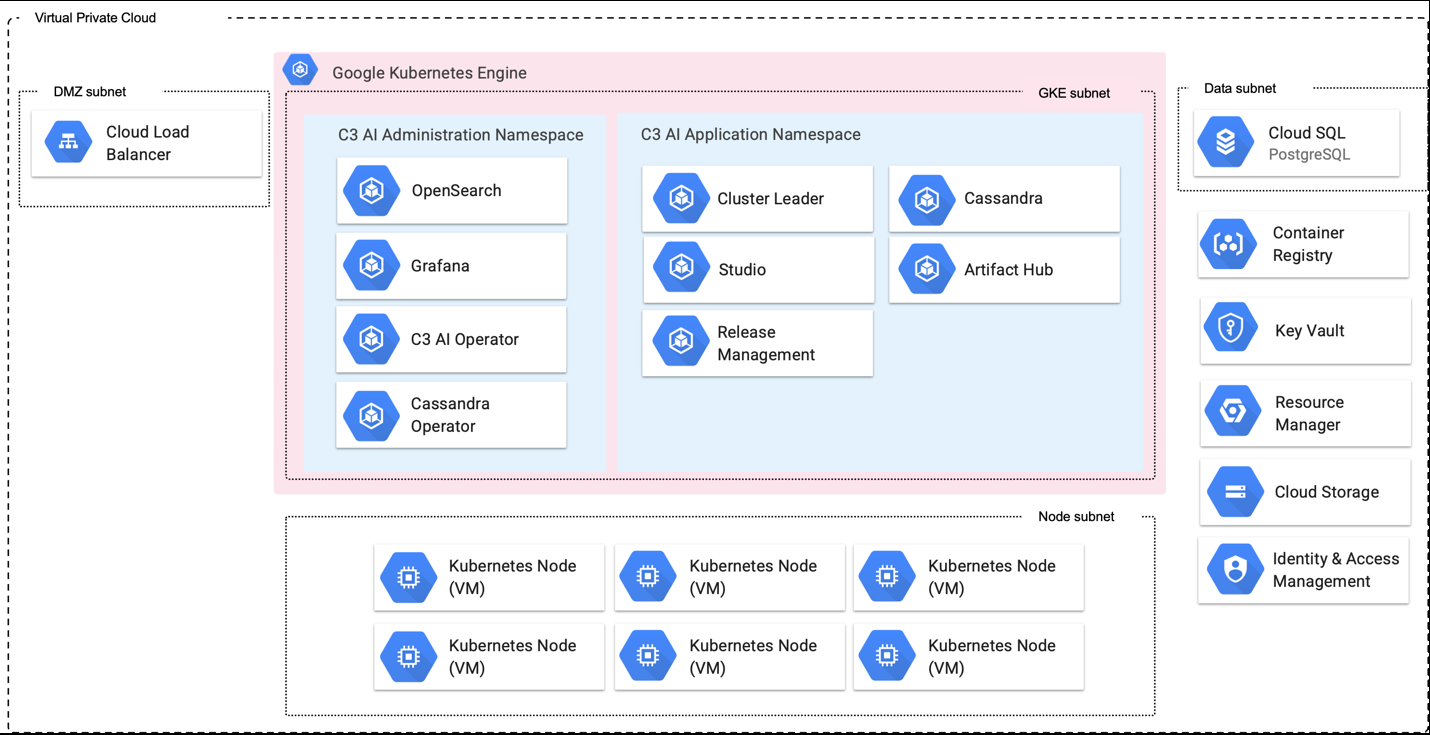
Virtual Private Cloud
├── DMZ / load balancer    Cloud Load Balancer (HTTPS 443, Cloud Armor policy, TLS ≥ 1.2)
├── GKE subnet             GKE cluster (private nodes)
│   ├── C3 AI Administration namespace   (C3 AI Operator, Grafana, OpenSearch, telemetry, Prometheus, ...)
│   └── C3 AI Application namespace      (Cluster Leader, AI Studio, Cassandra, Jupyter, ...)
├── Node subnet            Kubernetes node VMs (autoscaled node pools)
└── Data range             Cloud SQL for PostgreSQL (private IP, Private Services Access)
External services: Cloud Storage, Cloud KMS, Artifact Registry, IAM, Resource Manager
Selecting the right deployment option is essential for project success. C3 AI strongly recommends the SaaS/PaaS subscription for most enterprises. If you have questions or need a tailored recommendation, contact your C3 AI representative.
Pre-installation preparation
Before beginning the installation process, you must gather the following items from C3 AI. Failure to obtain these in advance will cause delays during infrastructure deployment.
Contact your C3 AI account manager and the C3 AI Center of Excellence (CoE) to obtain:
- IP Address Allowlist -- The set of C3 AI Operations IP addresses that must be allowed in your firewall rules, Cloud Armor policy, and GKE authorized networks. These are required for C3 AI to access and operate your deployment. They populate the ip_allowlist variable.
- CORS Domain List -- If your installation includes C3 AI Ex Machina, you will need a list of domains to allow for CORS. This enables file upload functionality. They populate the gcs_cors_domains variable.
- C3 AI Cluster Validation Utility -- A validation tool you will run after infrastructure deployment to confirm your environment meets all C3 AI requirements. Obtain this from the CoE before beginning installation.
- Terraform Module Version and Registry Access -- Confirm the correct module versions (bootstrap and c3cluster) from the C3 AI Bill of Materials (BOM) for your release, the C3 AI Terraform registry host (<c3_url>), and credentials for the private registry.
You must also determine the following before starting:
- Cluster Name -- Your cluster name must follow a specific naming convention. See Appendix A: Cluster Naming Convention for full details.
- Dev/QA clusters: stggke{customerabbreviation} (e.g., stggkecust)
- Production clusters: prdgke{customerabbreviation} (e.g., prdgkecust)
- Lowercase only, no hyphens, no special characters, must start with a letter, 15 characters or fewer total.
- GCP Region -- The Google Cloud region where the deployment will occur (c3_region).
- GCP Project ID -- The dedicated Google Cloud project for the C3 AI deployment. If Terraform will create the project, also determine the parent folder ID and billing account ID, and confirm who holds the rights to create projects and link billing.
- Delegated operations principals -- The users or groups that will receive the delegated operations role (delegated_iam_role_members).
- Initial node counts -- Agree with C3 AI Operations on initial node counts. The default node pools start at zero nodes and scale on demand (see Installation steps, section 1.4).
Customer-hosted install requirements: checklist
Summary
For C3 AI to operate in customer-hosted Google Cloud accounts, your organization must meet the following requirements consistently throughout the contract term. Deviations from the installation requirements incur additional operational fees.
You agree that your organization will allow C3 AI Operations to deploy all infrastructure required to support the C3 AI applications and platform per this specification and utilizes C3 AI deployment automation. This checklist only applies to customer hosted installations.
Installation and operational management checklist
For C3 AI Operations to deploy a cluster in a customer-hosted deployment, you must provide the following access, network setup, and infrastructure to C3 AI:
Temporary elevated access to a dedicated GCP project so that C3 AI can perform tasks to set up your deployment. The bootstrap module creates the custom role {project_name}c3icrole01 with the permissions needed to deploy the c3cluster module. Bootstrap does not grant this role to anyone, and it has not been validated as sufficient on its own for every configuration. Confirm the required permissions with C3 AI Operations, and bind the role to the identity that runs c3cluster (see 1.1 Run the bootstrap module).
C3 AI requires these privileges to set up IAM policy and create the roles that allow C3 AI Operations to perform installation, setup, and deployment tasks. You can remove the elevated access after initial setup. You must grant it again for new product releases and for any subsequent infrastructure changes, because it is required to read current infrastructure state.
A delegated operations role, {project_name}c3dopsrole01, with access to your dedicated GCP project so that C3 AI can manage infrastructure. Assign members with the delegated_iam_role_members variable of the bootstrap module. This role must remain active throughout the contract term.
Allow C3 AI Operations to deploy and manage a Privileged Access Management (PAM) solution. C3 AI leverages an industry-standard PAM for all infrastructure access to customer-hosted deployments. This requires:
- One-time use of a service account role to deploy the cluster and for select infrastructure upgrades.
- A service account created in your SSO / Active Directory used to manage the C3 AI Platform.
- An additional /28 CIDR block for the C3 Software-Defined Perimeter/Management (SDM) peered VPC. This range is not allocated by the Terraform modules; include it in your address plan.
If your firewall settings prevent C3 AI Operations from configuring access to required endpoints, you must allow access to the following:
- Routing to and from the C3 AI network so C3 AI can receive metrics, logs, and observability data to operate the deployment.
- Connectivity to endpoints that allow C3 AI product functionality. See the full endpoint list in the Endpoint access section.
- CORS domain allowlisting if using C3 AI Ex Machina (obtain list from C3 AI CoE).
- Inbound access from the C3 AI Operations IP allowlist, set in ip_allowlist. The same list is applied to the VPC firewall rule, the Cloud Armor policy, and the GKE authorized networks.
New VPC and subnet with at least 1024 IP addresses (/22) available for C3 deployment (gke_cidr_block, default 10.0.0.0/22). GCP subnets are regional; no per-zone layout is required. Secondary ranges are also required for GKE pods (gke_pod_secondary_cidr_block, default 172.20.0.0/14) and services (gke_svc_secondary_cidr_block, default 172.16.0.0/18).
Access to C3 AI and third-party container image and library repositories (or local alternatives such as Google Artifact Registry, JFrog, or Anaconda Enterprise).
Static DNS entry for C3 AI URL (for example, c3project.customer.com).
Private and public key (and the certificate chain if necessary) from the x509 certificate. Certificates issued by a public or an internal Certificate Authority are supported. Coordinate with the C3 AI Center of Excellence if you plan to use self-signed or internal-CA certificates so that the required trust chain can be pre-staged in the cluster.
GKE version 1.35. C3 AI deploys GKE 1.35, which is the module default. gke_version only sets the minimum control plane version; the NO_MINOR_UPGRADES exclusion in gke_upgrade_maintenance_policy (default 1.35 patch-only, ending 2027-04-11) is what holds the minor version. When the exclusion ends, GKE upgrades the cluster according to the release channel. GKE upgrades the control plane one minor version at a time, so an existing cluster on an older version must be upgraded stepwise.
PostgreSQL 15. This is the module default (postgres_version); keep the module at the release C3 AI gave you so that the default does not change. The module does not set a database password; after deployment, set a strong, unique password for the postgres user and share it through a secrets manager (see Appendix B: Post-Deployment Information Handoff).
A bastion host, only if your policy removes public reachability of the Kubernetes API endpoint or C3 AI Operations cannot reach it directly. The module exposes a public endpoint restricted to authorized networks (ip_allowlist or gke_ip_allowlist) with private nodes, so a bastion is not needed in the default configuration. If used, deploy it in a private subnet of the cluster VPC (C3 AI Operations connects through PAM, so no public IP is required) with: Red Hat Enterprise Linux 8, gcloud CLI (latest), kubectl v1.35, Helm v3.12+ with the Helmfile plugin, HashiCorp Terraform >= 1.13.0, TFSwitch, Python 3.12, Docker, yq, jq, and openssl. Bastion provisioning is a customer responsibility and is not part of the C3 AI Terraform modules. The module creates no port 22 rule.
A remote Terraform state backend bucket (recommended). Create a Cloud Storage bucket for state before running Terraform for the first time. See State management.
Decide whether to enforce the Cloud Armor WAF rules (waf_enforce_managed_rules). They run in preview mode by default, so they log but do not block. Agree the setting with C3 AI Operations before go-live.
After infrastructure deployment, execute the C3 AI Cluster Validation Utility and provide the results to C3 AI Operations. All checks must pass before C3 AI Operations can proceed with platform installation.
After infrastructure deployment, provide C3 AI Operations with all required cluster information. See Appendix B: Post-Deployment Information Handoff for the complete list.
Installation uses a two-stage Terraform deployment: first the bootstrap module, then the c3cluster module.
C3 AI installation requirements for Google Cloud Platform
The C3 Agentic AI Platform integrates with core Google Cloud services such as Compute Engine, Virtual Private Cloud (VPC), and IAM for cohesive security and infrastructure management. It requires specific GCP services and infrastructure, plus access for C3 AI Operations to install, administer, and upgrade the platform and applications.
Install and upgrade requirements including Bill of Materials (BOM) details can be reviewed on the documentation site https://docs.c3.ai/versions-and-compatibility/upgrade-requirements/8.12.
Required Google cloud services
Provide the services below, configured to C3 AI specifications as defined in the HashiCorp Terraform scripts.
| Google Cloud Service | Version / Default | Description | Terraform Variable(s) |
|---|---|---|---|
| Google Kubernetes Engine (GKE) | 1.35 (gke_version default; REGULAR release channel) | Runs, scales, and manages the C3 Agentic AI Platform and applications. Private nodes, Workload Identity, shielded nodes, intranode visibility, Gateway API (CHANNEL_STANDARD). | gke_version, gke_release_channel |
| Cloud Key Management Service | Current; 90-day key rotation | Customer-managed encryption keys (CMEK) for GKE, Cloud SQL, and Cloud Storage. Key name {project_name}-key-1 by default. | use_gcp_managed_keys (set false, the default, to provision KMS), kms_key_ring_name, kms_crypto_key_name |
| Cloud SQL for PostgreSQL | PostgreSQL 15 (POSTGRES_15, the postgres_version default), Enterprise edition | Relational data for the platform's internal operations. Instance {project_name}-pg-shared, private IP only, db-custom-16-106496, 250 GB, backups and point-in-time recovery on (7 days). See the Cloud SQL version policy for the supported minor version. | postgres_version, postgres_instances, postgres_default_instance_type, postgres_default_disk_size, postgres_default_edition |
| Cloud Storage | Current | Object storage for application and platform configuration. Default bucket c3--{project_name}. | gcs_buckets, gcs_default_storage_class, gcs_public_access_prevention |
| Identity and Access Management (IAM) | Current | Fine-grained access control. Bootstrap creates the custom roles {project_name}c3icrole01 and {project_name}c3dopsrole01. The cluster module creates the service accounts in the table below. | service_accounts, delegated_iam_role_members (bootstrap) |
| Virtual Private Cloud (VPC) | Current | Dedicated, isolated network for inter-cluster communication, with Cloud Router and Cloud NAT. | existing_network_configuration (set null to create a new VPC) |
| Cloud Armor and SSL policy | Current | Edge allowlist, WAF rules, and TLS ≥ 1.2 policy for the load balancer. | ip_allowlist, waf_*, firewall_extra_security_policies |
| Cloud DNS (private zones) | Current | Private zones for Google API domains (googleapis.com, gcr.io, gstatic.com, pkg.dev, pki.goog, run.app, gke.goog). | enable_private_google_api_routing, enable_restricted_google_api_routing, network_psc_enabled |
| Vertex AI | Current | API enabled by default; service account {project_name}-vtx. | vertexai_enabled, vertexai_service_account_enabled |
APIs enabled by the bootstrap module
iam, compute, bigquery, dns, cloudresourcemanager, storage-component, serviceusage, cloudkms, servicenetworking, file, storage-api, storage, container, sqladmin, and aiplatform (*.googleapis.com). The cluster module also force-creates the service identities for sqladmin and container, plus aiplatform and artifactregistry when vertexai_enabled = true.
Service accounts created by the cluster module
| Service Account | Kubernetes Service Account (Workload Identity) | Project Roles |
|---|---|---|
| c3aiops | c3-opsadmin/c3aiops, {project_name}/c3cassandra | storage.admin, cloudsql.admin, iam.workloadIdentityUser, monitoring.viewer, container.viewer, compute.viewer |
| c3server | {project_name}/c3 | storage.admin, bigquery.admin, iam.workloadIdentityUser, aiplatform.admin, artifactregistry.reader, iam.serviceAccountTokenCreator |
| telemetry | c3-opsadmin/telemetry | storage.admin, cloudsql.viewer, iam.workloadIdentityUser |
| c3-privileged | {project_name}/c3-privileged | Same as c3server |
| {project_name}-vtx (when vertexai_service_account_enabled = true) | none | aiplatform.user; c3server and c3aiops hold serviceAccountKeyAdmin on it |
With customer-managed keys (use_gcp_managed_keys = false), every account above except {project_name}-vtx also receives roles/cloudkms.cryptoKeyEncrypterDecrypter. Override the whole set with the service_accounts variable.
Google Cloud access requirements
To ensure security, operational excellence, and customer trust, C3 AI uses an industry-standard privileged access management (PAM) solution for infrastructure access and authentication. All access by C3 AI Operations to customer-hosted deployments is managed exclusively through PAM.
Why PAM and what it means for you:
- Centralized access control: a single platform manages all infrastructure access.
- Enhanced security: strong authentication and zero-trust principles.
- Full auditability: every session and command is logged.
- Rapid access revocation: access can be granted or revoked instantly.
- Operational efficiency and alignment with industry best practices.
PAM requirements:
- One-time use of a service account role to deploy the cluster and for select infrastructure upgrades.
- A service account in your SSO / Active Directory used to manage the C3 AI Platform.
- An additional /28 CIDR block for the C3 Software-Defined Perimeter/Management (SDM) peered VPC. This range is not allocated by the Terraform modules; include it in your address plan.
C3 AI Operations deploys and installs the PAM solution. You can request an audit log of user access through C3 AI Customer Support.
| Access Requirement | Description |
|---|---|
| Dedicated GCP project | When creating the project, C3 AI requires (1) the project ID and (2) the cloud region. |
| Secure internet access to the project | Secure remote access over the internet (VPN is acceptable) to a bastion host, if one is used, or to the GKE endpoint allowed by ip_allowlist. |
| GCP service accounts | C3 AI Operations needs access to the service accounts and Kubernetes workload identities created by Terraform. Terraform reference: service_accounts and workload_identites.tf define the defaults and bindings (table above). |
| Bastion host (when used) | Deploy in a private subnet of the cluster VPC; C3 AI Operations connects through PAM, so no public IP is required. Software requirements are in Customer-hosted install requirements: checklist. Customer responsibility; not in the Terraform modules. |
| Access to C3 AI and third-party repositories | Access for container images, Python libraries, Node.js libraries, and runtime billing data. If direct access violates your standards, the platform can use local artifact repositories such as Google Artifact Registry, JFrog, and Anaconda Enterprise. |
| X.509 certificate for network encryption | A fully qualified domain name for ingress (for example c3project.customer.com), plus the public certificate chain and private key. These are placed in a Kubernetes secret used by the ingress controller. Public and internal-CA certificates are supported; coordinate with the C3 AI CoE for self-signed or internal-CA trust chains. |
Security defaults to review
The following defaults in v3.0.11 are relevant to customer security reviews. Each can be changed or compensated for; none is silently enforced beyond what is listed.
| Area | Default | Notes |
|---|---|---|
| GKE API endpoint | Public, restricted to authorized networks | Private nodes. No private-endpoint toggle in the module. |
| Cloud SQL transport | ALLOW_UNENCRYPTED_AND_ENCRYPTED | Private IP only (no public IPv4). Enforce TLS at the client; track module change. |
| Cloud Storage | Uniform bucket-level access; public_access_prevention = inherited; no object versioning | Set gcs_public_access_prevention = "enforced" if policy requires. |
| Node hardening | Shielded nodes on at cluster level; Secure Boot / integrity monitoring off per pool | Set per pool in gke_extra_node_pools / gke_custom_node_pools. |
| Cloud Logging / Monitoring | GKE writes to none (gke_logging_service, gke_monitoring_service) | Platform observability uses the in-cluster stack and the C3 AI monitoring endpoints. |
| Edge | Cloud Armor default-deny with allowlist; WAF rules in preview (not enforced) until waf_enforce_managed_rules = true; TLS 1.2 minimum | See Network configuration. |
Network configuration
By default, C3 AI Operations provisions the VPC with Terraform following the requirements below. If your organization must pre-provision the VPC per internal policy, coordinate with the C3 AI Center of Excellence (CoE); this is a special-case scenario.
Terraform reference: to use existing network resources instead of creating new ones, set existing_network_configuration. See Using an existing network below and the examples/existing_network/README.md file contained in the Terraform module documentation.
VPC requirements
Your VPC must meet the requirements described in this section to host a C3 AI cluster.
VPC region
The GCP region for the deployment. Terraform variable: c3_region.
VPC sizing and IP ranges
The module reserves the following ranges. Plan your address space so none of them overlap with each other or with networks you peer or route to.
| Range (Default) | Association | Terraform Variable |
|---|---|---|
| 10.0.0.0/22 | GKE node subnet (primary range) | gke_cidr_block |
| 172.20.0.0/14 | GKE pod secondary range | gke_pod_secondary_cidr_block |
| 172.16.0.0/18 | GKE service secondary range | gke_svc_secondary_cidr_block |
| 10.0.6.16/28 | GKE control plane (master) peering range. Not a subnet. | gke_master_ipv4_cidr_block |
| 10.0.4.0/24 | Private Services Access range for Cloud SQL | network_data_cidr_global_address_address, network_data_global_address_prefix_length |
| 10.0.5.0/24 | Regional proxy-only subnet (internal load balancer) | network_proxy_cidr_block |
| 10.0.6.48/28 | Private Service Connect NAT subnet | network_psc_cidr_block |
| 10.0.6.32/28 (address 10.0.6.33) | Private Service Connect endpoint for Google APIs (when network_psc_enabled = true) | fixed in service_networking_connections.tf |
| 10.0.6.64/28 | Dual-stack private NLB subnet (when ipv6_support = true) | network_nlb_cidr_block |
| 10.0.7.0/24 | Vertex AI VPC peering range (not used when PSC is enabled) | network_vertexai_global_address_address, network_vertexai_global_address_prefix_length |
| fd20:678::/48 | Internal IPv6 range (when ipv6_support = true) | internal_ipv6_range |
Cloud SQL does not attach to the GKE subnet. It uses the 10.0.4.0/24 Private Services Access range.
If several clusters share one GCP project, use global_address_names to give each cluster unique global-address names (see Appendix C: Optional features).
Subnets
The Terraform module creates these subnets for each cluster:
| Subnet | Default CIDR | Name | Purpose |
|---|---|---|---|
| GKE | 10.0.0.0/22 | {project_name}-sn-kube-1 | Node subnet with secondary ranges for pods (/14) and services (/18) |
| Proxy-only | 10.0.5.0/24 | {project_name}-sn-proxy-1 | Regional internal load balancer proxies |
| PSC NAT | 10.0.6.48/28 | {project_name}-sn-psc-1 | Private Service Connect NAT |
| NLB (IPv6 only) | 10.0.6.64/28 | {project_name}-sn-privnlb-1 | Dual-stack private network load balancer |
GCP subnets are regional and span all zones in the region. No per-zone subnet design is needed. Node zones come from gke_node_locations (default: the first three zones in the region).
Additional networking requirements
- Workloads and resources must be private (GKE nodes have no external IPs; Cloud SQL has no public IPv4).
- Subnets need outbound access to the public network through Cloud NAT.
- Terraform reference: the network module creates a Cloud Router and Cloud NAT with manually allocated static addresses (the egress IPs customers allowlist). Add addresses with network_extra_nat_address_count. Tune ports with nat_min_ports_per_vm (0), nat_max_ports_per_vm (2048), and nat_enable_dynamic_port_allocation (true). The module does not create custom routes; the default internet route is used.
Firewall policies
Terraform reference: firewall.tf builds the rules and the firewall module creates them. The module creates three kinds of controls, all of which apply only when the module creates the network (existing_network_configuration = null).
VPC firewall rules (priority from 1000):
| Rule | Source | Ports |
|---|---|---|
| {project_name}-allowlist-443 | ip_allowlist plus the cluster's NAT addresses | TCP ports (default 443) |
| {project_name}-control-plane-cidr-webhooks | gke_master_ipv4_cidr_block | TCP 443, 9443, 8443, 6443 |
| {project_name}-internal-5432 | gke_cidr_block | TCP 5432 |
| Peering rules (vertex AI / data ranges, when PSC is off) | the reserved global ranges | TCP 9042, 5432 |
| {project_name}-internal-ipv6 (when IPv6 on) | internal_ipv6_range | all |
Setting firewall_rules replaces all of the default rules above. Do this only when you intend to own the full rule set.
Cloud Armor security policy ({project_name}-securitypolicy-lb):
- Deny (403) cve-canary; default rule denies all other traffic (404).
- Allow rules for each entry in ip_allowlist (IPv4, priority 2000+) and ipv6_allowlist (priority 3000+), batched 10 CIDRs per rule.
- 13 preconfigured WAF rules at priorities 1000-1012 from waf_rules.tf: SQL injection, cross-site scripting, remote code execution, scanner detection, protocol attack, local file inclusion, remote file inclusion, method enforcement, PHP injection, session fixation, Java attack, NodeJS attack, and JSON-based SQL injection bypass. They run in preview mode by default (logged, not blocked). Set waf_enforce_managed_rules = true to enforce them. Override the rule set with waf_security_policy_rules and add rate limiting with waf_rate_based_rules.
- Additional policies with firewall_extra_security_policies.
SSL policy ({project_name}-sslpolicy): minimum TLS 1.2.
ip_allowlist is used three times: the VPC firewall rule, the Cloud Armor allow rules, and the GKE master authorized networks (unless you set gke_ip_allowlist). The cluster's NAT addresses are appended automatically (firewall_include_nat_address, default true).
Endpoint access
If your firewall prevents C3 AI Operations from configuring endpoint access, allow outbound HTTPS to the endpoints below. They provide access to container registries, language-runtime package repositories (Python, Node.js, Anaconda), C3 AI artifact servers, and the vault that secures platform credentials. Blocking any of them prevents installation, upgrades, or runtime operations. Contact the C3 AI CoE for per-endpoint justification if required for security review.
- conda.anaconda.org - Conda packages
- files.pythonhosted.org - PyPI file hosting
- github.com - source code hosting
- c3ai.grafana.net - C3 AI Grafana dashboards
- huggingface.co - pre-trained models and datasets
- jfrog.c3.ai - C3 AI JFrog Artifactory
- nodejs.org - Node.js runtime
- npmjs.org - Node.js package registry
- prdgkemis.c3.ai - C3 AI MIS endpoint (if required)
- pypi.org - Python package index
- pypi.python.org - legacy PyPI alias
- registry.c3.ai - C3 AI private container and artifact registry
- repo.anaconda.com - Anaconda curated packages
- repo.continuum.io - legacy Anaconda repository
- telemetry.c3.ai - platform telemetry
- vault.c3iot.io - C3 AI HashiCorp Vault
Monitoring endpoints (outbound):
- fleet-management-prod-014.grafana.net
- prometheus-prod-36-prod-us-west-0.grafana.net
- logs-prod-021.grafana.net
Inbound from C3 AI Operations: allow the C3 AI Operations IP addresses to reach the deployment. Obtain the current list from your C3 AI account manager or the C3 AI CoE (see Pre-installation preparation). The list below is current at the time of writing and changes over time. If it differs from the list you were given, use the list you were given.
- 12.226.154.130/32
- 13.214.249.29/32
- 18.136.19.189/32
- 34.231.113.223/32
- 34.232.23.54/32
- 34.238.215.224/32
- 34.82.144.175/32
- 52.48.79.190/32
- 54.76.64.220/32
- 70.35.33.244/32
- 38.77.68.228/32
38.77.68.228/32 is the C3 AI Mexico office.
Terraform reference: add the C3 AI Operations addresses to ip_allowlist:
ip_allowlist = [
  { cidr_block = "CIDR_FROM_C3_AI", display_name = "C3 AI Operations" }, # ... add all required IPs
]
Outbound access is provided by Cloud NAT by default. If you apply egress filtering, ensure the endpoints and monitoring addresses above are reachable.
Google API access
By default the module creates private Cloud DNS zones that route Google API traffic through private.googleapis.com (enable_private_google_api_routing = true). Set enable_restricted_google_api_routing = true for restricted.googleapis.com (VPC Service Controls), or network_psc_enabled = true to use a Private Service Connect endpoint. Zones: googleapis.com, gcr.io, gstatic.com, pkg.dev, pki.goog, run.app, gke.goog.
Egress and ingress summary
GCP enforces this with VPC firewall rules and Cloud Armor; there are no security groups or subnet ACLs.
- Egress: allow TCP 443 to 0.0.0.0/0 (or the endpoint list above) and all traffic within the VPC. GCP's implied egress rule allows this by default; add explicit rules only if you apply a deny-all egress policy.
- Ingress: TCP 443 from the allowlist; webhooks from the control plane range; TCP 5432/9042 from the reserved service ranges. The module creates no SSH (port 22) rule. If a bastion is used, allow SSH from the source C3 AI Operations specifies for its PAM connection (confirm with C3 AI Operations).
- Subnet-level controls: GCP has no subnet ACLs. If you use hierarchical firewall policies or a deny-all egress rule at the organization level, make sure they permit the traffic above.
Using an existing network
When existing_network_configuration is set, the network and firewall modules are skipped. Terraform creates no VPC, subnets, NAT, firewall rules, or Cloud Armor rules, so you must provide equivalents.
existing_network_configuration = {
  vpc_self_link                = "https://compute.googleapis.com/compute/v1/projects/PROJECT_ID/global/networks/VPC_NAME"
  cloud_armor_policy_self_link = "https://compute.googleapis.com/compute/v1/projects/PROJECT_ID/global/securityPolicies/CLOUD_ARMOR_POLICY_NAME"
  ssl_policy_self_link         = "https://compute.googleapis.com/compute/v1/projects/PROJECT_ID/global/sslPolicies/SSL_POLICY_NAME"
  kube = {
    subnet_self_link                = "https://compute.googleapis.com/compute/v1/projects/PROJECT_ID/regions/REGION/subnetworks/GKE_SUBNET_NAME"
    pod_subnet_secondary_range_name = "K8S_POD_SECONDARY_RANGE_NAME"
    svc_subnet_secondary_range_name = "K8S_SVC_SECONDARY_RANGE_NAME"
  }
  data = {
    allocated_global_address_range_name = "DATA_ALLOCATED_IP_RANGE_NAME" # Private Services Access range for Cloud SQL
  }
  proxy = {
    subnet_self_link = "https://compute.googleapis.com/compute/v1/projects/PROJECT_ID/regions/REGION/subnetworks/PROXY_SUBNET_NAME"
  }
}
The existing resources must match what the module would create (subnet sizes, NAT, routes, firewall rules including those above). The identity running Terraform needs permissions on them.
HashiCorp Terraform configuration
HashiCorp Terraform is an open-source tool for creating safe and predictable cloud infrastructure. C3 AI Terraform scripts create the infrastructure required by the C3 Agentic AI Platform and automate its deployment in your Google Cloud project.
For customer-managed deployments, any customization made to the Terraform scripts must be reapplied with each new version of the C3 AI Terraform scripts. Prefer module input variables over editing module source.
Required versions: Terraform >= 1.13.0; providers hashicorp/google and hashicorp/google-beta, both pinned to 7.15.0 (versions.tf).
State management
By default terraform init stores state on the local filesystem. For production customer-hosted deployments, C3 AI strongly recommends a remote state backend on Google Cloud Storage. A GCS backend provides server-side state locking, encryption at rest, and object versioning, which together prevent concurrent-apply corruption and allow recovery from accidental changes.
Recommended backend configuration:
terraform {
  backend "gcs" {
    bucket = "TFSTATE_BUCKET"
    prefix = "c3/bootstrap"
  }
}
Guidance:
- Create TFSTATE_BUCKET in advance. It must exist before terraform init. A common pattern is one state bucket per GCP project, with a prefix per module.
- Use a distinct prefix per module (for example c3/bootstrap and c3/c3cluster) so state files do not collide.
- Enable Object Versioning so prior revisions can be restored.
- Restrict IAM on the bucket to the Terraform identity and C3 AI Operations.
- Keep the state bucket outside the c3cluster module's resources. The module creates only the workload bucket (c3--{project_name}), and a destroy does not remove the state bucket.
Local state is acceptable for short-lived development. For any customer-hosted production deployment, a lost or corrupted local state file typically requires a full redeployment.
Getting started
In this section, you install and configure the requirements to use Terraform and configure Terraform authentication. When finished, continue to Installation steps.
Requirements
A Google Cloud organization and a project in the account. The project name must follow the rules in Appendix A: Cluster Naming Convention.
Terraform reference: set project_name (optional; defaults to project_id). Validation enforces the 15-character maximum only.
Privileges to deploy, operate, and delete the infrastructure services. The bootstrap module creates the custom role {project_name}c3icrole01 for this purpose; see the permission list in the docs/SETUP_PRIVILEGES.md file contained in the Terraform module documentation. If you create the project through Terraform (is_org_admin = true), the person running bootstrap also needs rights to create folders and projects and to link the billing account.
On your workstation:
- The HashiCorp Terraform CLI ≥ 1.13.0 (choose AMD64 or ARM64 to match your hardware). Use TFSwitch to select versions.
- The gcloud CLI, signed in with Application Default Credentials (ADC):
gcloud --project="<project-id>" auth application-default loginReplace <project-id> with the Google Cloud project ID for this deployment. If omitted, the current project is assumed. See Google's documentation for installing and authorizing the gcloud CLI.
- Access to the C3 AI Terraform registry. Configure credentials for the private registry (JFrog) before terraform init: add a credentials block for the registry host to your Terraform CLI configuration (~/.terraformrc) using the credentials C3 AI provides (see the JFrog Artifactory instructions referenced in the examples/standard/README.md file contained in the Terraform module documentation).
Terraform state placement. Store the state in a secure remote backend rather than on a workstation. A GCS bucket with object versioning and state locking is typical. For custom, FieldOps, or Fed deployments, coordinate with C3 AI FieldOps on backend configuration. Losing or corrupting the state file complicates upgrades and teardown. See State management.
Installation steps
Installation of the C3 Agentic AI Platform on GCP is a multi-step process due to limitations of Terraform and GCP-specific configuration requirements. The installation process is the following:
- Create the VPC and required GCP services (bootstrap module, then c3cluster module).
- Grant C3 AI Operations access to the GCP project.
- Validate the VPC and configuration of required GCP services, and provide C3 AI Operations access to the cluster.
- C3 AI Operations completes the installation of the C3 Agentic AI Platform.
- Environment teardown, if required (for example, rebuild, decommission, or disaster recovery).
Contact your C3 AI account manager for estimated durations and responsibilities for each stage.
To create a VPC, C3 AI requires the use of HashiCorp Terraform and will provide a set of Terraform scripts to assist you in the creation of the VPC and required GCP Services. If you are unfamiliar with Terraform, review their Get Started -- Google Cloud documentation.
See the HashiCorp Terraform configuration section to ensure all requirements are met prior to completing the installation steps below.
See the Pre-installation preparation section to ensure you have obtained all required items from C3 AI before beginning.
A description of the Terraform modules is below. See the README.md file in the downloaded Registry folder for the most up-to-date information.
Terraform modules. The root c3cluster module orchestrates the submodules below. The bootstrap module is deployed separately, first, from its own directory.
| Terraform Module | Description | Key Terraform Variables |
|---|---|---|
| bootstrap | Creates the project and folder (optional), enables APIs, and creates the custom IAM roles that let a Terraform operator deploy everything else. | project_id, project_name, delegated_iam_role_members, use_gcp_managed_keys, folder_id, billing_account, is_org_admin |
| c3cluster (root) | Coordinates all other modules. | project_id, project_name, c3_region, ip_allowlist, gcs_cors_domains |
| project | Force-creates Google-managed service identities and grants their service-agent roles. | activate_api_identities, vertexai_enabled |
| iam / gke-sa | Creates service accounts and binds them to Kubernetes service accounts through Workload Identity. | service_accounts |
| kms | Key ring and crypto key (rotation 90 days) with grants for the GCS, GKE, Compute, and Cloud SQL service agents. | use_gcp_managed_keys, kms_key_ring_name, kms_crypto_key_name |
| network | VPC, subnets, secondary ranges, Cloud Router, Cloud NAT, global address ranges, service networking connections. | gke_cidr_block, gke_pod_secondary_cidr_block, gke_svc_secondary_cidr_block, network_proxy_cidr_block, network_psc_enabled, ipv6_support |
| firewall | VPC firewall rules, Cloud Armor policies (allowlist + WAF), SSL policy, forwarding rules. | ip_allowlist, firewall_extra_security_policies, waf_rate_based_rules |
| dns | Private Cloud DNS zones for Google APIs. | enable_private_google_api_routing, network_psc_enabled |
| postgres | Cloud SQL for PostgreSQL on private IP. | postgres_version, postgres_instances, postgres_default_instance_type, postgres_default_disk_size |
| gke-cluster | GKE control plane: private nodes, authorized networks, release channel, maintenance policy. | gke_version, gke_master_ipv4_cidr_block, gke_release_channel |
| gke-nodepool | One module instance per node pool. | gke_default_node_pools, gke_extra_node_pools, gke_custom_node_pools |
| gcs | Cloud Storage buckets with CORS and optional CMEK. | gcs_buckets, gcs_cors_domains, gcs_default_storage_class |
project-admin (project and folder creation helper) and v7 (legacy compatibility module) exist in the repository but are not part of the standard installation.
In addition to the required tools listed in the HashiCorp Terraform configuration section, install TFSwitch to switch easily between Terraform versions. See the TFSwitch website for installation instructions.
The Terraform module version is separate from the C3 AI Platform version. Obtain the correct module version from the C3 AI Bill of Materials (BOM) for your release.
1. Create the VPC and required GCP services
This step creates the cloud infrastructure required by the C3 Agentic AI Platform using Terraform. Run bootstrap first, then c3cluster, each from its own directory with its own state.
1.1 Run the bootstrap module
Bootstrap enables the required APIs and creates the custom IAM roles used for the rest of the installation. When is_org_admin = true it also creates the folder and project and links billing.
Create a new main.tf, replacing the CAPITALIZED values.
The project name must follow Appendix A: Cluster Naming Convention.
For more options, download the Terraform modules from the C3 AI registry and see the "Inputs" section in the module README.
module "bootstrap" {
  source       = "<c3_url>/tf-registry__c3/gcp/c3//modules/bootstrap"
  version      = "VERSION_NUMBER"          # exact version from the C3 AI BOM
  project_id   = "GCP_PROJECT_ID"
  project_name = "GCP_PROJECT_NAME"        # Optional: only when it differs from the project ID

  # Principals who receive the delegated operations role ({project_name}c3dopsrole01).
  # Use the member prefix: user:, group:, or serviceAccount:
  delegated_iam_role_members = ["group:c3-ops@CUSTOMER_DOMAIN"]

  # Must match the value used by the c3cluster module (false = customer-managed KMS keys)
  use_gcp_managed_keys = false

  ## PROVIDE THE VARIABLES BELOW ONLY WHEN TERRAFORM IS CREATING THE PROJECT ##
  folder_id       = "GCP_PROJECT_FOLDER_ID"
  billing_account = "GCP_BILLING_ACCOUNT"
  is_org_admin    = true
}

provider "google" {}

terraform {
  required_version = ">= 1.13.0"
  required_providers {
    google = {
      source  = "hashicorp/google"
      version = "7.15.0"
    }
  }
}
NOTE: Replace:
- <c3_url> with the C3 AI registry host provided by C3 AI.
- VERSION_NUMBER with the bootstrap module version listed in the C3 AI BOM for your release.
- GCP_PROJECT_ID with the ID of the Google Cloud project.
- GCP_PROJECT_NAME with the name of the C3 AI cluster. It must follow the naming rules.
- CUSTOMER_DOMAIN with your organization's domain in the delegated_iam_role_members group, or replace the entry with the users, groups, or service accounts that should receive the delegated role.
- GCP_PROJECT_FOLDER_ID and GCP_BILLING_ACCOUNT (only when Terraform creates the project) with the parent folder ID and the billing account ID.
What bootstrap creates:
- (is_org_admin = true only) a folder named {project_name} under folder_id and the project inside it, with auto_create_network = false.
- The 15 required APIs (see APIs enabled by the bootstrap module). They are disabled again on destroy.
- Custom role {project_name}c3icrole01, with the permissions needed to deploy c3cluster (including Cloud KMS permissions when use_gcp_managed_keys = false).
- Custom role {project_name}c3dopsrole01, bound to delegated_iam_role_members.
Grant the setup role. Bootstrap does not bind c3icrole01. If you use it, bind it to the identity that runs c3cluster (see the note in section 1.3 about its coverage):
gcloud projects add-iam-policy-binding PROJECT_ID \
  --member="user:DEPLOYER_EMAIL" \
  --role="projects/PROJECT_ID/roles/PROJECT_NAMEc3icrole01"
The role ID has no hyphens even though the role title does ({project_name}-c3icrole-01).
1.2 Run Terraform commands
From the same directory:
tfswitch
terraform init
terraform plan --out out.plan
Review the plan before applying. Confirm:
- The resource count matches your expectation. For a new bootstrap deployment, no resources should be destroyed.
- No unexpected destroys appear. If they do, stop and investigate.
- The target project ID matches the deployment you intend.
- Module source and version point to the approved C3 AI registry values.
Then apply:
terraform apply "out.plan"If you receive "Command not found: terraform", the binary is not on your PATH. See HashiCorp's installation instructions.
1.3 Run the c3cluster module
This module coordinates all other Terraform modules. Create a new main.tf in a separate directory from bootstrap, replacing the CAPITALIZED values. Run it as an identity with permission to create the resources listed in docs/SETUP_PRIVILEGES.md. The bootstrap role c3icrole01 is intended for this purpose, but it has not been validated as sufficient for every configuration. For example, it does not include compute.globalForwardingRules.create, which c3cluster needs when network_psc_enabled = true. Confirm the required permissions with C3 AI Operations before you apply.
Obtain the list of IP addresses from your C3 AI account manager or the CoE; they populate ip_allowlist. C3 AI requires these CIDR blocks to be allowlisted so C3 AI Operations can deploy the platform.
The C3 AI Terraform modules create a new VPC and subnets. If your organization must create these separately, use existing_network_configuration (see Using an existing network and the examples/existing_network/README.md file contained in the Terraform module documentation).
module "c3cluster" {
  source       = "<c3_url>/tf-registry__c3/gcp/c3"
  version      = "VERSION_NUMBER"          # exact version from the C3 AI BOM
  c3_region    = "us-west1"
  project_id   = "GCP_PROJECT_ID"
  project_name = "GCP_PROJECT_NAME"        # Only when it differs from the project ID

  # Obtain the C3 AI control IPs from the C3 CoE
  ip_allowlist = [
    {
      cidr_block   = "CIDR_TO_ALLOWLIST"
      display_name = "ALLOWLISTED_CIDR_NAME"
    },
  ]

  # Obtain the CORS domains from the C3 CoE
  gcs_cors_domains = ["https://*.DOMAIN_NAME"]

  # Optional: block (not just log) requests that match the default WAF rules
  # waf_enforce_managed_rules = true
}

provider "google" {}

terraform {
  required_version = ">= 1.13.0"
  required_providers {
    google = {
      source  = "hashicorp/google"
      version = "7.15.0"
    }
    google-beta = {
      source  = "hashicorp/google-beta"
      version = "7.15.0"
    }
  }
}
NOTE: Replace:
- <c3_url> with the C3 AI registry host provided by C3 AI.
- VERSION_NUMBER with the c3cluster module version in the C3 AI BOM.
- us-west1 with your deployment region.
- GCP_PROJECT_ID with the ID of the Google Cloud project.
- GCP_PROJECT_NAME with the cluster name (naming rules apply), or remove the line when it equals the project ID.
- CIDR_TO_ALLOWLIST and ALLOWLISTED_CIDR_NAME with each CIDR block and a display name from the list your C3 AI account manager provides.
- DOMAIN_NAME with the domain list obtained from the C3 AI CoE.
Version control. postgres_version defaults to POSTGRES_15 in this module release; use the module default and keep the module at the release you were given, because defaults can change in newer releases. Changing it on an existing instance triggers a major-version upgrade (see Appendix C: Optional features). gke_version defaults to 1.35 but only sets the minimum control plane version (min_master_version). What holds the cluster on 1.35 is the NO_MINOR_UPGRADES exclusion in gke_upgrade_maintenance_policy (default name 1.35 patch-only, ending 2027-04-11). When the exclusion ends, GKE upgrades the cluster to the next minor version regardless of gke_version. Do not change either setting without C3 AI guidance.
Additional c3cluster configuration options
Optional variables (the full list is in Appendix D: Variable reference and the module README):
| Variable | Description | Module Default |
|---|---|---|
| gke_version | Minimum GKE control plane version. The maintenance policy exclusion controls minor upgrades. | 1.35 |
| postgres_version | Cloud SQL PostgreSQL version | POSTGRES_15 |
| use_gcp_managed_keys | Use Google-managed keys instead of customer-managed KMS | false |
| enable_delete_protection | Deletion protection on GKE, Cloud SQL, and GCS. Must be false before terraform destroy. | true |
| gke_default_node_pools | Override machine type and counts of the 8 default pools | See 1.4 Configure GKE node pools |
| gke_extra_node_pools | Add pools on top of the defaults | {} |
| gke_custom_node_pools | Replace all default pools | {} |
| vertexai_enabled | Create the Vertex AI and Artifact Registry service identities and grant their roles (bootstrap enables the API) | true |
| existing_network_configuration | Use an existing VPC and subnets | null |
| gke_ip_allowlist | Override the GKE master authorized networks (defaults to ip_allowlist) | [] |
| network_psc_enabled | Use Private Service Connect for Google APIs | false |
1.3.1 Implement CORS policy for C3 AI Ex Machina
If the installation includes C3 AI Ex Machina, setting the C3 AI CORS domains is all that is needed. The CORS policy facilitates file uploads for Ex Machina.
Terraform variable: gcs_cors_domains, a list of domain patterns (for example ["https://*.example.com"]). The module creates one rule on each bucket (methods GET, PUT; headers Content-Type, ETag; max age 3600 s). Use gcs_cors_rules for fully custom rules. Both are combined. See cors_rules.tf.
1.4 Configure GKE node pools
The Terraform module supports three node pool strategies:
| Strategy | Variable | Behavior |
|---|---|---|
| Override defaults | gke_default_node_pools | Customize attributes (machine type, scaling, accelerators) of the 8 C3-recommended pools: c3ondemand, c3spot, c3fallback, c3gpu, c3obs, c3logs, c3cass, c3code |
| Add extra pools | gke_extra_node_pools | Keep all defaults and add additional pools on top |
| Full custom | gke_custom_node_pools | Completely replace all default pools with your own definitions |
If gke_custom_node_pools is defined, it completely replaces both gke_default_node_pools and gke_extra_node_pools.
All eight default pools are created with 0 nodes (node_count = 0, min_count = 0) and autoscale up to the maximum shown. C3 AI Operations raises node counts or lets the cluster autoscaler add nodes as workloads are scheduled. Change pool sizes through the c3cluster module, not the console, so Terraform state stays accurate:
gke_default_node_pools = {
  "c3ondemand" = { machine_type = "n2d-highmem-16", min_count = 3, max_count = 20 }
}
Default node pools:
| Pool | Machine Type | Min / Max Nodes | Notes |
|---|---|---|---|
| c3ondemand | n2d-highmem-16 | 0 / 20 | General workloads |
| c3spot | n2d-highmem-16 | 0 / 20 | Preemptible; label/taint c3HardwareAvailability=low |
| c3fallback | n2d-highmem-16 | 0 / 20 | Label/taint c3HardwareAvailability=balanced |
| c3gpu | g2-standard-96 (8× nvidia-l4) | 0 / 10 | Taint gpuWorkload=true |
| c3obs | c2d-highcpu-8 | 0 / 20 | Observability; 50 GB disk |
| c3logs | n2d-highmem-8 | 0 / 20 | Log system; 50 GB disk |
| c3cass | c3d-highmem-4 | 0 / 20 | Cassandra; 50 GB disk |
| c3code | n2d-highmem-16 | 0 / 20 | Code execution; taint c3ComputeKind=c3code |
Pool defaults: 500 GB pd-ssd, COS_CONTAINERD, auto-repair and auto-upgrade on, surge upgrades (max_surge 1, max_unavailable 0), 110 pods per node, Secure Boot and integrity monitoring off unless set per pool.
Security: Shielded nodes are enabled at the cluster level, Workload Identity is on, and nodes are private. Secure Boot and integrity monitoring default to off per pool (enable_secure_boot, enable_integrity_monitoring); set them in gke_extra_node_pools or gke_custom_node_pools if your policy requires them.
Deletion protection: The Terraform module enables deletion protection by default for the GKE cluster, Cloud SQL instances, and the Cloud Storage bucket (enable_delete_protection = true). Set enable_delete_protection = false only for test/development environments.
1.5 Run Terraform commands for the c3cluster module
After configuring the c3cluster main.tf, including the CORS domains (1.3.1) and any node pool settings (1.4), run the following from the same directory:
tfswitch
terraform init
terraform plan --out out.plan
Review the plan as in 1.2 (resource count, no unexpected destroys, correct project and region). Then apply:
terraform apply "out.plan"Expect the default node pools to be created with zero nodes. C3 AI Operations sets node counts during the installation (step 4).
2. Grant C3 AI Operations access to the GCP project
2.1 Grant the delegated operations role
Grant C3 AI Operations the delegated operations role. Run as a user with permission to set project IAM policy:
gcloud auth login
gcloud projects add-iam-policy-binding PROJECT_ID \
  --member="user:USER_EMAIL" \
  --role="projects/PROJECT_ID/roles/PROJECT_NAMEc3dopsrole01"
NOTE: Replace:
- PROJECT_ID with the project ID.
- PROJECT_NAME with project_name (or the project ID if you did not set one). The role ID has no hyphens.
- USER_EMAIL with the principal's email. The member format is user:email, group:email, or serviceAccount:email.
You can instead set delegated_iam_role_members on the bootstrap module (see 1.1 Run the bootstrap module) and re-apply. That keeps the grant in Terraform state.
3. Validate the VPC and configuration of required GCP services
After the VPC and required cloud services are configured, you are required to execute the C3 AI Cluster Validation Utility and provide the results to C3 AI. If all checks performed by the C3 AI Cluster Validation Utility pass, the VPC is suitable for C3 AI Operations to deploy the C3 Agentic AI Platform on the Kubernetes cluster.
If the cluster validation utility fails, you must remediate all exceptions. All checks must pass for C3 AI Operations to be able to deploy the C3 Agentic AI Platform on your Kubernetes cluster. See the Common issues and troubleshooting section for guidance.
Once the checks are successfully completed, provide C3 AI Operations access to the cluster. Refer to the subsequent section for more information.
3.1 Run the C3 AI Cluster Validation Utility and provide results to C3 AI Operations
Contact the C3 AI Center of Excellence (CoE) for more information and to obtain the C3 AI Cluster Validation Utility. You should have obtained this during the Pre-installation preparation step.
Run the C3 AI Cluster Validation Utility to determine whether the infrastructure requirements are fulfilled to allow the C3 AI Operations to deploy the C3 Agentic AI Platform.
If the C3 AI Cluster Validation Utility indicates the VPC is ready for C3 AI Operations to deploy the C3 Agentic AI Platform on the Kubernetes cluster, provide the output to C3 AI Operations.
If the output indicates the VPC is not ready, remediate all exceptions and rerun the C3 AI Cluster Validation Utility.
You can pre-validate many checks by inspecting your environment:
| Area | Checks |
|---|---|
| VPC and subnets | Subnet ranges match gke_cidr_block, network_proxy_cidr_block, and the GKE pod and service secondary ranges. Nodes have no public IPs. |
| GKE cluster | Cluster uses the documented gke_version (1.35). Node pool configuration (machine types, counts, labels, taints) matches the defaults or your overrides. |
| Cloud SQL | GKE subnets can reach the Cloud SQL private IP on port 5432. Instance version matches postgres_version (POSTGRES_15). |
| Outbound connectivity | Cloud NAT is reachable from the GKE subnet. Requests to the endpoints in Endpoint access succeed through the firewall and NAT. |
| IAM | The service accounts c3aiops, c3server, telemetry, and c3-privileged exist; each is mapped to its Kubernetes service account through Workload Identity; the delegated role {project_name}c3dopsrole01 has the expected bindings. |
| Firewall and allowlist | ip_allowlist admits the C3 AI Operations CIDR blocks on 443. Monitoring endpoints are permitted outbound. |
3.2 Provide C3 AI Operations access to the cluster
In addition to the output of the C3 AI Cluster Validation Utility, you must provide C3 AI Operations with the information listed in Appendix B: Post-Deployment Information Handoff, including the cluster name, region, Cloud SQL endpoint and credentials, service account principals, bucket name, domain name, and certificate with private key.
Share the Postgres credentials and certificate through your approved secret store (for example Google Secret Manager). Do not send them by email or chat.
4. Complete installation
C3 AI Operations completes the installation of the C3 Agentic AI Platform.
With the infrastructure properly configured, C3 AI Operations will continue with the installation of the C3 Agentic AI Platform.
At the conclusion of the VPC creation and the deployment of the C3 Agentic AI Platform, the Google Cloud environment will resemble the following.
Expected result
At the end of VPC creation and platform deployment, the GCP environment resembles the following.
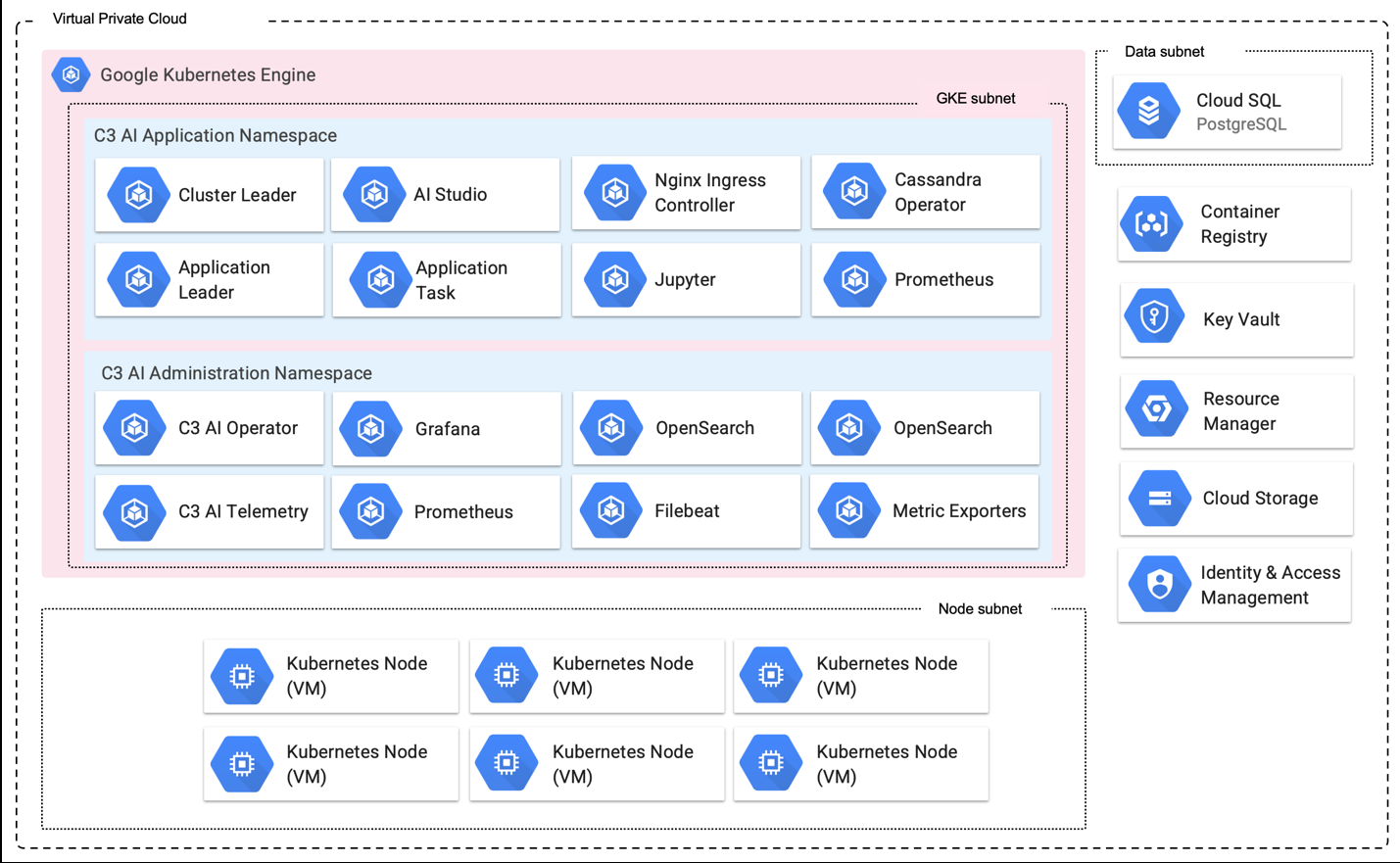
GKE subnet -- C3 AI Application namespace:
- Cluster Leader
- AI Studio
- NGINX Ingress Controller
- Cassandra Operator
- Application Leader
- Application Task
- Jupyter
- Prometheus
GKE subnet -- C3 AI Administration namespace (c3-opsadmin):
- C3 AI Operator
- Grafana
- OpenSearch (×2)
- C3 AI Telemetry
- Prometheus
- Filebeat
- Metric exporters
Data range: Cloud SQL for PostgreSQL (private IP).
External services: Cloud KMS, Resource Manager, Cloud Storage, Identity and Access Management, Artifact Registry.
Node subnet: Kubernetes node VMs (the count depends on the node pool configuration; 6+ in a typical environment).
5. Environment teardown
Use this chapter to rebuild a development cluster, destroy a test cluster, recover from a corrupt deployment, or decommission a customer-hosted cluster. Run destroy operations in the reverse order of the initial apply: destroy c3cluster first, then bootstrap.
Before you start:
- Confirm the teardown with your C3 AI account team. Teardown of a production cluster is irreversible.
- Back up any data you must keep: Cloud SQL exports, Cloud Storage object contents, and cluster configuration files.
5.1 Disable delete protection
The default deployment sets enable_delete_protection = true, which protects the GKE cluster, Cloud SQL instances, and the default GCS bucket (as force_destroy = false). Set it to false in the c3cluster module and apply:
terraform plan --out out.plan
terraform apply "out.plan"
Review the plan to confirm the only changes are the protection flags. A bucket or instance with an explicit per-resource override (deletion_protection, force_destroy) keeps that value; change those too.
5.2 Resolve customer-managed key protection (KMS)
Skip this section if use_gcp_managed_keys = true.
With customer-managed keys, the KMS crypto key is declared with lifecycle { prevent_destroy = true } (modules/kms/main.tf), so terraform plan -destroy fails with a "Instance cannot be destroyed" error. Google Cloud also does not delete key rings or keys; only key versions can be scheduled for destruction. Choose one approach, and agree it with C3 AI:
Remove the key resources from state (recommended), leaving the key ring in place:
Command Lineterraform state list | grep gcp-kms terraform state rm 'module.c3cluster.module.gcp-kms[0].google_kms_crypto_key.crypto_keys["KEY_NAME"]'Adjust the address to your module path. Then schedule destruction of the key versions with gcloud kms keys versions destroy once the data they protect is gone.
Maintain a local copy of the module without the lifecycle block. This conflicts with the "reapply customizations on each version" rule; avoid unless required.
Rebuild in the same project: the key ring and key names persist after teardown. Set a new kms_key_ring_name / kms_crypto_key_name on the rebuilt cluster, or import the existing key ring and key.
5.3 Destroy the c3cluster module
From the c3cluster directory:
terraform plan -destroy --out destroy.plan
terraform apply "destroy.plan"
Review the destroy plan carefully. This removes the GKE cluster and node pools, the Cloud SQL instance, GCS buckets, service accounts and IAM bindings, DNS zones, and network resources (VPC, subnets, firewall rules, NAT, Cloud Armor).
Cloud SQL private connection. Deleting the Private Services Access connection can fail with "producer services are still using this connection" until the Cloud SQL instance is fully removed. Wait for the instance deletion to finish and retry the apply.
5.4 Destroy the bootstrap module
From the bootstrap directory:
terraform plan -destroy --out destroy.plan
terraform apply "destroy.plan"
This removes the custom roles ({project_name}c3icrole01, {project_name}c3dopsrole01), their bindings, and disables the APIs the module enabled (disable_dependent_services = true).
If bootstrap created the project (is_org_admin = true), this step does not delete the project or its folder. With the pinned provider, google_project defaults to deletion_policy = "PREVENT" and google_folder to deletion_protection = true, and bootstrap sets neither. The destroy removes the custom roles and their bindings and disables the APIs, then fails at the project. To keep the project, remove module.bootstrap.google_project.project[0] and module.bootstrap.google_folder.project_folder[0] from state before you destroy. To delete it, run gcloud projects delete PROJECT_ID after the destroy stops, remove both resources from state, and delete the folder once the project is gone.
Deleted custom roles keep their IDs reserved for a period, so a rebuild with the same project_name may require waiting or choosing a different role_name.
5.5 Clean up remote state
If you configured a remote state backend (see State management), the GCS state bucket is not removed by the steps above. Delete the state objects and, if no other environments use the bucket, the bucket itself, once you no longer need the state history.
If a destroy plan shows resources you did not expect, such as resources created outside Terraform or resources that depend on artifacts in another project, stop and reconcile before applying. Do not force-delete resources unless you are certain they are not in use.
Common issues and troubleshooting
The following issues are commonly encountered during infrastructure deployment. Review these before contacting C3 AI support.
GKE nodes cannot access the internet
Cause: Cloud NAT is misconfigured, the Cloud Router is missing, or an organization-level egress policy blocks traffic.
Solution: Verify that the cluster's Cloud Router and Cloud NAT exist and cover the GKE subnet ({project_name}-sn-kube-1) and its secondary ranges. Check Cloud NAT logs for dropped connections or port exhaustion and tune nat_min_ports_per_vm, nat_max_ports_per_vm, or network_extra_nat_address_count. If you apply egress filtering, allow the endpoints in Endpoint access.
C3 AI Operations cannot reach the application or the GKE API
Cause: C3 AI Operations IP addresses are not in ip_allowlist, or gke_ip_allowlist overrides the authorized networks.
Solution: ip_allowlist feeds three controls: the VPC firewall rule on port 443, the Cloud Armor allow rules, and the GKE master authorized networks. Verify the C3 AI Operations addresses are present. If gke_ip_allowlist is set, it replaces the list used for the GKE API. Cloud Armor returns 404 for sources that match no allow rule. If you use a bastion, the module creates no port 22 rule; verify your own firewall allows SSH from the source C3 AI Operations specifies for its PAM connection.
Certificate validation fails
Cause: The issuing Certificate Authority's trust chain is not present in the cluster.
Solution: If using a certificate from a public Certificate Authority, verify the certificate chain file is included alongside the certificate. If using a certificate from an internal Certificate Authority or a self-signed certificate, coordinate with the C3 AI Center of Excellence to pre-stage the required trust chain in the cluster before re-submitting the certificate.
Cluster validation utility reports failures
Cause: One or more infrastructure requirements are not met.
Solution: Review the specific validation failures reported by the utility. Remediate each issue according to the error messages. Re-run the validation utility after remediation. All checks must pass before C3 AI Operations can proceed.
Cloud SQL PostgreSQL is inaccessible from GKE
Cause: The Private Services Access connection, its allocated range, or the firewall rules are not in place.
Solution: Cloud SQL uses a private IP from the allocated range (default 10.0.4.0/24), not the GKE subnet. Verify the service networking connection exists and the instance {project_name}-pg-shared has a private IP. Verify the firewall rule {project_name}-internal-5432 allows TCP 5432 from gke_cidr_block. When using existing_network_configuration, verify data.allocated_global_address_range_name names an allocated range that is peered with the VPC.
Terraform apply fails with permission errors
Cause: The identity running Terraform does not hold the setup role, or required APIs are not enabled.
Solution: Verify the identity holds projects/PROJECT_ID/roles/{project_name}c3icrole01. Bootstrap creates this role but does not grant it, and it may not cover every configuration (for example, network_psc_enabled = true needs compute.globalForwardingRules.create). If errors name a missing permission, confirm with C3 AI Operations before granting additional permissions. If an API error appears, verify bootstrap completed and allow a few minutes for API enablement to propagate.
gcloud projects add-iam-policy-binding returns NOT_FOUND for the role
Cause: The role ID was written with hyphens.
Solution: Terraform removes hyphens from custom role IDs. Use {project_name}c3dopsrole01 and {project_name}c3icrole01, not {project_name}-c3dopsrole-01. Run gcloud iam roles list --project PROJECT_ID to confirm the IDs.
Terraform apply fails with "Command not found: Terraform"
Cause: The Terraform binary is not in your system PATH.
Solution: Install Terraform using TFSwitch or download the correct binary from the HashiCorp website. Run tfswitch in your working directory to select the correct version. See the Get Started in Google Cloud -- Install Terraform page on the HashiCorp Terraform website.
Terraform plan proposes a GKE or PostgreSQL version change
Cause: The module was upgraded to a newer release that changed the postgres_version default (4.x module releases default to POSTGRES_17 and GKE 1.36). For GKE, gke_version is only a minimum; when the NO_MINOR_UPGRADES exclusion in gke_upgrade_maintenance_policy ends (default 2027-04-11), GKE moves the cluster to the next minor version regardless of gke_version.
Solution: Keep the module at the release you were given, or pin postgres_version = "POSTGRES_15" if you must move to a newer release. A PostgreSQL major-version change on an existing instance is an in-place upgrade that cannot be reverted. Do not apply a plan that changes postgres_version unless you intend it. Coordinate GKE minor upgrades and the maintenance policy with C3 AI Operations.
Project name rejected or role IDs look wrong
Cause: Terraform validates only that project_name is 15 characters or fewer.
Solution: Follow Appendix A: Cluster Naming Convention. A name containing hyphens is accepted by terraform plan but produces role IDs that differ from the role titles.
Deletion protection prevents terraform destroy
Cause: The module enables deletion protection by default (enable_delete_protection = true) for GKE, Cloud SQL, and Cloud Storage. With customer-managed keys, the KMS crypto key also has prevent_destroy.
Solution: Set enable_delete_protection = false and run terraform apply before terraform destroy. For KMS, follow 5.2 Resolve customer-managed key protection (KMS).
Images or Google APIs unreachable from private nodes
Cause: The private DNS zones for Google APIs are missing or point to the wrong endpoint.
Solution: Verify the Cloud DNS private zones (googleapis.com, gcr.io, pkg.dev, and others) are attached to the VPC. Check enable_private_google_api_routing, enable_restricted_google_api_routing, and network_psc_enabled. With an existing network, the module still creates these zones on that VPC. If the VPC already has private zones for these domains, set enable_private_google_api_routing = false and keep your own.
No firewall rules or Cloud Armor policy were created
Cause: existing_network_configuration is set, which skips the network and firewall modules.
Solution: Create the equivalent VPC, NAT, firewall rules, Cloud Armor policy, and SSL policy yourself. See Using an existing network.
Appendix A: Cluster naming convention
The cluster name is used throughout the deployment to name Google Cloud resources, IAM roles, subnets, service accounts, and Kubernetes objects ({project_name}-vpc-1, {project_name}-pg-shared, c3--{project_name}, and others). Choosing a name that follows the required convention is critical. Changing a cluster name after deployment requires rebuilding infrastructure.
Format
| Environment | Format | Example |
|---|---|---|
| Dev / QA | stggke{customerabbreviation} | stggkecust |
| Production | prdgke{customerabbreviation} | prdgkecust |
Rules
All of the following rules are required by C3 AI. The Terraform module itself only validates the maximum length (rule 6), so a non-conforming name can pass terraform plan and still cause problems during installation. For example, hyphens are removed from custom IAM role IDs, so a name with hyphens yields role IDs that no longer match their titles:
- Must start with a letter -- cannot start with a number.
- Lowercase only -- no uppercase letters are allowed.
- No hyphens -- the - character is not allowed.
- No special characters -- only lowercase letters (a-z) and numbers (0-9).
- No diacritics -- no accented or non-ASCII letters (for example, é, ñ, ü).
- Maximum length -- 15 characters or fewer total.
- Required prefix -- must begin with stg (for dev/QA) or prd (for production).
- Required cloud indicator -- must include gke immediately after the environment prefix.
Terraform reference: set project_name when it differs from project_id. When omitted, project_id is used as the name and must follow the same rules.
Valid examples
- stggkecust
- prdgkeacme
- stggketest01
- prdgkecorp
Invalid examples
| Name | Problem |
|---|---|
| stg-gke-cust | Contains hyphens |
| StgGkeCust | Contains uppercase letters |
| stgawscust | Wrong cloud identifier (should be gke) |
| gkestgcust | Wrong prefix order (environment must come first) |
| stggkecustomerlongname | Exceeds 15 characters |
| 1stggkecust | Starts with a number |
| stggke-cust | Contains a hyphen |
Appendix B: Post-deployment information handoff
After infrastructure deployment is complete, you must provide C3 AI Operations with the following information. Gathering this information in advance will accelerate the platform installation. Share credentials and keys through your approved secret store (for example Google Secret Manager), never by email or chat.
| # | Information Item | How to Obtain | Example |
|---|---|---|---|
| 1 | C3 AI Operations credentials | Add the requested principals to delegated_iam_role_members (bootstrap) or bind the delegated role as in Installation steps 2.1 | user:ops@customer.com |
| 2 | GKE cluster name | Console -> Kubernetes Engine -> Clusters, or gcloud container clusters list --project PROJECT_ID | stggkecust-kube-1 |
| 3 | GCP region | Your deployment region (c3_region) | us-west1 |
| 4 | Project ID | Your dedicated project | stggkecust |
| 5 | Cloud SQL private IP | Console -> SQL -> {project_name}-pg-shared -> Private IP address, or gcloud sql instances describe {project_name}-pg-shared --format="value(ipAddresses[0].ipAddress)" | 10.0.4.2 |
| 6 | PostgreSQL admin password | The module sets no password. Console -> SQL -> instance -> Users -> postgres -> Change password, or gcloud sql users set-password postgres --instance={project_name}-pg-shared --prompt-for-password | Secure password string |
| 7 | Service account principals | gcloud iam service-accounts list --project PROJECT_ID; provide c3aiops@PROJECT_ID.iam.gserviceaccount.com and c3server@PROJECT_ID.iam.gserviceaccount.com | c3aiops@stggkecust.iam.gserviceaccount.com |
| 8 | GKE subnet and secondary ranges | Console -> VPC network -> Subnets -> {project_name}-sn-kube-1; note region, primary range, and the pod and service secondary range names | stggkecust-sn-kube-1-pod-range |
| 9 | Cloud Storage bucket name | Console -> Cloud Storage -> Buckets. Default is c3--{project_name}; there is one bucket unless gcs_buckets was overridden | c3--stggkecust |
| 10 | Domain name (FQDN) | Your designated domain | c3project.customer.com |
| 11 | SSL certificates | Your certificate files from a public or internal CA | Private key, public key, certificate chain |
| 12 | Cluster validation results | Output from C3 AI Cluster Validation Utility | Validation report file |
Appendix C: Optional features
Features present in the Terraform module. Each is opt-in unless stated. Longer examples are in the repository under examples/.
C.1 Node pools
Three variables control GKE node pools (nodepools.tf):
| Variable | Behavior |
|---|---|
| gke_default_node_pools | Overrides machine_type, node_count, min_count, max_count, and guest_accelerator of the 8 default pools. Labels and taints are fixed. |
| gke_extra_node_pools | Adds pools on top of the defaults. All pool attributes are configurable. |
| gke_custom_node_pools | Replaces the defaults entirely when non-empty. |
GPU pools: see examples/gpu-nodepools/README.md. Not every zone offers every GPU; set node_locations on the pool.
C.2 GKE upgrades and maintenance
See examples/gke-auto-upgrade/README.md.
- gke_enable_auto_upgrade (default true) and gke_release_channel (default REGULAR).
- gke_upgrade_maintenance_policy: default window Sundays 06:00 UTC with a NO_MINOR_UPGRADES exclusion (1.35 patch-only, ending 2027-04-11 in this release) tied to the default version's end of standard support. Override to allow minor upgrades or to change the window.
- gke_version sets the minimum control plane version. The exclusion keeps the cluster on the default minor version until its end date, after which GKE upgrades per the release channel.
- default_upgrade_strategy (SURGE or BLUE_GREEN) with default_surge_upgrade_settings / default_blue_green_upgrade_settings.
- When you set gke_version to a version other than the module default, update the exclusion name and end time to that version's end-of-standard-support date.
C.3 Cloud SQL
- Default instance: {project_name}-pg-shared, db-custom-16-106496, 250 GB, ENTERPRISE, private IP, backups and PITR on (7 days of backups and 7 days of transaction logs). Baseline flags include max_connections=5000 and autovacuum tuning (postgres_default_database_flags merges over them).
- Multiple instances: postgres_instances (per-instance size, edition, flags, backups, deletion_protection). A per-instance database_flags list replaces the baseline flags instead of merging with them, and a per-instance edition defaults to ENTERPRISE regardless of postgres_default_edition.
- ENTERPRISE_PLUS edition needs a db-perf-optimized-* instance_type; the default db-custom-16-106496 isn't valid for it. postgres_instances entries with edition = "ENTERPRISE_PLUS" default to data cache on, 14 days of transaction logs, and 15 backups. The default instance created through postgres_default_edition keeps the 7-day defaults with data cache off.
- Major version upgrades: see docs/FLEXIBLE_PG_UPGRADE.md (covers 11 → 15). They cannot be reverted; upgrade extensions first.
- postgres_insights_config enables Query Insights.
- Transport encryption: the instance accepts both encrypted and unencrypted connections (ALLOW_UNENCRYPTED_AND_ENCRYPTED). Connections use private IP only. Enforce TLS in client configuration (for example sslmode=require).
C.4 Encryption and storage
- use_gcp_managed_keys = true skips KMS and uses Google-managed encryption. Keep it consistent between bootstrap and c3cluster.
- KMS keys rotate every 90 days; key rings and keys cannot be deleted (see 5. Environment teardown).
- gcs_buckets overrides the default bucket list; gcs_public_access_prevention (inherited default; set enforced where policy requires).
- Regional replication: global_location, gcs_default_storage_class, gcs_dual_backup_location (see examples/regional-replication/README.md). Changing a bucket from single-region to multi-region forces recreation; multi-region buckets need a multi-region KMS key.
- Object versioning is not enabled on the workload bucket by default.
C.5 Edge protection
- Cloud Armor default-deny with ip_allowlist / ipv6_allowlist, preconfigured WAF rules (preview-only until waf_enforce_managed_rules = true; override with waf_security_policy_rules), and rate limiting through waf_rate_based_rules (examples/rate-limiting/README.md).
- firewall_extra_security_policies adds additional policies.
- ports (default ["443"]) controls the ports opened to the allowlist.
C.6 Private Service Connect
network_psc_enabled = true publishes the platform and Google API access through Private Service Connect instead of VPC peering (no Vertex AI peering range is created). After the platform is installed, give the service attachment URL to the consuming team. See examples/private-service-connection/README.md.
kubectl -n <app-namespace> get serviceattachment c3-sa -o jsonpath='{.status.serviceAttachmentURL}'C.7 IPv6 dual-stack
ipv6_support = true with ipv6_allowlist, internal_ipv6_range (default fd20:678::/48), and ipv6_access_type. It enables dual-stack on the GKE cluster and uses the advanced datapath. See examples/ipv6_dual_stack/README.md.
C.8 Multiple clusters in one project
Use global_address_names to give each cluster unique names for the data, vertexai, and psc global addresses. Changing names on an existing cluster forces replacement of those global addresses and can briefly interrupt Cloud SQL and Vertex AI connectivity. Plan any rename with C3 AI Operations.
C.9 Vertex AI
vertexai_enabled (default true) enables the Vertex AI and Artifact Registry service identities. vertexai_service_account_enabled (default true) creates {project_name}-vtx with roles/aiplatform.user.
C.10 Logging and monitoring
gke_logging_service and gke_monitoring_service default to none. Set them to logging.googleapis.com/kubernetes and the monitoring equivalent if you want GKE to send data to Cloud Logging and Cloud Monitoring (extra cost applies).
Appendix D: Variable reference
Input variables of the c3cluster (root) module at v3.0.11, with defaults read from variables.tf. Variables marked required have no default. The module README in the downloaded registry folder is generated by terraform-docs and is the authoritative list for your module version.
| Variable | Default | Description |
|---|---|---|
| project_id | required | The ID of the project |
| project_name | null | The name of the project |
| c3_region | required | c3_region |
| c3_labels | {} | Generic C3 Labels for GCP resources |
| c3_env | null | c3_env |
| c3_pod | null | c3_env |
| c3_owner | "c3" | c3_owner |
| global_location | null | Specific region to use when deploying multi region KMS and GCS |
| activate_api_identities | (see variables.tf) | The list of service identities (Google Managed service account for the API) to force-create for the project (e.g. in order to grant additional roles). |
| service_accounts | null | Service Accounts for c3 deployment with workload load identities |
| network_extra_nat_address_count | 0 | The number of extra IPs for cloud NAT. Note: once allocated, terraform can't explicitly delete the NAT address |
| nat_min_ports_per_vm | 0 | Minimum number of ports allocated to a VM from a VM's external IP address |
| nat_max_ports_per_vm | 2048 | Maximum number of ports allocated to a VM from a VM's external IP address |
| nat_enable_dynamic_port_allocation | true | Enable dynamic port allocation |
| network_psc_enabled | false | Enable Private Service Access for GCP services |
| enable_private_google_api_routing | true | Enable DNS routing for Google APIs through private.googleapis.com. Only applies when network_psc_enabled is false |
| enable_restricted_google_api_routing | false | Enable DNS routing for Google APIs through restricted.googleapis.com. Only applies when network_psc_enabled is false |
| network_proxy_cidr_block | "10.0.5.0/24" | CIDR used by subnet dedicated to proxy |
| network_psc_cidr_block | "10.0.6.48/28" | CIDR used by subnet dedicated to PSC NAT |
| network_nlb_cidr_block | "10.0.6.64/28" | IPV4 CIDR used by dual stack subnet for private NLB |
| gke_master_ipv4_cidr_block | "10.0.6.16/28" | CIDR block for GKE control plain |
| gke_svc_secondary_cidr_block | "172.16.0.0/18" | secondary subnet CIDR used for GKE services |
| network_data_cidr_global_address_address | "10.0.4.0" | Global address for Data services |
| network_data_global_address_prefix_length | 24 | Global address prefix length for Data services |
| network_vertexai_global_address_address | "10.0.7.0" | Global address for Vertex AI |
| network_vertexai_global_address_prefix_length | 24 | Global address prefix length for Vertex AI |
| gke_ip_allowlist | [] | All List of ips to access C3 GKE Cluster |
| gke_pod_secondary_cidr_block | "172.20.0.0/14" | secondary subnet CIDR used for GKE pods |
| gke_cidr_block | "10.0.0.0/22" | CIDR used by GKE subnet |
| gke_version | "1.35" | The Kubernetes version of the masters. If set to 'latest' it will pull latest available version in the selected region. |
| gke_logging_service | "none" | The logging service that the GKE cluster should write logs to. Available options include logging.googleapis.com/kubernetes, logging.googleapis.com ... |
| gke_logging_config_components | { enable_components = null } | The list of GKE components to log |
| gke_monitoring_service | "none" | The monitoring service that the GKE cluster should write metrics to. Automatically send metrics from pods in the cluster to the Stackdriver Monitor... |
| gke_gce_persistent_disk_csi_driver_config | true | Enable the Google Compute Engine Persistent Disk Container Storage Interface (CSI) Driver |
| gke_gcp_filestore_csi_driver_config | true | Enable the Filestore CSI driver |
| gke_node_locations | [] | Availability zones for GKE nodes |
| gke_default_node_pools | (see variables.tf) | List of maps containing node pools with customizable attributes |
| gke_extra_node_pools | {} | Extra node pools in addition to default node pools |
| gke_custom_node_pools | {} | Custom node pools that override default and extra node pools |
| gke_enable_l4_ilb_subsetting | false | Enable L4 ILB subsetting |
| gke_gateway_controller_release_channel | "CHANNEL_STANDARD" | Release channel for gateway controller |
| gke_enable_auto_upgrade | true | Enable auto upgrade for GKE |
| gke_enable_auto_repair | true | Enable auto repair for GKE |
| gke_release_channel | "REGULAR" | The release channel of this cluster. Accepted values are UNSPECIFIED, RAPID, REGULAR and STABLE. |
| gke_upgrade_maintenance_policy | (see variables.tf) | Maintenance policy for the node pool |
| default_upgrade_strategy | "SURGE" | Node upgrade strategy |
| default_gke_autoscaling_location | "ANY" | Default autoscaling location policy |
| default_gke_image_type | "COS_CONTAINERD" | Default gke nodes image type |
| default_surge_upgrade_settings | { max_surge = "1" max_unavailable = "0" } | Surge node upgrade settings |
| default_blue_green_upgrade_settings | (see variables.tf) | Blue green node upgrade settings |
| default_gke_disk_size_gb | 500 | default gke nodes disk size in gb |
| ip_allowlist | [] | All List of ips to access C3 network. Priority will be assigned on descending order. |
| ipv6_allowlist | [] | All List of ipv6s to access C3 network. Priority will be assigned on descending order. |
| existing_network_configuration | null | IDs and attributes expected from an existing network |
| ipv6_support | false | Enable IPv6 support |
| internal_ipv6_range | "fd20:678::/48" | CIDR block for IPv6 private network |
| ipv6_access_type | "EXTERNAL" | The type of IPv6 access for the subnetwork |
| postgres_instances | null | DB instances |
| postgres_default_instance_type | "db-custom-16-106496" | Instance type. Ref https://cloud.google.com/compute/docs/instances/creating-instance-with-custom-machine-type#create |
| postgres_default_disk_size | "250" | Disk size for postgres |
| postgres_default_backup_enabled | "true" | Enable / Disable backup |
| postgres_default_point_in_time_recovery_enabled | "true" | Enable point_in_time_recovery |
| postgres_default_backup_transaction_log_retention_days | 7 | transaction logs retention days |
| postgres_default_backup_retention_days | 7 | Number of days to retain backups |
| postgres_default_database_flags | [] | Additional database flags merged over baseline flags. See https://cloud.google.com/sql/docs/postgres/flags |
| postgres_version | "POSTGRES_15" | DB version. Ref https://cloud.google.com/sql/docs/db-versions |
| postgres_insights_config | null | Settings for Query Insights |
| postgres_default_edition | "ENTERPRISE" | Default edition of the Postgres instance |
| postgres_default_data_cache_config | false | Default enabling of data cache for the instance |
| kms_crypto_key_name | null | Encryption key for GCS, GKE & PG |
| kms_key_ring_name | null | Specific name for keyring |
| gcs_cors_rules | [] | Configuration of CORS for bucket with structure as defined in https://registry.terraform.io/providers/hashicorp/google/latest/docs/resources/storage_bucket#cors |
| gcs_cors_domains | [] | List of domains that are allowed to make CORS requests. CORS rules will be created for each domain in the list. |
| gcs_buckets | null | Buckets |
| gcs_public_access_prevention | "inherited" | Prevents public access to a bucket |
| gcs_default_storage_class | "STANDARD" | Default GCS storage class |
| gcs_dual_backup_location | null | backup region to use when GCS is using dual-region replication |
| firewall_rules | [] | Firewall rules |
| firewall_include_nat_address | true | Enable adding NAT prefix in firewall allow list |
| security_policy_rules | null | Google Compute Security Policy |
| ports | ["443"] | ports to open in the firewall |
| firewall_extra_security_policies | [] | Extra Google Compute Security Policies |
| waf_security_policy_rules | null | WAF values for Google Compute Security Policy |
| waf_enforce_managed_rules | false | waf enforce managed rules |
| waf_rate_based_rules | [] | The custom rate based WAF rules |
| vertexai_enabled | true | Enable Vertex AI |
| vertexai_service_account_enabled | true | Enable Vertex AI service account |
| use_gcp_managed_keys | false | Flag to indicate if GCP managed keys should be used |
| enable_delete_protection | true | Enable deletion protection for mission-critical resources (GKE, CSQL, GCS). When true, resources are protected from accidental deletion. Set to fal... |
| global_address_names | null | Override names for global addresses used in VPC peering and Private Service Connect. |
Support and escalation
For questions during installation:
- Contact the C3 AI Center of Excellence (CoE). Obtain contact details from your C3 AI account manager.
For critical installation blockers:
- Contact your assigned C3 AI account manager directly.
For post-installation platform issues:
- Contact C3 AI Customer Support. Obtain portal access details from your C3 AI account manager.