Register a Data Lakehouse Catalog
A catalog is the Data Lakehouse's entry point to a set of DataLake.Table instances. The catalog organizes the tables into namespaces and gives you one interface to list and read them. C3 can store and manage the tables itself, or read them live from an external database, Snowflake, or AWS Glue.
Two types of catalogs are available:
- A managed catalog stores tables that C3 owns and manages, in object storage or a metastore (a database that tracks table metadata).
- A foreign catalog is a live connection to an external system (a JDBC database, Snowflake, or AWS Glue). C3 does not persist the tables. C3 reads the table schema and data on demand.
You register a catalog with c3.DataLake.createCatalog, passing a DataLake.Catalog.Config subtype for the kind you want. Managed catalogs fill in platform defaults, so their config can be left empty. Foreign catalogs require connection details. JDBC and Snowflake catalogs take JdbcCredentials or a reference to an existing external data source. An AWS Glue catalog takes a region and AWS credentials.
Users who do not have a broader role, such as C3.AppAdmin, need the C3.DisclosureRequestor role to register and read managed, JDBC, and Snowflake catalogs. The role does not grant DataLake.Catalog.Iceberg.Glue or DataLake.Catalog.Config.Iceberg.Glue. Use a broader role to register an AWS Glue catalog.
Catalog types
| Family | Catalog | Backing store | Best for |
|---|---|---|---|
| Managed | Hadoop | Object store (Amazon S3, Google Cloud Storage, Azure Data Lake Storage) | Default for most applications; lowest configuration overhead. |
| Managed | Iceberg JDBC metastore | Relational database that holds Iceberg metadata; data files live in object storage | Production tenants that need a metastore with concurrent writers. |
| Managed | External Application | Read view into another C3 Application's catalog | Cross-application sharing without copying data. |
| Foreign | Generic JDBC | JDBC database, such as PostgreSQL, SQL Server, or MySQL | Load tables into Spark. Pandas and tuple reads are not supported. |
| Foreign | Snowflake | Snowflake | Read and create Snowflake tables from C3 with native optimizations. |
| Foreign | AWS Glue | AWS Glue Data Catalog; Iceberg data files in Amazon S3 | Read existing Iceberg tables registered in Glue. |
The default catalog for most applications is a Hadoop catalog named datasets.
Common catalog operations
The following operations work the same on every catalog type:
Get a catalog
catalog = c3.DataLake.Catalog.inst()Or by name:
catalog = c3.DataLake.getCatalog(c3.DataLake.Catalog.DEFAULT_CATALOG)
catalog = c3.DataLake.Catalog.forName("my_catalog")
List every registered catalog:
c3.DataLake.listCatalogs()List namespaces and tables
catalog.namespaces()
catalog.tables(c3.DataLake.Catalog.TableSpec.make())
Filter by namespace. The default namespace is dfl:
spec = c3.DataLake.Catalog.TableSpec.make().withNamespace("dfl")
catalog.tables(spec)
The Studio Tables tab lists tables for the selected catalog; the SQL Editor tab's View Reference Table panel is a quick way to scan a table.
Get a table
table = catalog.table("turbineMeasurements")Read a table into Spark
Loading a table into a Spark DataFrame works identically for managed and foreign catalogs:
ss = c3.SparkCluster.inst().dataSparkSession()
spark_df = ss.load_table(table)Managed catalogs
In a managed catalog, C3 owns the table lifecycle and stores data in Iceberg format in object storage or a metastore. Most applications need only the default datasets catalog. Register additional managed catalogs when a workload needs its own metastore or cross-application access.
In C3 AI Studio
Use Create new catalog for managed catalogs that need only standard configuration.
- Open your application in C3 AI Studio.
- Select Data Lakehouse in the Data section of the side navigation.
- Select the Catalogs tab.
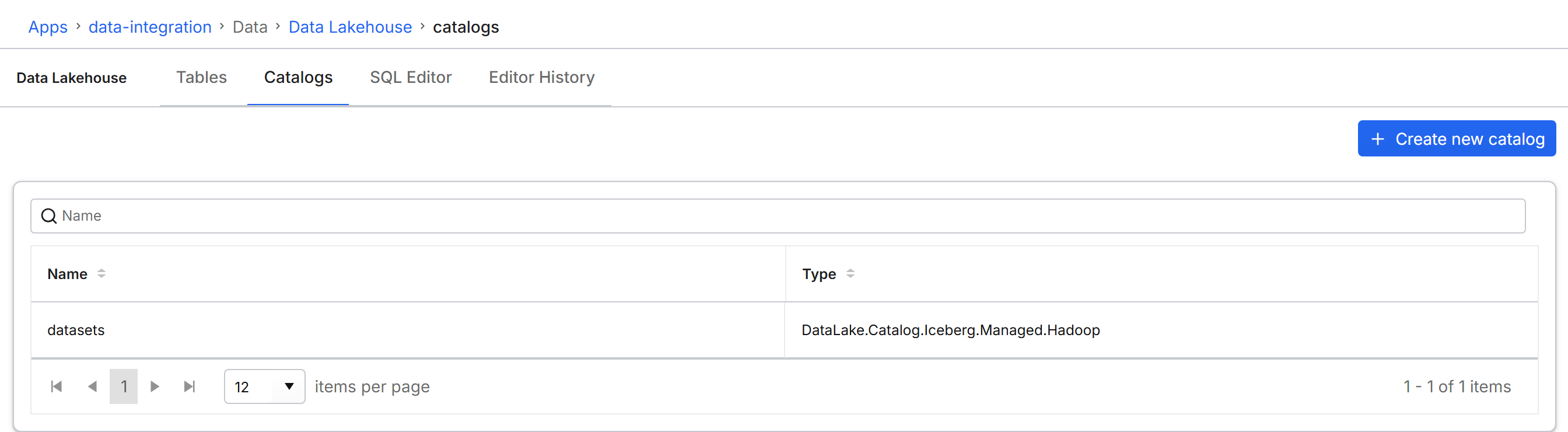
- Select Create new catalog at the top right.
- From the Catalog type dropdown, select JDBC, Hadoop, or External App.
- Enter a Catalog name.
- For External App, enter the App Id and the External catalog name of the catalog in that application.
- Select Create catalog.
The catalog appears in the grid and is selectable on the SQL Editor tab.
The Studio form covers managed catalogs with their platform-default connection. Register foreign catalogs, or override custom connection settings, from a notebook, as the following sections show.
Register a Hadoop catalog
Use a Hadoop catalog for a file-system-style catalog over an object store. The catalog keeps its table metadata in that object store.
catalog = c3.DataLake.createCatalog(
    "analytics",
    c3.DataLake.Catalog.Config.Iceberg.Hadoop.make()
)Register an Iceberg JDBC metastore catalog
Use this catalog for managed Iceberg tables with concurrent writers. The catalog tracks Iceberg metadata in a relational database; the data files still live in object storage.
catalog = c3.DataLake.createCatalog(
    "jdbc",
    c3.DataLake.Catalog.Config.Iceberg.Jdbc.make()
)Register an External Application catalog
Use an External Application catalog to read tables that live in another C3 Application without copying the data. The owning application must grant your consumer application access before you register the catalog. Set catalogName to any catalog that exists in the target application. See Share Data Lakehouse Tables Across Applications for the full producer flow.
conf = c3.DataLake.Catalog.Config.ExternalApp.make({
    "name": "external",
    "appId": "local-c3-datalake",
    "catalogName": c3.DataLake.Catalog.DEFAULT_CATALOG
})
catalog = c3.DataLake.createCatalog("external", conf)Foreign catalogs
Foreign catalogs let you query data that lives in an external system without duplicating it into C3. C3 does not persist table metadata for a foreign catalog. C3 reads schema, namespaces, and table names from the remote system.
For Generic JDBC and Snowflake, the external database, schema, and table map to the C3 catalog, namespace, and table. Schema and primary keys are read from the remote database. For AWS Glue, a Glue database maps to a namespace, and each table is an existing Iceberg table whose data files stay in Amazon S3.
Three types of foreign catalog are available:
- Generic JDBC (DataLake.Catalog.Jdbc.Generic): connects to a JDBC database, such as PostgreSQL, SQL Server, or MySQL. Spark is the supported read path.
- Snowflake (DataLake.Catalog.Snowflake): supports reads,
createTablewithout partitions or primary keys, andimportCsvinAPPENDorOVERWRITEmode. - AWS Glue (DataLake.Catalog.Iceberg.Glue): reads Iceberg tables whose metadata lives in the AWS Glue Data Catalog.
Capability matrix
| Capability | Generic JDBC | Snowflake | AWS Glue |
|---|---|---|---|
namespaces, tables, table | Yes | Yes | Yes |
Read into Spark (load_table) | Yes | Yes | Yes |
readAsTuples | No | Yes | Yes |
read_pandas | No | Yes | Yes |
createTable and importCsv | No | Yes | No |
Provide JDBC credentials
Build JdbcCredentials from a server endpoint. The schema you pass becomes the catalog's default namespace. Use this helper for Generic JDBC and Snowflake catalogs.
cred = c3.JdbcCredentials.fromServerEndpoint(
    "my-postgres-host.example.com",  # host
    5432,                            # port
    "postgres",                      # datastore type
    "my_database",                   # database name
    "my_schema",                     # schema (default namespace)
    "username",                      # username
    "password"                       # password
)Register a Generic JDBC catalog
Register a Generic JDBC catalog from raw credentials:
config = c3.DataLake.Catalog.Config.Jdbc.Generic.make({"credentials": cred})
catalog = c3.DataLake.createCatalog("my_postgres", config)
Or reference an external SQL source you already configured through Data Fusion, so credentials stay in the store:
config = c3.DataLake.Catalog.Config.Jdbc.Generic.make({"jdbcStore": "my_external_store"})
catalog = c3.DataLake.createCatalog("my_external_db", config)
Override the database or default schema on the same connection:
config = c3.DataLake.Catalog.Config.Jdbc.Generic.make({
    "jdbcStore": "my_external_store",
    "database": "another_database",
    "defaultSchema": "another_schema"
})
catalog = c3.DataLake.createCatalog("another_db_catalog", config)Register a Snowflake catalog
The Snowflake config extends the JDBC config with Snowflake-specific settings: accountIdentifier, warehouse, and role.
cred = c3.JdbcCredentials.fromServerEndpoint(
    "my_account.snowflakecomputing.com",  # host
    443,                                  # port
    "snowflake",                          # datastore type
    "MY_DATABASE",                        # database
    "PUBLIC",                             # schema
    "snowflake_user",                     # username
    "snowflake_password"                  # password
)

config = c3.DataLake.Catalog.Config.Snowflake.make({
    "credentials": cred,
    "accountIdentifier": "my_account",
    "warehouse": "COMPUTE_WH",
    "role": "DATA_READER"
})
catalog = c3.DataLake.createCatalog("my_snowflake", config)Register an AWS Glue catalog
Use an AWS Glue catalog to read Iceberg tables that are already registered in the AWS Glue Data Catalog. C3 does not create or write these tables.
Set region, accessKey, and secretKey. accessKey and secretKey stay required when you set assumeRole. With assumeRole, those keys identify the caller that assumes the IAM role, and that caller must be allowed to assume the role. Without assumeRole, the same keys access AWS Glue and Amazon S3 directly.
Set customProperties for extra Iceberg settings, such as io-impl and s3.endpoint.
config = c3.DataLake.Catalog.Config.Iceberg.Glue.make({
    "region": "us-east-1",
    "accessKey": "aws_access_key_id",
    "secretKey": "aws_secret_access_key",
    "assumeRole": "arn:aws:iam::123456789012:role/GlueAccess"
})
catalog = c3.DataLake.createCatalog("my_glue", config)
readPartitions fails when a Glue table contains a decimal column. Use readArrowIterator for those tables.
Inspect foreign tables
Namespaces map to external schemas or Glue databases, and table metadata is read from the remote system:
catalog = c3.DataLake.Catalog.forName("my_postgres")
catalog.namespaces()
catalog.tables()

spec = c3.DataLake.Catalog.TableSpec.make({"namespace": "c3"})
catalog.tables(spec)

table = catalog.table("measurements")
table.dataSchema.toString()
Read into Spark with load_table, exactly as for managed catalogs (see Read a table into Spark).
For Snowflake and AWS Glue tables, you can also read to pandas or C3 tuples. Generic JDBC tables do not support these reads:
df = snowflake_table.read_pandas()
snowflake_table.readAsTuples(10)Configure partitioned reads (Generic JDBC)
Spark reads a table in parallel. For a Generic JDBC table, set a Data.Spark.PartitionReadSpec so Spark can split the read. Without that spec, Spark uses a single JDBC connection.
Choose one of two methods:
Column-based partitioning and predicate-based partitioning are mutually exclusive. Set one or the other, not both.
Column-based partitioning
Column-based partitioning splits a numeric, date, or timestamp column into ranges. lowerBound and upperBound only tune the interval math; they do not filter data, and are computed automatically when omitted:
spec = c3.Data.Spark.PartitionReadSpec.make({
    "partitionColumn": "id",
    "numPartitions": "8",
    "lowerBound": "1",
    "upperBound": "1000000"
})
table.setPartitionReadSpec(spec)Predicate-based partitioning
Predicate-based partitioning defines one partition per WHERE expression:
spec = c3.Data.Spark.PartitionReadSpec.make({
    "predicates": ["region = 'US'", "region = 'EU'", "region NOT IN ('US', 'EU')"]
})
table.setPartitionReadSpec(spec)
Each partition opens its own JDBC connection to the external server. Keep numPartitions modest so you do not overload the remote database.
Create and write Snowflake tables
The Snowflake catalog supports reads, createTable (without partitions or primary keys), and importCsv in APPEND or OVERWRITE mode. upsertObjects, importCsvJob, exportCsv, changeSchema, and deleteTable are not supported for Snowflake.
Move a table between catalogs
The Studio user interface does not expose table moves. From a notebook, move a table from one catalog to another without rewriting the data:
jdbc_catalog = c3.DataLake.getCatalog("jdbc")
table = catalog.table("turbineMeasurements")
table.moveToCatalog(jdbc_catalog, True)
The second argument confirms the move and must be True. After the move, you can no longer access the table from the source catalog.