Data Exploration with Apache Spark on C3 Agentic AI Platform
The C3 Agentic AI Platform offers an additional data execution engine choice - Spark. The scope of this integration includes Data Exploration on Spark. Spark provides you with a scalable, distributed execution engine for big data processing. You can now do the following:
- Start and terminate Spark clusters.
- Create remote SparkSessions and use Spark APIs to execute queries on the Spark cluster from JupyterLab.
C3 Agentic AI Platform offers a SparkCluster type to manage the Spark cluster and Data.Spark subtypes that provide PySpark API access. A SparkSession serves as an entry point, offering two ways interact with it. Both of them point to the remote Spark cluster.
Spark Connect SparkSession— Use supported PySpark APIs. Check official API reference for more details. Find supported APIs using the Supports Spark Connect label.c3 Data SparkSession— A C3 Type that represents a native Spark Session, which provides APIs that target Pandas API on Spark with C3 extensions.
Before interacting with a Spark cluster, you must first set it up. You can spin up a Spark cluster endpoint with your custom configuration. Manage Spark clusters with the SparkCluster Type and define the cluster with the SparkClusterSpec Type.
This document shows how to set up Spark Cloud Service and conduct data exploration on the platform.
Start C3 Spark Cluster with Default Configuration
To start a default Spark Cluster, run the following code in Jupyter.
cluster = c3.SparkCluster.create()Start C3 Spark Cluster with Customized Configuration
By default, the C3 server image uses the latest version of Spark. To use a specific version, you must provision to configure it using a command like the following:
cluster = c3.SparkCluster.create({
    "numOfExecutors": 2,
    "executorMemory": "16G",
    "timeout": 10
})
Do not set executeMemory below 16GB, as it reduces the driver core count below 4. The driver core defines resources given to driver pod. Giving this piece of the cluster less than 4 cores compromises its functionality.
Executor settings control resources given to Spark Executors running the main processes. To start a larger cluster, increase numOfExecutors. See SparkClusterSpec for list of all available configurations.
SparkClusterSpec includes an addtionalConfig field that allows users to specify configurations that are not included by default. Specify any Spark application properties as a key-value pair in this field. The following code snippet shows example properties you could add.
cluster = c3.SparkCluster.create({
    "additionalConfig": {"spark.app.name": "app", "spark.driver.maxResultSize": "2g"}
})Monitor the status of C3 Spark Cluster
Run the following code snippet in Jupyter to get the status of the Spark cluster:
cluster.statusSparkCluster includes the following statuses:
- pending — The service is starting up
- available — The service is ready to use. (It may take a few minutes for the service to become available.)
When the service becomes available, proceed to next step to start the data exploration.
List running Spark clusters
An AppAdmin can access the list of running Spark Clusters in the current app through the listForApp method.
c3.SparkCluster.listForApp()Terminate the C3 Spark Cloud Service
When finished with the Spark cluster, use the following command to terminate the service:
cluster.terminate(True)Use C3 Spark Connect
Spark Connect allows remote connectivity to Spark clusters using the DataFrame API. C3 Agentic AI Platform supports Spark Connect protocol in Jupyter to allow you to interact with a Spark cluster. For more information about Spark Connect, please refer to Apache's Spark Connect Overview.
Prerequisites
Before you run Spark Connect you must install extra dependencies in the Jupyter runtime. Jupyter includes a ready-to-use runtime called py-spark to run Spark Connect.
If you decide to instead create your own runtime for pyspark, you must run the following command:
pip install pyspark[connect]==3.5.0This version ofpyspark includes all necessary dependencies for Spark Connect.
In your JupyterLab environment, select Kernel > Change Kernel and choose an adequate runtime. You can alternatively select the name of your current Kernel to update your runtime. 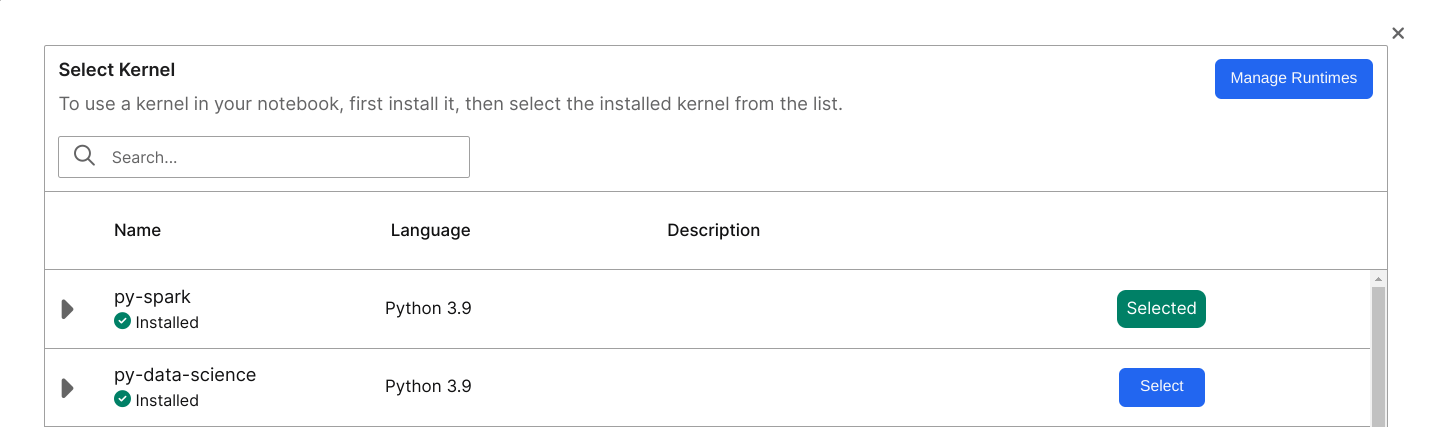
Create Spark Connect Session
Use the getSparkConnectSessoion method to create a Spark Connect Session from the cluster.
spark = cluster.getSparkConnectSession()To create a more customized Spark Connect Session, you create a SparkSession using sparkConnectUrl.
from pyspark.sql import SparkSession
spark = SparkSession.builder.remote(cluster.sparkConnectUrl()).config("c3.auth.token", c3.userSessionToken().signedToken).getOrCreate()
spark is a native Python object that points to the remote Spark Cluster through the sparkConnectUrl.
Start exploration with PySpark APIs
Now that you're connected to a SparkSession, you can start exploration with any Spark Connect supported PySpark APIs. The following code snippet offers some examples.
from datetime import datetime, date
from pyspark.sql import Row

df = spark.createDataFrame([
    Row(a=1, b=2., c='string1', d=date(2000, 1, 1), e=datetime(2000, 1, 1, 12, 0)),
    Row(a=2, b=3., c='string2', d=date(2000, 2, 1), e=datetime(2000, 1, 2, 12, 0)),
    Row(a=4, b=5., c='string3', d=date(2000, 3, 1), e=datetime(2000, 1, 3, 12, 0))
])
df.show()

df.filter('a == 1').show(1)Integration between Spark Connect and C3 Platform
You may need to know the following implementation details of the Spark Connect integration on C3 Agentic AI Platform:
- You can ingest data from the server into native Spark DataFrame without needing to install any custom packages.
- You can use standard Spark reader API supplying special format string and additional parameters in order to execute fetch or evalMetrics operation from native Spark.
- The
batchsizelimit is larger than the default of 2000 for scalability of testing. - During the execution of fetch operation, Spark executors run multiple fetch requests to the C3 server.
- You must provide a FetchSpec for fetch and an EvalMetricsSpec for evalMetrics. You do not need to filter the data in
spec. The following code snippet models how to add a FetchSpec before running a fetch command.
include = 'location,power,manufacturer.name'
spec = c3.Data.SparkFetchSpec.builder().include(include).build()
fetch_df = spark.read.format("c3.spark.c3source.C3TableProvider") \
.option("typeName", "WindTurbine") \
.option("spec", spec.toJsString()) \
.option("action", "fetch").load()Spark Connect limitations
- Since C3 Spark Connect runs on Apache Spark Connect, it offers the same APIs. However, Apache Spark Connect does not support all Spark Dataframe APIs.
- Currently C3 Spark Connect runs through an internal IP address. You cannot access the Spark cluster from outside of host K8 cluster.
C3 Data Spark
C3 Data Spark targets provide the same interface as Pandas API on Spark 3.5.0. Unlike Spark Connect, C3 Data Spark doesn't include extra dependencies. Any runtime can use C3 Data Spark. You can use C3 Data Spark with the Data.SparkSession Type, which logically corresponds to the Spark Connect SparkSession.
Create c3.Data.SparkSession
Call the getDataSparkSession method to create a {link Data.SparkSession} from the cluster.
sparkSession = cluster.getDataSparkSession()Read data into Spark
You can read data into C3 Data Spark using two different methods:
- Read flat files on remote file system.
- Read data from an application data model.
C3 Server uses read-only paths. See Data.SparkSession for the list of supported APIs. Below are some examples usages:
# read data from remote file system, only paths that c3server have access to are readable
df1 = sparkSession.read_csv("gs://path-to-file")

# directly pass manually constructed data
df2 = sparkSession.DataFrame({'a': [1, 2, 3], 'b': [4, 5, 6]})

# This is logically equivalent to c3.WindTurbine.fetch(include = 'location,power,manufacturer.name')
include = 'location,power,manufacturer.name'
spec = c3.Data.SparkFetchSpec.builder().include(include).build()
df3 = sparkSession.fetch(typeName="WindTurbine", spec=spec)Reading feature sets from Feature Store
Use C3 Data Spark API to load data from C3 Feature Store. The following code snippet shows how to load a data frame with the feature set ID feature_set_id to be manipulated with C3 Data Spark API.
df = sparkSession.readFeatureSet(feature_set_id, batchSize=1000, flatten=True)Use the same batch size that you used for feature set materialization.
If the flatten flag is True, then the new date frame flattens the timeseries data.
Start data exploration with Pandas API on Spark
After reading data into Spark, you can perform Pandas operations like the following example:
data2 = df.rename(columns={"variety": "Species"}).drop(["sepalLength"], axis=1).fillna(method='ffill')
data3 = data2.groupby("Species")
data4 = data3.mean()
print(data4)Convert between Data Spark, Spark, and Pandas
The to_spark API allows you to convert a Data.Spark.DataFrame Type to a native Spark Connect DataFrame. The client and Spark cluster do not transfer data. Instead, the Data.Spark.DataFrame Type converts execution plans from C3 Data Spark format to the native execution plan for Spark.
You must first establish a Spark Connect SparkSession before calling to_spark.
Similarly, the to_pandas API converts a Data.Spark.DataFrame Type to a native Pandas DataFrame. The call invokes to_spark internally, which means you must first establish a Spark Connect SparkSession.
Differences between Spark Connect and C3 Data Spark
- Spark Connect uses prebuilt PySpark API to define query plans, which requires your runtime to include Pyspark and Spark Connect as dependencies. It is difficult to extend to integrate with C3 Agentic AI Platform.
- C3 Data Spark provides a custom implementation for creating query plans. It targets Pandas API on Spark, which itself mirrors Pandas API. Developing with this API requires additional effort while allowing you to avoid dependencies on specific runtimes. It also offers more control and the ability to add custom API extensions like Metrics evaluation and Feature Store integration.