Evaluate TimeZones
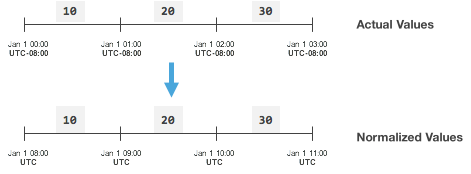
The C3 Agentic AI Platform time series engine can query data in various time zones irrespective of where the source of the data come from. All C3 time series evaluation APIs take in a time zone parameter which indicates the desired timezone for the data produced by the evaluation. By default, the series is normalized in the time zone of the raw data.
Timezone options
Available options are detailed on the TimeZone Type. Some popular choices include:
- NONE — Logical time without any zone information
- UTC — Coordinated Universal Time
- Offset from UTC time — For example, "2010-01-01T00:00:00-08:00". The offset is always shifted 8 hours from the UTC time
- Specific time zone
id— Follows daylight savings for example, "America/Los_Angeles"
Examples
No timezone specified
Below is an example where no time zone is specified and there is no offset from UTC time, resulting in the normalized values being identical to raw actual values.
var ts = SmartBulb.evalMetric({
  expression: "AverageLumens",
  id: "SMBLB1",
  start: "2015-01-01T00:00:00",
  end: "2015-01-01T03:00:00",
  timeZone: "NONE",
  interval: "HOUR",
}).data();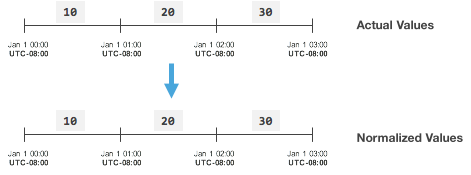
Specifying timezone
To normalize data from disparate sources into the same time zone, provide the time zone in which the developer would like the data to be normalized. This can be done by setting the timeZone field on the header Type that models your time series data.
Note that all header types have an implicit timeZone field.
Consider the SmartBulb measurements time series data example, which is modeled by the SmartBulbMeasurementSeries header Type:
/**
  * A series of measurements taken from a single {@link SmartBulb}.
  */
 entity type SmartBulbMeasurementSeries mixes IntervalDataHeader<SmartBulbMeasurement> schema name "SMRT_BLB_MSRMNT_SRS" {

   // The {@link SmartBulb} for which measurements were taken.
   smartBulb: SmartBulb
 }
To update the time zone for SmartBulb measurements to be UTC, run the following:
SmartBulbMeasurementSeries.update({id == 'SBMS_serialNo_SMBLB1', timeZone:"UTC"});
When evaluating on this time series, the data is adjusted to be displayed in the UTC timezone.
var ts = SmartBulb.evalMetric({
  expression: "AverageLumens",
  id: "SMBLB1",
  start: "2015-01-01T00:00:00",
  end: "2015-01-01T03:00:00",
  interval: "HOUR",
}).data();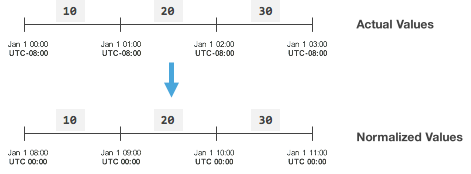
Potential error
- If the query to evaluate time series data that is assigned to the UTC time zone looked like the following (note the
timeZonefield):
var ts = SmartBulb.evalMetric({
  expression: "AverageLumens",
  id: "SMBLB1",
  start: "2015-01-01T00:00:00",
  end: "2015-01-01T03:00:00",
  timeZone: "NONE",
  interval: "HOUR",
}).data();
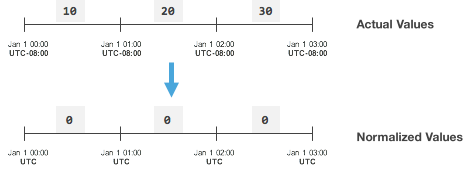
This call does not produce the desired result because the time series header has been specified as UTC, and there is no data on for the period (start and end) requested in UTC. The results of this time series evaluation would be the following:
- To get back the initial results (or "Actual Values"), the following query executes successfully. The difference was made by changing the start and end times:
var ts = SmartBulb.evalMetric({
  expression: "AverageLumens",
  id: "SMBLB1",
  start: "2015-01-01T08:00:00",
  end: "2015-01-01T11:00:00",
  timeZone: "NONE",
  interval: "HOUR",
}).data();