Overview of Invalidation Queues and Asynchronous Processing
The C3 Agentic AI Platform uses queues to parallelize work and run asynchronous logic in the background.
When processing needs to happen in the background, one or more entries are added to a queue. When a task node has resources available, it picks the entry for execution.
This topic explains the inner workings of queues.
See Create Long-Running Jobs for more descriptions of different job types.
Key terminology
Queues and queue entries - The system uses queues to manage tasks that are to be processed asynchronously. There are various types of queues, each serving a different purpose (like BatchQueue and CronQueue). Queue entries are the tasks themselves that are waiting to be processed.
Processing mechanism - Task nodes have scheduling threads that periodically check for available CPU/memory resources and then pull entries from queues to process them. The entries are locked during processing to prevent duplicate processing.
Locking mechanism - The InvalidationQueueLock table of records are created to lock entries during processing. This is to ensure that no two processes handle the same entry simultaneously.
How entries are processed
All queues mixin InvalidationQueue and are persisted in a separate database table. The following diagram illustrates the general flow of task processing within the system.
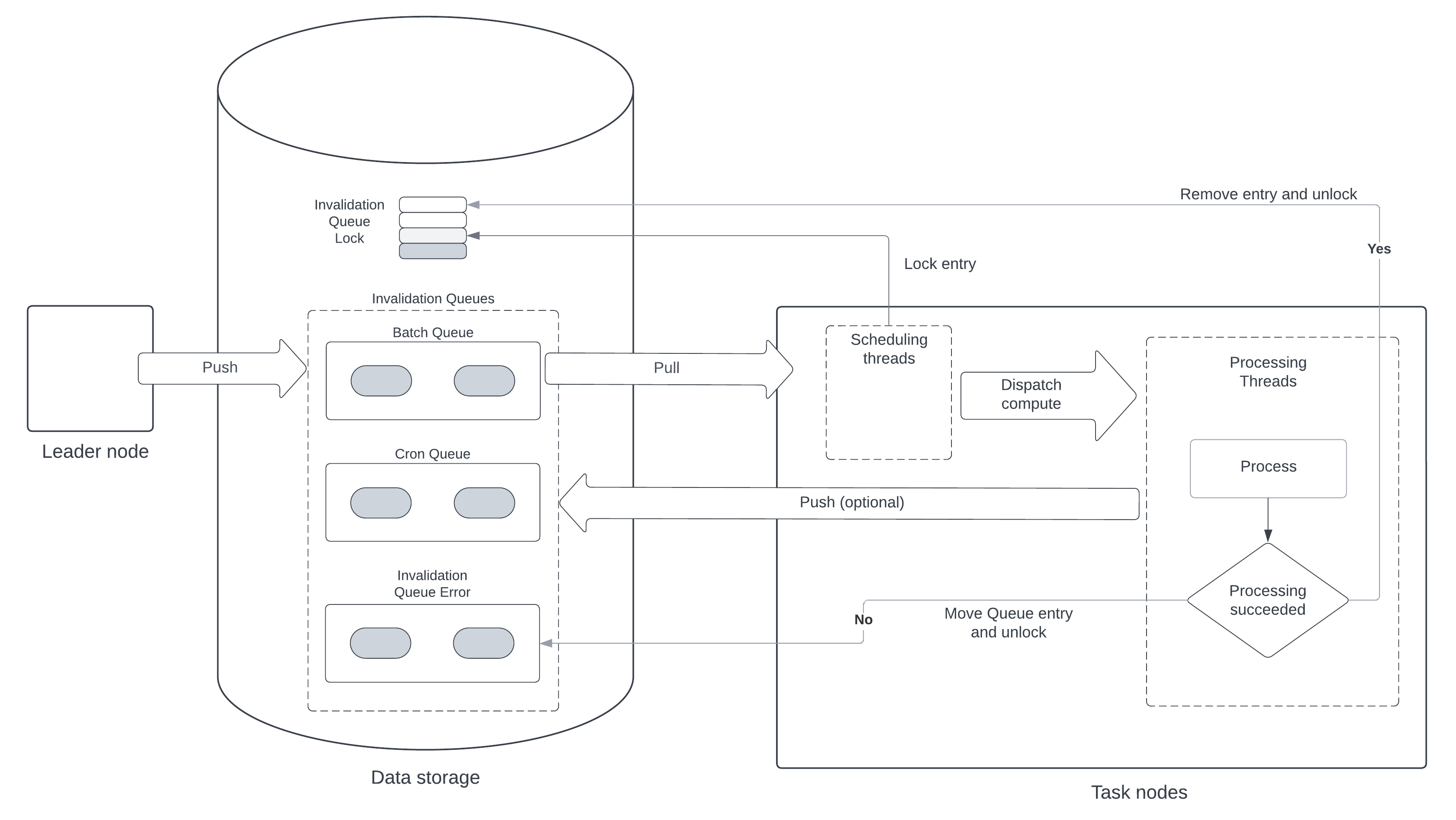
The following is a step-by-step summary of the task-processing workflow:
Push to Queue - The leader node pushes entries to the invalidation queues (such as, batch, cron, and queue error) of the data storage.
Pull from Queue - Task nodes pull entries from these queues when resources are available.
Scheduling Threads - Within the task nodes, scheduling threads are responsible for pulling the entries, checking for CPU/memory availability, and dispatching compute tasks.
Each task node runs a few
schedulingthreads and manyprocessingthreads. Each scheduling thread periodically:- Checks with ResourceGovernor if the node has enough CPU and memory to take the work.
- Selects a queue using round robin.
- Select the queue that has used the least resources, weighted by priority.
- Queries the queue for entries with status set to
Pending. - Tries to mark entries as locked by creating an InvalidationQueueLock record for each entry.
- Checks to see if there is a processing thread that is idle.
- Dispatches each entry to an available processing thread.
Processing Threads - Processing threads execute the logic associated with each queue entry. When receiving a new entry, the processing thread:
- Executes the logic for the entry.
- Removes the completed entry from its source queue and removes its lock entry.
- If there was an error executing the logic, creates a record in InvalidationQueueError.
Post-Processing - After processing, the entry is either removed from the queue and its lock is released if successful, or it is moved to the error queue if there was an error.
Both leader and task nodes can add entries to a queue. Only task nodes read entries from the queue with the exception of the cron queue, which is read by leader nodes.
This diagram below provides a closer look at the scheduling and processing mechanisms.
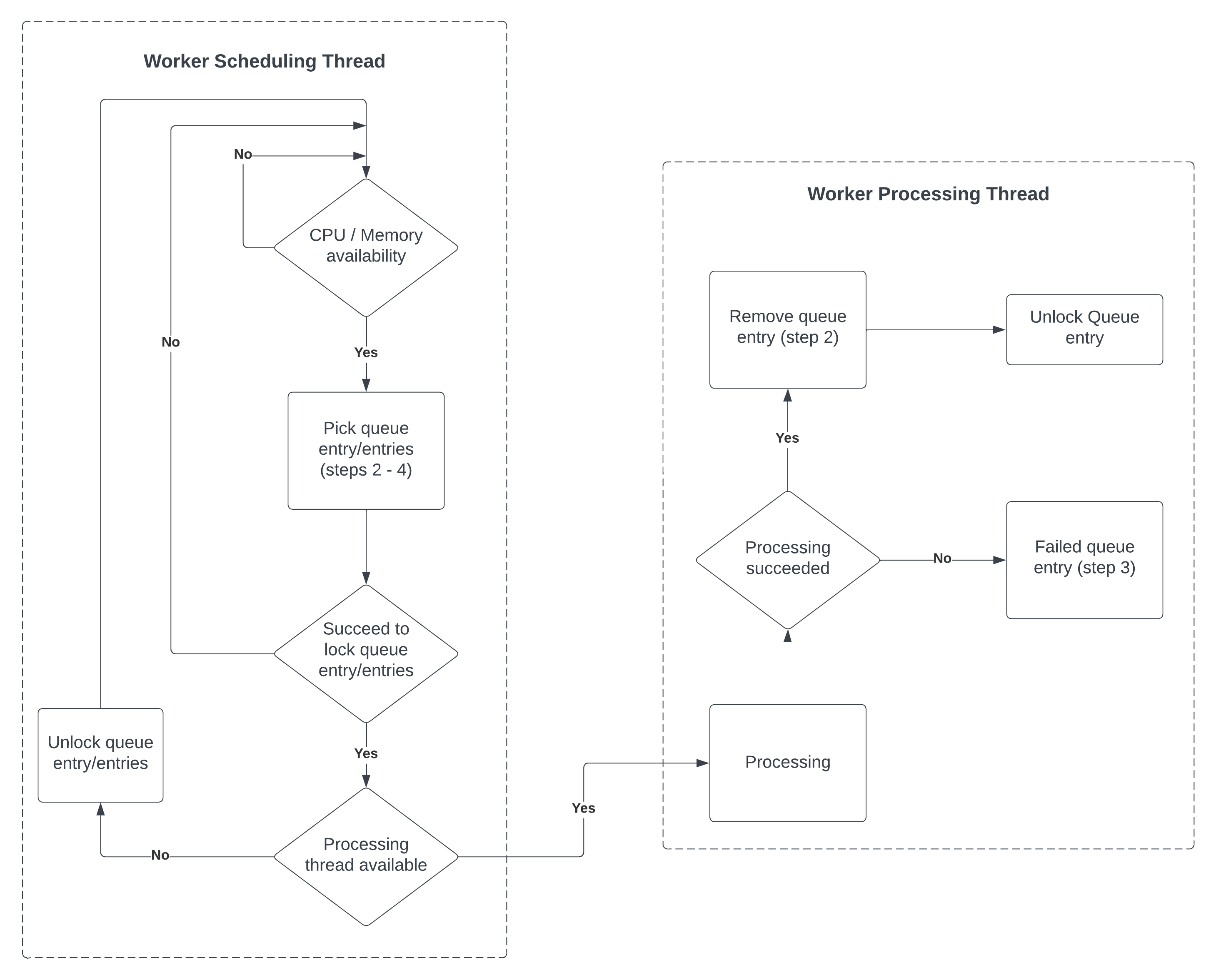
The following provides additional detail:
Worker Scheduling Thread:
- Checks for CPU/memory availability.
- Picks queue entries that are in the
pendingstate. - Locks the entries for processing.
- If a processing thread is available, dispatches the entry for processing.
Worker Processing Thread:
- Processes the locked queue entry.
- On successful processing, removes the queue entry and unlocks it.
- If processing fails, marks the queue entry as failed.
The InvalidationQueueLock Type is used to make sure the same entry is not processed twice. Each record represents a lock for a group of entries. Each lock can be created or deleted atomically by the scheduling and processing threads.
The queues themselves are never locked, so they can be read at any time.
Grouping entries
Some queues support grouping multiple entries if they share the same context. As example, when refreshing multiple calculated fields for one instance, the entries for each field can be grouped.
Entries are grouped by sharing the same lock key. A single lock record locks all the entries in the group.
Grouping can be done explicitly when adding entries to the queue, or later through compaction. Compaction creates a new queue entry to replace all entries in the same group, and is done mainly to reduce the number of entries in the queue. When entries are grouped, they are executed by the same process on the same node.
Each queue Type definition indicates which fields (if any) can be used to group entries, with an annotation. As an example, the CalcFieldsQueue allows grouping entries by target object:
@invalidationQueueOptions(grouping='targetObjId')
type CalcFieldsQueue mixes InvalidationQueue<CalcFieldsQueueEntry>, MergeableInvalidationQueue<CalcFieldsQueueEntry> {}Queue entry states
Each queue entry has 6 different states, represented by QueueStatusEnum:
initialandpendingare real values stored in the invalidation queue table.disabledmay be stored in the invalidation queue entry state or inferred when priority is-1.computingis inferred from statusPendingand a lock created.failedis inferred when the entry is in the queue InvalidationQueueError.awaitingComputeis the number of queue entries that are currently waiting to be computed.
When an entry is in initial state, its processing must be deferred. As an example this can be a cron job entry that is waiting for the next executing schedule. When a queue entry is ready to execute, its state is updated to pending.
The scheduling thread of task nodes only pulls queue entries that are in pending state. When the scheduler thread passes the entry to a processing thread, the entry status is set to computing.
After an entry is in the computing state it either succeeds, in which case it is unlocked and removed from the queue, or fails executing and is moved the InvalidationQueueError.
A queue entry can be marked as disabled independently of its state. This is useful if a job is consuming too many resources. Disabling a job sets its queue entries with priority -1.
Note: The sum of the initial and pending states equals the sum of the computing and awaitingCompute states because they represent two different perspectives on the life cycle of queue entries within the processing system:
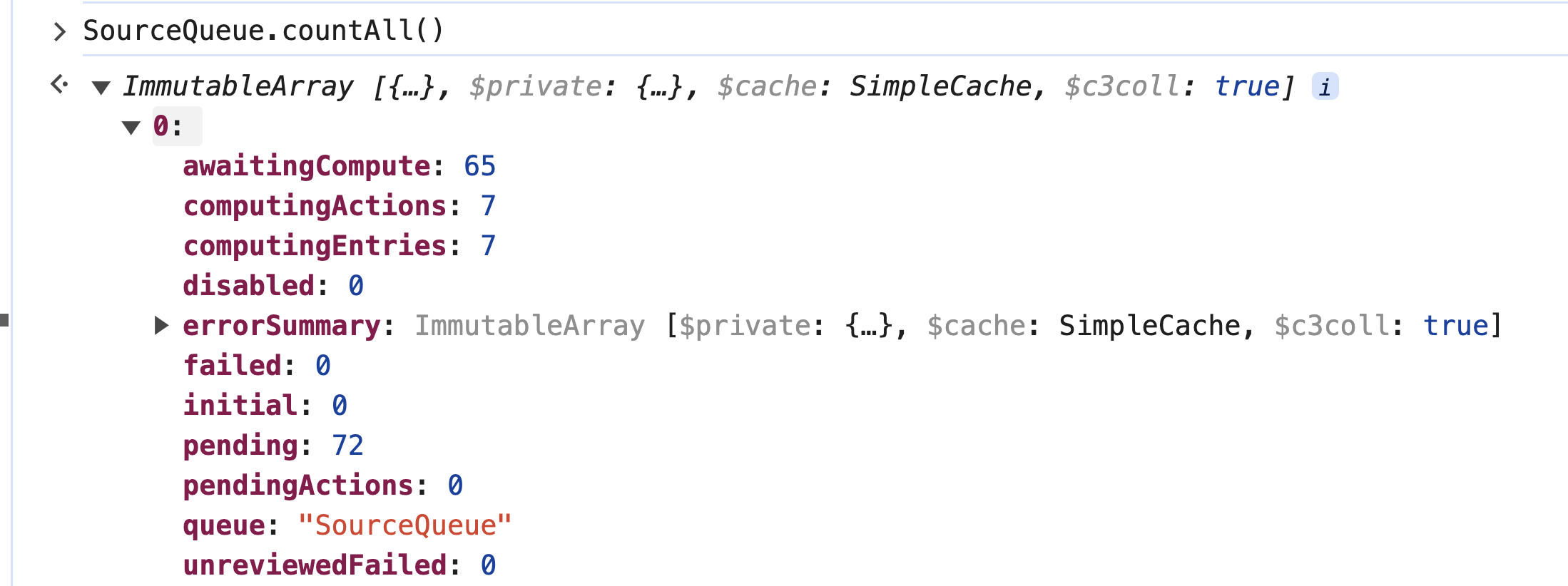
Initial and Pending - These states represent the queue entries as they are introduced into the system.
initial- The entry has been created but is not yet ready for processing. It is in a preparatory state, possibly awaiting a trigger or a scheduled time to transition topending.pending- The entry is ready and waiting to be processed. It has been triggered or scheduled for processing and is waiting for available resources to start the actual computation.
Computing and AwaitingCompute - These states represent what is currently happening to those entries in the system.
computing- The entry is actively being processed by a worker or a processing thread.awaitingCompute- The entry is in the queue, ready for processing, but is waiting for an available processing thread to pick it up. This is effectively a subset ofpending, which means the entry is ready but not yet being processed due to resource constraints.
The reason for these sums being equal is that they account for all queue entries that have been initiated but not yet completed or failed. Essentially, all entries must pass through these stages. An entry that is initial will eventually become pending when it is ready to be processed. Similarly, a pending entry will either be awaitingCompute if it is waiting for resources or computing if it is currently being processed. The transition from initial to pending to either computing or awaitingCompute is a flow that all tasks will follow in a well-functioning system.
Thus, the sum of initial and pending represents all the work that has entered the system and is not yet processed, while the sum of computing and awaitingCompute represents all the work currently being handled by the system, either actively processing or queued to be processed next. In a balanced system under normal operation, the number of tasks entering the system (initial + pending) should match the number of tasks being processed or waiting to be processed (computing + awaitingCompute).
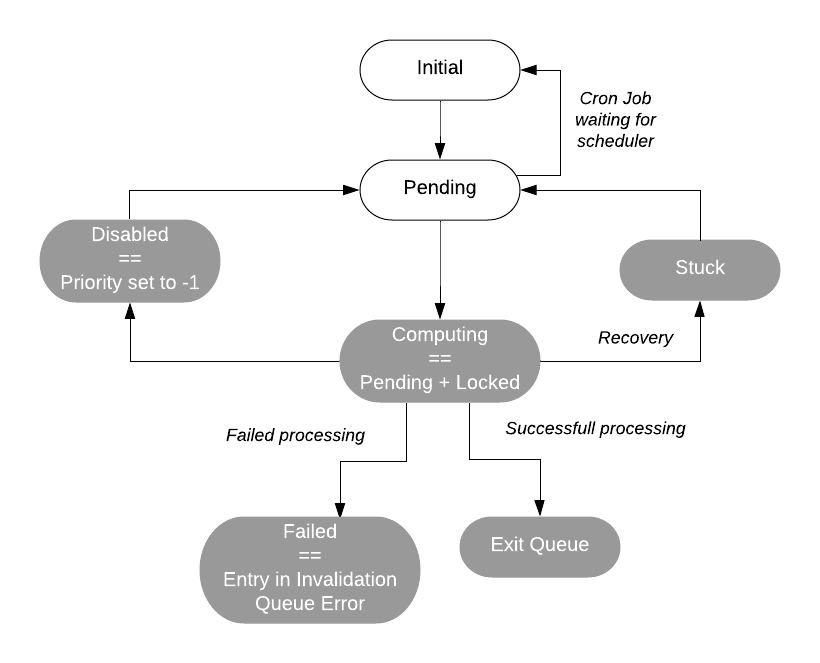
In the following diagram, the white states are set explicitly, and the states highlighted in gray are set implicitly.
The third diagram is focused on the ability of the system to detect and recover from errors or issues in processing.
Recovery mechanism
A queue entry is considered stuck when its state is pending and a lock exists, but the assigned task node is not processing the entry. This can happen when the node processing the queue entry is not healthy.
Leader nodes periodically look for stuck entries as illustrated in the image below.
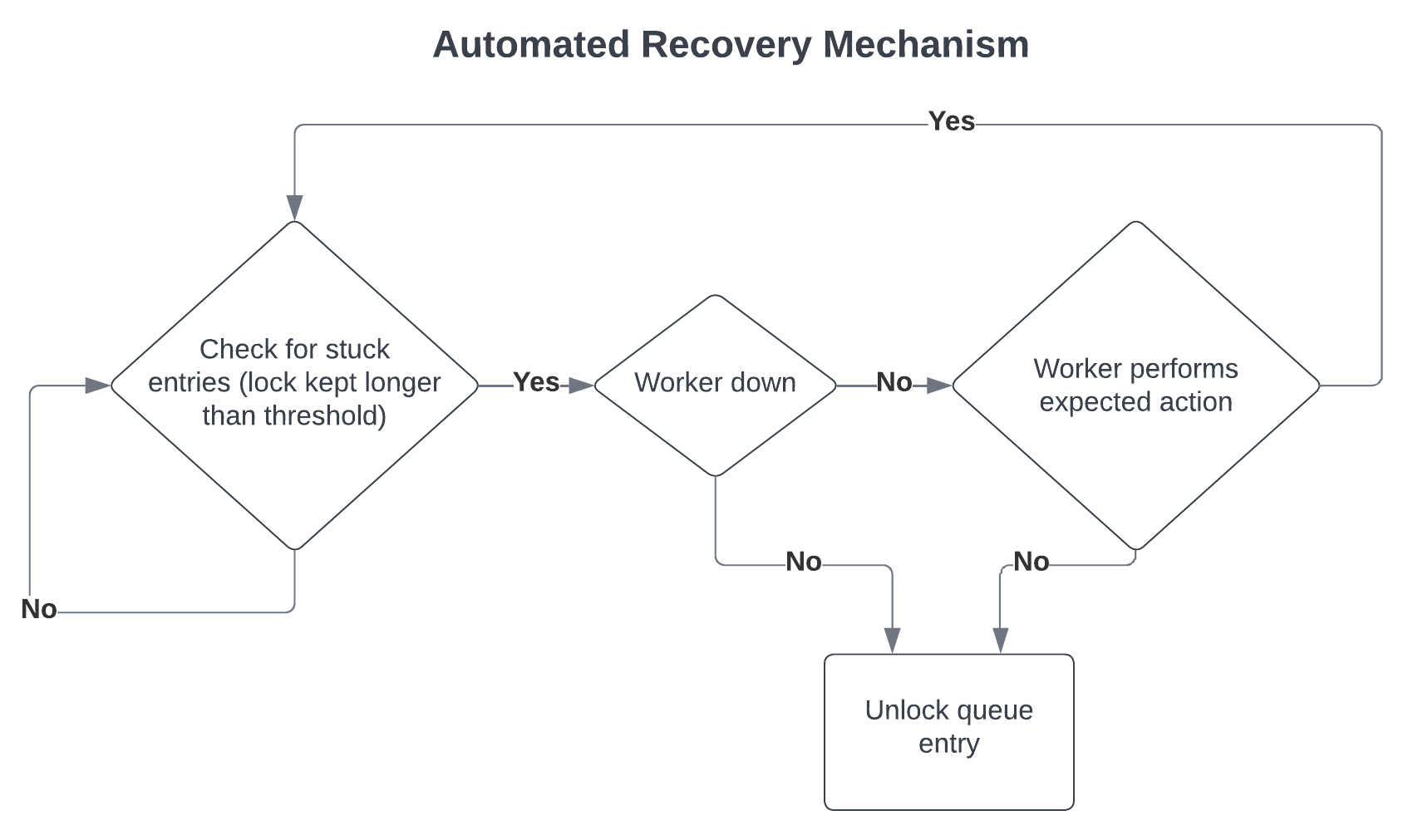
The diagram above focuses on the ability of the C3 Agentic AI Platform to detect and recover from errors or issues in processing:
Detection - The system regularly checks for entries that are stuck, meaning they have been locked for processing but have exceeded a certain time threshold without being processed.
Diagnosis - If an entry is stuck, the system checks whether the worker (task node) is down.
Recovery - Depending on the diagnosis:
If the worker is down or not performing the expected action, the system will unlock the queue entry to allow it to be reprocessed.
If the worker is active and performing as expected, no action is taken on the entry.
The C3 Agentic AI Platform checks if the task node is still healthy, in which case it checks if the entry is being processed. If the node is unhealthy or the entry is not being processed, the leader node removes the lock and updates the entry state to pending.
Note: If there are many items in the awaitingCompute state, it is likely that the task nodes are stuck. This can be due to memory issues (memory steadily increasing). This can be resolved by restarting task nodes in the appropriate multi-node environment.
Pause and resume
When you pause a queue, entries in that queue are not scheduled to be processed. If a cluster is constrained for resources, you can pause a queue to allow other more important work to be executed first.
Data flow
The diagram below shows the components producing and consuming queue entries.
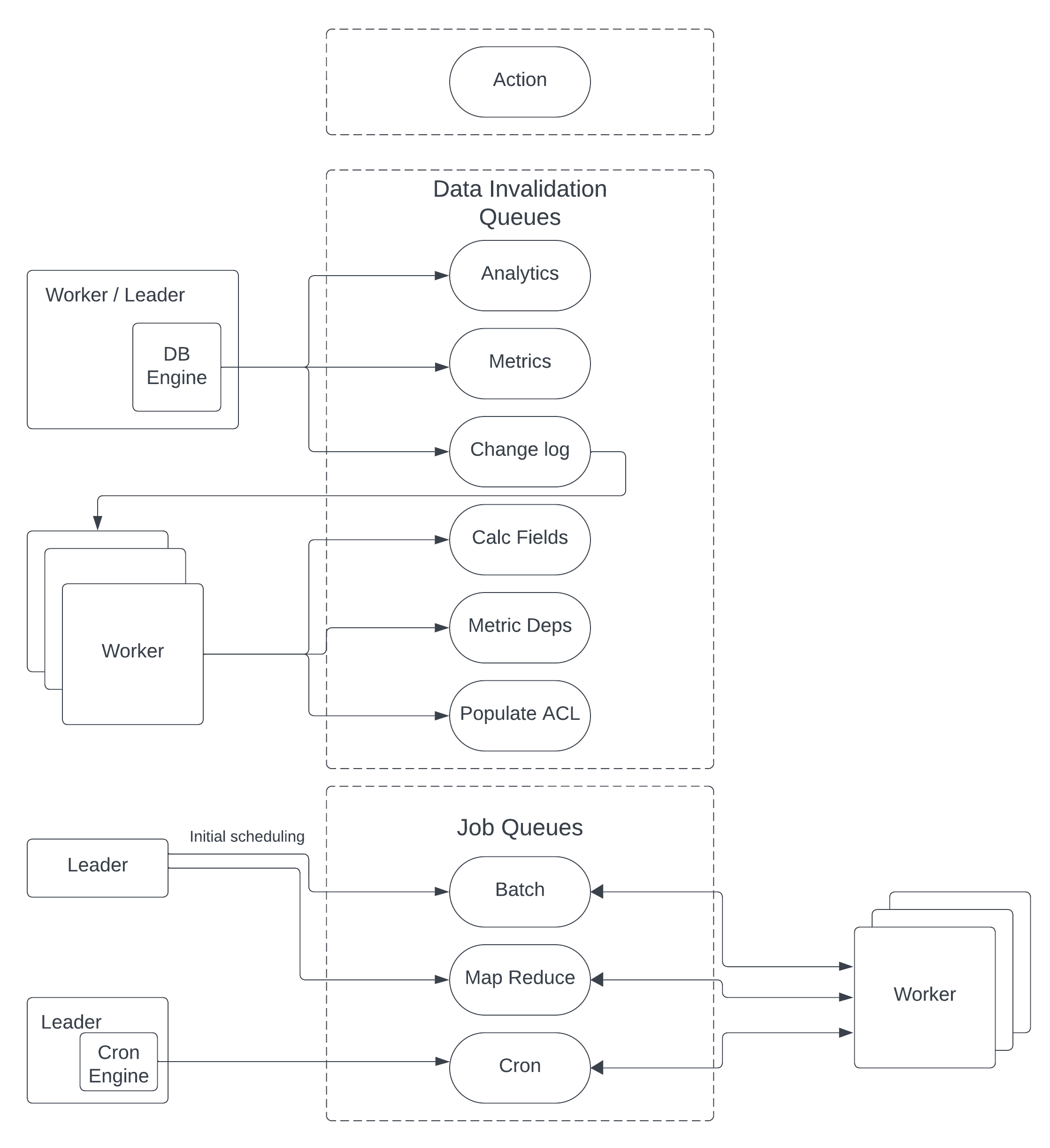
As an example, when a data field is changed:
- The database engine creates an entry in the
ChangeLogQueuedescribing the change "For this object set field A to B". - A task node processes that entry, determines the impact of the change and creates entries in the corresponding queues to, for example, update calculated fields, metrics, ACLs.
- The process continues until there is no more work to be done.
Cron queue
CronQueue is handled differently than other queues. The Cron Engine, which is executed on leader nodes, ensures only one queue entry exists for each cron job. An entry is set with the initial state. The Cron Engine is responsible for checking when an entry has reached its time to execute and updates the entry to pending.
After that happens, task nodes can pick the job for execution.
When completed, the processing thread removes the entry from the queue, and its lock, creates a new entry with its status set to initial and timestamp set to the next execution time.
Resource governor
ResourceGovernor keeps track of the resources available on a node, including CPU, memory, and processing threads available.
Fairness is handled by the queue mechanism, which allows the scheduling thread to lock queue entries in round robin order based on queue priority, queue entry state, and how many resources an environment or application is currently using.
The scheduler thread pulls queue entries from the queues without a guarantee that the task node has the resources needed to execute it.
Guarantees and invariants
C3 Agentic AI Platform guarantees resource isolation. A task node is dedicated to running queue entries for a specific application. Queues are iterated in a round-robin order, and entries with the same priority are executed in first-in first-out (FIFO) order.
For individual jobs, it is possible to configure the maximum number of concurrent processing threads for the whole application or per task node. The platform is also non-blocking. Even though compute threads compete for resources they are independent and don't block other threads.