Monitor and Manage Queues
The C3 Agentic AI Platform uses queues to parallelize work and run asynchronous logic in the background. As an example, batch jobs, cron jobs, and data integration jobs use queues to manage the lifecycle of a job.
When logic needs to run asynchronously, one or more entries are added to a queue. When a task node has resources available, it picks one or more entries for execution.
See also Overview of Invalidation Queues and Asynchronous Process.
Overview of queues
Jobs and actions that are triggered within the application environment are processed through queues. The following overview provides a summary of the types and categories of queues available in the C3 Agentic AI Platform.
Types of queues
There are multiple kinds of queues, but they all fall in one of these categories.
| Category | Description |
|---|---|
| Action | Execute an asynchronous action. |
| Job | Execute a compute and memory intensive job. |
| Data Invalidation | Re-compute calculated data when its dependencies changed. |
| Data Load | Load data from external systems. |
List of queues
There is a queue for each different kind of logic that must be executed.
| Queue | Type | Description |
|---|---|---|
ActionQueue | Action | General purpose queue for invoking any C3 action asynchronously like persisting data in the database. |
BatchQueue | Job | Handles all batch jobs created by users or the platform. |
CalcFieldsQueue | Data Invalidation | Refreshes values in stored calc fields that have become invalidated due to data that they depend on changing. |
ChangeLogQueue | Data Invalidation | Generic queue to track and listen for changes in data. |
CloudInvalidationQueue | Data Load | Generic queue for cloud data processing. See below. |
CronQueue | Job | Handles all cron jobs based on their schedules. |
FileDataQueue | Data Load | Generic queue for file data processing. See below. |
HierDenormQueue | Action | Updates existing hierarchy de-normalizations due to changes that altered the hierarchy of the structure. |
MapReduceQueue | Job | Handles all map-reduce jobs create by users or the platform. |
MetricDepsQueue | Data Invalidation | Used to update the metric dependency cache when data changes. |
MetricsQueue | Data Invalidation | Used to invalidate cached metrics when data changes that invalidate the cached values. |
NormalizationQueue | Data Invalidation | Used for invalidation and incremental normalization of timeseries data. |
PiiQueue | Data Invalidation | Used to manage personal identifiable information access audits. |
PopulateAclQueue | Data Invalidation | Used to update access control list entries. |
SourceQueue | Data Load | Generic queue used for asynchronous processing of data sources. |
SourceStatusQueue | Data Load. | Used to process data integration status messages to asynchronously source and target status. |
WorkflowQueue | Job | Handles all workflow processing. |
For cloud data processing, there are multiple queues.
| Queue | Type | Description |
|---|---|---|
EventHubQueue | Data Load | Used to import data from Azure Event Hub. |
KafkaQueue | Data Load | Used to import data from Apache Kafka. |
KinesisQueue | Data Load | Used to import data from Amazon Kinesis. |
SqsQueue | Data Load | Used to import data from Amazon SQS. |
Overview of queue management
Queue Management helps you monitor and perform basic administrative actions on those queues.
For example, you might choose to pause one or more queues if a reoccurring error is discovered in a MapReduce job. In this instance, a typical workflow would be to fix the application code error, deploy the application fix, unpause the MapReduce Queue, then finally, recover (reprocess) the failed actions in the MapReduceQueue using the queue management tooling in the C3 Agentic AI Platform.
You can perform the following actions on a queue:
Resume -
SourceQueue.resume()Pause -
SourceQueue.pause()Recover -
SourceQueue.recover()Clear -
SourceQueue.clear({ status: 'failed'})CAUTION: Clearing queues deletes the error message, which therefore cannot be recovered or reprocessed. It is best practice is to recover errors in a queue instead of clearing them, fix the underlying issue, then recover the queue. The error count is reduced each time a recovered error succeeds.
See the following sections for more detail on each action.
Monitor a queue
You should monitor the queues to make sure both the C3 Agentic AI Platform and applications are running without problems.
You can monitor queues from the C3 AI Console. As an example, you can monitor the CronQueue by running:
// Get the status of the cron queue
CronQueue.count()

// Search for specific entries
CronQueue.find()
As a further example, you can list entries in the CronQueue with c3MonitorQueues:
c3MonitorQueues(CronQueue)For more information, see c3MonitorQueues.
Pause and resume a queue
You can pause a queue to stop entries in that specific queue from being processed. In the C3 AI Console, run the following code snippets:
// Pause a specific queue to stop processing entries for the current env/app
CronQueue.pause()

// Resumes a specific queue to continue processing entries for the current env/app
CronQueue.resume(/*for all apps*/false)

// When called from a specific env/app, pauses all queues for that env/app
// When called from c3/c3, pauses all queues for all envs and apps
InvalidationQueue.pause()

// When called from a specific env/app, resumes all queues for that env/app
// When called from c3/c3, resumes all queues for all envs and apps
InvalidationQueue.resume(/*for all apps*/false)
By default pausing and resuming queues only affects the application where you issued the command.
Queues are paused until you resume them, so after troubleshooting, make sure to resume the queue so that the jobs start being processed again.
Queue and job priorities
Some queues have higher priority than others, so entries added to those queues are picked first for execution. This makes sure critical jobs run first. This is a server configuration and is not configurable. If you need to customize this, reach out to C3 AI support.
By default, queue entries on the same queue are processed in first-in first-out order, but this can be customized by setting a priority when the job is created, or by updating the priority for a set of entries:
// Specify which entries to set priority
var filter = InvalidationQueueFilterSpec.make({status: 'initial'});
// Update priority for entries in this queue for the current env/app
// When called from c3/c3 sets priority for all env/apps
CronQueue.setPriority(filter, 90);

// Update priority for all queues for the current env/app
// When called from c3/c3, sets priority for all queues in all env/apps
InvalidationQueue.setPriority(filter, 90);Job status
A job can be in one of several status.
| Status | Description |
|---|---|
initial | The job is being added to the queue. |
running | The job is running. |
pending | The job is waiting for execution. |
completed | The job is completed. |
computing | The job is being processed. |
failing | At least one part of the job failed, so the job is not marked as failed. |
failed | The job was executed and failed. |
canceling | The job is being canceled. |
canceled | The job was canceled. |
disabled | The job is not picked for execution. |
Refer to InvalidationQueue and InvalidationQueueStats to learn more.
Monitor jobs with errors
When a job is picked up from the queue for processing, and there is an error while running it, that job is moved to the InvalidationQueueError. Here the job is stored with information about the error that caused it to fail.
You can monitor which jobs failed from the C3 AI Console by running:
// Check if there are any jobs with errors in a specific queue
CronQueue.errors()// Or fetch all queue entry errors, independently of the queue and tenant/tag
InvalidationQueue.fetch()Recover failed jobs
Once you find what is causing the error, fix the application logic and sync the application with the latest changes. Then, you can retry running the jobs that failed. In the C3 AI Console, select the environment and application, and run:
// Update status of failed jobs to 'pending', so they get scheduled for execution again
CronQueue.recoverFailed()

// Retry all failed jobs, for all queues
InvalidationQueue.recoverFailed()Debugging infinite loops and recovering stuck entries
The following sections provide more information for debugging issues related to infinite loops and how to recover stuck entries.
Infinite loops
Sometimes when a queue entry is executed, it creates other entries and schedules them for execution. This is what happens with calculated fields. When processing a CalcFieldsQueue entry to refresh the value of a calculated field, that entry identifies other calculated fields depending on the first one, and adds new entries to the queue to refresh those fields too.
When implementing these kinds of jobs, make sure the jobs are designed to make forward progress and don't get stuck in a loop with jobs scheduling other jobs infinitely. C3 Agentic AI Platform allows a maximum depth of 100 jobs, at which point the job fails to make sure the job doesn't stay in an infinite loop. When this happens, you should fix the job logic to make sure it can make forward progress.
Recover stuck entries
When a task node picks a queue entry for processing, it starts by marking it as locked so no other task nodes process the same entry. If a task node goes down, all the queue entries it was processing are locked for a period of time. After that period, the C3 Agentic AI Platform detects the node is no longer active, and unlocks the queue entries so they can be picked up by other nodes.
If you notice queue entries are not being automatically unlocked after a node goes down, you can manually recover by running:
// Recover entries in this specific queue
CronQueue.recoverStuck()
// Recover entries in all queues
InvalidationQueue.recoverStuck()Troubleshooting
This section serves as a technical resource for users encountering errors, configuration issues, or irregularities in queue processing.
Basic collection of InvalidationQueue statistics
Use
c3Grid(InvalidationQueue.countAll())to output theInvalidationQueuestats in a readable grid and find the CronQueue row.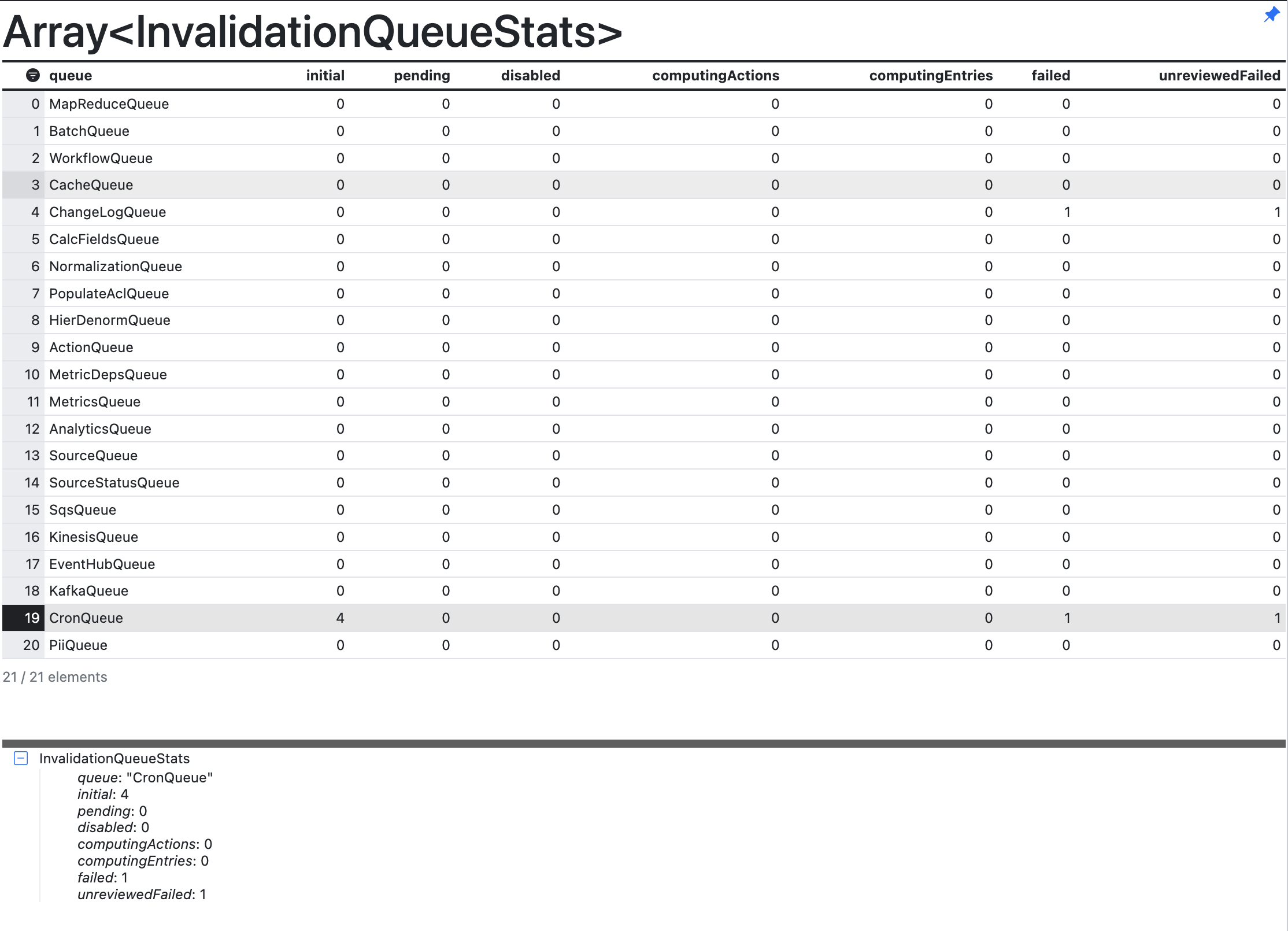 Example of an Invalidation Queue Stats table
See the following table for descriptions to interpret the output in the figure above.
Column headers Description queue The name of the queue. For instance, MapReduceQueue or BatchQueue. initial The QueueEntry has not yet been picked up by the scheduler. This column represents the number of queue entries in the initialstatus.pending The QueueEntry has been received and is starting up. This column represents the number of queue entries in the pendingstatus.computingActions Number of actions that are currently computing for the queue entries. computingEntries Number of queue entries that are currently being computed. failed The entry has been run and failed with some error. unreviewedFailed The number of failures that are not yet reviewed. Use the command
Sql<yourqueue>Entry.fetch()to show a list of allQueueEntriesin the queue and check if your entry is in this list.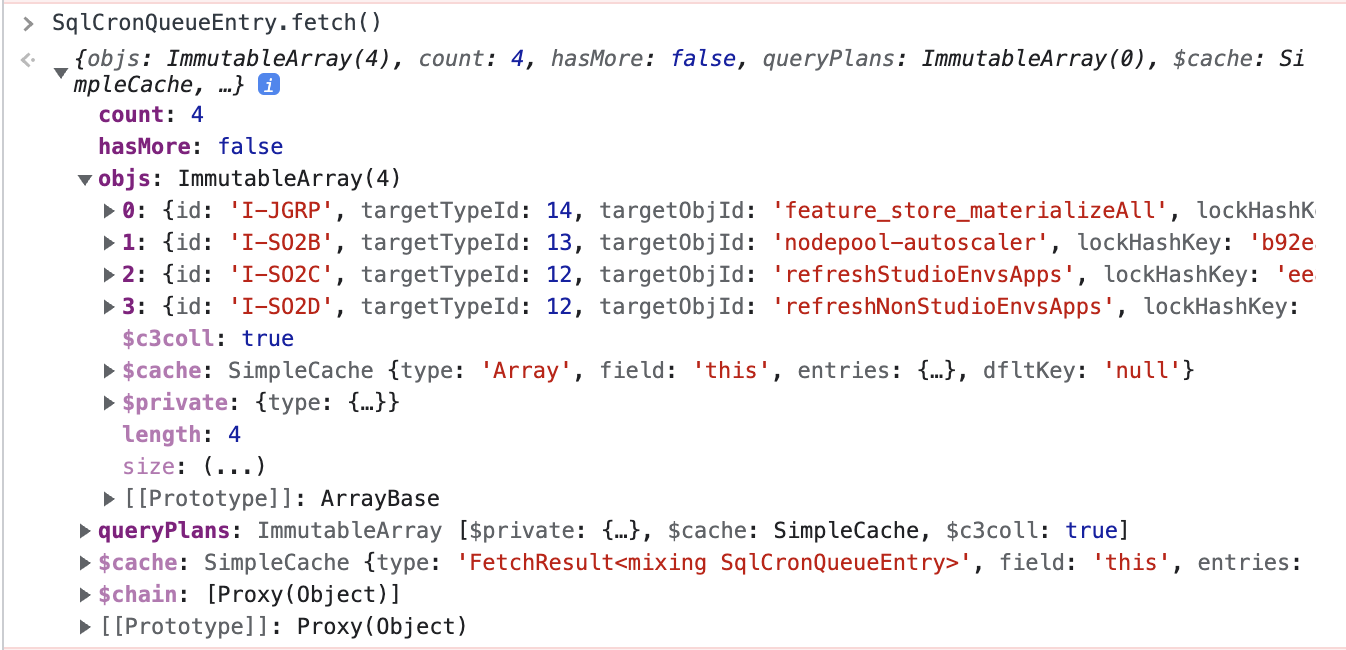 Example of a QueueEntries list
Use
<yourqueue>.errors()to list all entries whose processing failed with an error. It is expected that theperiodic-tmpfilesystem-cleanupCronJob fails. Make sure you expand the detail section and report theerrorCode,errorLog, anderrorMessage.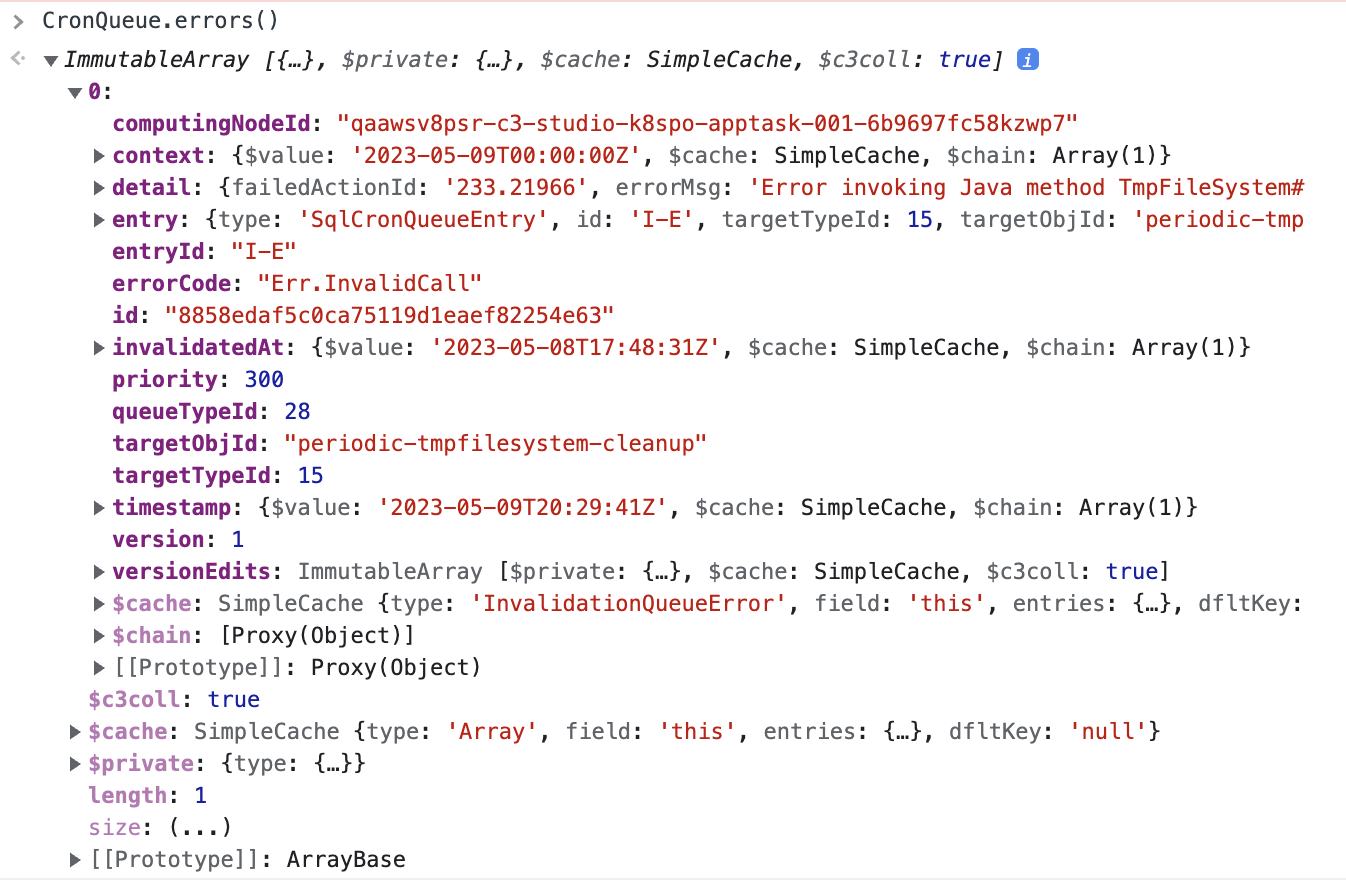 Example of the list of queue errors
Check if your queue is running with
<your queue>.isPaused(). If this returnstrue, resume the processing of your queue by running the command<your queue>.resume().
Entries stuck in pending
Stale locks
From time to time, InvalidationQueueLocks might become stale, meaning a lock exists that prevents the next cron job from being executed, but the lock is no longer associated with an action and is never released. This can happen when an action abruptly terminates or the node is killed.
Invalidation Queue Locks -
InvalidationQueueLock.fetch()- This command returns a list of all locks that are currently in use by theInvalidationQueue. If the returned list is zero, you do not have a problem with stale locks.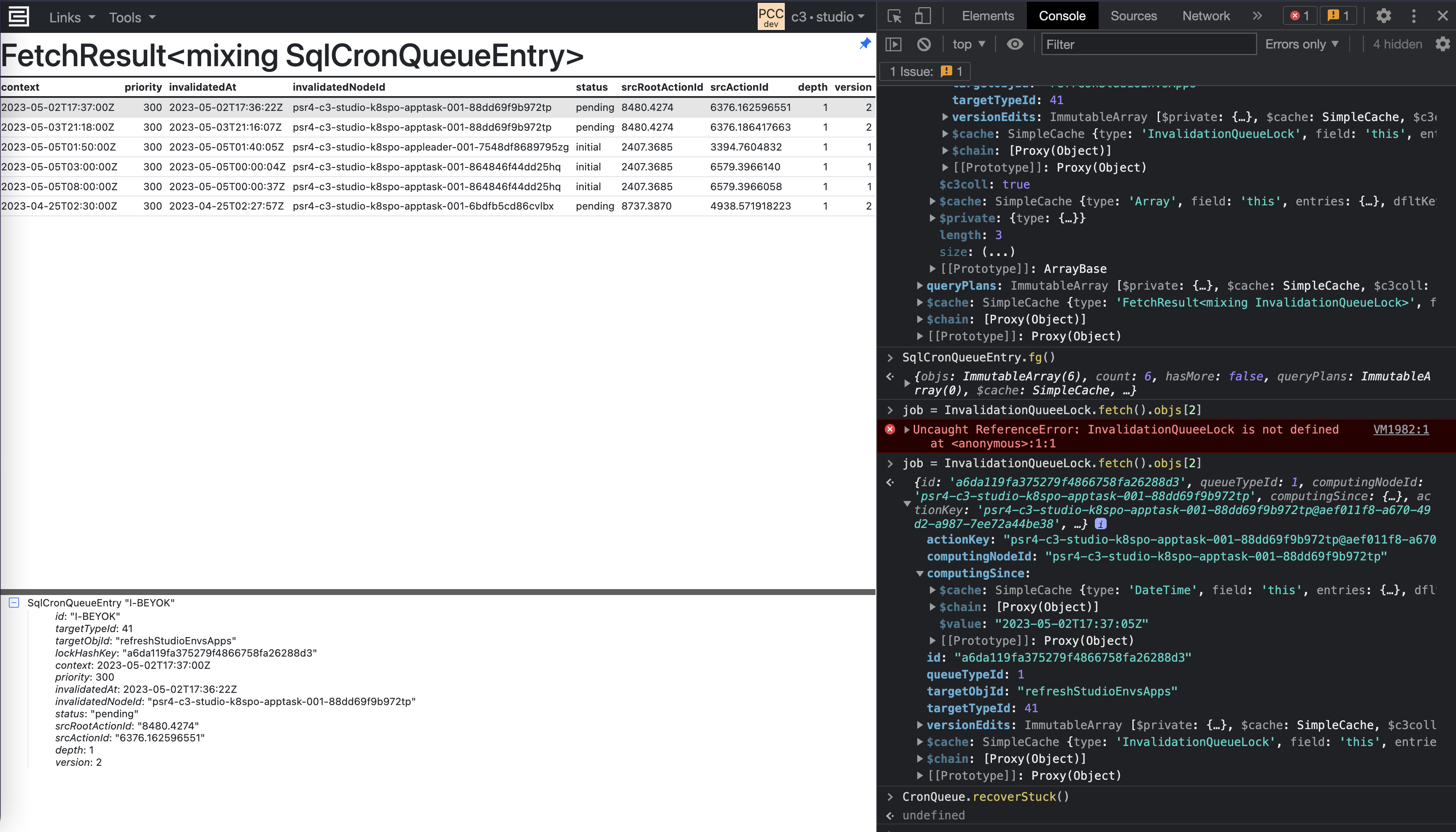
Recover Stuck Invalidation Queue -
CronQueue.recoverStuck(true)or<your queue>.recoverStuck(true)- This command attempts to release locks that are no longer valid. In the screenshot below, you can see that the entries are now being computed.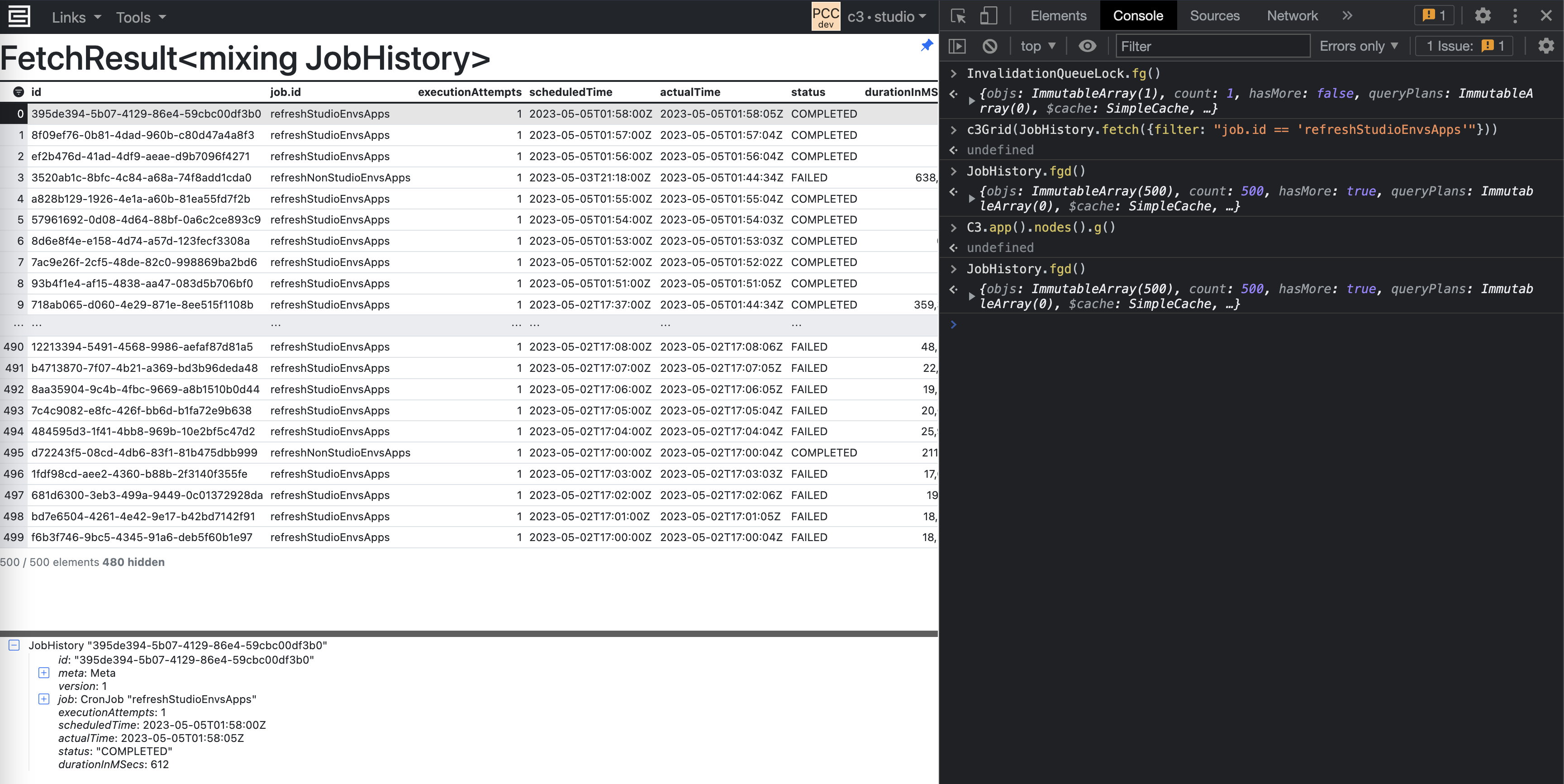
See the InvalidationQueue Type or CronQueue Type for more information.
Db locks
Separate from Invalidation Queue locks, it is also possible that you can have stale DbLockEntries, which are also acquired when a task is pending.
DbLockEntry.fetch()- This command returns a list of all db locks currently acquired. You can check the ID of the lock and match this to a correspondingCronQueueEntryto see who acquired the lock.DbLockDoctor.recover()- This command attempts to release any stale db locks that are no longer associated with any entry in the invalidation queue.
Checking InvalidationQueue configurations
If processing is using fewer threads than expected, verify the configurations for the invalidation queue.
Resource governor
InvalidationQueue.maxConcurrentComputes()- This command checks the max concurrent computes dictated by the ResourceGovernorConfig. By default, the value is 8. To set the max concurrent compute for theResourceGovernorConfig, see the "Set configuration values" section in Configure and Tune Batch JobsTo set further resource governor configurations, see the QueuesResourceGovernorConfig Type.
InvalidationQueue.maxConcurrentProcessingThreads()- By default, the value should be 8.
Child configs
Each queue has an additional child config that determines how a task node acquires entries from the queue.
InvalidationQueueConfig.inst()- Prints out settings for each queue. If the queue config is not listed, it usesdefault.
Increase batch size factor for a specific queue
To improve task node dispatching, you can increase the batch size.
Here is an example of how you might update the config:
queues = [SourceQueue]
for (let i = 0; i < queues.length; i++) {
    childConfig = InvalidationQueueConfig.inst().childConfig(queues[i]);
    childConfig = childConfig.withBatchSize(3);
    InvalidationQueueConfig.inst().withField(queues[i], childConfig).setConfig();
}
Ensure that any configuration changes are propagated to all task nodes.
You cannot change the batch size for all queue types. Specifically, BatchQueue has a fixed batch size of 1 because it processes batches one at a time.
When recover or recoverStuck does not work
If running the command InvalidationQueue.recoverStuck(true) does not resolve the issue, check if the node is running using C3.app().nodes().
This command returns a list of all nodes running in your environment. Search for the node ID that corresponds to the stuck CronQueueEntry, and check if the node is running.
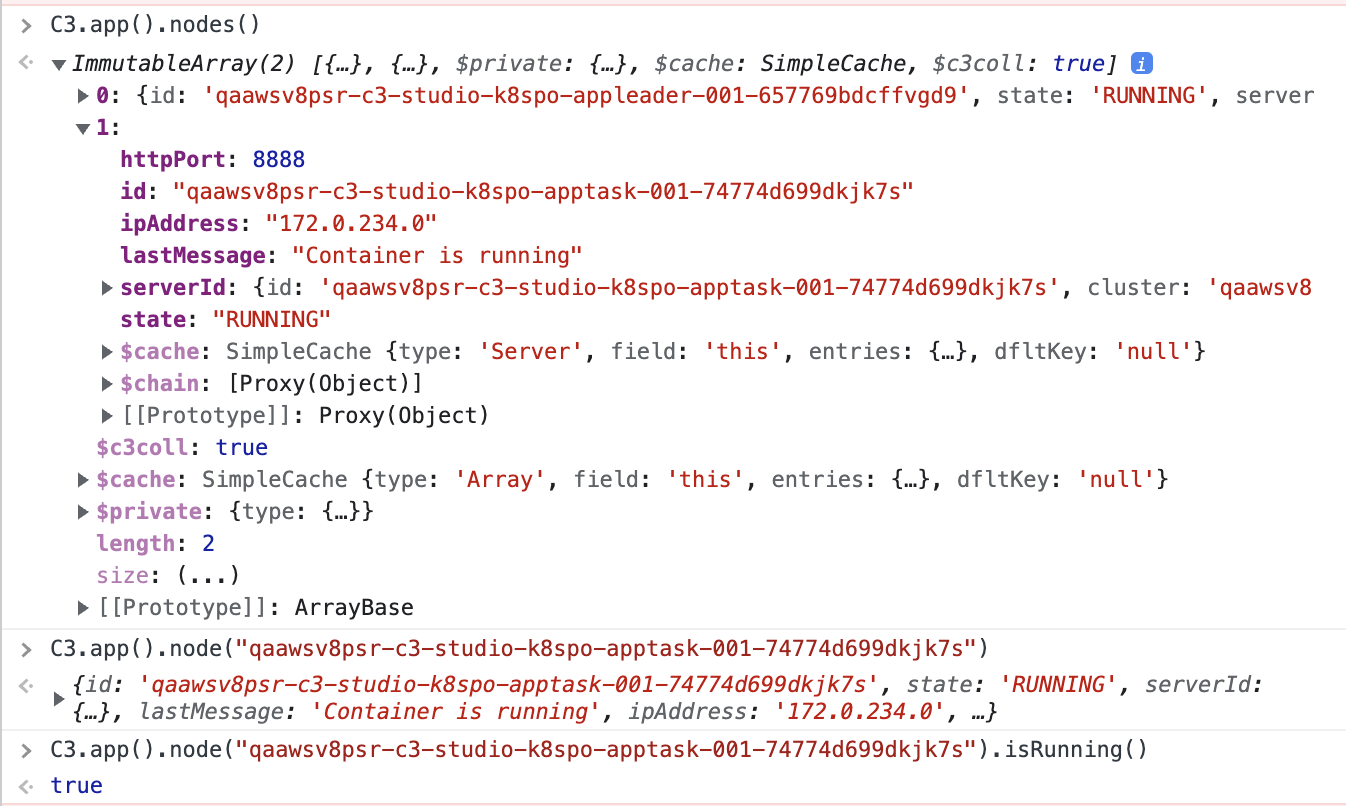
Search for errors with the keywords "Failed to recover*" in OpenSearch to identify if the background recovery action is failing.
If the node is offline or in an error state, or if you identify an exception, contact cloud support to restart the node or report the error.
Checking Action and HierDenormQueue issues
If an action has erroneous behavior, causing the node to crash or hang indefinitely, use OpenSearch to check the source of the action and identify which node is executing the stuck entry.
For issues with
HierDenormQueue, use the following commands:JavaScriptlogs = Os.commandWithArgs('tail', ['-20000', '/usr/local/share/c3/server/log/c3-server.log']) tmp = logs.match(/Did not find any relationship .* Skipping/g)If hierarchy denormalization is not triggering automatically, it could be due to a configuration issue (refer to the HierDenormQueue in the List of queues section in the original document).
Limitations of increasing maxConcurrency
Increasing maxConcurrency can have unintended side effects, particularly when dealing with complex or resource-intensive tasks. For example, Demand Forecasting is a process where future customer demand for products is predicted based on historical data. This involves running sophisticated machine learning models that can be resource-intensive.
Consider a scenario where a Demand Forecasting Interpret job is configured to handle 1000 Demand Forecast Subjects (DFS). The job uses the MlSubject#interpretBatch action, with a batch size of 25 and maxConcurrency set to 80. This configuration leads to several issues:
- Actions in the WorkflowQueue and ActionQueue become stuck.
- Running the job with 100 DFS with the same configuration can result in errors.
- Running the job with a single DFS or reducing
maxConcurrencyto10for100DFS completes successfully.
High maxConcurrency values can lead to congestion and resource contention in queues, causing actions to get stuck and jobs to fail. In the InvalidationQueue, many entries can remain in a stuck state, and extensive timeouts may occur.
Recommendations
- Do not set
maxConcurrencybeyond a validated threshold to avoid causing these issues. - In a Non-Prod environment experiment and Run PSR Tests with different
maxConcurrencyvalues to determine the optimal configuration for your specific workload. - Monitor the queues and job statuses to detect and address any issues early.