Orchestrate Workflows
Workflows are useful for automating a series of tasks. The primary role of creating a workflow in the context of machine learning (ML) operations is to provide an intermediate executable representation of a ML pipeline.
Workflow syntax
A workflow is a directed acyclic graph (DAG) that could be disconnected and is a representation of the FlowGraph Type where FlowGraph edges are attached to vertices at specific ports, represented by the FlowGraph.Port Type. As a port graph, multiple edges can be linked between any two vertices of a workflow representation with specific names to direct numerous inputs and outputs.
Workflow vertices
A workflow can perform complex tasks by breaking them into smaller discrete steps. These discrete steps are vertices chained together to form a workflow.
You can assemble workflow vertices to accomplish a complex task or action. The vertices are required to run in a particular order specified by the directed edges between vertices. A single vertex can use the output from previous vertices as input for its execution.
You can connect vertices by using directed edges between ports, and a single vertex can connect to more than one port.
Action-based vertex
Action-based vertices perform a single action.
Depending on your choice of WorkflowExecutionSpec#executor, you can configure the workflow execution to be synchronous or asynchronous. The default option is asynchronous, which means that when a workflow executes an action, it queues the action to the ActionQueue and waits for its completion. C3 AI currently supports only one asynchronous executor, which uses the invalidation queues for orchestration. If you use a synchronous workflow, it executes tasks in order, with one task finishing before moving on to the next.
Upon completion, the workflow advances to the next vertices, if any.
An example of an action-based vertex is the Type Workflow.Action, a Workflow.Vertex that represents an ActionRef.
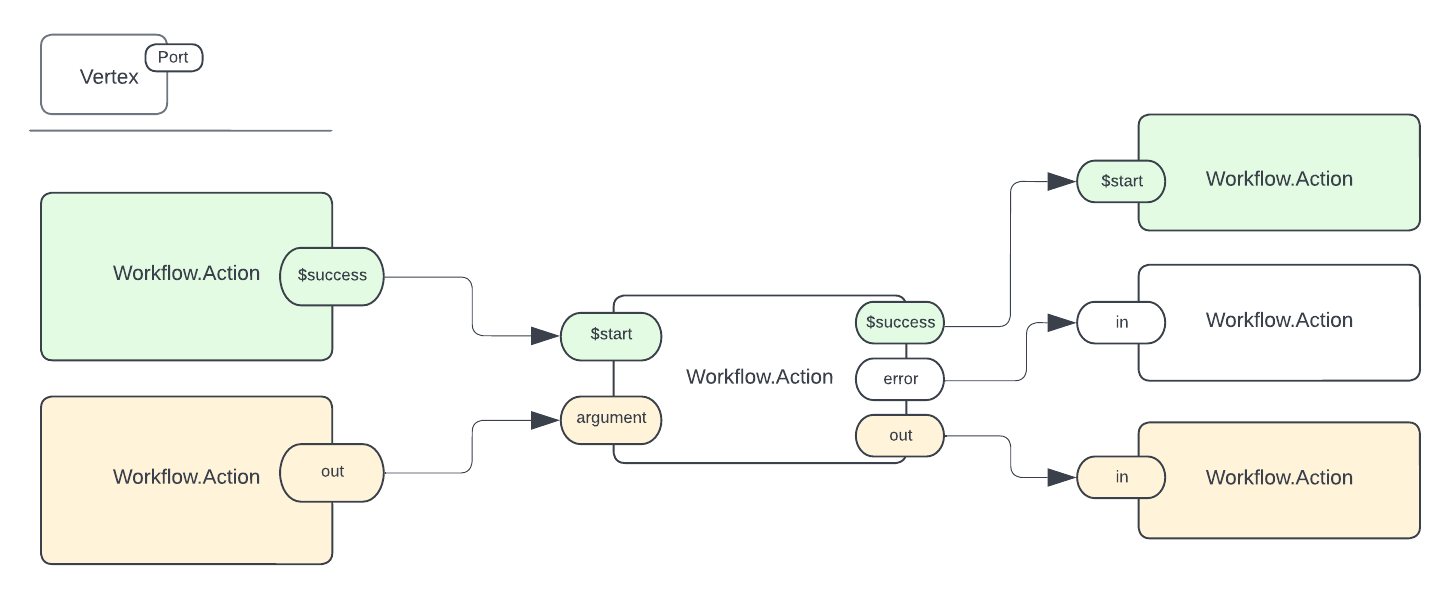
Input and output ports
There are direct inputs and outputs, represented by input and output ports, respectively:
Use
$successto represent an output port whose role is to send aWorkflow.Signal. You can connect it to a$startinput port of a receiving vertex to indicate a relationship.Use
$startto represent an input port whose role is to signal through aWorkflow.Signal. It can be connected to a$successoutput port of the previous vertex, indicating an implicit relationship.- Use an
erroras an output port if the input data has as anError. You can use theerroroutput as input for subsequent steps for custom error handling.
- Use an
Use the $ prefix naming convention to distinguish control flow related ports from data flow related ports.
NOTE: Refer to the signal for more information.
Workflow execution
The Workflow#start method handles workflow execution. Each time you execute a workflow, it can create a different Workflow.Run. Refer to the Workflow.Run Type to learn more about the information recorded during workflow execution and the result of the execution.
WorkflowExecutorRun can call the status() function on the Workflow.Run to determine the status of the workflow.
{
  "type" : "Workflow.Status",
  "started" : "2023-03-28T19:57:30Z",
  "startedby" : "9d3b1c47b470a633385200e45d8ffff8e9da5700840ff82e15a39469c219b0d1",
  "status" : "running"
}
The above output is from the example Simple Sequence workflow example below. The life cycle of a Workflow.Run is the following:
- Initial
- Running
- Completed
- Failed
- Canceled
Refer to the Workflow.Status Type for more details. The WorkflowExecutionSpec Type allows you to choose multiple executors that support the workflow. Selecting an executor happens by setting the executor field in WorkflowExecutionSpec.
Types of workflows
A workflow can consist of two types between vertices and ports: control flow (green) or data flow (yellow) .
Control flow
No data is passed from vertex to vertex in the control flow workflow, and a vertex can execute after all its parents have completed execution. Vertices link ports that pass a signal to notify the source vertex has succeeded, enabling the next vertex to start executing.
Data flow
A data flow workflow requires passing data between vertices by linking edges from the output port of the source vertex to an input port of its adjacent (destination) vertex. One vertex's output becomes another input in this type of workflow.

In the above diagram, there are three vertices and two edges. The first edge contains an out port and an input port that accepts arguments as data input, args. The second port only passes data from one vertex to the final vertex in the chain.
A workflow can combine control flow and data flow even between the same two pairs of vertices. There are no restrictions on incorporating the control flow workflow with the data flow workflow within or even within the same set of workflow vertices. For example, how a single output port is connected does not affect the connections of any other output port (or other connections from that same port). Input ports are related because the vertex can start after all Workflow#signals are present on all the input ports.
Example creation of a simple workflow
The following examples demonstrate workflow concepts.
Simple workflow
The most basic workflow contains one Workflow.Action Type on one Workflow.Const Type. This example builds a simple workflow and runs the actions in sequence.
Create two lists to hold the vertices and edges:
Python# hold the vertices vertices = [] # hold the edges edges = []Construct two types of vertices: The
Workflow.Constand theWorkflow.Action.Python# fromConst is a helper method for creating a `Workflow.Const` const_vertex = c3.Workflow.Const.fromConst("constant").withId("msg")The
Workflow.ConstType is a specializedWorkflow.Vertexrepresenting a vertex with a constant value, such as the integer 42. AWorkflow.Consthas no input ports but can have a single output port labeledout.Construct the
Workflow.Actionand the action vertex.You can construct three vertices: A
Workflow.Const, andWorkflow.Action, and aWorkflow.Output.Python# The "out" output represents the return value of the `#action`, if any. action_ref = c3.ActionRef(typeName="Echo", actionName="echoText") action_vertex = c3.Workflow.Action.fromAction(action_ref,"echoText", ["msg"], ["out"]) output = c3.Workflow.Output.fromName("out");Construction the edges.
Vertices create edges between their ports. For specific naming of ports, refer to the documentation for the C3 AI Types of the vertices
Workflow.Action,Workflow.Input,Workflow.Output, andWorkflow.Const. For example, the TypeWorkflow.Actionhas portsstart,success, andout.Pythonedge01 = c3.Workflow.makeEdge(const_vertex.port("out"), action_vertex.port("msg")); edge02 = c3.Workflow.makeEdge(action_vertex.port("out"), output.port("in"));FlowGraph#makeEdgereturns a new edge connecting the two ports.Construct the workflow.
Python# Append the ports to the vertices and edges vertices.append(const_vertex) vertices.append(action_vertex); vertices.append(output); edges.append(edge01); edges.append(edge02); workflow = c3.Workflow(vertices=vertices, edges=edges).create().get(); x = workflow.start(None)A simple workflow is created. To visualize the workflow you can call:
Pythonworkflow.visualize()
The following workflow is created and visualized.
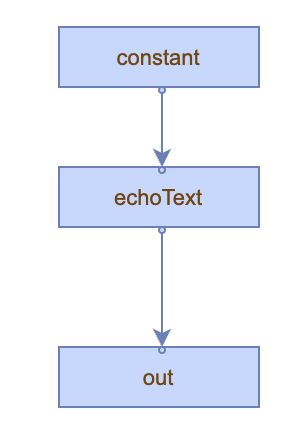
The above workflow contains three vertices and two edges.
Input and output workflow
The following example illustrates the use of an input provided by a lambda function to update the vertex value.
Construct a
Workflow.Const:Python# fromConst is a helper method for creating a `Workflow.Const` const_vertex = c3.Workflow.Const.fromConst("8.3").withId("msg")A
Workflow.Consthas no input ports but can have a single output port labeled out.Using the
Workflow.InputType, create specializedWorkflow.Vertexthat serves as a source vertex to represent the unique name of a workflow input. EveryWorkflow.Inputhas a single disconnected input port whose name is the name of this vertex, and everyWorkflow.Inputhas a single output port out.Pythoninput_lambda = c3.Workflow.Input.fromName("input_lambda")Next, create a specialized
Workflow.Vertexthat represents anActionRef. EveryWorkflow.Actionhas multiple input ports: a port$startand a number of ports whose names match the arguments to the configuredWorkflow.Action#action. EveryWorkflow.Actionhas three output ports: an optional portout, a port$success, and a porterror. Theoutoutput represents the return value of theWorkflow.Action#action, if any.Python# fromActionRef - Helper method for creating a `Workflow.Action` Type from a `ActionRef`. # Automatically infers fields from `FlowGraph.Vertex`. lambdaCaller = c3.Workflow.Action.fromActionRef(c3.ActionRef.fromTypeAction(type=c3.Lambda, action='apply')).withName("apply").withId("apply")Create a
Workflow.Vertexthat serves as a sink vertex to represent the unique name of a workflow output. EveryWorkflow.Outputhas a single input portin. EveryWorkflow.Outputhas a single disconnected output port whose name represents the workflow output name.Pythonoutput_ = c3.Workflow.Output.fromName("output")FlowGraph#makeEdgeconstructs an edge and returns a new edge connecting the two ports. Three edges are constructed for this workflow.Python# create an edge between the out port of the input_lambda vertix edge_one = c3.Workflow.makeEdge(input_lambda.port("out"), lambdaCaller.port("this")) # create an edge between the constant vertex edge_two = c3.Workflow.makeEdge(const_vertex.port("out"), lambdaCaller.port("args")) # create an edge between vertex representing an Workflow.Action and the sink vertex edge_three = c3.Workflow.makeEdge(lambdaCaller.port("out"), output_.port("in"))Build the workflow.
Pythonvertices = [input_lambda, const_vertex, lambdaCaller, output_] edges = [edge_one, edge_two, edge_three] workflow = c3.Workflow(vertices=vertices, edges=edges) workflow = workflow.create(returnInclude='this')Implement a function to accept input and return a string. The returned string hydrates the value of the
Workflow.Constvertex.Pythondef func(arg1=None): list_strings = ["version_"+arg1, "some_other_string"] return list_strings lambda_func = c3.Lambda.fromPyFunc(func) inputs = {} inputs['input_lambda'] = lambda_func run = workflow.start(inputs=inputs)Applying the lambda function to the
Workflow.Constvertex updates the vertex value toconst_8.3.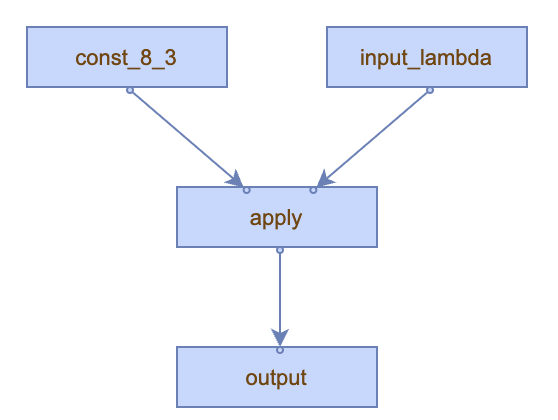
Using multi-input lambdas in a workflow
The following workflow demonstrates how to convert a standard Python function, func, into a workflow-compatible component. It illustrates the process of creating constants, manipulating and combining them, and then feeding the results into a function.
At a high level:
- You define a function,
func, that takes an integer and a string as inputs, and converts the string to an integer, and then returns their sum. - The workflow contains various vertices:
- Two constants with values
1(an integer) and"1"(a string). - A definition of a Python function
func. - A combiner that creates a tuple from the two constants.
- An action that calls the function using the combined inputs.
- A final output node.
- Two constants with values
- Edges that direct data flow between these vertices.
- Upon defining all vertices and edges, the workflow is instantiated and named
DummyWorkflow. - In the final step, the workflow is started, executing the defined operations in sequence and routing data through the established paths.
The Python func expects two inputs: an integer a and a string b. It returns the sum of a and the integer representation of b.
def func(a, b):
     """a should be int and b should be string"""
    return a + int(b)
The following vertices are created:
# Represents a constant integer value of `1`.
vertex_a = c3.Workflow.Const.fromConst(const=1)
# Represents a constant string value of `"1"`.
vertex_b = c3.Workflow.Const.fromConst(const="1")
The Lambda#fromPyFunc method converts the given Python function func into a Lambda function implemented in Python.
func_lambda = c3.Lambda.fromPyFunc(func)The func Python function is wrapped or transformed into a format (func_lambda) that can be used as a vertex in the workflow. This allows for the workflow to later use this converted function as an executable step, preserving its logic and behavior.
Next, create a new constant vertex in the workflow using the previously converted func_lambda.
# Represents the Python function `func`
vertex_lambda = c3.Workflow.Const.fromConst(const=func_lambda)
c3.Workflow.Const.fromConst(...) is used to create a constant vertex, vertex_lambda, for the workflow.
const=func_lambda sets the constant value of the vertex to the func_lambda object.
The resulting object, vertex_lambda, represents a constant vertex in the workflow that holds the Python function. This line is integrating your Python function into the Workflow by making it a constant vertex, so it can be used as a reference for other workflow operations.
Now, create a vertex, vertex_combine, in the workflow that is used to structure or combine data into a specific format. vertex_combine takes two inputs: int and string and then produces an output structured as { a: int, b: string }.
The inputs for this vertex are be provided from vertex_a and vertex_b, and the output is passed along to the subsequent vertices in the workflow.
# Combines the outputs of `vertex_a` and `vertex_b` into a tuple with type { a: int, b: string }
vertex_combine = c3.Workflow.Make.fromTargetType(
    targetType=c3.TupleType.fromString("{ a: int, b: string }"),
    inTypes={"a": c3.IntType(), "b": c3.StringType()}
)
c3.Workflow.Make.fromTargetType(...) is a method call that creates a vertex in the workflow and can take multiple inputs and combine them to form a specific type. The next line targetType=c3.TupleType.fromString("{ a: int, b: string }") specifies the desired output format or structure of the combined data.
It suggests that the output should be a tuple or an object with two fields:
awith typeint.bwith typestring.
The TupleType defines the schema or shape of the resulting data after combining the inputs.
inTypes={"a": c3.IntType(), "b": c3.StringType()} provides a mapping for the expected input types:
- Input for the field a should be of type
int. - Input for the field b should be of type
string.
Create edges between vertices in the workflow.
e1 = c3.Workflow.makeEdge(vertex_a.port("out"), vertex_combine.port("a"))
e2 = c3.Workflow.makeEdge(vertex_b.port("out"), vertex_combine.port("b"))
In the lines above, e1 is an edge connecting the output of vertex_a to the a input port of vertex_combine.
vertex_a.port("out") retrieves the out port of vertex_a.
vertex_combine.port("a") retrieves the a input port of vertex_combine.
Similarly, e2 is an edge connecting the output of vertex_b to the b input port of vertex_combine.
The output data from vertex_a flows into the a input of vertex_combine.
And, the output data from vertex_b flows into the b input of vertex_combine.
These lines set up the data flow structure, ensuring that vertex_combine receives its inputs from vertex_a and vertex_b.
The following code snippet below creates a vertex, specifically an action vertex, in the workflow. Recall, an action refers to a function or method call. This vertex executes a specific action, in this case, a Lambda function.
# Represents the action of calling the `func` lambda function
vertex_sum = c3.Workflow.Action.fromAction(
    action=c3.ActionRef.fromTypeAction(
        type=c3.Lambda,
        action="call"
      ),
    inNames=["this", "args"],
    outNames=["out"],
    name="dummy_lambda"
)
Breaking down the above code snippet:
c3.Workflow.Action.fromAction(...)constructs a new action vertex for the workflow.action=c3.ActionRef.fromTypeAction(...)specifies what action the vertex performs:type=c3.Lambda- The action belongs to theLambdaType.action="call"- Specifies the method or function of the Lambda Type that should be executed. The action should calls the lambda function (or executes it).
inNames=["this", "args"]are the names of the input ports for this vertex. The"this"port expects the actual lambda function to be executed, and the"args"port expects the arguments to be passed to the lambda function.outNames=["out"]are the names of the output ports for this vertex. After the lambda function is executed, the result is available at this"out"port.name="dummy_lambda"provides a name to the action vertex, for identification or logging purposes.
The following code snippet creates edges between vertices in the workflow.
# creates an edge between the out port of the `vertex_lamba` and the input port labeled "this" of the vertex_sum. This
# edge is effectively passing the lambda function to the action vertex, which will call it
e3 = c3.Workflow.makeEdge(vertex_lambda.port("out"), vertex_sum.port("this"))
e4 = c3.Workflow.makeEdge(vertex_combine.port("out"), vertex_sum.port("args"))
These lines are ensuring that:
The lambda function,
func, is passed to thevertex_sumaction vertex.The combined values from
vertex_aandvertex_bare also passed as arguments to the same action vertex, ensuring that when the action is executed, it can successfully call the lambda function with the provided arguments.
This next code snippet defines the final steps of the workflow.
vertex_output = c3.Workflow.Output.fromName("output")
e5 = c3.Workflow.makeEdge(vertex_sum.port("out"), vertex_output.port("in"))

vertices = [vertex_a, vertex_b, vertex_lambda, vertex_combine, vertex_sum, vertex_output]
edges = [e1, e2, e3, e4, e5]
workflow = c3.Workflow.make({
    "vertices": vertices,
    "edges": edges,
    "id": str(uuid.uuid4()),
    "name": "DummyWorkflow"
}).create()

workflow.start()
Let's break down its functionalities step-by-step:
Create an output vertex named
outputfor the workflow.Pythonvertex_output = c3.Workflow.Output.fromName("output")Create an edge
e5that connects the out of thevertex_sum(which represents the action of calling the lambda functionfuncon the inputsaandb) to the input port ofvertex_output. It routes the result of the lambda function to the final output node.Pythone5 = c3.Workflow.makeEdge(vertex_sum.port("out"), vertex_output.port("in"))The vertices and edges defined in the workflow are assigned into two separate lists, representing all the vertices and edges in the workflow.
Pythonvertices = [vertex_a, vertex_b, vertex_lambda, vertex_combine, vertex_sum, vertex_output] edges = [e1, e2, e3, e4, e5]Using the
Workflow.makemethod, a new workflow is instantiated with the following properties:vertices: List of all vertices in the Workflow.edges: List of all edges in the Workflow.id: A unique identifier for the Workflow, generated using theuuidlibrary.name: A string name for the Workflow, in this case,DummyWorkflow.
Calling create() finalizes the creation of the workflow, ensuring all the provided vertices and edges are valid.
workflow = c3.Workflow.make({
    "vertices": vertices,
    "edges": edges,
    "id": str(uuid.uuid4()),
    "name": "DummyWorkflow"
}).create()
After the workflow is created, it can be started using the
start()method to execute the workflow, passing data from the input vertices, through the defined operations, and finally to the output vertex.Pythonworkflow.start()
The final steps of the multi-input lambda workflow, link together all previously defined operations and data points, and then begins its execution.
Troubleshooting tips for workflow issues
This section covers the most common issues that can occur with workflows and how to troubleshoot them.
Structural issues
A common cause of workflow errors results from improper design of the workflow. For example, a workflow could contain an improperly designed cycle by creating an edge that links back to the same vertex. Taking advantage of the
visualize()method in theWorkflowType can enable you to visualize the workflow output.Mixing ports that are not compatible is another common issue. An example is trying to connect an
outport to a$startport.A final common issue is if your workflow is missing edges where you intended to have edges. Calling the
visualize()method can help you visualize your design or triage any structural issues with your workflow.
Execution issues
- An issue you might encounter when executing workflows is attempting to inspect the output before execution it has completed.
Workflow.status()can be used to view the status of a workflow. You should not visualize the output until the workflow status iscomplete.
See also
- Overview of Invalidation Queues and Asynchronous Processing
Workflow.BatchWorkflow.MapReduce