View the Build Queue
You can view the build queue and build configurations in the Build Queue page in C3 AI Studio.
View Build Queue in C3 AI Studio
To view the Build Queue page in C3 AI Studio, navigate to the Releases tab and select Build Queue.
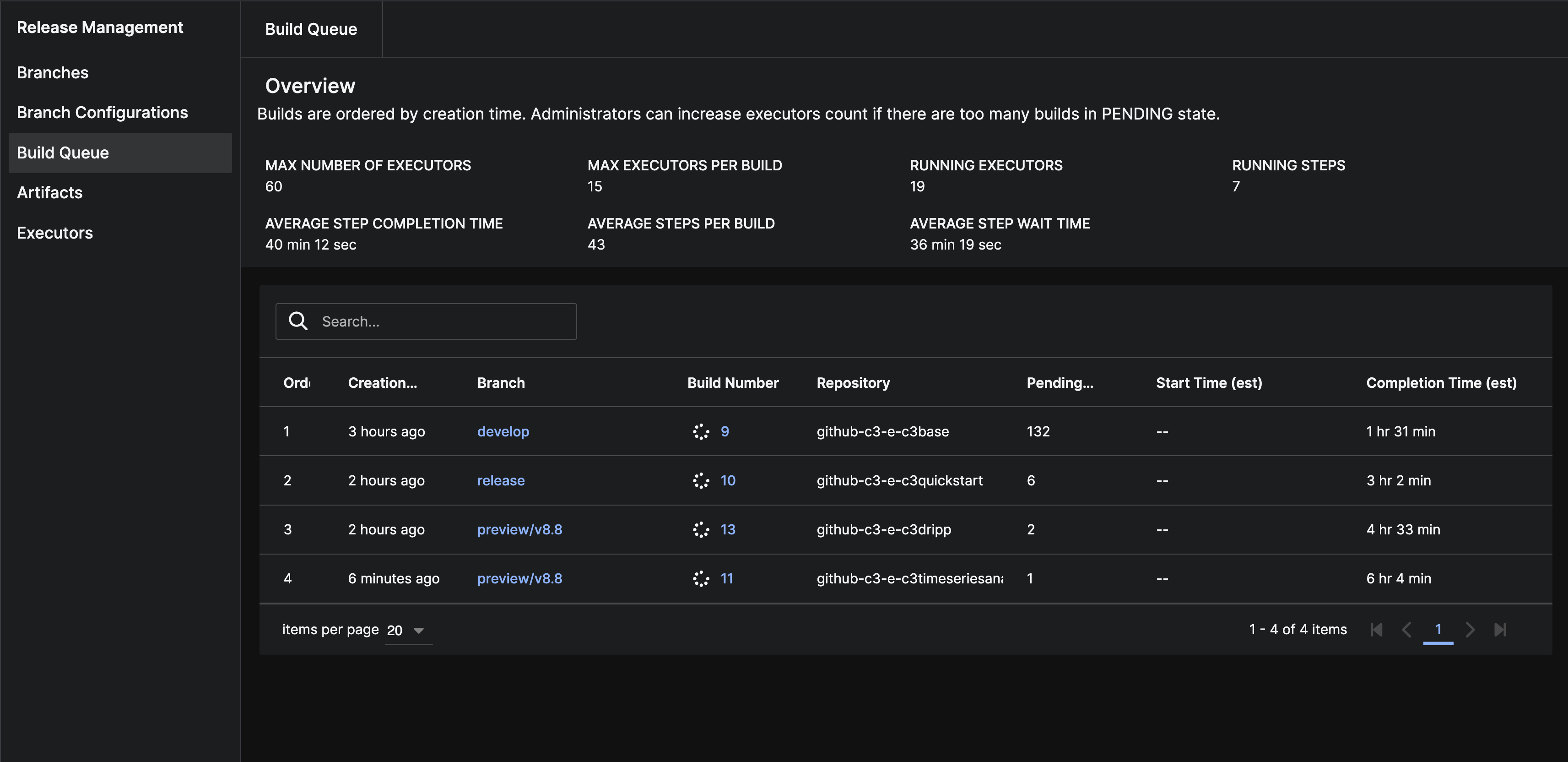
The Build Queue page displays the current build performance indicators and the build queue.
The build queue table shows the status and details of build steps waiting to run in the pipeline:
| Build information | Description |
|---|---|
| Order | Position of a build in the queue. The order indicates the sequence in which builds run. |
| Creation Time | Timestamp when the system received the build request to add to the queue. |
| Branch | Branch of the repository where the build initiates. |
| Build Number | Unique sequential number that helps track specific build instances for a branch. |
| Repository | Source control repository where the code builds. |
| Pending Step Count | Number of steps still waiting to run as part of the build process. |
| Start Time (est) | Estimated timestamp for when build begins running. |
| Completion Time (est) | Estimated timestamp for when build finishes running. |
See also
To customize build pipelines or manage build configurations, see the following additional documentation: