User Groups in C3 AI
Groups in the C3 Agentic AI Platform are pivotal in managing a large number of users. They facilitate efficient user management and permission assignment by grouping users with common access requirements.
Relationship between users, roles, and groups
The User Type represents an individual user with attributes like username, password, and email. Each user is a distinct entity with their own set of credentials and potentially unique access requirements. A user is assigned to one or more groups.
The Role Type defines a collection of permissions or access levels. Roles are created to represent different levels or types of access to resources and actions. For example, roles could be Admin, Editor, or Viewer, each with different permissions.
The UserGroup Type associates one or more users with a particular role. Groups simplify the management of user permissions. UserGroups have one parent role that can contained nested roles. UserGroups consist of users, and a UserGroup has a role.
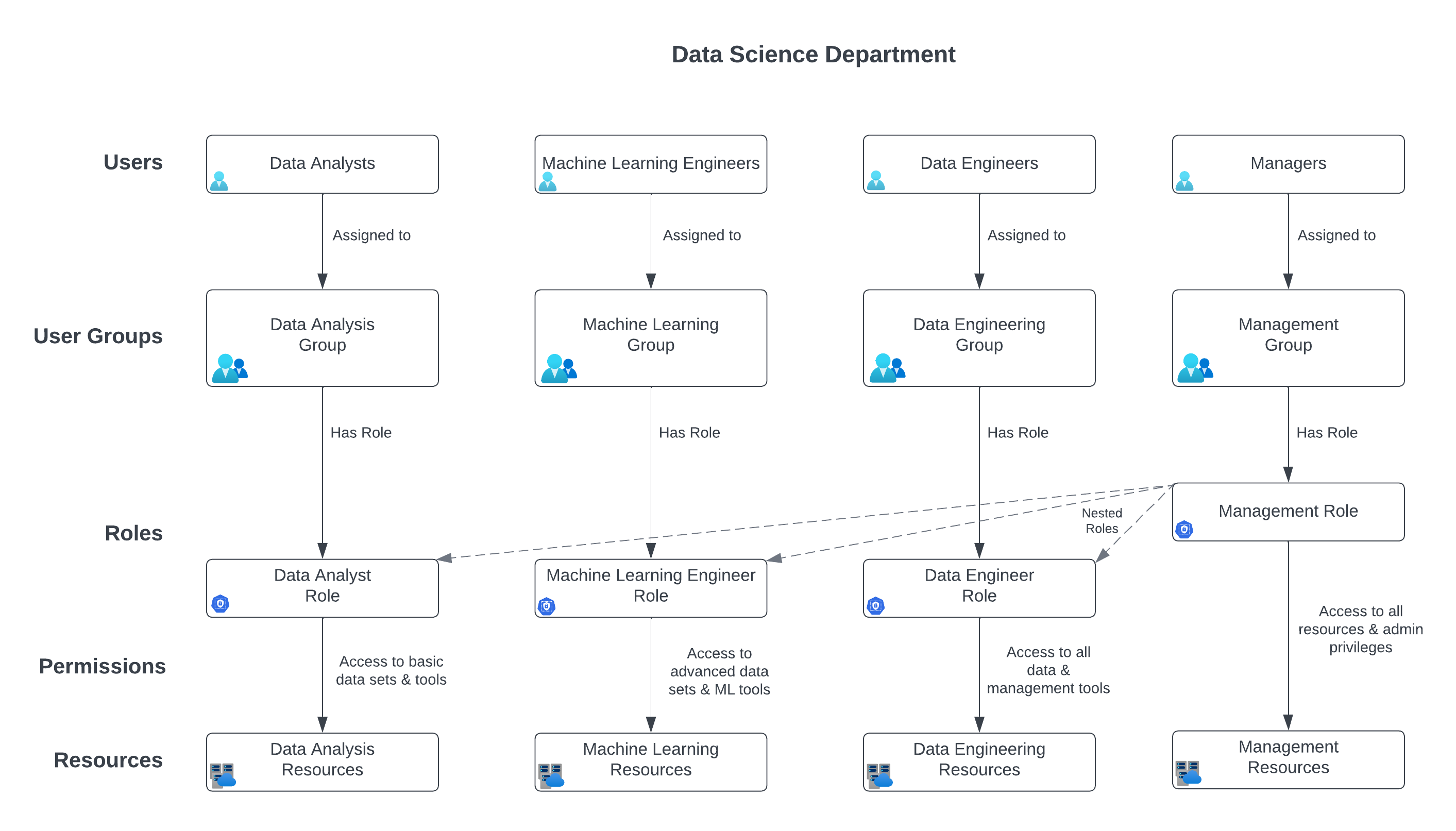
Consider a data science department in an organization. There are various teams with specific functions like Data Analysis, Machine Learning, Data Engineering, and Management. Each team requires different levels of access to data, tools, and resources.
Groups
In the data science department, there are employees distributed among the four groups.
- Data Analysis Group: Users in this group are assigned the Data Analyst Role.
- Machine Learning Group: Users in this group are assigned the Machine Learning Engineer Role.
- Data Engineering Group: Users in this group are assigned the Data Engineer Role.
- Management Group: Users in this group are assigned the Manager Role, which inherently includes access permissions of all nested roles.
Roles
Each group in the data science department contains a role. Recall from the topic on roles in the C3 Agentic AI Platform that a role can contain nested roles.
- Data Analyst Role: Access to basic data sets, analytics tools.
- Machine Learning Engineer Role: Access to advanced data sets, machine learning tools, and computational resources.
- Data Engineer Role: Access to all data, including raw and processed data, and data management tools.
- Manager Role: Overarching access to all data and tools, plus administrative privileges. This role includes nested roles like Data Analyst, Machine Learning Engineer, and Data Engineer.
The Manager Role contains several nested roles. See Define Roles and Groups to learn more.
Scenario 1: Accessing resources
A new data analysis project starts. Users in the Data Analysis Group need to access basic data sets and analytics tools. Since they are assigned the Data Analyst Role, they have the necessary permissions.
A Machine Learning Engineer needs to access advanced computational resources for model training. Being in the Machine Learning Group, the user has the appropriate permissions through the Machine Learning Engineer Role.
Scenario 2: Role expansion
A Data Analyst is promoted to a Machine Learning role. The user is moved from the Data Analysis Group to the Machine Learning Group, automatically inheriting the permissions of the Machine Learning Engineer Role.
Scenario 3: Management oversight
A Manager needs to review work across all teams. Being in the Management Group, the user has the Manager Role, which includes nested roles of Data Analyst, Machine Learning Engineer, and Data Engineer. This allows the Manager to access all levels of data and tools across the department.
This use case demonstrates how the UserGroup Type effectively associates users with specific roles, simplifying user management. Nested roles within the Role Type provide flexibility, allowing broader access control for certain groups like managers. By assigning users to appropriate groups, the organization ensures that each employee has access to the resources they need, according to their role and responsibilities.
Key functions of the UserGroup Type
Grouping Users: The users field in the UserGroup Type holds an array of User objects. These are the users that belong to this specific group. By adding users to this array, they become part of the UserGroup.
Role Assignment: The role function within the UserGroup Type returns the role assigned to this group. Since each UserGroup can have at most one Role, all users in the group are implicitly mapped to this single role. This function is key in establishing the relationship between users and their roles. It is important to note that the role function can optionally fail if no role is assigned to the group, ensuring that roles are explicitly managed.
Managing Group States: The inactive field indicates whether a group is active or not. An inactive group does not allow adding or removing users, which can be useful for maintaining stable group compositions or during certain administrative processes.
Extended Functions for Roles and Permissions: The UserGroup Type also includes functions like hasSecurityLevel, allRoles, allDataPermissions, and allPermissions. These functions provide additional information about the roles and permissions associated with the UserGroup Type, allowing for more detailed access control and management.
Identity Provider (IdP) Integration: Functions like addIdpGroupForIdp, removeIdpGroupForIdp, and idpGroupIdsForIdp suggest integration with external identity providers. This means the UserGroup Type can be linked to groups defined in an IdP, enabling identity management and authentication to be handled externally.
Lifecycle Management: Methods like activate, deactivate, upsertSeededGroups, and upsertPlatformSeededGroups provide ways to manage the lifecycle and state of the UserGroup entities. This includes activating or deactivating groups, and updating groups with predefined (seeded) configurations, ensuring that the groups remain relevant and up-to-date within the application's context.
The UserGroup Type is required for mapping users to roles in the C3 Agentic AI Platform. It does this by grouping users together and assigning a single role to each group. This design simplifies permission management and ensures consistency in access control. The Type contains various functionalities to manage group states, integrate with identity providers, and handle different group-related operations efficiently within the platform's hierarchical structure.
Grouping users
Users are added to a UserGroup based on the role they need to have. For instance, all users who need admin access might be added to one UserGroup, while those who need editor access would be in another.
Role assignment
The UserGroup is associated with a single role. This means that all users in the group inherit the permissions of the role associated with the group.
Efficient permission management
By using groups, it becomes easier to manage permissions. If a role's permissions must be updated, it can be done at the role level, and all users in the associated UserGroup automatically get the updated permissions. Similarly, adding or removing users from a group is an efficient way to manage who has what kind of access.
The UserGroup Type serves as a mechanism to efficiently manage user permissions by grouping users and associating them with specific roles, thereby simplifying the administration of access control.
Group membership and access control
Group membership is a crucial factor in determining a user's access within the platform. Users inherit all the permissions associated with the roles of their groups.
Effective Permissions: The cumulative permissions from all the roles within a user's groups define their effective permissions.
Best practices for user group management
Effective user group management involves regularly reviewing group memberships, ensuring accurate role assignments, and maintaining an organized structure that reflects the organization's operational hierarchy.
Regular Audits: Periodically auditing groups and their memberships ensures that users have appropriate access and that the security posture remains robust.
Special considerations
Special considerations in managing groups include dealing with overlapping permissions, handling temporary access requirements, and understanding the implications of nested group structures.
Overlapping Permissions: Be mindful of overlapping permissions when a user is part of multiple groups.
User groups are a fundamental component of user management in the C3 Agentic AI Platform. They simplify the administration of user permissions and access, ensuring that users are efficiently grouped for optimal platform utilization and security.