Tutorial - Hierarchy Denormalization
This document presents a step-by-step tutorial on hierarchy denormalization. You can use hierarchy denormalization to flatten an acyclic graph data structure. See also Understanding Hierarchy Denormalization.
This step-by-step guide is for a non-strict hierarchy.
Step 1
Identify the edges and the vertex Types for your graph. There may be more than one edge Type for the given vertex. This could be similar to an edge-coloring problem where there are multiple edges of different colors between the same two vertices.
Consider an Organization hierarchy, where Organization is the vertex Type, and there are different groups within the organization identified by their colors. Each color represents a unique edge Type.
/**
 * Type of vertex in the graph
 *
 * The target must be specified on the vertexType.
 * It tells vertexType the name of type that stores the denormed hierarchy.
 */
@denorm(target='OrganizationHierarchyDenorm')
entity type Organization schema name 'THIERDNRM_ORG' {
  denormParents:  [OrganizationHierarchyDenorm](to)
  redParents:     [OrganizationRelationRed](to)
  blueParents:    [OrganizationRelationBlue](to)
  greenParents:   [OrganizationRelationGreen](to)
  purpleParents:  [OrganizationRelationPurple](to)
  violetParents:  [OrganizationRelationViolet](to)
  redChildren:    [OrganizationRelationRed](from)
  blueChildren:   [OrganizationRelationBlue](from)
  greenChildren:  [OrganizationRelationGreen](from)
  purpleChildren: [OrganizationRelationPurple](from)
  violetChildren: [OrganizationRelationViolet](from)
}
For this example consider that OrganizationRelationRed, OrganizationRelationBlue, OrganizationRelationGreen, and OrganizationRelationViolet are the Types of edges in the graph.
You have a graph structure that must be denormalized (flattened) so you need to first mix in the HierarchyDenorm Type. Refer to the Ann.Denorm Type for more information about using the denorm annotation.
/**
 * Type to mixin hierarchy denorm that contains the final flattened data
 */
@db(shortId=true, shortIdReservationRange=10000)
@denorm(sources=[
                  {
                    'type': 'DenormSource',
                    parentFieldName: 'redParents',
                    childFieldName: 'redChildren',
                    source: 'OrganizationRelationRed'
                  },
                  {
                    'type': 'DenormSource',
                    parentFieldName: 'blueParents',
                    childFieldName: 'blueChildren',
                    source: 'OrganizationRelationBlue'
                  },
                  {
                    'type': 'DenormSource',
                    parentFieldName: 'greenParents',
                    childFieldName: 'greenChildren',
                    source: 'OrganizationRelationGreen'
                  },
                  {
                    'type': 'DenormSource',
                    parentFieldName: 'violetParents',
                    childFieldName: 'violetChildren',
                    source: 'OrganizationRelationViolet'
                  },
                  {
                    'type': 'DenormSource',
                    parentFieldName: 'purpleParents',
                    childFieldName: 'purpleChildren',
                    source: 'OrganizationRelationPurple'
                  }
                ], strictHierarchy=true)
entity type OrganizationHierarchyDenorm mixes HierarchyDenorm<Organization> schema name 'THIERDNRM_ORGHDNRM' {

  name:         ~ not persistable
  version:      ~ not persistable
  meta:         ~ not persistable
  versionEdits: ~ not persistable
}
Note: You must specify the @denorm annotation indicating the edge Types associated with this hierarchy denorm Type. The resulting Type should mixin HierarchyDenorm<Organization>.
Define several edge Types OrganizationRelationRed, OrganizationRelationBlue, OrganizationRelationGreen, and OrganizationRelationViolet.
Each edge Type should mixin the Relation Type to inherit the edge properties.
entity type OrganizationRelationRed mixes Relation<Organization> schema name 'THIERDNRM_ORGRELRED'entity type OrganizationRelationBlue mixes Relation<Organization> schema name 'THIERDNRM_ORGRELBLU'entity type OrganizationRelationGreen mixes Relation<Organization> schema name 'THIERDNRM_ORGRELGRN'entity type OrganizationRelationViolet mixes Relation<Organization> schema name 'THIERDNRM_ORGRELVIO'Step 2
Create sample data for the vertex and the edge Types according to the structure below and then denormalize them.
                                                       A
                                                      /
                                                E    B
                                               / \	/ \
F C Dvar o1 = Organization.make({id:"A"}).create();
var o2 = Organization.make({id:"B"}).create();
var o3 = Organization.make({id:"C"}).create();
var o4 = Organization.make({id:"D"}).create();
var o5 = Organization.make({id:"E"}).create();
var o6 = Organization.make({id:"F"}).create();Step 3
Create the relationship edges for red and blue categories.
// red relations
OrganizationRelationRed.make({id:"AB", from:o1, to: o2, fromInfo:"A", toInfo:"B", relationship:"red"}).create();
OrganizationRelationRed.make({id:"BC", from:o2, to: o3, fromInfo:"B", toInfo:"C", relationship:"red"}).create();
OrganizationRelationRed.make({id:"BD", from:o2, to: o4, fromInfo:"B", toInfo:"D", relationship:"red"}).create();

// blue relations
OrganizationRelationBlue.make({id:"EC", from:o5, to: o3, fromInfo:"E", toInfo:"C", relationship:"blue"}).create();
OrganizationRelationBlue.make({id:"EF", from:o5, to: o6, fromInfo:"E", toInfo:"F", relationship:"blue"}).create();Step 4
Now that the edges and the vertices have been created, you can denormalize the hierarchy.
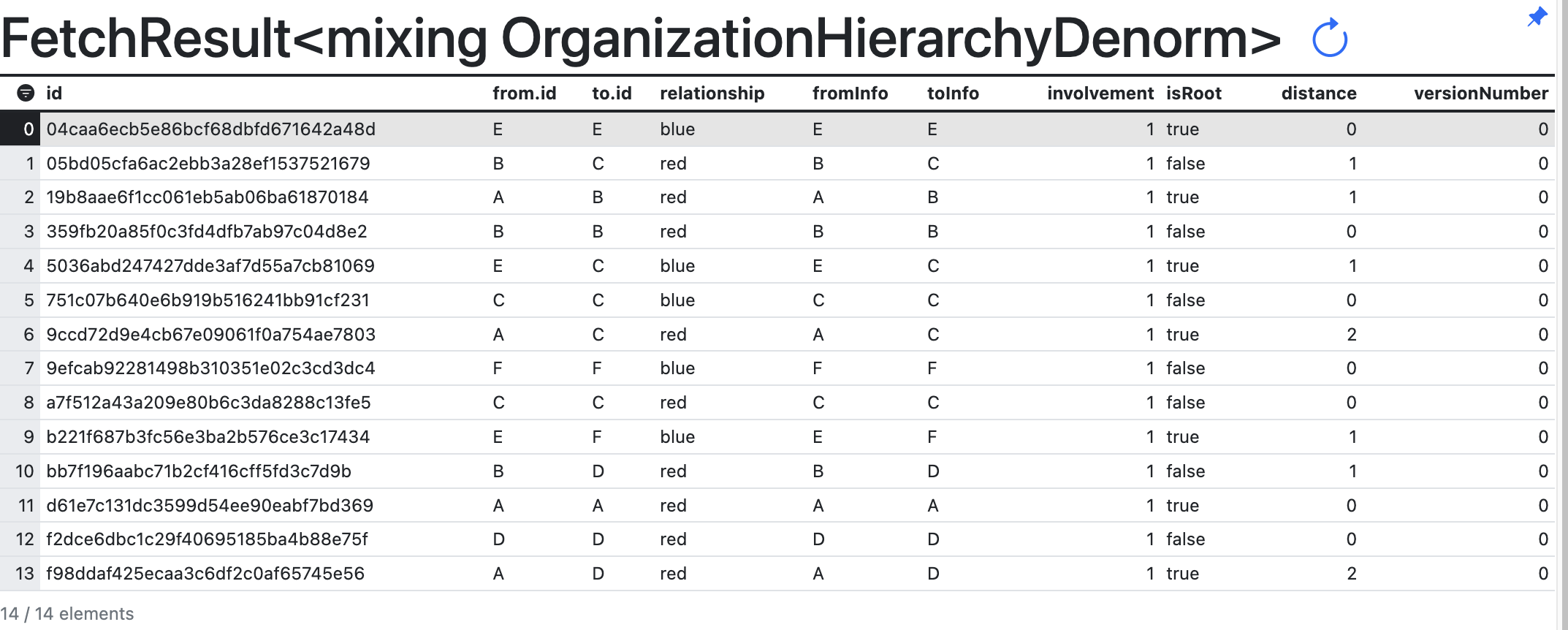
OrganizationHierarchyDenorm.denormalizeHierarchy()After hierarchy denormalization is complete, the results are populated in the OrganizationHierarchyDenorm Type. Run the command OrganizationHierarchyDenorm.fetch() in the static Console to see the following results: