Complex Component Communication
This document aims to provide context on how components within the C3 AI UI Framework communicate to achieve complex results. This document is a continuation of ui-basic-data-flow. Please start there for base knowledge.
Definitions
Epic
An epic (https://redux-observable.js.org/docs/basics/Epics.html for more information) is simply a function that takes in actions and returns actions. This allows extra operations to be performed as well as chaining of actions to create greater effects.
Example - Prepopulating form and storing information in Application State
This example follows creating a UiSdlButton that on-click opens a UiSdlModal. The modal has a UiSdlForm that needs to be pre-populated using an effectTrigger and a changeMultipleInputsAction. Additionally, it stores information in the redux store in a UiSdlApplicationState about when form inputs change.
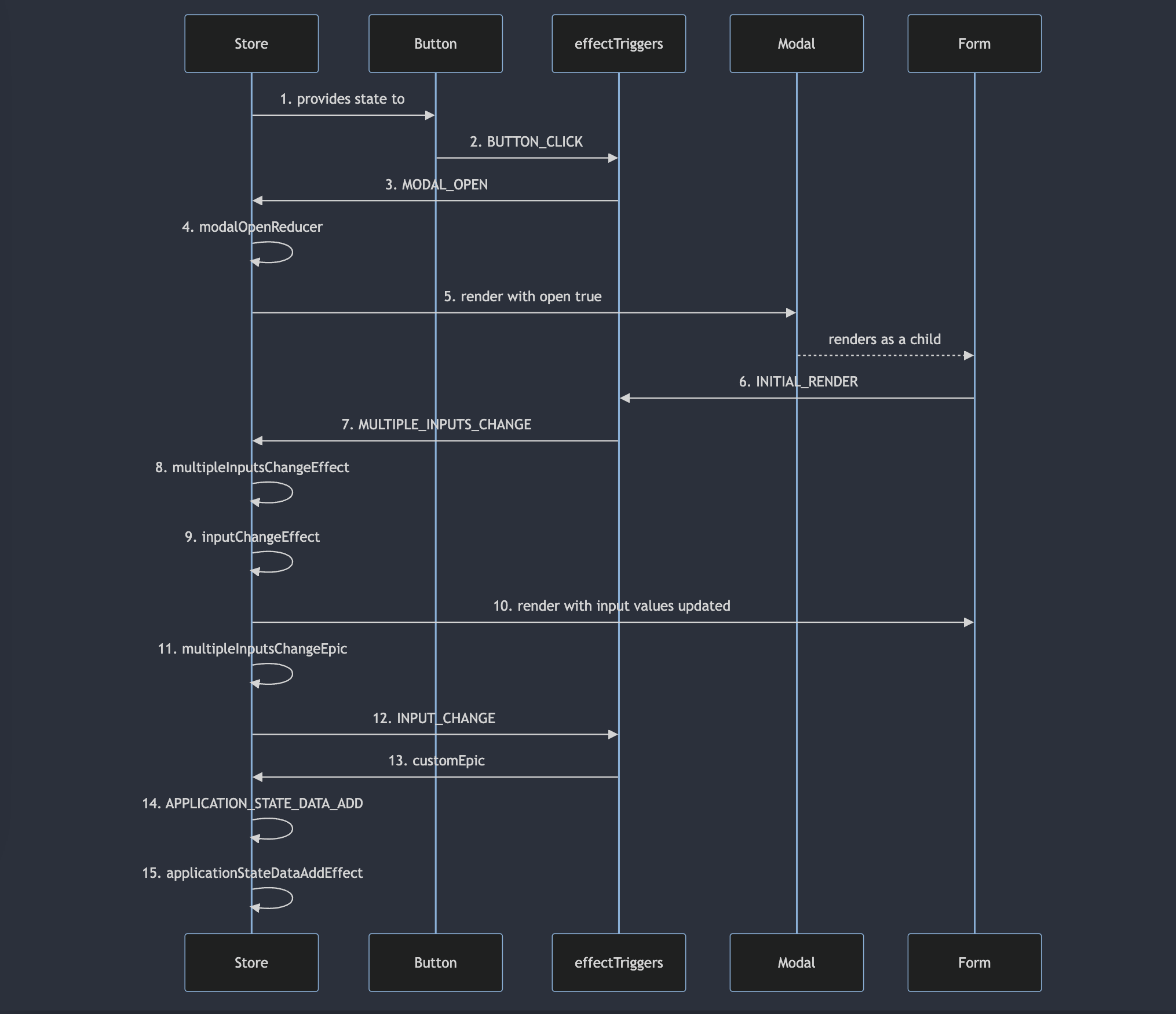
Steps 1-5 are discussed in ui-basic-data-flow.
Step 6
When the UiSdlForm is rendered for the first time, it will dispatch an INITIAL_RENDER action. Every connected component (components wrapped with UiSdlConnected) will dispatch this action on its first render as a signal that it has been bound to the redux store.
Step 7
By configuring the UiSdlForm as follows
{
  "type" : "UiSdlConnected<UiSdlForm>",
  "component" : {
    // Actual component configurations
  },
  "effectTriggers" : [ {
    "trigger" : "Example.SimpleForm.INPUT_CHANGE",
    "effectType" : "customEpic"
  }, {
    "trigger": "Example.SimpleForm.INITIAL_RENDER",
    "actions": [
        {
          "type": "Example.SimpleForm.MULTIPLE_INPUTS_CHANGE",
          "payload": {
            "componentId": "Example.SimpleForm",
            "changes": [
              {
                "field": "exampleFieldName",
                "value": "exampleTextValue"
              }
            ]
          }
        }
      ]
  } ]
}
when the form initially renders, it'll dispatch a MULTIPLE_INPUTS_CHANGE action to prepopulate the field with name "exampleFieldName" with the value "exampleTextValue".
Step 8
MULTIPLE_INPUTS_CHANGE is an action that has both an epic and a reducer associated with it. In that case, all reducers will fully run before any epics run, so multipleInputsChangeEffect runs first.
Step 9
Since reducers are just functions, multipleInputsChangeEffect actually directly calls inputChangeEffect, another reducer. inputChangeEffect is what actually updates the redux store with new information about the form's inputs.
Step 10
After the store is updated, Steps 10 and 11 happen at the same time with no way of knowing which will actually complete first. For that reason, it is important that epics that aim to change something about a component update the store to ensure that the component is re-rendered with the most up-to-date values. For the sake of closing the loop from step 8, this example will assume that the form is re-rendered with the new input values first.
Step 11
After the store is updated from the reducer completing, the multipleInputsChangeEpic epic will then run.
Step 12
multipleInputsChangeEpic took in the MULTIPLE_INPUTS_CHANGE action and returns an INPUT_CHANGE action.
Step 13
As defined in the form json above, this example includes a custom epic, "customEpic" to actually take the INPUT_CHANGE action and translate that into updating a UiSdlApplicationState. More information about creating custom epics can be found at https://developer.c3.ai/docs/8.3/guide/guide-ui-framework/communication-between-component .
Step 14
customEpic in this case sends out an APPLICATION_STATE_DATA_ADD action.
Step 15
APPLICATION_STATE_DATA_ADD has an associated reducer applicationStateDataAddEffect that is then called to update the application state in the redux store.
NOTE: If multiple effects/actions are listening to the same trigger, their order of execution is also not guaranteed. If they need to be accurately chained, UiSdlEpics or more UiSdlEffectTriggers should be used to guarantee the order.
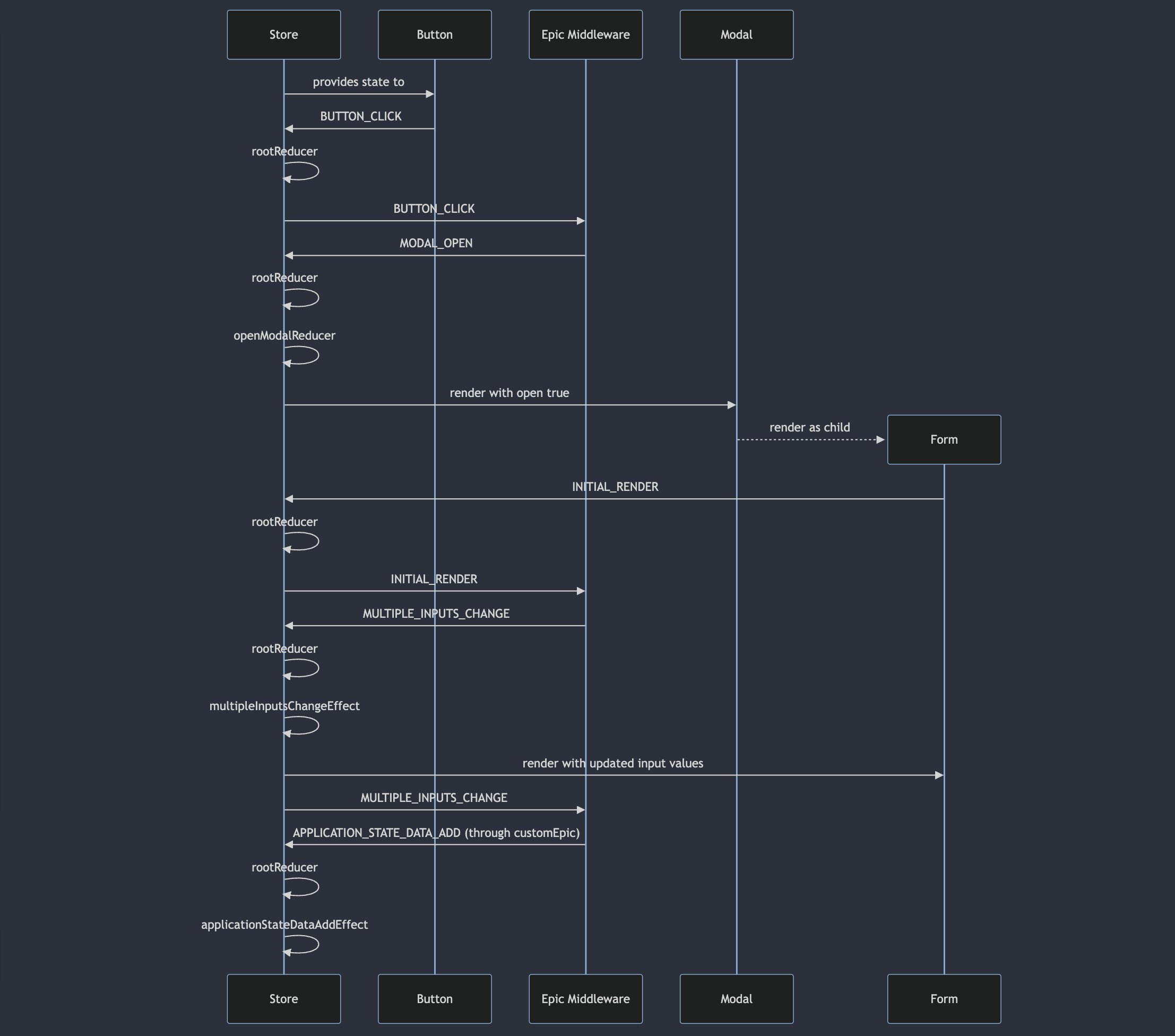
For those interested in what is going on outside of UI Framework terms when this process happens, this diagram shows a more accurate depiction of how the redux store is communicating with components as well as "Epic Middleware" (https://medium.com/kevin-salters-blog/epic-middleware-in-redux-e4385b6ff7c6), a tool used to enact extra functionality with actions as well as dispatch new actions, to get the exact same effect.