Understanding Unstructured Data Integration Pipelines
Unstructured Data Integration (UDI) pipelines in C3 AI Data Fusion ingest documents from a file source, parse and chunk them, optionally enrich the chunks with metadata and extracted entities, and store the result as embeddings. You use the embeddings for semantic search, retrieval-augmented generation (RAG), and analytics workflows.
A UDI pipeline runs as a chain of canvas nodes.
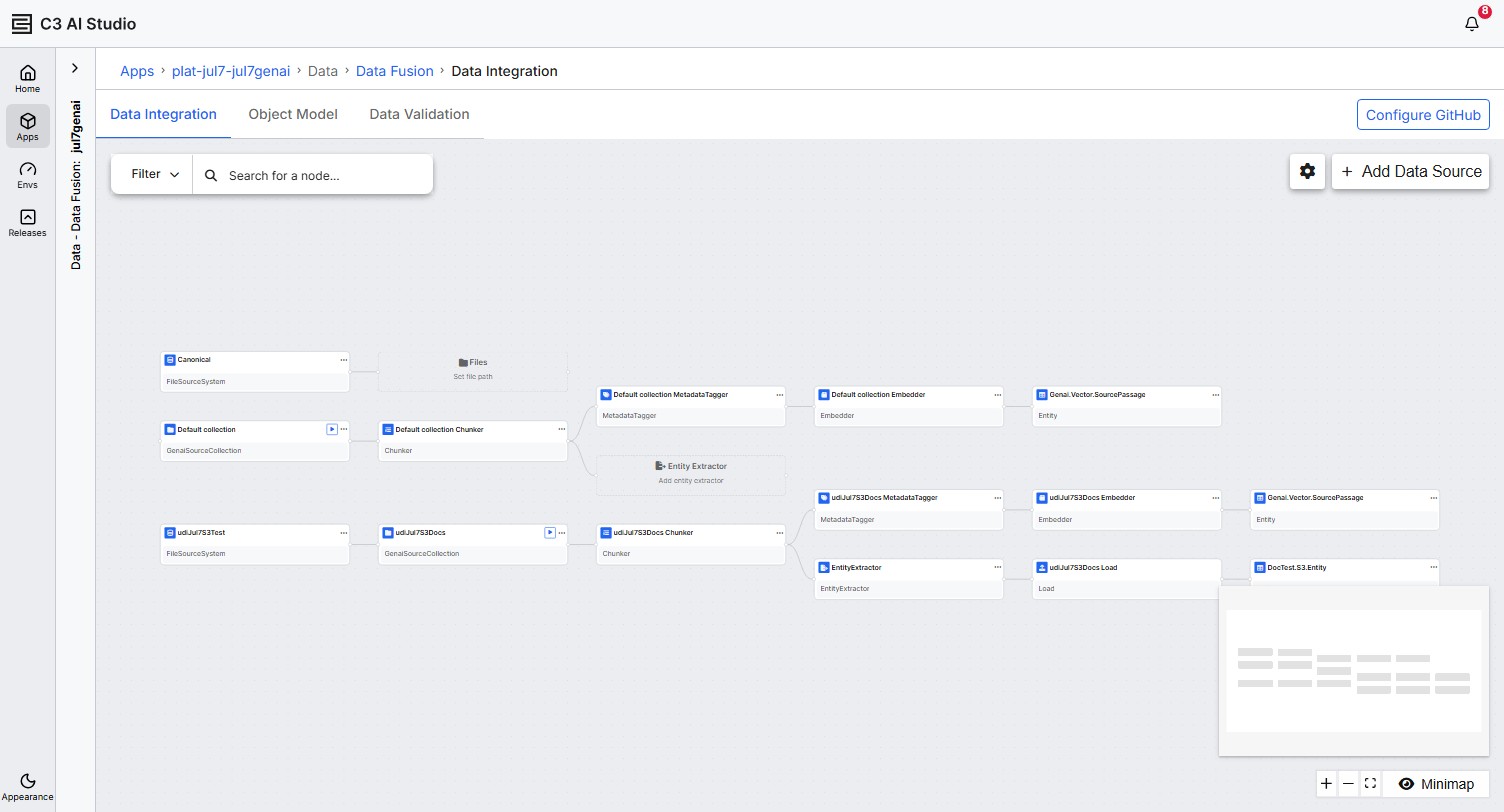
When to use Unstructured Data Integration
Data Fusion offers two ways to ingest data: Unstructured Data Integration (UDI) for documents and Structured Data Integration (SDI) for tabular and streaming sources. Use the comparison below to decide which fits your data.
Use Unstructured Data Integration (UDI) when:
- Your data lives in documents such as PDFs, Word files, PowerPoint files, spreadsheets, HTML, Markdown, or images.
- You need full-text chunking, parsing of complex layouts (tables and images), and embeddings for semantic search.
- You want the platform to extract structured entities or metadata tags from unstructured content using an LLM.
Use Structured Data Integration (SDI) when:
- Your data lives in a database table, a CSV, JSON, or Parquet file with a fixed schema, or a streaming topic.
- You want column-level transforms, type inference, and SQL-style filters.
- You need Change Data Capture (CDC) and incremental loads.
The rest of this topic describes UDI in detail.
Audience
The UDI canvas is designed for three personas:
- Data engineer: Connects file-based data sources, configures chunking and metadata, and operates the pipeline.
- Solution engineer: Wires UDI into customer applications and RAG architectures.
- Platform administrator: Manages source-system credentials, roles, and pipeline schedules.
Capabilities
A UDI pipeline supports the following:
- Connections to file-based sources, including the platform's built-in
Canonicalstorage, Amazon S3, Azure Blob Storage, Google Cloud Storage, OneDrive or SharePoint, and Google Drive. - Document parsing for PDF, Word, PowerPoint, spreadsheet, HTML, Markdown, and image formats using the Mew3 parser.
- Parsing presets that trade off cost, latency, and accuracy. The Chunker UI exposes three: Balanced, Text-Focused, and Table-Focused. Layout-detection tuning and verbalization prompts for images and tables are optional.
- Optional enrichment with LLM-driven metadata tags grouped into Open or Closed categories, plus extracted entities defined by a custom or imported schema.
- Embedding generation using a pluggable embedder model. The platform writes embeddings to the vector store referenced by your Retriever ID.
- Loading of extracted entities into your application data model or to an external file destination.
- Per-file processing status and a batch job visible on the Jobs > Batch page.
Parser-node configuration and the View results mode apply only to PDFs. The platform parses other file types using their default configurations.