Unstructured Data Pipeline Architecture
An Unstructured Data Integration (UDI) pipeline is a directed graph of canvas nodes. The graph moves documents through parsing, chunking, optional enrichment, embedding, and persistence. Each node maps to a Type in the platform.
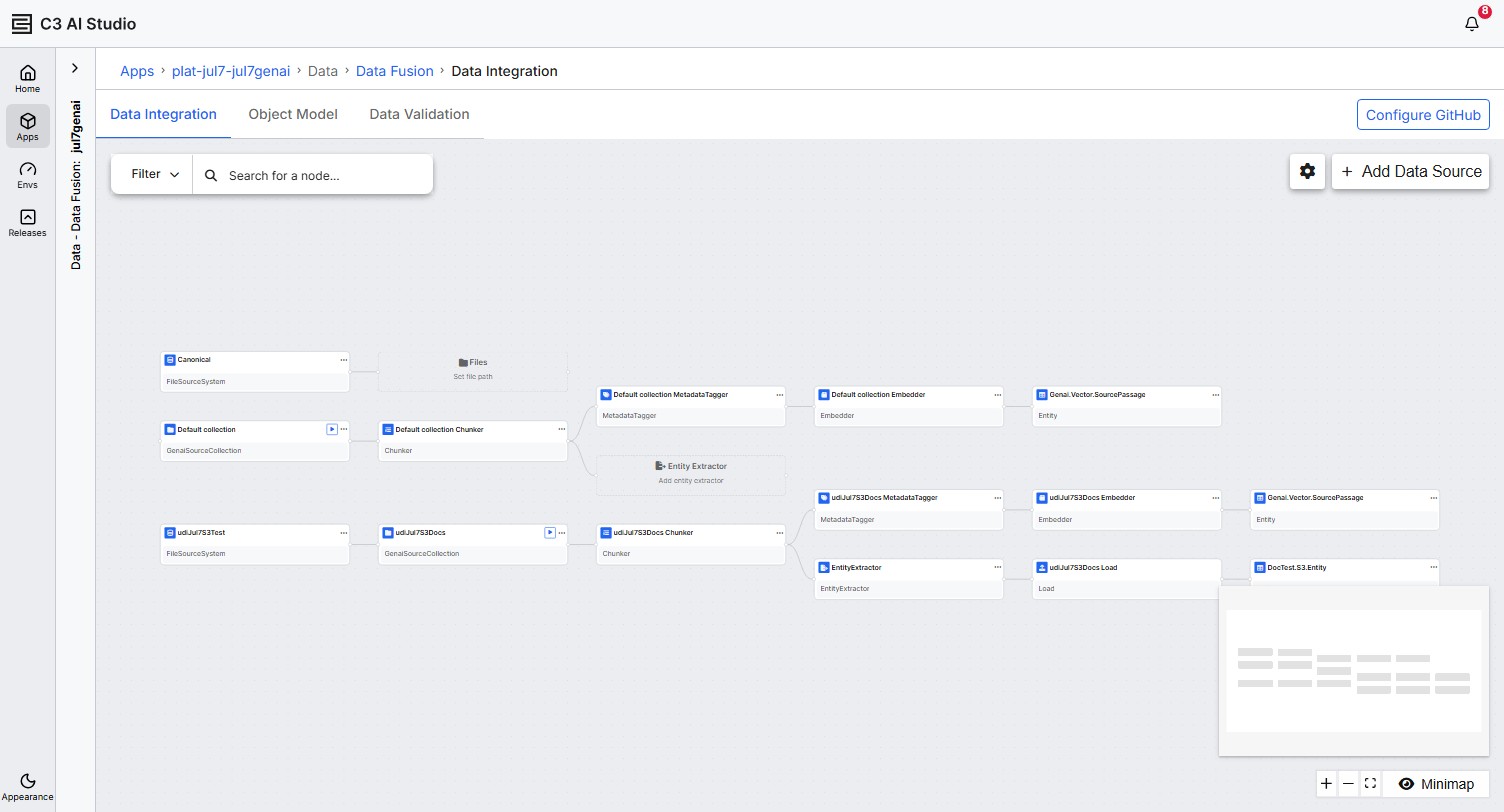
Pipeline building blocks
The pipeline always includes the required nodes below. Metadata tagging and entity extraction are optional.
- File source system: Represents the cloud or local storage location that holds your documents. Implemented as FileSourceSystem with a credentials profile and a bucket or path reference.
- Source collection: A scoped subset of files inside the source system. One source system can host many source collections.
- Chunker: Parses documents and splits them into chunks. The Chunker invokes an LLM client for content extraction.
- Embedder: Generates a vector embedding for each chunk and writes it to a vector store keyed by your Retriever ID.
- Target entity: The persistence destination for chunks. Extraction results are stored at
SourcePassage.metadata.structure. - Metadata Tagger (optional): Adds LLM-generated tags to each chunk.
- Entity Extractor (optional): Extracts structured entities such as Contract, Person, or Facility from chunks using an LLM and a schema you define or import.
- Load destination (optional): Routes extracted entities to the application data model or to an external file destination.
How the canvas builds itself
Nodes are added incrementally as you configure each step. Saving one node creates the placeholders for the nodes that come after it.
- After you create a source collection, the canvas adds a placeholder for the Chunker.
- After you save the Chunker, the canvas adds three downstream placeholders at the same time: the Entity Extractor, the Metadata Tagger, and the Embedder.
- After you save the Embedder, the canvas adds the vector-store entity node automatically. The pipeline now has all the required nodes.
You don't need to add every optional node. A pipeline of Source > Chunker > Embedder > vector entity can index documents end to end.
Destination modes
The Load Destination node, when present, supports two modes:
- Load to Application Data Model: Ingests extracted entities into a Type in your application's data model. If the target entity Type does not already exist, the platform creates it during pipeline execution. The platform removes records when their source file is deleted.
- Load to External Source: Dumps processed output to an external file destination using a connector (such as Azure Blob or Amazon S3), a path prefix, and a source table name.
For decision guidance, see Configure the Load Destination.
File lifecycle
When a source file is removed from the source collection, the platform cascades removal of the file's processing history, its vector-store passages, and the stored passage content.
Entity node interactions and cascade
When you save the Entity Extractor, the platform auto-creates a Load node and attaches one entity child node per entity in the Extractor. The Open menu on each entity child depends on which mode the Load is in.
Load to External Source — the default on Entity Extractor save — offers Browse on the entity child. Load to Application Data Model offers Edit properties, View Data, and Delete.
Deleting an entity child in Application Data Model mode is guarded by a type-to-confirm dialog and cascades:
- The entity node is removed from the canvas.
- If the deleted entity was the Load node's only entity, the Load node is also removed.
- The upstream Entity Extractor is reset to a placeholder when it no longer has any entities.
- If a matching entity exists in a paired structured Transform-child pipeline, it is removed there too.
Field-level edits stay in sync between the Entity Extractor modal and the entity child node: renaming a field or changing its type in either place updates the other.
Execution model
When you select Execute on the source collection node, the platform submits a batch job to the batch queue. You can monitor the run in Monitor > Jobs > Batch.
The source collection node also exposes a View run status action that opens a modal with live job and queue metrics — see Monitor Pipeline Execution.
Multiple pipelines per application
The UDI canvas supports multiple parallel pipelines. Each pipeline is keyed by its source collection and runs independently with its own configuration. You can tailor a different chunker preset, embedder, or target entity for each pipeline.
See also
- Configure Unstructured Data Integration Pipeline
- Understanding Unstructured Data Integration Pipelines
- Prerequisites for Unstructured Data Integration
- Create an Unstructured Source Collection
- Configure the Chunker
- Configure the Embedder
- Configure the Load Destination
- Execute the Pipeline
- Monitor Pipeline Execution