Amazon Kinesis Connector
The C3 Agentic AI Platform connector for Amazon Kinesis enables integration between C3 AI Applications and your Amazon Kinesis service.
To consume Kinesis data and persist it in a C3 Agentic AI Platform data store, use the CloudMessageSourceSystem framework. The framework consumes and ingests messages without code from messaging systems such as Azure Event Hubs, Amazon SQS, Amazon Kinesis, and Apache Kafka.
Prerequisites
Before you use the Amazon Kinesis connector, make sure you have access to an active Kinesis stream.
Register Amazon Kinesis credentials with the C3 Agentic AI Platform
Define the Kinesis cloud message broker name:
var kinesisResourceName = "< KINESIS_STREAM_NAME >"Generate the configuration key from an AwsKinesis instance that you construct with the broker name. Then set the broker name as the configuration value:
var configKey = AwsKinesis.make({resourceName: kinesisResourceName}).configKey();
AwsKinesis.setConfigOrSecretValue(configKey, "resourceName", kinesisResourceName);
AwsKinesis.setConfigOrSecretValue(configKey, "external", true);
Set the credentials for your Kinesis stream:
var credentials = {
  "type": "AwsCredentials",
  "accessKey": "< ACCESS_KEY >",
  "secretKey": "< SECRET_KEY >",
}

AwsKinesis.setCredentialsForResourceName(kinesisResourceName, credentials, ConfigOverride.APP);
If your pipeline reads the stream through a CloudMessageSourceCollection, you can set the credentials on the source system instead, with CloudMessageSourceSystem.forName("<source system name>").setCredentials(credentials). This sets them on each of the source system's deployed collections.
Configure an Amazon Kinesis consumer
To subscribe the C3 Agentic AI Platform to an Amazon Kinesis stream, complete these three steps:
- Configure the Types that model the messages consumed from the stream.
- Configure
CloudMessageSourceSystemand CloudMessageSourceCollection Types to register the stream. - Enable the
CloudMessageSourceCollectionto receive messages.
You can also configure a CloudInboundMessage Type to model a Kinesis stream explicitly. CloudInboundMessage is a parametric Type, so you specify a Type that represents the messages consumed from the stream.
The next sections define and apply the configuration that subscribes the C3 Agentic AI Platform to the connectortesting-kinesis stream in Amazon Kinesis.
In this example, the messages published to the connectortesting-kinesis stream have the following format:
{
  "start": "2023-01-01T00:00:00",
  "deviceId": "SMBLB1",
  "power": 60.04,
  "illuminance": 8.553,
  "voltage": 119.04,
  "temperature": 80.34
}Configure the Types to model the messages consumed from the stream
Define the Types that model the JSON format of the messages you consume from the stream. This example uses one Type, SourceSmartBulbMeasurement, which models the JSON message above.
/**
 * This type represents measurement data from a smart bulb.
 */
type SourceSmartBulbMeasurement mixes Source {
  /**
   * This represents the datetime to use for the start of a measurement
   */
  start: datetime

  /**
   * This represents the ID of the smart bulb
   */
  deviceId: string

  /**
   * This represents the watts measurement
   */
  power: double

  /**
   * This represents the lumens measurement
   */
  illuminance: double

  /**
   * This represents the voltage measurement
   */
  voltage: double

  /**
   * This represents the temperature measurement
   */
  temperature: double

}
You may need additional Types, transforms, and Application Types to capture the full models of the messages you consume.
Configure the CloudMessageSourceSystem and CloudMessageSourceCollection Types to register the stream
A CloudMessageSourceSystem organizes related CloudMessageSourceCollection instances.
You create a CloudMessageSourceSystem by specifying its name. For example, add the following Kinesis.json file to the \metadata\CloudMessageSourceSystem directory of your package:
{
    "name": "Kinesis"
}
A CloudMessageSourceCollection represents a source collection that references a CloudMessageBroker and its related queue, topic, or stream.
The CloudMessageSourceCollection references a CloudMessageSourceSystem and holds the information needed to process data received from the stream and to connect to the stream.
For example, to model a CloudMessageSourceCollection called SmartBulbMeasurementSource, add the following SmartBulbMeasurementSource.json file to the \metadata\CloudMessageSourceCollection directory of your package:
{
    "name": "SmartBulbMeasurementSource",
    "sourceSystem": {
        "type" : "CloudMessageSourceSystem",
        "name" : "Kinesis"
    },
    "source": "SourceSmartBulbMeasurement",
    "external": true,
    "cloudMessageBrokerName": "< KINESIS_STREAM_NAME >",
    "cloudMessageBrokerType": "AwsKinesis",
    "batchSize": 10,
    "timeoutMillis": 5000
}
In the console, you can configure the CloudMessageSourceCollection further with the SourceCollection.Config mixin. The following code sets the content type, the preferences for archiving records, and the SourceCollectionProcessMode.
  var config = CloudMessageSourceCollection.forName("SmartBulbMeasurementSource").config();
  config.setConfigValue("contentTypeOverride", "application/json", ConfigOverride.APP);
  config.setConfigValue("doNotChunk", true, ConfigOverride.APP);
  config.setConfigValue("doNotArchiveStatus", false, ConfigOverride.APP);
  config.setConfigValue("doNotArchiveSources", true, ConfigOverride.APP);
  config.setConfigValue("doNotArchiveFailedSources", false, ConfigOverride.APP);
config.setConfigValue("processMode", "ON_ARRIVAL", ConfigOverride.APP);Enable the CloudMessageSourceCollection to receive messages
Run the following commands to subscribe the C3 Agentic AI Platform to the stream and process messages in real time as they arrive:
src.register()
src.startOnArrivalMode()
To verify that the platform receives messages, create an AwsKinesis instance from your stream name and call the receiveMessages() method. Include the shard of the Kinesis stream that you want to read messages from.
broker = AwsKinesis.fromResourceName(kinesisResourceName);
messages = broker.receiveMessages({partition: "shardId-000000000001"})
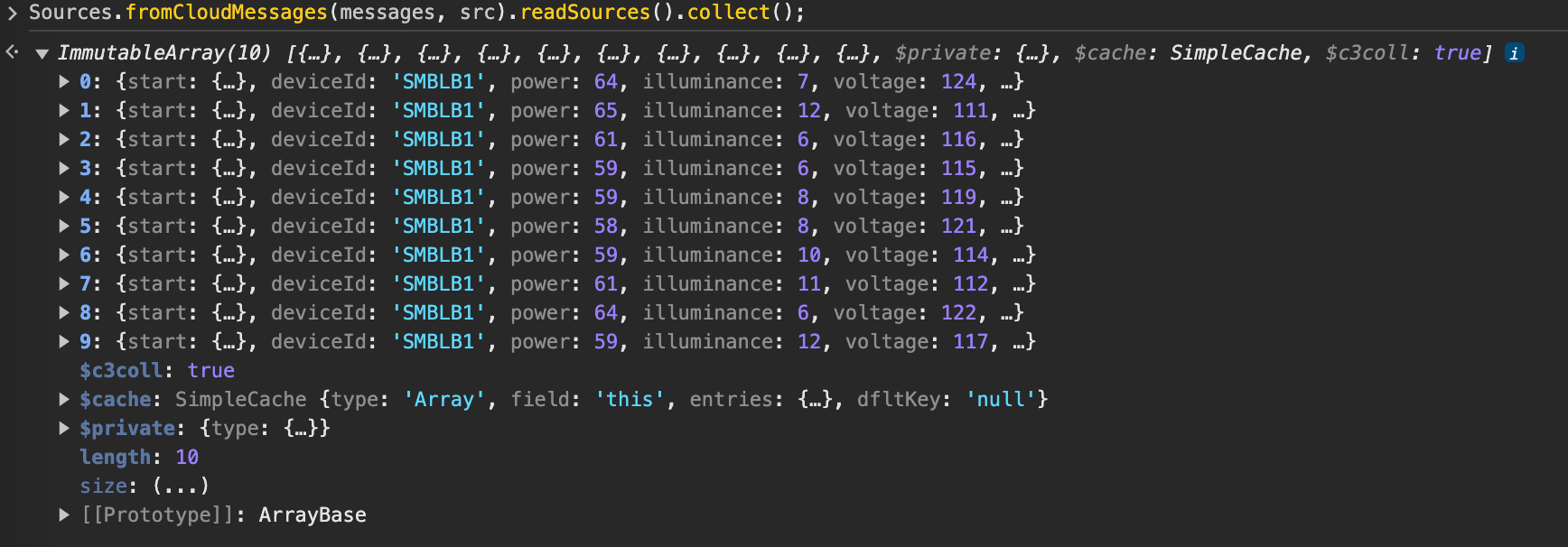
The platform stores messages as a JavaScript ArrayBuffer. Run the following command to read the messages as objects:
This command works only when sources are not archived. With archiving on, the platform consumes messages on receipt, so you cannot read them.
Sources.fromCloudMessages(messages, src).readSources().collect();The command returns output like the following:
Configure a CloudInboundMessage Type and link to Kinesis stream
To model a Kinesis consumer and configure downstream processing, create a CloudInboundMessage Type. When a Type mixes in CloudInboundMessage, the C3 Agentic AI Platform treats it as a Kinesis consumer.
The platform dispatches each message consumed from the connectortesting-kinesis stream to the SourceSmartBulbMeasurementInboundQueue.process() method.
type SourceSmartBulbMeasurementInboundQueue mixes CloudInboundMessage<SourceSmartBulbMeasurement> {

  process: ~ js-server

}
Implement the process method in SourceSmartBulbMeasurementInboundQueue.js, which persists data to the SmartBulbMeasurement Type.
function process(messages) {

    var array = C3.ArrayBuilder.fromJson({type: 'ArrayBuilder<SmartBulbMeasurement>'});
    var meas;

    messages.each(function (msg) {

      meas = SmartBulbMeasurement.make({
        start: msg.start,
        deviceId: msg.deviceId,
        power: msg.power,
        illuminance: msg.illuminance,
        voltage: msg.voltage,
        temperature: msg.temperature
      });

      array.push(meas);

    })

    try {
      SmartBulbMeasurement.createBatch(array.build());
    } catch (e) {
      log.info(e.message);
    }
  }
Next, associate the SourceSmartBulbMeasurementInboundQueue Type with the connectortesting-kinesis Kinesis stream.
SourceSmartBulbMeasurementInboundQueue.setBrokerName(kinesisResourceName, "AwsKinesis");
SourceSmartBulbMeasurementInboundQueue.setBatchSize(10);
SourceSmartBulbMeasurementInboundQueue.setTimeoutMillis(10000);

SourceSmartBulbMeasurementInboundQueue.register();
Each message from the stream now becomes a SmartBulbMeasurement record that holds the message's start, deviceId, power, illuminance, voltage, and temperature values.
Configure an Amazon Kinesis producer
Publishing to a Kinesis stream takes nearly the same steps as consuming from one. This section reuses the stream registered above and configures a CloudOutboundMessage Type to model a Kinesis producer explicitly. The published messages have the same structure as the consumed ones, so you reuse the SourceSmartBulbMeasurement Type in the CloudOutboundMessage parametric Type.
Configure a CloudOutboundMessage Type and link to Kinesis stream
When a Type mixes in CloudOutboundMessage, the C3 Agentic AI Platform treats it as a Kinesis producer.
type SourceSmartBulbMeasurementOutboundQueue mixes CloudOutboundMessage<SourceSmartBulbMeasurement>Next, associate the SourceSmartBulbMeasurementOutboundQueue Type with the connectortesting-kinesis Kinesis stream.
SourceSmartBulbMeasurementOutboundQueue.setBrokerName(kinesisResourceName, "AwsKinesis");
SourceSmartBulbMeasurementOutboundQueue.setBatchSize(10);
Publish messages to the connectortesting-kinesis stream with the SourceSmartBulbMeasurementOutboundQueue.sendBatch() method. The following code generates sample data and publishes it to the stream:
function createMeasurements(batchSize) {
  var cAry = C3.ArrayBuilder.fromJson({type: 'ArrayBuilder<SourceSmartBulbMeasurement>'});
  var partition = "factory";
  var meas;
  var time = DateTime.fromString("2023-01-01T00:00:00");
  var deviceId = "SMBLB1";

  for (var i=0; i<batchSize; i++) {

    meas = SourceSmartBulbMeasurement.make({
        start: time,
        deviceId: deviceId,
        power: randomBetween(55, 65),
        illuminance: randomBetween(6, 12),
        voltage: randomBetween(110, 125),
        temperature: randomBetween(65, 110)
      });

    cAry.push(meas);

    time = time.plusDays(1);

  }

  SourceSmartBulbMeasurementOutboundQueue.sendBatch(cAry.build(), partition);
}

function randomBetween(min,max)
{
    return Math.floor(Math.random()*(max-min+1)+min);
}

createMeasurements(10);
Here, partition is the partition key: a string that Kinesis uses to distribute records across shards. The partition key differs from the partition that receiveMessages() takes, which is the shard ID that identifies the shard.
You can then verify that the messages reached the stream.