Connect Application to Postgres Database
The C3 Agentic AI Platform has a built-in Java Database Connectivity (JDBC) connector for integrating with Postgres databases.
C3 AI Studio offers Data Fusion, a visual tool for building data pipelines. Data Fusion configures data sources and connects them to C3 Canonicals and Entities. For more information, see Data Fusion Overview.
To connect to Postgres from your application:
- Add a SqlSourceSystem modeling the Postgres source system to your package.
- Configure the JdbcCredentials authorizing the connection to the external Postgres database.
- Add a SqlSourceCollection modeling the target Postgres table to your package.
- Create an External Type modeling the schema of the external Postgres table.
For more information on the Postgres JDBC driver, see the Postgres documentation.
Model the source system
Create a SqlSourceSystem and set the name field as the identifier for the external database system.
For example, add the following PostgresSourceSystem.json to the \metadata\SqlSourceSystem directory of your package:
{
    "name": "PostgresSourceSystem"
}Configure the credential used to authorize the JDBC connection
Create a JdbcCredentials Type instance to configure the connection to the external Postgres database, passing the following fields to the JdbcCredentials.fromServerEndpoint() method:
serverEndpoint: Postgres server hostnameport: Postgres server portdatastoreType: The type of datastore,DatastoreType.POSTGRESfor a Postgres connectiondatabase: The name of the Postgres database that you are connecting toschemaName: The schema to use, ornullto use the default schemausername: The account with authorization to access the Postgres database tablepassword: The password for this account
For example, run the following code in the console to configure the JdbcCredentials:
var creds = JdbcCredentials.fromServerEndpoint("HOST",
                                                PORT,
                                                DatastoreType.POSTGRES,
                                                "SOME_DB",
                                                null,
                                                "some_username",
                                                "some_password");

SqlSourceSystem.forName("PostgresSourceSystem").setCredentials(creds);Model the table containing the data
To model the external Postgres table in your application, create a SqlSourceCollection and set the following fields:
name: Identifier for the Postgres tablesource: Name of theExternalType that models the schema of the external Postgres tablesourceSystem: Name of the PostgresSqlSourceSystem
For example, to model a table called vendors, add the following PostgresTable.json to the \metadata\SqlSourceCollection directory of your package:
{
    "name" : "Vendors",
    "source" : "Vendors",
    "sourceSystem" : {
      "type" : "SqlSourceSystem",
      "name" : "PostgresSourceSystem"
    }
}Model the table schema
To model the schema of the Postgres table in your application, create an External entity Type. Give the entity Type a schema name that matches the name of the Postgres table exactly. The schema name is case sensitive.
Start by adding the following Vendors.c3typ file to the \src directory of your package:
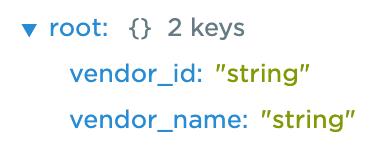
entity type Vendors mixes External, NoSystemCols schema name 'vendors'Use the inferSourceType() method to see the C3 AI data types that the C3 Agentic AI Platform infers from the source data types of the table:
var schema = SqlSourceCollection.forName("Vendors").inferSourceType().declaredFieldTypes;

var myObject = {};
for (let i = 0; i < schema.length; i++) {
        schemaName = schema[i].schemaName;
        myObject[schemaName] = schema[i].valueType.name;
    }
The platform maps Postgres data types to PrimitiveTypes according to the following table:
| Postgres Data Types | C3 AI Data Types |
|---|---|
| integer | int, int32 |
| smallint | int16 |
| bigint | bigint |
| bytea | binary |
| boolean | boolean |
| date, time, timestamp | datetime |
| character, character varying, smallserial, serial, text | string |
| numeric | decimal |
| real | float |
| double precision | double |
| json | json |
To validate the type inference, view the source data types:
SqlSourceCollection.forName("Vendors").connect().columns;
Complete the External entity Type definition:
entity type Vendors mixes External, NoSystemCols schema name "vendors" {

  @db(dataTypeOverride='string')
  id: ~ schema name "vendor_id"

  vendorName: string schema name "vendor_name"
}
Your table must include an id field. If your table has no column called id, change the schema name for the corresponding id field with the following annotation:
@db(dataTypeOverride="ID_FIELD_DATA_TYPE")
id: ~ schema name "ID_FIELD"
The example Vendors Type uses the vendor_id column as the id field.
Read data from the table
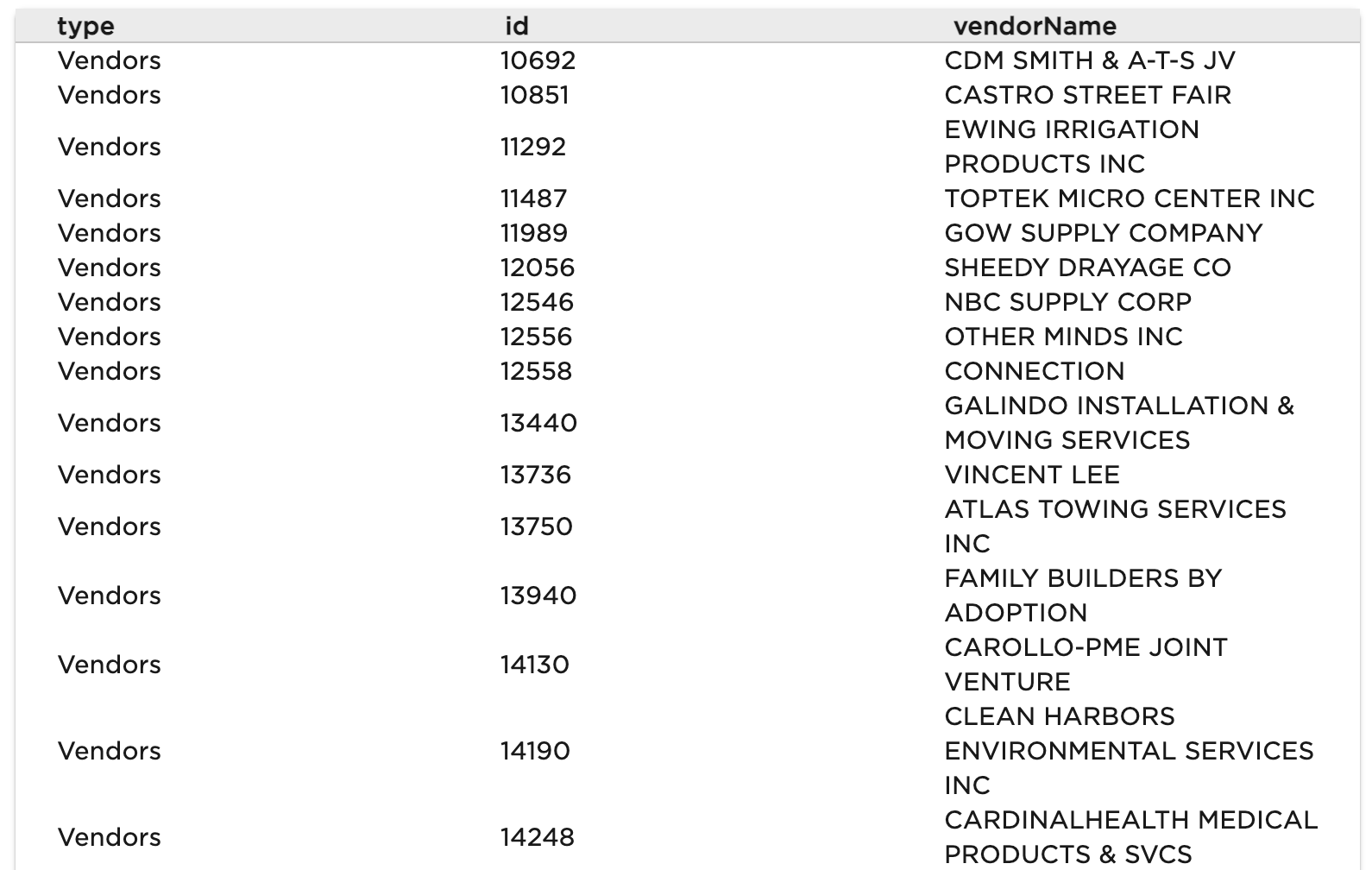
After you complete the External entity Type definition, validate the configuration. Fetch the External Type data from the Postgres table:
c3Grid(Vendors.fetch());