Connect to Microsoft Fabric Using Azure AD Authentication
Overview
You can configure Microsoft Fabric SQL Databases with Azure Active Directory (AD) authentication, through either a managed identity or a service principal. With either method, the C3 Agentic AI Platform authenticates through Azure AD instead of a database user name and password. After you connect, you infer the source type and fetch data from a SQL table.
Before you begin
Make sure you have the following:
- A Microsoft Fabric SQL Database or SQL endpoint: you connect to a Microsoft Fabric SQL endpoint through a fully qualified server hostname and port.
- Credentials for the selected authentication method: a client ID and client secret for a service principal, or the client ID of a managed identity.
- Access permissions on the Microsoft Fabric SQL Database: the authenticated identity must have sufficient permissions.
- Network connectivity to Fabric SQL over the required port (1433): the connection uses the standard SQL port 1433.
Method 1: Authenticate with an Azure AD service principal
With Azure AD service principal authentication, applications access Microsoft Fabric resources securely without user accounts. You manage the credentials yourself, typically a client secret or a certificate.
Create an Azure AD service principal if you do not already have one.
Step 1: Create a SQL source system
Register a new SQL source system to connect to a Microsoft Fabric SQL database.
sys = c3.SqlSourceSystem.make().withName("FabricSqlSourceSystem").upsert()
Step 2: Configure JDBC credentials
Provide the Fabric SQL endpoint, port, datastore type, and service principal credentials. Then set the authentication and connection properties.
creds = c3.JdbcCredentials.fromServerEndpoint("<SERVER_ENDPOINT>",
    1433,
    c3.Jdbc.DatastoreKind.MSFABRIC,
    "<DATABASE_NAME>", None,
    "<CLIENT_ID>",
    "<CLIENT_SECRET>");

## Set authentication and connection properties
creds = creds.withProperties(c3.Map.ofStrToAny("authentication", "ActiveDirectoryServicePrincipal", "encrypt", "true", "trustServerCertificate", "false"))
Step 3: Attach credentials to the system
sys.setCredentials(creds)
Step 4: Verify connectivity
Verify the connection with a simple connectivity test. Run the following command:
sys.ping()
When the connection is configured correctly, the command returns the following:
{
    "type" : "PingResult",
    "reachable" : true
} Method 2: Authenticate with an Azure AD managed identity
With Azure AD managed identity authentication, Azure-hosted applications access Microsoft Fabric resources securely and without passwords. Azure creates and manages managed identities, so you do not store or rotate secrets.
Create an Azure AD managed identity if you do not already have one.
Step 1: Create a source system
Define a logical SQL source in the C3 Agentic AI Platform for your Fabric connection.
sys2 = c3.SqlSourceSystem.make().withName("FabricManagedIdentitySourceSystem").upsert()
Step 2: Configure managed identity credentials
The JDBC driver gets an Azure AD token for the managed identity, so you store no password or secret.
creds2 = c3.JdbcCredentials.fromServerEndpoint ("<SERVER_ENDPOINT>",
    1433,
    c3.Jdbc.DatastoreKind.MSFABRIC,
    "<DATABASE_NAME>", None,
    "<MANAGED_CLIENT_ID>",
    None);

## Set authentication and connection properties
creds2 = creds2.withProperties(c3.Map.ofStrToAny("authentication", "ActiveDirectoryManagedIdentity", "encrypt", "true", "trustServerCertificate", "false"))
Step 3: Attach credentials to the system
sys2.setCredentials(creds2)
Step 4: Verify access and list tables
Input:
sys2.ping()
Output:
{

 "type" : "PingResult",
 "reachable" : true

}
Input:
sys2.connect().listTableNames()
Output:
{   "type" : "JdbcListTableNamesResult",
    "names" : [ "Address", "Customer", "CustomerAddress", "Product", "ProductCategory", "ProductDescription", "ProductModel", "ProductModelProductDescription" ]
}
Infer the source type
You can infer the entity Type definition from an external SQL table. The source collection step uses sys2 from Method 2. If you used Method 1, use sys instead.
Create a source collection
coll = c3.SqlSourceCollection.builder().name("Address").sourceSystem(sys2).build().upsert()
Infer the Type
Input:
srcType = coll.inferSourceType2();
srcType = c3.pkg().upsertType(None, srcType.toString())
srcType.toString()
Output:
The platform reads the source table and generates the entity definition automatically.
entity type Address mixes External, NoSystemCols, Source schema name '[SalesLT].[Address]' {
  @db(dataTypeOverride='int32')
  id: string schema name 'AddressID'

  addressline1:  string schema name 'AddressLine1'
}Fetch data from the Fabric SQL table
After the platform generates the Type, fetch data from it:
Input:
c3.Address.fetch()
Output:
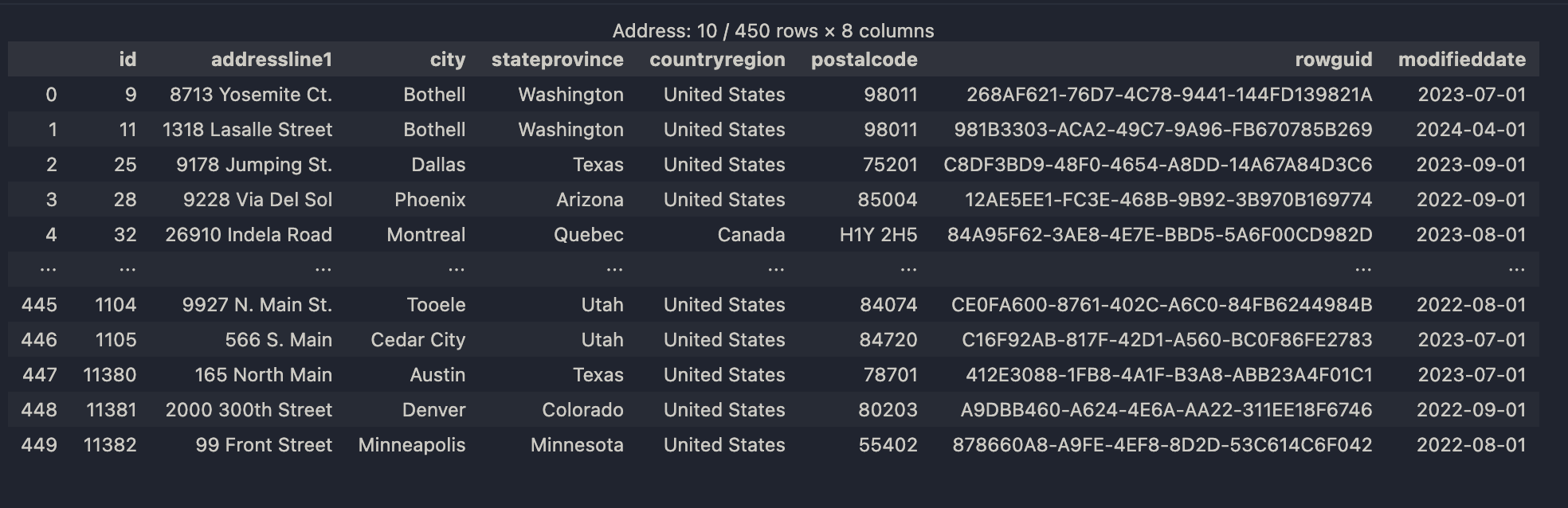 |
| Address Table |