Configure C3 Agentic AI Platform to Use Local Conda and PyPI Repositories in an Air-Gapped Environment
The C3 Agentic AI Platform provides the runtime capability to support reproducible and flexible deployment of third-party packages into the execution environments for data science and application code. For Python code, runtimes leverage the Conda Package Manager. Unlike the built-in "pip" package manager for Python, Conda supports installing the Python interpreter itself, which is important if the desired Python version is different from the one coming with the host operating system. The Conda Package Manager has its own language-agnostic package format (“conda”) and also supports Python packages installed using pip (“PyPI packages”).
When installing or resolving Python runtimes, the C3 Agentic AI Platform needs access to one or more Conda package repositories and a PyPI repository for downloading packages and package metadata, which are the Anaconda and PyPI packages official repositories by default.
However, when deployed in an air-gapped environment in which the C3 Agentic AI Platform does not have access to the Internet, or access is restricted so that the official repository sites are not available, it is necessary to configure the C3 Agentic AI Platform to use a repository mirror or a proxy cache repository to request Conda and PyPI packages and metadata locally.
Overview of supported solutions for local Conda and Pip repositories
There are two supported solutions to ensure the C3 Agentic AI Platform has access to the Conda and PyPI repositories necessary for runtime capabilities in an air-gapped deployment: a repository mirror or a repository proxy cache.
A repository mirror pre-downloads packages from remote repositories. The set of packages may be defined through rules or the mirror may download the entire repository. Downloads may be scheduled manually or occur on a regular basis. Once populated, any package or metadata request that matches the download criteria can be satisfied from the local copy, allowing you to remove access to the remote repositories at that point. Note that the amount of data required to download can be quite significant. For example, the repository maintained by Anaconda is over 650 GB in size. For an example of a repository mirror product, see how to mirror a repository in an air-gapped environment using Anaconda Enterprise.
A repository proxy cache maintains a local cache of packages. It starts out as empty. When requests are made for a package, if it does not have the package in its local cache, it requests the package from the remote repository, adds the package to the cache, and returns it to the requestor. The key advantage is that you only need to download the packages you use, which is significantly less than the full repository contents. However, you must either maintain permanent access to the remote repositories from the local proxy or have a "priming" phase where you force the proxy to download all the packages you will eventually need before turning of your internet connection. Example repository proxy products include JFrog Artifactory and Sonatype Nexus Repository.
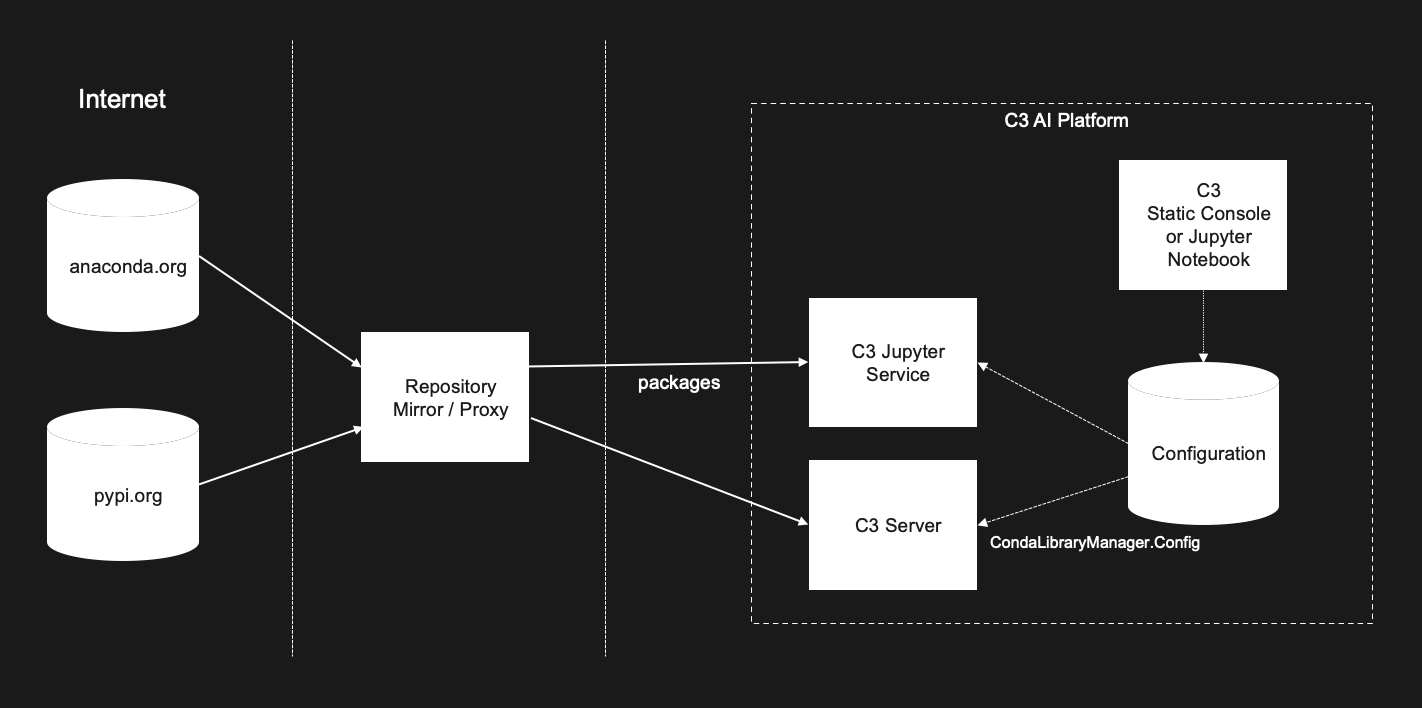
Either approach results in a similar network topology. See the following figure for an illustration of the configuration topology of the C3 Agentic AI Platform with a Conda/PyPI repository mirror or proxy.
Deployment considerations
Repositories
The Conda package manager supports retrieving conda packages from multiple repositories. These conda repositories are called channels. At a minimum, you will need to configure your mirror/proxy to include two conda channels and the PyPI repository for pip packages:
- A Conda repository for the primary/default Conda channel from Anaconda (called
pkgs) - A Conda repository for the third party channel
conda-forge - A PyPI repository for the primary Python package index at https://pypi.org
These are usually configured to run in the same mirror/proxy server, but with different URLs. If you use different conda channels in your C3 AI Conda runtimes, these can be added to the mirror/proxy as well.
Authentication
C3 AI supports anonymous read access (no authentication for reads) and authentication schemes where the username and password/token are included in the repository URL. To use username and password/token authentication, see the following section to configure access on the C3 AI-side.
HTTP and HTTPS
For the connection between the C3 Agentic AI Platform and the local repository mirror/proxy, there are two options for the protocol:
You can use HTTPS, but only with public certificates that will validate with the certificate chain pre-installed in C3 AI containers.
You can use HTTP. This will require one additional setting in the C3 AI configuration: that is,
trustedHostsPPI. See the following section.
C3 AI does not currently provide a way to add new certificate chains to the C3 Agentic AI Platform.
Configuration Override Level
Repository configuration can be set at the application, environment, and cluster levels. This is done via the override parameter of most configuration methods. See the type ConfigOverride for details. In general, to set the configuration at a specific level, you do the following:
- Make sure you have the appropriate permissions for the desired level (Application Administrator, Environment Administrator, or Cluster Administrator).
- Go to the static console for that level (e.g.
c3/c3for cluster,envname/c3for environment, andenvname/appnamefor application). - Specify your configuration, using the associated level for
overrideparameters:ConfigOverride.APP,ConfigOverride.ENV, orConfigOverride.CLUSTER. - If there are existing applications, you may need to clear the associated
CondaLibraryManager.Configcaches for those applications.
Note that configuration types can have a minimum configuration level. Currently, the minimum level for CondaLibraryManager.Config is Environment. This means that you can override the configuration from the environment or cluster, but not the application. We recommend setting repository configuration at the environment level.
C3 AI Configuration Types for Conda and PyPi repositories
Configuring Authentication
If you need to configure authentication, use CondaRepositoryCredentials and PyPIRepositoryCredentials to specify a username and password for Conda and PyPi repositories, respectively.
Here is an example:
CondaRepositoryCredentials.setConfigValue("username", "myconda-user");
CondaRepositoryCredentials.setSecretValue("password", "myconda-password");
PyPIRepositoryCredentials.setConfigValue("username", "mypip-user");
PyPIRepositoryCredentials.setSecretValue("password", "mypip-password");
// If you have a different credentials for a specific conda channel, you can set those as well.
CondaRepositoryCredentials.forId("conda-forge").setConfigValue("username", "conda-forge-user");
CondaRepositoryCredentials.forId("conda-forge").setSecretValue("password", "conda-forge-password");Configuring Repository URLs
The primary type for configuring repository URLs is CondaLibraryManager.Config. The configuration type has the following fields:
channelAlias- this corresponds to thechannel_aliasparameter of the Conda configuration file. It is the pre-pended URL location to associate with channel names.defaultChannels- this corresponds to thedefault_channelsparameter of the Conda configuration file. It is the list of channel names and/or URLs to be used for the 'defaults' multichannel.customChannels- this is a map from channel name to channel location Channels present incustomChannelsoverride thechannelAliasvalue.baseUrlPPI- this represents the base url of Python Package Index. This should point to a repository compliant with PEP 503 or a local directory laid out in the same format.trustedHostsPPI- list of hosts or host:port pairs which will be marked as trusted by Python Package Index, even though it does not have valid or any HTTPS. You only need to set this if you are using HTTP instead of HTTPS.
Here is an example:
CondaLibraryManager.Config.clearCache();
var config = CondaLibraryManager.config();
config.setConfigValue("channelAlias", "https://my-repo-host");
config.setConfigValue("customChannels",
                     {"pkgs/main":"https://my-repo-host/common-base-path/pkgs/main",
                     "conda-forge":"https://my-repo-host/common-base-path/conda-forge"});
config.setConfigValue("baseUrlPPI", "https://my-repo-host/common-base-path/pip/simple");

// Inspect the config to verify our changes
CondaLibraryManager.config();