Access Documentation in JupyterLab with Contextual Help
Contextual Help is a feature in JupyterLab that offers abbreviated documentation within the user interface. Use this tool when you need a reminder about the following code elements:
- Python methods
- C3 Types
- C3 methods
This tool does not include all C3 documentation; for more complex questions, review the site documentation and courses.
Open Contextual Help
You can open Contextual Help using two methods:
- In a Notebook file, select Help > Show Contextual Help.
- In the Launcher tab, scroll to the Other section and select Show Contextual Help.
Either method opens the Contextual Help panel beside your open tabs.
Use Contextual Help
You can use Contextual Help to review documentation for native Python functionality as well as C3 Types and methods. Place your cursor on the Python function, the C3 Type, or Type's method. Documentation fills the Contextual Help tab.
Select the right arrow icon beside Fields, Methods, Constants, or Properties to expand the section.
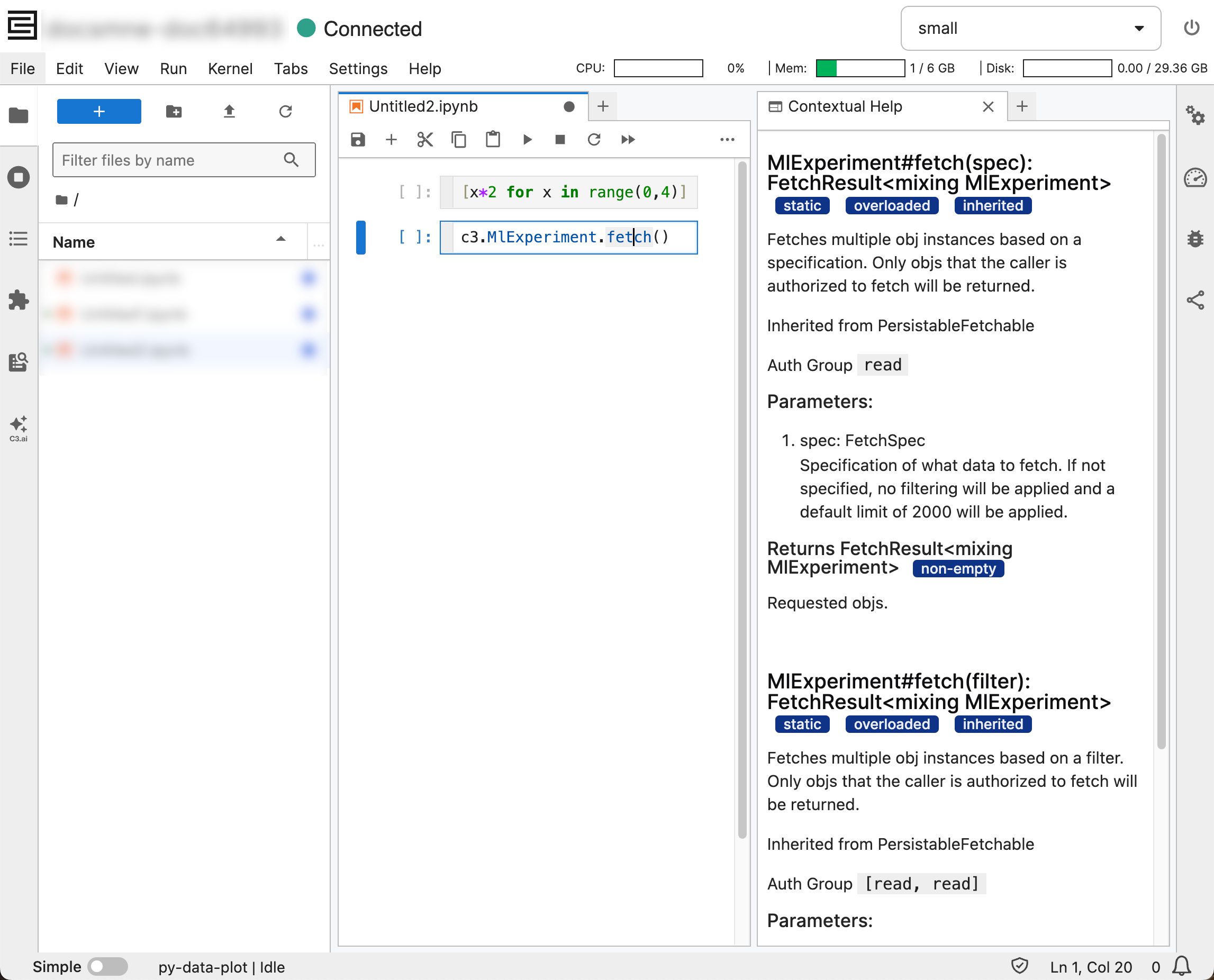
For example, if you enter the following code into your Python Notebook:
[x*2 for x in range(0,4)]Place the cursor on the range() function to see the following in Contextual Help:
    Init signature: range(self, /, *args, **kwargs)
    Docstring:
    range(stop) -> range object
    range(start, stop[, step]) -> range object

    Return an object that produces a sequence of integers from start (inclusive)
    to stop (exclusive) by step.  range(i, j) produces i, i+1, i+2, ..., j-1.
    start defaults to 0, and stop is omitted!  range(4) produces 0, 1, 2, 3.
    These are exactly the valid indices for a list of 4 elements.
    When step is given, it specifies the increment (or decrement).
    Type:           type
    Subclasses:
If you enter the following C3 call:
c3.MlExperiment.fetch()Place the cursor on MlExperiment to show the following in Contextual Help:
    Type MlExperiment
    Represents a Machine Learning Experiment for organizing metadata and artifacts of model experimentation. An experiment consists of one or more runs.
    Beta
    Mixes:

    Persistable
    WithName
    Inner Types:

    Plot
    Run
    RunGraph
    TestPlot1
    TestPlot2
Move the cursor to fetch() to see the following in Contextual Help:
    MlExperiment#fetch(spec): FetchResult<mixing MlExperiment> staticoverloadedinherited
    Fetches multiple obj instances based on a specification. Only objs that the caller is authorized to fetch will be returned.

    Inherited from PersistableFetchable

    Auth Group read

    Parameters:
    spec: FetchSpec
    Specification of what data to fetch. If not specified, no filtering will be applied and a default limit of 2000 will be applied.

    Returns FetchResult<mixing MlExperiment> non-empty
    Requested objs.

    MlExperiment#fetch(filter): FetchResult<mixing MlExperiment> staticoverloadedinherited
    Fetches multiple obj instances based on a filter. Only objs that the caller is authorized to fetch will be returned.

    Inherited from PersistableFetchable

    Auth Group [read, read]

    Parameters:
    filter: Filter required non-empty
    Specification of filter to apply to data to fetch. Note that default limit of 2000 will be applied.

    Returns FetchResult<mixing MlExperiment> non-empty
    Requested objs.