Work with the Functional Testing Framework - Luke
Luke is an all-purpose UI testing framework for web applications. It uses BrowserEngine to automate user-browser interactions.
Luke and other functional testing frameworks
Most functional and end-to-end testing frameworks are built on top of the Selenium WebDriver, making them tightly coupled to the capabilities of that automation engine.
Luke provides an abstraction layer that can integrate multiple automation engines, allowing you to choose the best engine for your use case. A Luke test is ready to run on a different automation engine with effectively no code change. This minimizes the risk of writing tests in a specific automation technology that can be replaced in the future.
Luke offers support for:
- BrowserEngine, a high-performance solution.
Browser engine
BrowserEngine leverages WebWorker and direct JavaScript execution to drive browser automation. The Browser engine runs the automation commands directly, leading to higher performance and reliability.
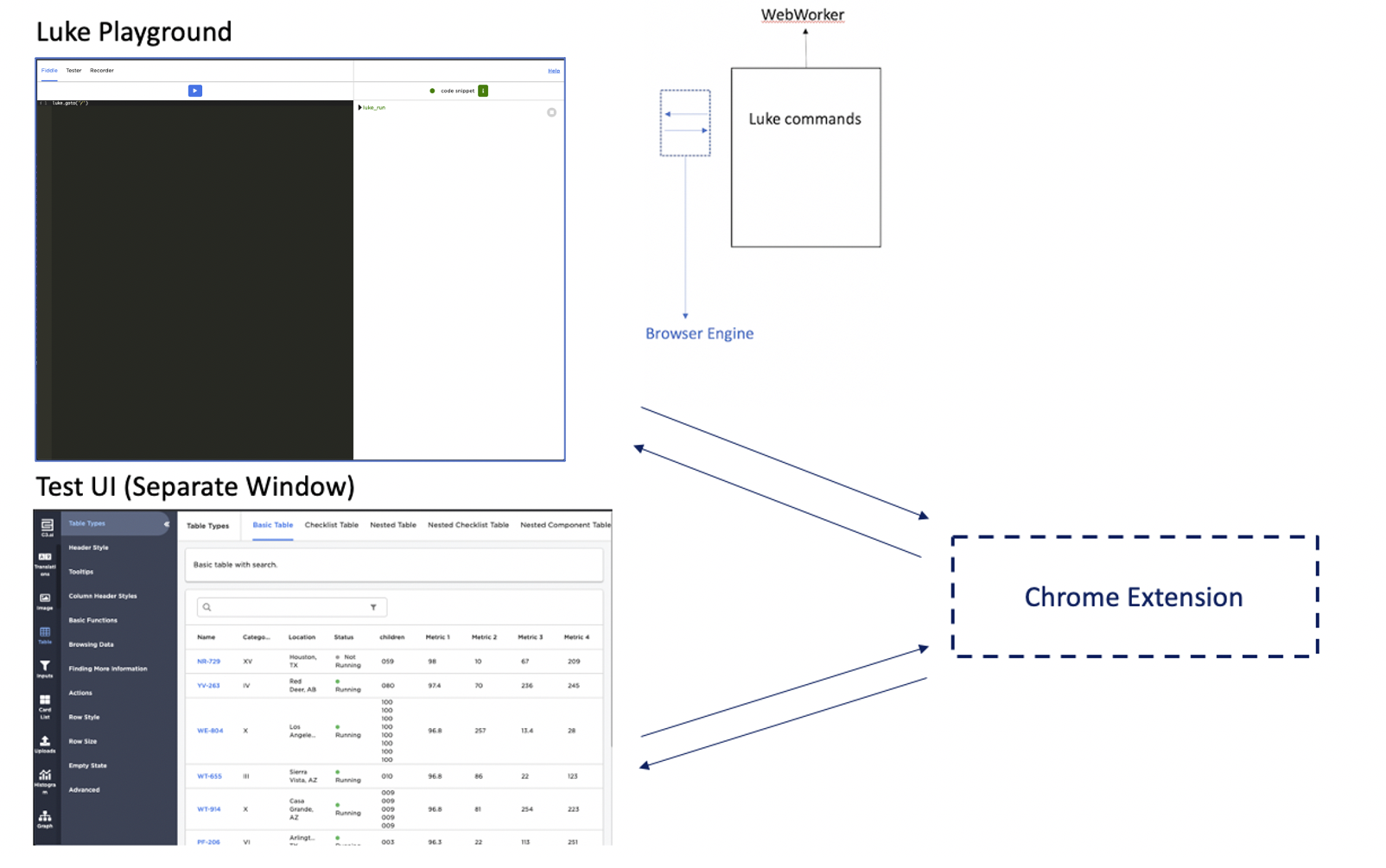
Jango
Jango provides an interactive testing environment to develop, debug, and run Luke tests. The Jango Chrome extension is used to handle messaging from the Luke instance to the Test UI. Learn more.
Asynchronous UX workflow
With Luke, you don't have to implement wait and retry logic in your tests, so it takes less effort to write reproducible tests.
A typical work flow for writing a Jasmine test starts with a product spec. The individual testing translates a spec to key steps of an automation script.
Below is a sample UX spec:
Type a search string "abc" in the name input field, click the filter button, and the grid shows the filtered result with 4 rows.
It gets translated to the following pseudo code, which can be implemented by a specific testing framework.
Search for the input with selector "input[field=name]", set its value to "abc";
Search for the button with selector "button.filter", click it;
Search for all elements with selector ".grid-row", count their occurrence, expect it to be 4;
If a testing script only implements the three steps described above, the test is likely to fail, in a way that's difficult to reproduce. In a modern web application, there are many transient states between key UX steps. As an example, network requests, animations, or JavaScript tasks can take an arbitrary time to be executed.
Since these states are strongly coupled with the application implementation details, they make it hard to write reproducible tests that are easily maintainable.
Luke is designed to automatically figure out the best timing and take the burden off of test writers. With minimum input (key UX steps) from the test writer, Luke is capable of auto-piloting an entire test flow, in a stable way.
How it works
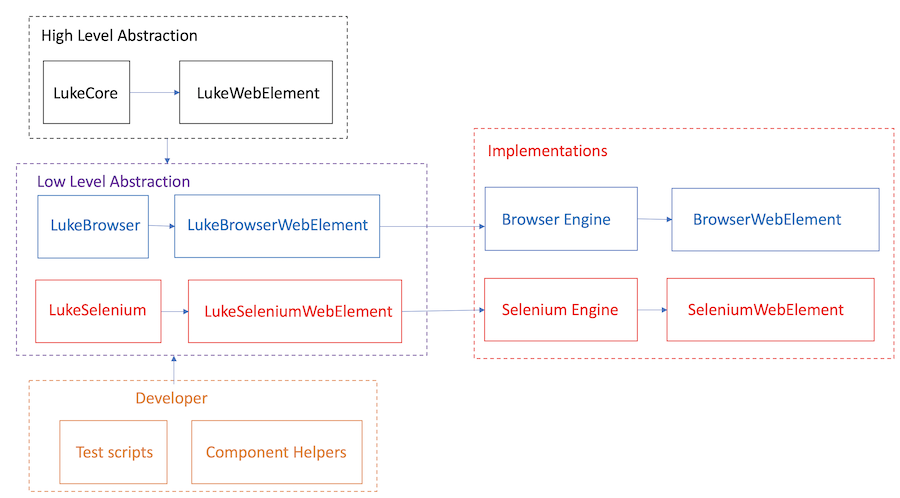
Luke is designed to allow you to write tests in a way that's agnostic to the automation engine being used. The key to this are the LukeCore and LukeWebElement interfaces. These interfaces define abstract methods that are implemented by the engine-specific Types:
The lower-level types abstract the Engine implementations, using behind-the-scenes scripts to work with engine-specific APIs and behaviors. This paradigm creates the seamless developer experience of shared Luke methods, with the added benefit of easy migration between engines with minimal code change.
The lifecycle of a Luke Test consists of two phases: the planning phase and execution phase.
Planning phase
In the planning phase, a Luke instance reads all key UX steps planned by the test writer, pushes them into a queue. The aforementioned UX spec can be implemented in Luke as follows:
it ('Filter by name', function () {
  // this.client is a Luke instance that was created in a `beforeAll` block
  this.client.search('input[name]').setValue('abc');
  this.client.search('button.filter').click();
  this.client.searchAll('.grid-row').size().assert('toEqual', 4);
});
The above self-explanatory commands do not perform actual interactions or assertions, they instead schedule asynchronous tasks (re-runnable nodes) for the future. Below is an async queue populated by the above code block.
There are 3 chains of nodes in the queue:
<NODE search('input[name]')> => <NODE setValue('abc')>
<NODE search('button.filter')> => <NODE click()>
<NODE searchAll('.grid-row')> => <NODE size()> => <NODE assert('toEqual', 4)>Execution phase
When Luke starts running, it pops chains from the queue and runs them one after another. For each chain, Luke keeps re-trying all its nodes successively until the entire chain resolves or times out. If any node in a chain fails, the chain will start over from its first node. Chained nodes explicitly depend on their precursors and have to be re-tried as a whole. For example, the third chain consists of three nodes:
searchAll, size and assert. If the searchAll node fails to return a result, the size node won't be able to get the length, and the chain must start over from the first node. Likewise, if the chain successfully proceeds to the assert node but the length resolved from the second node (size) does not equal 4, the assert node will never succeed unless the chain start over by searching all .grid-rows.
There are implicit chronological dependencies between chains. The next chain won't kick off until the current chain succeeds. But if the current chain fails, the previous chains won't re-run. For example, if the third chain for asserting number of grid rows fails, Luke won't re-run the first chain to set the input value or the second chain to click the filter button, because the UX spec only demands one successful setValue and one successful click. As such, while auto-piloting the test flow to find the best timing, Luke avoids introducing extra typing or clicking as a side effect and makes sure the original UX spec is fully respected.
RunLambda
LukeCore#runLambda provides a convenient way of running JavaScript directly in the browser window. Below demonstrates how to use runLambda for altering a dom element.
this.client.runLambda(function (text, selector) {
  document.querySelector(selector).innerText = text;
}, ['hello', '.my-selector']);Types of async node
LukeAsyncQueueNode
LukeAsyncQueueNode is the base type of async nodes. It stores the settings and instructions for Luke to re-run it and yield a promise. It also contains methods that generate chained LukeAsyncQueueNodes.
Then
The LukeAsyncQueueNode#then function generates a next LukeAsyncQueueNode and chains it after the current node; then takes a callback function that yields a promise for the next node.
/**
 * The following chain resolves true if the text value of the dom element
 * is 'hello'
 */
client.search('.message').text().then(function (client, text, expected) {
  return text === expected;
}, ['hello']);Assert
The LukeAsyncQueueNode#assert function generates a next LukeAsyncQueueNode that compares the value resolved from the current node with an expected value. It is usually used as the tail node of a chain for determining whether one run of the chain is successful.
client.search('.alert').visible().assert('toEqual', true);
client.searchAll('label.info').size().assert('toBeGreaterThan', 4);
See LukeAsyncQueueNode#attr, LukeAsyncQueueNode#transform and LukeAsyncQueueNode#transformAll
LukeWebElement
LukeWebElement mixes LukeAsyncQueueNode and adds functions that are specific to web elements.
Click
LukeWebElement#click clicks the underlying web element the node represents. It returns a LukeAsyncQueueNode that will be resolved with the same LukeWebElement reference when the click succeeds.
ScrollTo
LukeWebElement#scrollTo scrolls to the underlying web element the node represents. It returns a LukeAsyncQueueNode that will be resolved with the same LukeWebElement reference when the window scrolls to the target position.
Text
LukeWebElement#text Gets the text of the underlying web element the node represents. It returns LukeAsyncQueueNode that can be resolved with the text value.
RunLambda
Same as LukeCore#runLambda but providing the corresponding dom element as the first argument for easy access.
this.client.search('.my-element').runLambda(function (element, display) {
  // the element is the dom element found by Luke.search
  element.style.display = display;
}, ['none']);
See LukeWebElement#search, LukeWebElement#searchAll, LukeWebElement#moveTo, LukeWebElement#searchForElementWithText, LukeWebElement#getValue and more helpers.
LukeAsyncQueueCollection
LukeAsyncQueueCollection represents a collection of LukeAsyncQueueNodes and provides a functional programming interface for interacting with its async elements. Leveraging LukeAsyncQueueCollection is the key to writing engine-agnostic test scripts and component helpers.
For example, LukeCore#searchAll returns a LukeAsyncQueueCollection<LukeWebElement>. If you want to get the text of all dom elements and resolve them as a collection, you can use LukeAsyncQueueCollection#mapToAny.
// Correct way of writing engine-agnostic Luke test
client.searchAll('span').mapToAny(function (client, element, index) {
  // element is a LukeWebElement that has engine-agnostic API for getting text
  return element.text();
}).assert('toEqual', ['1', '2', '3', '4']);
The iteratee function of mapToAny is passed a LukeCore instance and a LukeWebElement and an element index. High-level engine-agnostic APIs can be called on LukeWebElement. The result of all iterations are aggregated to a LukeAsyncQueueCollection<LukeAsyncQueueNode> in which each element node resolves a string. Any direct access to engine-specific API should be strictly avoided.
LukeAsyncQueueCollection is a subclass of LukeAsyncQueueNode, and also has the then function. The callback of the then API essentially access the raw data backing the LukeAsyncQueueCollection. For example, the raw data for LukeAsyncQueueCollection<LukeWebElement> is an array of BrowserWebElements, and therefore we should avoid using then if it exposes engine-specific implementations or data model. If all elements of LukeAsyncQueueCollection<LukeAsyncQueue> resolve string, number, json or other engine-agnostic value types, it is perfectly fine to attach then or assert.
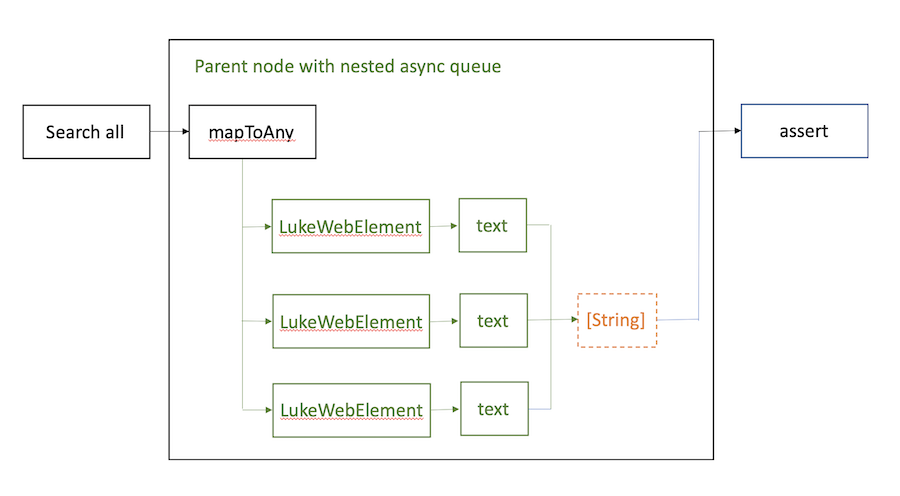
As shown in the figure, when functional programming interface is used, the LukeAsyncQueueCollection node essentially spawns a nested asyncQueue, or a "mini" Luke under the current parent node. The chains in the nested queue will be resolved sequentially, which then leads the parent node to be resolved, and the parent chain to move on to the next node. In that sense, Luke async queue is not a flat array of chains, it is a tree structure of async tasks that will be resolved in a DFS fashion.
See LukeAsyncQueueCollection#mapToSame, LukeAsyncQueueCollection#mapToAny, LukeAsyncQueueCollection#reduce, LukeAsyncQueueCollection#size, LukeAsyncQueueCollection#find, LukeAsyncQueueCollection#filter, LukeAsyncQueueCollection#at and more functions. Please also refer to test_LukeAsyncQueueCollection_browser.js for examples.
Debug async nodes
LukeAsyncQueueNode#inspectResult and LukeAsyncQueueNode#spyOn are helpful for debugging async nodes. Those functions are only supported when a test is running in a playground or /console browser environment and with DevTools open.
/**
 * It will pause on a breakpoint when the `visible` node resolves a result.
 * The developer can inspect whether the visibility is true or false.
 */
luke.searchAll('.my-selector').visible().inspectResult().assert('toEqual', true);/**
* It will pause on a breakpoint before the `visible` node starts running its function that yields a promise.
* The developer can debug that function.
*/
luke.searchAll('.my-selector').visible().spyOn().assert('toEqual', true);Additionally, LukeBrowserWebElement#inspectElement can be used to pause on the current LukeBrowserWebElement for inspecting the DOM element.
Timeout
Each async chain has a timeout configured at its head node, and by default it is 20 seconds. A timeout value specifies the maximum time Luke should wait before declaring the failure of a chain.
Any root command (a method that is defined on Luke and that generates a {@LukeAsyncQueueNode}) should take timeout as the last optional argument.
// Luke will wait at most 10 seconds for the entire chain to resolve
luke.getValue('input[name]', 10).assert('toEqual', 'abc');LukeDynamicValue
There are cases where a Luke async chain depends on value(s) resolved asynchronously from preceding chain(s). LukeDynamicValue provides a better alternative to nested then callbacks, helping to flatten and modularize test cases.
For instance, there is a grid with a filter bar, rendering a collection of books. In our test, we would like to filter the grid by the name of the first book (displayed as the first row) and expect that the number of grid rows decreases as we apply the filter. In this advanced use case, we don't know the filter string or the number of rows until the test runs and therefore they cannot be hardcoded.
Below is a less-than-ideal approach using nested then callbacks. It properly composes an async flow of luke tasks, but the test case is inseparable as one big block.
// Nested `then` callbacks, not ideal
it('should filter the grid', function () {
  this.client.searchAll('.row').size().then(function (client, rowCount) {
    client.searchAll('.row').at(0).search('.cell').text().then(
      function (client, bookName, originalCount) {
        client.search('input.filter').setValue(bookName);
        client.searchAll('.row').size().assert('toBeLessThan', originalCount)
      },
      [rowCount]
    );
  });
});
In contrast, the same test case can stay flat thanks to LukeDynamicValue. LukeDynamicValue is a special annotation that mimics the normal variable assignment and reference while instructing Luke to read and write values to / from dynamic values.
// A flat test structure using LukeDynamicValue
describe('filter the grid', function () {
  beforeAll(function () {
    // saveAsDynamicValue mimics `var originalCount = ...;`
    this.client.searchAll('.row').size().saveAsDynamicValue('originalCount');
    // saveAsDynamicValue mimics `var bookName = ...;`
    this.client.searchAll('.row').at(0).search('.cell').text().saveAsDynamicValue('bookName');
    this.client.search('input.filter').setValue(LukeDynamicValue.makeValue('bookName'));
  });

  it('the number of rows should decrease', function () {
    this.client.searchAll('.row').size().assert('toBeLessThan', LukeDynamicValue.makeValue('originalCount'));
  });

  it('the first row should match the filter', function () {
    this.client.searchAll('.row').at(0).search('.cell').text().assert(
      'toEqual',
       LukeDynamicValue.makeValue('bookName')
    );
  });
});Read and write LukeDynamicValue
As demonstrated above, LukeAsyncQueueNode#saveAsDynamicValue is a convenient way of assigning a value resolved from a LukeAsyncQueueNode to a dynamic variable. That variable can be referenced as a LukeDynamicValue (LukeDynamicValue.makeValue(<variableName>)) and freely passed as a function argument to Luke commands. Alternatively, LukeDynamicValue can be written and read synchronously using LukeCore#updateDynamicValue and LukeCore#resolveDynamicValue. Below are examples of reading / writing LukeDynamicValues asynchronously and synchronously.
// Read and write dynamic value asynchronously
// saveAsDynamicValue happens after the `text()` node resolves
luke.search('label.min').text().saveAsDynamicValue('min');
luke.searchAll('label.value').filter(function (luke, element) {
  // min will be automatically resolved from the dynamicValue named `min`
  return element.text().then(function (luke, value, min) {
    return parseFloat(value) > parseFloat(min);
  }, [LukeDynamicValue.makeValue('min')]); // Passing dynamicValue named `min`
}).size().assert('toBeGreaterThan', 0);// Read and write dynamic value synchronously
luke.search('label.min').text().then(function (luke, text) {
// Write parseFloat(text) to a dynamicValue named 'min' synchronously
luke.updateDynamicValue('min', parseFloat(text));
});
luke.searchAll('label.value').filter(function (luke, element) {
return element.text().then(function (luke, value) {
// Read value from a dynamicValue named 'min' synchronously
return parseFloat(value) > luke.resolveDynamicValue('min');
});
}).size().assert('toBeGreaterThan', 0);Write a complete and runnable Luke test
A Luke test is essentially a Jasmine test that requires some special setup. After Luke async tasks are scheduled, LukeCore#run must be called to kick off the execution. LukeBrowser#runJasmine generates a boilerplate that automatically triggers a Luke run for each jasmine block (such as it, beforeEach, beforeAll) by wrapping it with logic of managing LukeCore#run. In a test file, call the helper function passing the outermost describe of your jasmine test.
Users can also specify any of the flags mentioned in LukeJasmineEnvSpec, which they can pass in as the third argument for LukeBrowser#runJasmine. This alters the Jasmine environment to your specifications.
// Using a Browser Engine
LukeBrowser.runJasmine(filename, function () {
  beforeAll(function () {
    // Setup LukeBrowser
    this.client = LukeBrowser.init();
    this.client.goto('/user/abc');
  });

  // rest of your script goes here
}, { stopOnSpecFailure: true });Using the Page Object Pattern
The LukeTestPage and LukeTestComponent types provide developers with the ability to leverage the Page Object Pattern in their Luke tests for pages and components in their application.
After initializing the Luke client, create a LukeTestPage instance with various properties corresponding to the page that will be opened by the test. The LukeTestPage#baseUrl, LukeTestPage#path, and LukeTestPage#pathParams properties are used to construct the full URL the browser navigates to when the LukeTestPage#openPage method is called. The LukeTestPage#username and LukeTestPage#password fields cause the page to be opened with authentication as the provided user, allowing developers to simulate how various users with differing permissions would interact with the application.
LukeBrowser.runJasmine(filename, function () {
  beforeAll(function () {
    this.client = LukeBrowser.init();
    this.page = LukeTestPage.make({
      luke: this.client,
      baseUrl: 'http://localhost:8080'
      path: '/my-page',
      username: 'my_test_user',
      password: 'my_test_password',
    });
    this.page.openPage();
  });
  ...
});
Developers can extend the LukeTestPage type to create their own page types with unique selectors and helper methods.
type MyTestPage extends LukeTestPage {

  path: ~ = 'my-page'

  rendered: ~ js server

  /**
   * Selector for the page content
   */
  pageContent: string = '.page-content'
}
Similarly, developers can extend the LukeTestComponent type to create their own test component types.
type MyTable extends LukeTestComponent {
  /**
   * Row selector
   */
  row: string = '.row'

  /**
   * Get the number of rows in the table
   *
   * @param timeout
   *          Timeout in seconds for the chain
   * @return a {@link LukeAsyncQueueNode} that will be resolved with the number of rows
   */
  numberOfRows: inline member function(timeout: int): LukeAsyncQueueNode js
}
For complex pages with rich assortments of components, test component types can be composed together to model page structure.
type MyTestPage extends LukeTestPage {

  path: ~ = 'my-page'

  rendered: ~ js server

  /**
   * Selector for the page content
   */
  pageContent: string = '.page-content'

  /**
   * Representation of the table on MyTestPage
   */
  tableComponent: MyTable

  /**
   * Representation of the chart on MyTestPage
   */
  chartComponent: MyCategoricalChart
}Run LukeBrowser tests on CI
To make your LukeBrowser tests recognizable and properly run on CI, place them under the folder /test/browser/integration/luke/. If your application uses Webpack, the folder should be /test/browser/webpack/integration/luke/