Register a Data Lakehouse Catalog
A catalog holds DataLake.Table instances and points the Data Lakehouse at the storage layer that backs your tables. The C3 AI Data Lakehouse supports four catalog kinds in 8.11. The fastest way to register one is the Create new catalog form on the Catalogs tab in C3 AI Studio. For catalog kinds that need custom configuration — JDBC connection strings, Snowflake credentials, external-application app ids — use the notebook path documented at the bottom of this topic.
Catalog kinds
| Kind | Backing store | Best for |
|---|---|---|
| Hadoop | Object store (Amazon S3, Google Cloud Storage, Azure Data Lake Storage) | Default for most applications; lowest configuration overhead. |
| JDBC | Relational database that holds Iceberg metadata; data files live in object storage | Production tenants that need a metastore with concurrent writers. |
| Snowflake | Snowflake-managed Iceberg tables | Read C3 data that is governed by Snowflake. |
| External Application | Read-only view into another C3 Application's catalog | Cross-application sharing without copying data. |
The default catalog for most applications is a Hadoop catalog backed by the application's object storage.
In C3 AI Studio
Use the Create new catalog form when the catalog kind you want needs only the standard configuration that the form exposes.
- Open your application in C3 AI Studio.
- Select Data Lakehouse in the Data section of the side navigation.
- Select the Catalogs tab.
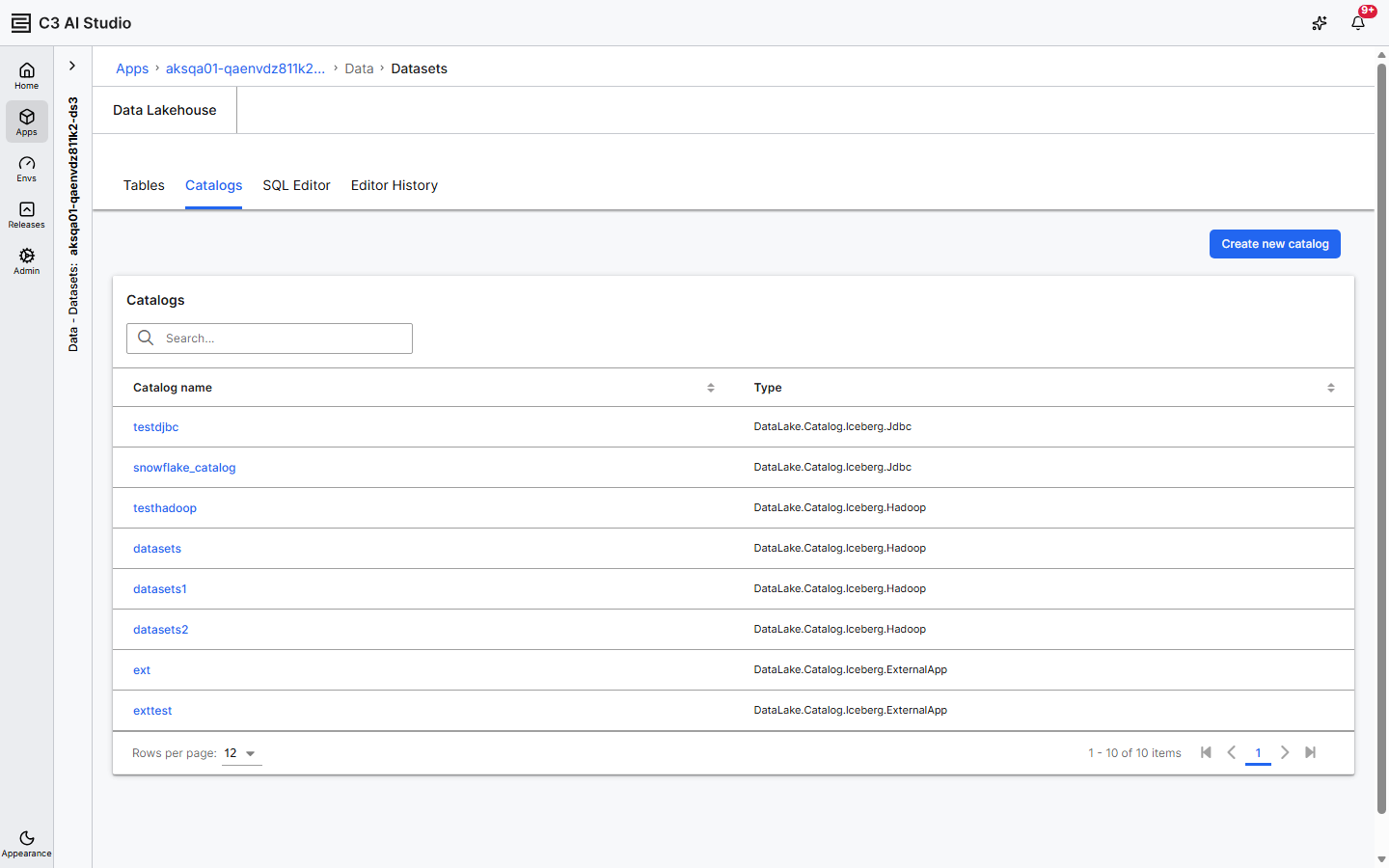
- Select Create new catalog at the top right.
- Enter a Catalog name.
- From the Catalog type dropdown, select JDBC, Hadoop, or External App. The Studio form exposes these three kinds in 8.11.
- Fill in the kind-specific fields. For most kinds, the platform defaults work; override only the fields you need.
- Select Create.
The catalog appears in the grid and is selectable on the SQL Editor tab.
To register a Snowflake catalog, use the notebook path below — the Studio form does not expose Snowflake in 8.11. The Studio form also covers only the platform-default connection for each kind it does expose; override custom JDBC URLs, Snowflake credentials, or specific external-app ids through the notebook path.
From a notebook
The notebook path exposes the full DataLake.Catalog.Config surface for each kind.
Get the default catalog
catalog = c3.DataLake.Catalog.inst()The default catalog is also addressable by name:
catalog = c3.DataLake.getCatalog(c3.DataLake.Catalog.DEFAULT_CATALOG)Register a Hadoop catalog
Use a Hadoop catalog when you want a file-system-style catalog over an object store and do not need a metastore.
conf = (
    c3.DataLake.Catalog.Config.Iceberg.Hadoop.builder()
    .name("analytics")
    .build()
)

catalog = c3.DataLake.createCatalog("analytics", conf)
Register a JDBC catalog
Use a JDBC catalog for production workloads with concurrent writers. The JDBC catalog tracks Iceberg metadata in a relational database. Data files still live in object storage.
conf = (
    c3.DataLake.Catalog.Config.Iceberg.Jdbc.builder()
    .name("jdbc")
    .build()
)

catalog = c3.DataLake.createCatalog("jdbc", conf)
The C3 Application's default JDBC connection backs the catalog. To use a different database, configure DataLake.Catalog.Config.Iceberg.Jdbc on the catalog.
Register a Snowflake catalog
Use a Snowflake catalog to read Iceberg tables that Snowflake manages. The catalog reads from Snowflake; the C3 Application does not own the storage.
conf = (
    c3.DataLake.Catalog.Config.Snowflake.builder()
    .name("snowflake_catalog")
    .build()
)
catalog = c3.DataLake.createCatalog("snowflake_catalog", conf)
Configure Snowflake credentials through the matching JdbcStore or source-system config. See Snowflake Connector.
Register an external-application catalog
Use an external-application catalog to read tables that live in another C3 Application without copying the data. The owning application must grant your consumer application the C3.Developer role with allowAccess before you register the catalog. See Share Data Lakehouse Tables Across Applications for the full producer flow.
conf = (
    c3.DataLake.Catalog.Config.ExternalApp.builder()
    .appId("local-c3-datalake")
    .catalogName(c3.DataLake.Catalog.DEFAULT_CATALOG)
    .name("external")
    .build()
)
catalog = c3.DataLake.createCatalog("external", conf)
You can read and write to an external catalog, depending on the access granted.
List tables in a catalog
From a notebook:
catalog.tables(c3.DataLake.Catalog.TableSpec.make()).objsTo filter by namespace:
spec = c3.DataLake.Catalog.TableSpec.make().withNamespace("dfl")
catalog.tables(spec).objs
The Studio Tables tab lists tables for the selected catalog; the Studio SQL Editor tab's View Reference Table panel (with its Select Table... combobox) is a quick way to scan a namespace.
Move a table between catalogs
The Studio user interface does not expose table moves. From a notebook, move an existing table from one catalog to another without rewriting the data:
jdbc_catalog = c3.DataLake.getCatalog("jdbc")
table = catalog.table("turbineMeasurements", c3.DataLake.Catalog.TableSpec.make())
table.moveToCatalog(jdbc_catalog, True)
The second argument controls whether the source catalog entry is dropped after the move.