Share Data Lakehouse Tables Across Applications
The C3 AI Data Lakehouse supports two sharing patterns. The request-and-approve workflow captures a specific snapshot for a downstream consumer; you can run the entire flow — submit, approve, download — in C3 AI Studio. The user can manage table-level access control lists (ACLs) using fine-grained roles. The external-application catalog gives the consumer a long-lived delegating view of the producer's tables (listing, metadata reads, and table creation forward to the producer; deleteTable and transferTableOwnership are blocked); it is set up from a notebook and used from then on through the same Studio user interface.
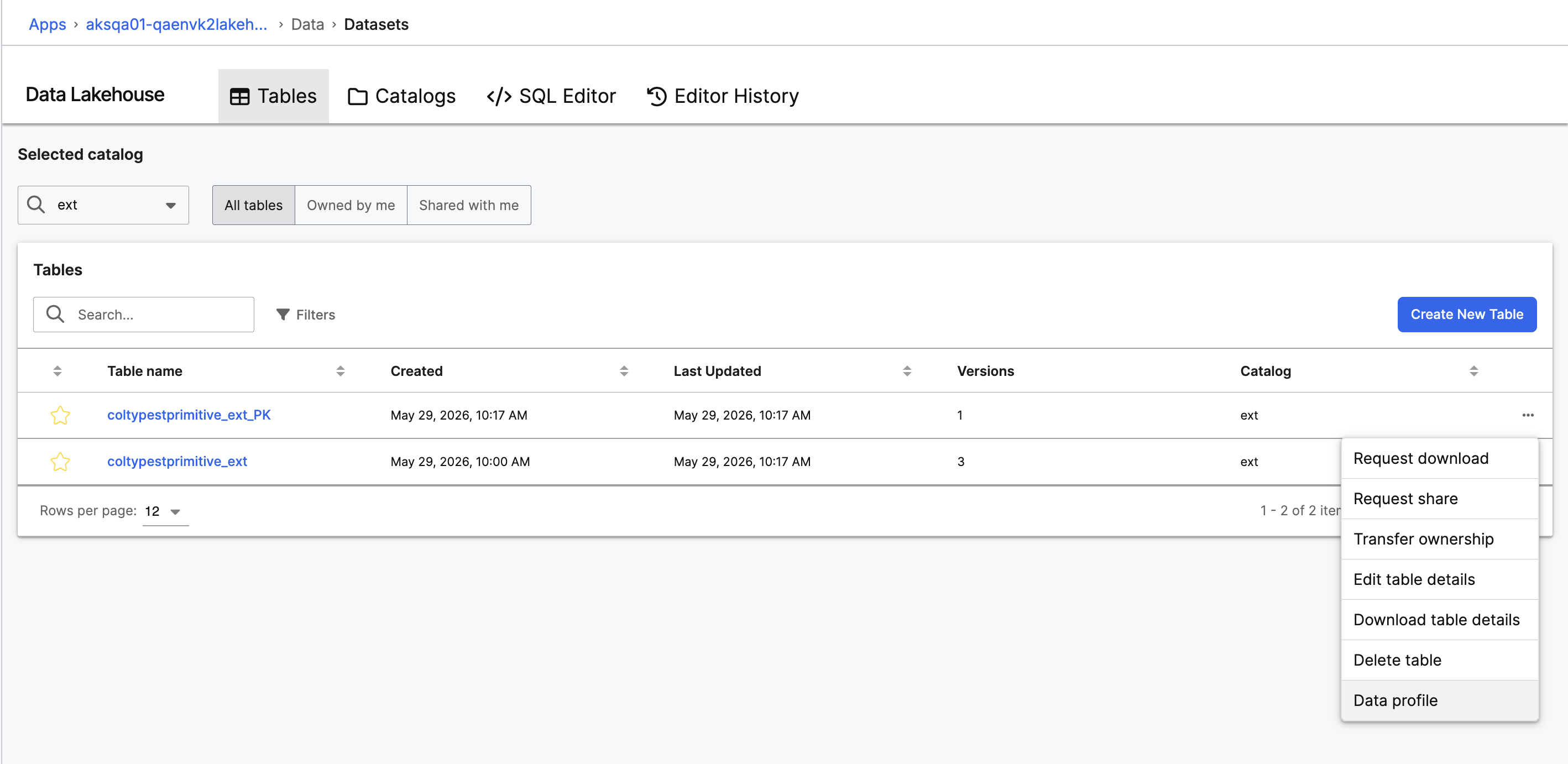 |
| Request-and-Approve Workflow |
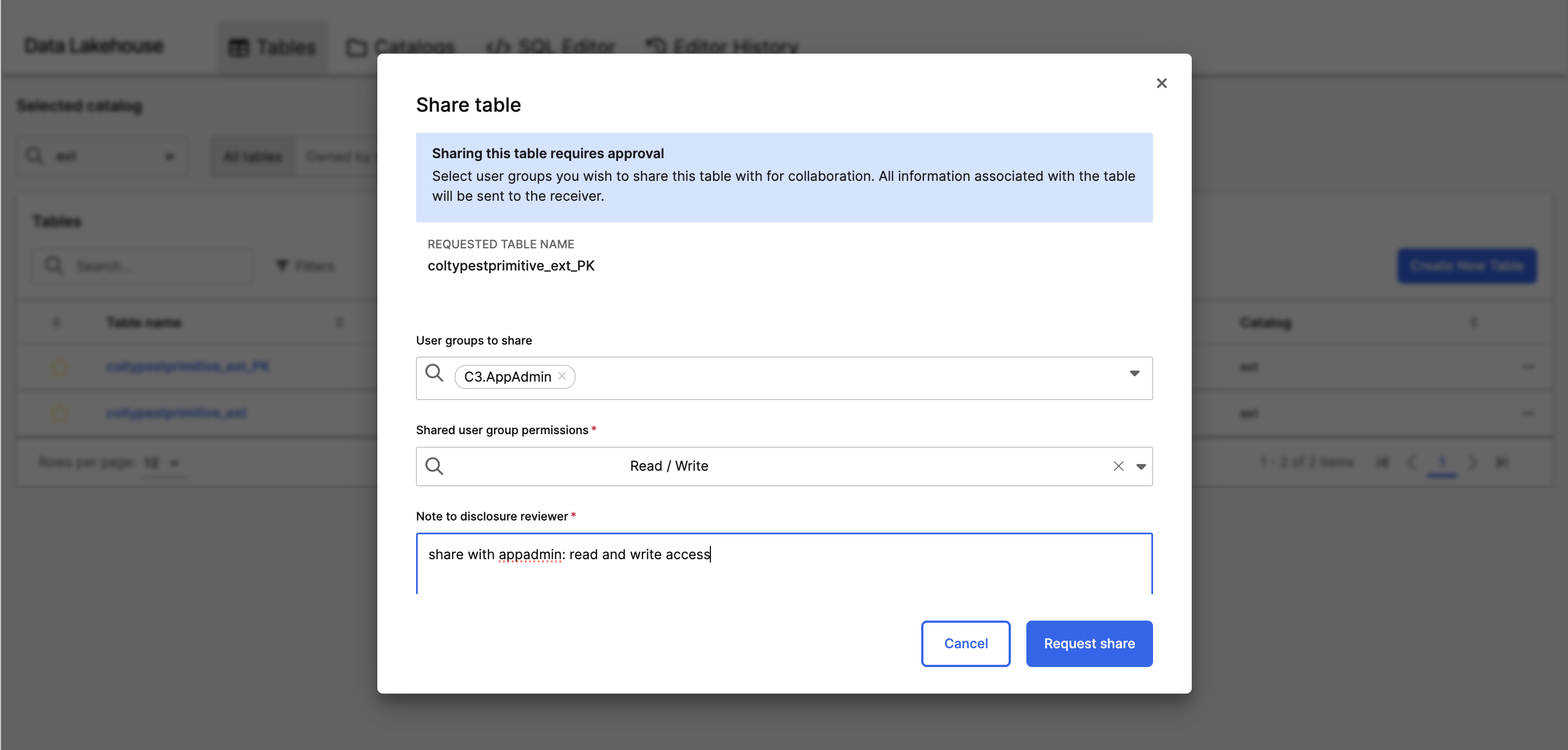 |
| Request-and-Approve: Request Share Access to a Table |
In C3 AI Studio: Request and Approve A Snapshot
Use the share or download request workflow when the consumer needs a specific snapshot rather than a live view, when you need a compliance audit trail, or when one team wants to receive the dataset as a file.
Roles
- C3.DisclosureRequestor: A role in the consumer application that can file share or download requests.
- C3.DisclosureReviewer: A role in the producer application that approves or rejects requests.
A user without one of these roles cannot see the request panels.
File a Share or Download Request
A user with the C3.DisclosureRequestor role files the request from the table's detail view as shown in the image below.
|
| File a Share or Download Request |
After approval, the consumer downloads the file from the Downloads page in C3 AI Studio. See Data Lakehouse Downloads for the consumer side of the flow.
Approve a Share or Download Request
A user with C3.DisclosureReviewer reviews the request, including the table, snapshot, requestor, and free-text description. The reviewer either approves or rejects with a comment.
From a Notebook (optional)
If you prefer to file or approve a request from a notebook:
# Run as a user with the C3.DisclosureRequestor role
table = catalog.table("turbineMeasurements", spec)

req = c3.DataLake.Table.ShareRequest.createRequest(
    table,
    c3.DataLake.Table.ShareRequest.CreateRequestSpec.make({
        "description": "Joint analysis with Atlas Power downstream team.",
    }),
)
A share request grants ongoing read access on the table; it does not bind to a specific snapshot. Use a DownloadRequest (below) if you need a point-in-time capture instead.
# Run as a user with the C3.DisclosureReviewer role
req = c3.DataLake.Table.ShareRequest.forId("<request id>")
req.approveRequest()
To reject:
req.rejectRequest("Description does not match approved analytics use cases.")The download request follows a similar pattern, but takes a specific snapshot:
# Run as a user with the C3.DisclosureRequestor role
snapshot = table.snapshots[0]

req = c3.DataLake.Table.DownloadRequest.createRequest(
    table,
    snapshot,
    c3.DataLake.Table.DownloadRequest.CreateRequestSpec.make({
        "description": "Q1 retrospective dataset.",
    }),
)
After the reviewer approves, the consumer downloads the file from the Downloads page in C3 AI Studio.
From a Notebook: External-Application Catalog
The external-application catalog gives a consumer application a long-lived delegating view of the producer application's catalog (list, metadata read, and createTable forward to the producer; deleteTable and transferTableOwnership are blocked). It is the right choice when the consumer needs always-current access without filing a request for every snapshot. The setup is one-time and runs from a notebook; once configured, the catalog is visible from the Catalogs tab in C3 AI Studio and queryable from the SQL Editor tab.
Producer Setup
The producer application grants the consumer access by application identity. The producer does not need to know the consumer's users; it grants the consumer's app id at the catalog level.
# Run as an admin in the producer application
producer_catalog = c3.DataLake.Catalog.inst()
# Configure the access control entries on the catalog that the consumer
# application should be able to read. The platform's ACL model controls
# read access at the catalog and table level.
The exact ACL grant depends on your application's role model. See the ACL privileges section below for the privilege the platform uses to gate Lakehouse table reads.
Consumer Setup
In the consumer application, register an external-application catalog that points at the producer:
conf = (
    c3.DataLake.Catalog.Config.ExternalApp.builder()
    .appId("atlas-power-prod")
    .catalogName(c3.DataLake.Catalog.DEFAULT_CATALOG)
    .name("upstream")
    .build()
)
upstream = c3.DataLake.createCatalog("upstream", conf)
After the catalog is registered, every consumer-side user can use it through the same Studio user interface as any other catalog:
- The catalog appears on the Catalogs tab as
DataLake.Catalog.Iceberg.ExternalApp. - The catalog is selectable from the SQL Editor tab's Catalog dropdown.
To list and read tables from a notebook:
upstream.tables(c3.DataLake.Catalog.TableSpec.make()).objs
table = upstream.table(
    "turbineMeasurements",
    c3.DataLake.Catalog.TableSpec.make().withNamespace("dfl"),
)
df = ss.load_table(table)Choose Between the Two Patterns
| Need | Pattern |
|---|---|
| Live, always-current read access to a producer's tables | External-application catalog |
| One-off transfer of a specific snapshot | Share or download request |
| Compliance audit trail for who got what data and when | Share or download request |
| No coupling between consumer and producer schedules | External-application catalog |
ACL Privileges
The platform seeds privileges that control Lakehouse-related access, including table-level ACL with fine-grained roles. The managed Iceberg table privileges come as three distinct IDs:
- DataLakeTableManagedIcebergOwnerPrivilege: Identifies the owner of a managed Iceberg table.
- DataLakeTableManagedIcebergSharedReadOnlyGroupsPrivilege: Grants read-only access to a managed Iceberg table for a group.
- DataLakeTableManagedIcebergSharedUpdateRemoveGroupsPrivilege: Grants update and remove access to a managed Iceberg table for a group.
For Spark workload visibility:
- SparkExecutionAclPrivilege: Controls who can see Spark Executions.
Grant these privileges to roles in your application's package metadata. The C3.DataLakehouseUser role bundles the read privileges most users need.