Overview of Cluster Architecture
The C3 Agentic AI Platform is a multi-environment platform that allows multiple stakeholders to create and manage applications in the same environment while enforcing strong isolation between those applications. This isolation is supported by three constructs within the platform layer:
- Cluster
- Environment
- Application
The platform layer is the unit of a Kubernetes installation of the C3 Agentic AI Platform, which encapsulates the logic to manage infrastructure resources needed to operate the C3 Agentic AI Platform instance, including cluster management.
See Introduction to the C3 Agentic AI Platform.
C3 AI Cluster
The C3 AI Cluster hosts environments in which you can deploy and operate C3 AI Applications, as well as C3 AI services and other critical infrastructure to support the C3 Agentic AI Platform. The cluster is materialized through the C3 AI Cluster Management Environment.
See C3 AI Cluster Manager for more information.
The cluster is based on the same major.minor version as the C3 Agentic AI Platform. The environments that exist in a
particular cluster instance can be based on a different (but compatible) C3 Agentic AI Platform software version than the parent cluster. The application software version only needs to be compatible with the platform software version of the environment.
The C3 AI Cluster backplane consists of a set of nodes and applications that are networked together to work within a single unified cluster. These compute nodes and applications can run on a public cloud, private cloud, or even a local machine. See CloudInstance.
The particular infrastructure and applications vary depending on where C3 Agentic AI Platform is instantiated. As an example, if the C3 Agentic AI Platform is within an AWS ecosystem, an Amazon S3 would be configured for file storage. However, if the C3 Agentic AI Platform uses Azure as infrastructure, Azure Blob Storage would be configured for the file system instead.
See Overview of C3 AI Supported Deployments for more information.
C3 AI backplane nodes
The C3 AI Cluster backplane nodes network with C3 AI Applications in the C3 AI backplane environment to maintain the cluster and core C3 Agentic AI Platform services. The following table describes the three backplane nodes that constitute the C3 AI Cluster.
| Node | Description |
|---|---|
<my-cluster>-c3-c3 | The main cluster node that runs the C3 AI Application in the C3 AI backplane environment. |
<my-cluster>-c3-studio | The C3 AI Studio application that runs in the C3 AI backplane environment. |
<my-cluster>-<my-env>-c3 | Every C3 AI Environment started includes a C3 AI Application, which materializes the <my-env> C3 AI Environment. This C3 AI Application will start other apps and services inside the <my-env> C3 AI Environment. |
C3 AI Cluster compute nodes
In addition to the C3 AI backplane nodes, the following C3 AI Cluster compute nodes complete actions in the C3 AI Cluster and on behalf of C3 AI Environments, as needed. C3 AI Cluster compute nodes are configured and managed through the C3 AI Cluster Management Environment. See C3 AI Cluster Manager for more information.
| Node | Description |
|---|---|
| Cluster leader node | Routes requests to all nodes and manages tasks. Acts as an environment leader node, as needed. A cluster has at least one leader node. More can be added for horizontal scaling, as needed. See Cluster.Leader. |
| Environment leader node | An environment leader node routes requests to the nodes within an environment. |
| Cluster task node | Runs and manages all of the other nodes, except for the Leader node. A cluster can have zero or more task nodes and typically a cluster is configured so that the number of task nodes scales dynamically as the number of jobs increases. |
Communication between nodes occurs through a persistent path or channel. The channel is used for dispatching child actions and collecting streamed responses. For streamed responses, a TCP/IP connection is required instead of a typical REST call over HTTP.
See also Server.Role and Configure and Manage Node Pools for more information.
Cluster routing and load balancing
The C3 Agentic AI Platform optimizes routing for applications through the auto-scalable Kubernetes ingress. The Kubernetes ingress optimizes routing by alternating between leader nodes (that is, round robins) for single C3 AI Application.
See also Overview of Kubernetes Routing to Applications and Kubernetes Networking Components for Applications for more information.
Cluster management resource state transitions
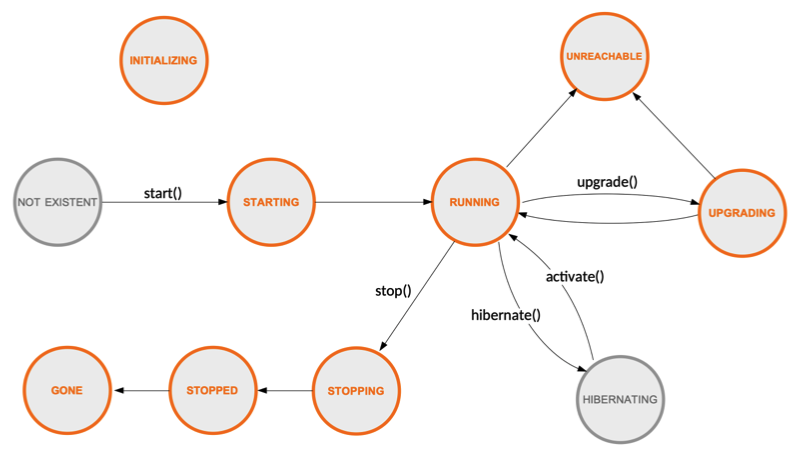
The Cluster Administrator manages and reviews the status of clusters, environments, and applications in the C3 AI console. See CloudCluster.
The diagram below illustrates the typical states and transitions of a Cluster, Env, or App. See CloudCluster.State.
C3 AI services
In addition to hosting C3 AI Environments in which C3 AI Applications are created and managed, the C3 AI Cluster also hosts services and other critical infrastructure to support the C3 Agentic AI Platform. These services can be externally managed services or internal C3 AI-managed services.
See also Configure Cloud Service for an Application Using C3 AI Console.
External services
Externally-managed services include client-managed RDS instances or other relational databases, key/value stores, Hadoop clusters, and other services and microservices to which the C3 Agentic AI Platform is granted access through valid credentials. Once integrated at the cluster level, external services can be shared among the C3 AI Environments.
See the C3 AI Data Integration Guide for more information about integrating external services with the C3 Agentic AI Platform.
Internal services
The lifecycle of internal services, such as relational databases or key/value stores, are managed by the C3 Agentic AI Platform. These services are internal to the cluster.
Environment Administrators can integrate an internal service and configure it to be specific and private to that environment, creating a private internal persistence service. An internal service can also be shared among C3 AI Environments.
Actions
Actions are the logic through which work is performed in the C3 Agentic AI Platform: from development of applications to cluster management and productionization of machine learning models. Actions are completed by Task nodes.
An action can be created locally by a C3 AI SDK call or through a remote API call sent over HTTP or other transport. When an action is invoked remotely, it is done via a request that has headers and payloads, which detail requirements, if needed. However, if the action is invoked locally, additional headers or specific requirements can be specified through lambdas, action wrappers (for example, C3.withGpu(Action)), or annotations. See Lambda or Annotation.
Actions are categorized as Root, Parent, or Child actions:
Root actions - Typically created by a user request or request placed in a queue. Once the request reaches a node, it results in the creation of a Root action. At the time of the instantiation, the context and access control elements are created as part of this action.
Parent actions - Actions that invoke other actions through an SDK call. For example, a database action can invoke a child action to fetch the data, as well as invoke a child action to configure a data store.
Child action - Actions invoked through an SDK call and share the same process as the Parent action. Child actions can also be carried by HTTP requests to load balancers.
NOTE: If a Child action is executed on the same node as the Parent action, a separate authorization is not required.
C3 AI Environment
C3 Agentic AI Platform is a multi-environment platform, so a single C3 AI Cluster can have one or more environments; however, there is at least one C3 AI Environment per cluster, which functions as the C3 AI Cluster Management Environment. The Cluster Administrator uses the C3 AI Cluster Management Environment to perform cluster-level administrative work: user creation, role assignment, regular environment creation, and resource allocation and management.
NOTE: A user account is typically associated with a single environment.
A C3 AI Environment has the following characteristics:
A C3 AI Environment hosts nodes, which execute various actions or other functionality required by C3 AI Applications.
A C3 AI Environment is based on the same version of the C3 Agentic AI Platform that is running within it. However, it is possible to have environments with different versions within the same cluster. The C3 AI Environment is independent of the other C3 AI Environments within the C3 AI Cluster, and therefore can be upgraded independent of the other environments as well. See Upgrade the Server Version of an Application or Environment from the C3 AI Console for more information.
A C3 AI Environment can map to a DNS sub-domain (for example,
http://<name>.<company>.c3.ai). The URL subpath can be used to route to a specific C3 AI Application.
A C3 AI Environment does not have an endpoint; however, each C3 AI Environment contains a default C3 AI Application that includes the compute nodes to manage the C3 AI Environment. This base C3 AI Application uses the Platform package. By comparison, additional C3 AI Applications created in the C3 AI Environment can be configured to use other packages.
When a C3 AI Environment is created, the Cluster Administrator can configure the initial state of the environment, specifying the following resource requirements as desired:
- Number of nodes
- Node sizes (such as, CPU, GPU, and memory)
- Shutdown profile (when to terminate nodes)
See Configure and Manage Node Pools and Use Hardware Profiles for more information.
Additionally, Cluster Administrators can modify autoscaling and other parameters as needed. See also Env.Autoscaler.
C3 AI Environment types
In the C3 Agentic AI Platform, there are two types of environments a Cluster Administrator can create:
- Single Node Environment (SNE)
- Shared environment
Shared environment
Shared environments allow the Cluster Administrator to enforce isolation between teams or business units. The changes made by users in this environment are synced, allowing users to see changes within the environment in real time. As such, this environment has multiple nodes and multiple users.
Applications within the environment can be set up to run in different modes, allowing the ability for a Cluster Administrator to allocate or map applications to a desired application development lifecycle stages within in an environment (such as, Development or Production). See also Cluster.Membership.
An environment can also serve as the unit of application configuration, so when an application package is deployed to that environment, it is configured according to the policies configured to that environment.
Every C3 AI Application started has its own set of server nodes, which include one leader node and as many task nodes as needed (including zero).
See also Env.Summary and Env.Membership.
Single Node Environment (SNE)
When creating environments for an individual developer, the Environment Administrator can create a single node environment (SNE), which allows the developer to access the environment on demand through the C3 AI VS Code extension (VSCE).
The SNE is meant for active development by a single developer. The developer connects and stays synced to the environment through the C3 AI VSCE. The environment consists of a single C3 AI node and can have multiple apps running on that single C3 AI node.
The single C3 AI node specific to the SNE functions as both the leader and task node for the SNE.
C3 AI Applications started within a SNE run within the server nodes of the environment.
See also Set up Developer Environment.
C3 AI Environment lifecycle
The C3 AI Environment Lifecycle can be managed by the Cluster Administrator through the C3 AI Cluster Management Environment. Once created, a C3 AI Environment can be in one of the following states:
- Initializing: Apps are starting
- Started: Server nodes for Apps are up
- Hibernated (Stopped) - Hibernation is a reaction action in response to inactivity as a means to free up resources for other environments and applications. Backing data and configurations are maintained even when an App is stopped/hibernated. This reaction action can be configured in the C3 AI Cluster Management Environment by the Cluster Administrator; however, an Environment Administrator can also initiate the process manually by accessing the C3 AI Environment endpoint.
- Terminating: Apps alongside backing data and configurations are in the process of being permanently terminated.
See also Start and Stop Application from C3 AI Console for more information.
C3 AI application
While environments provide isolation for teams or companies, applications provide data or logical isolation within a team. Each environment must have at least one application. When deploying an application package, you deploy it to a specific application. Conversely, each application hosts a deployed application package.
An application name must be unique to the environment and must contain only alphanumeric characters and hyphens (-); for example, a-z0-9. See App.
The application name is a component of the Application ID, which uniquely identifies the application within a cluster. The Application ID is composed by concatenating the Cluster ID, the Environment name (which is unique to the cluster), and the application name. The Application ID should:
- Not exceed 63 characters.
- Only contain lowercase alphanumeric values or hyphens (
-); for example,acme-dev-crm(that is, cluster-env-app).
C3 AI Application architecture
Environments and applications in a cluster generally share the same resources. That means work from all environments and applications are distributed across the same database and compute nodes, but you can configure your cluster so that each environment has its own dedicated database and compute nodes.
Applications within the environment can be set up to run in different modes, allowing the ability for a Cluster Administrator to allocate or map applications to a desired application development lifecycle stages within in an environment (such as, Development, Testing, QA, or Production).
Compute nodes
The following compute nodes are available in a C3 AI Environment to complete actions for C3 AI Applications. Each node has a unique ID.
| Node | Description |
|---|---|
| Leader node | Prioritizes and distributes asynchronous jobs to task nodes, and handles synchronous user requests, including API requests from end-users, web console, and CLI. |
| Task node | Executes actions, including runtime actions that are received through an API server. The synchronous requests or responses can be either a "control (management)" request or a "user" request. Each task node runs one action at a time and may be reused for sequential actions. |
| NOTE: Task nodes are also used in instances in which storage is needed to complete an action, for example when the action is specific to compute data and requires persistent storage. In these instances, storage is attached to a Task node for the action to perform the computation and persist the data. |
Communication between nodes occurs through a persistent path or channel. The channel is used for dispatching child actions and collecting streamed responses. For streamed responses, a TCP/IP connection is required instead of a typical REST call over HTTP.