C3 AI Feature Store Overview
A feature is a data input to a machine learning model. Typically, features involve transformations from the source data available to a problem. These transformations may include value mappings, value scaling, and aggregations.
A feature store is a centralized repository of materialized (pre-computed) feature data. It provides three main functions:
- Share and discover features across teams.
- Reuse named features in both training and prediction/inference contexts.
- See a point-in-time view of multiple features (for example, see the most recent data defined in each feature at a specific point in time).
Components of the C3 AI Feature Store
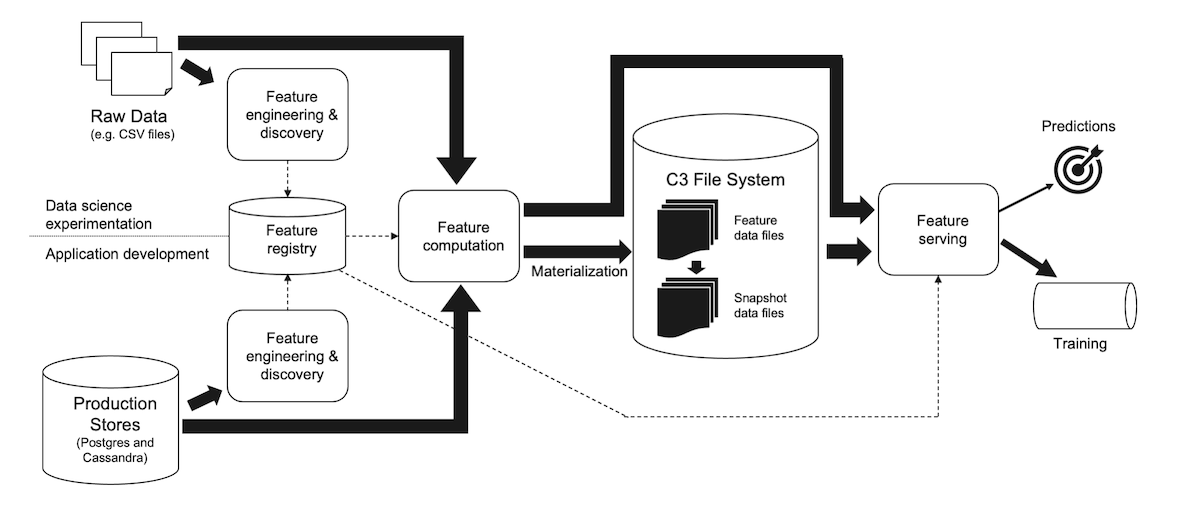
The C3 AI Feature Store uses a metadata-driven design that tightly integrates with the upstream and downstream steps of a machine learning (ML) workflow. Metadata, which includes the transformations required to create a feature from source data, can be created through datasets or manually through direct API calls. This metadata then drives the process of efficiently computing and storing features from both experimental data and production data.
Many capabilities that required you to use a feature store in a production ML workflow can be automated with this approach: transition from experimentation to production, recomputing of updated features, resampling of time series features, aggregation of composite features, and end-to-end data lineage.
Features and feature sets
A Feature represents an individual input value for a ML model, typically a scalar value or a time series. Features are indexed by a subject id. A subject id is an identifier for the specific object (subject) on which the ML prediction or classification is performed (for example, a smart bulb, wind turbine, or customer). If the feature is a time series feature, the feature values are indexed by a time stamp in addition to the subject id.
A Feature.Set is a collection of features that are used together as a named input to a ML model. For example, if a smart bulb has voltage and temperature features, we might define a feature set with both features and use that as the input to a failure prediction model. Typically, the target variable(s) are part of another feature set.
In some cases, you might use a feature without a feature set (for example, to show a value in the user interface). Also, you can create a kind of feature set -- Lambda Feature Set -- that does not reference independent features (see below).
Core actions
There are three core actions that you can take on the C3 AI Feature Store:
Create – This action is used to create a feature definition. This definition contains metadata about the feature and the code for a transformation function that coverts input data to the desired feature value.
Materialize – This action runs the transformation function against (a subset of) the input data to compute the feature values and saves the results in the C3 AI File System.
Evaluate – This action reads materialized feature data and returns a dataframe with the requested feature(s), performing a point-in-time join, if needed. Evaluation can be filtered by
subject idand time range. Evaluate can be used to inspect and explore feature data, to pass feature data to the user interface or ML pipelines, and is used internally by ML models to obtain their data.
Defining features
Features can be defined using either C3 AI Metrics or Python functions. In both cases, the materialization and evaluation process is the same.
Create features from metrics
C3 AI Metrics provide an expression language optimized for time series processing. You can define a feature on top of an existing metric or pass an in-line metric definition into a feature definition. Unlike the underlying metrics, each feature has a specific interval (for example, hourly, daily, monthly). When creating a feature from a metric, this interval must also be specified.
When features created from metrics are materialized, the underlying metrics are evaluated (computed) and the results saved to the feature store.
For more details, see the tutorial Create Features Using C3 Metrics or Metric Expressions.
Create features from functions
Lambda Feature Sets provide a performant and convenient way to define features. To create a Lambda Feature Set, first write a feature computation function that reads source data (for example, from the application data model using eval()), computes feature values, and returns a Pandas DataFrame. Then, you create a Feature.Set definition, referencing this function. There are two variants of the feature computation function - one that processes the data for a single subject (for example, WindTurbine) at time and one that processes the data for a batch of subjects at a time. You can provide implementations for either of these variants or both.
Feature materialization runs your function on the server for each subject instance (for example, WindTurbine) in your database and stores the results in the C3 AI File System.
For more details, see the tutorial Create, Materialize, and Evaluate Features Using Lambda Feature Sets.
Advanced use cases - materialization and snapshots
A snapshot is a copy of feature data that is named and stored separately from the primary feature store data, which may be changed at any time using materialization. Snapshots are helpful in ensuring reproducibility in ML. You can take a snapshot of your training data and later refer to the same snapshot to retrain on the exact same data.
For more information on how to use Feature Set Snapshots, see the Feature Set Snapshot topic.
Examples of more advanced use cases around materialization and snapshots may be found in the tutorial Feature Materialization and Snapshots.
Timestamp alignment
The feature store does not align timestamps for materialization by default. Not aligning timestamps allows for more precise incremental materialization (for example, you can set hourly timestamps).
For Lambda feature Sets, if you require the start and end timestamp to be aligned, use one of the following approaches:
- If you resample to a specific interval, specify the interval in the interval field of the Feature.Set definition (for example, HOUR).
- Round timestamps inside the Lambda function, for example, by using Pandas.Timestamp.floor ().
For more information, see Feature Materialization and Snapshots.
Ability to disable materialization
Some customers may wish to globally disable all feature store materialization in accordance with their security policies. C3 has added a configuration Feature.Store.MaterializationConfig that contains the field doNotMaterialize. A user with cluster admin access can set this flag to true to disable all materialization in the cluster. This cannot be overridden by users without cluster admin access.
To set this flag, run the following in any console via a user with cluster admin access:
Feature.Store.MaterializationConfig.inst().withDoNotMaterialize(true).setConfig(ConfigOverride.CLUSTER);This causes any materialization request to fail. NOTE: In some instances, there may be a significant performance cost increase to dynamically compute features rather than reading from materialized features.
See also
- Configure and Tune Batch Jobs
- Work with Data on the C3 Agentic AI Platform
- Feature Engineering and Time Series Analysis in C3
- Overview of Pandas APIs
- Create Features Using C3 Metrics or Metric Expressions
- Create, Materialize, and Evaluate Features Using Lambda Feature Sets
- Materialization and Snapshots in the C3 AI Feature Store
- Model Development Typical Workflow on the C3 Agentic AI Platform
- Model Deployment Overview
- C3 AI Data Science and Machine Learning Guide