Modeling Time Series Data
There are two types of data: Quantitative and Qualitative.
Quantitative can be further classified into four types of data: continuous, discrete, nominal, and ordinal. Examples of quantitative data include a light bulb's temperature or time (how long ago it had been replaced).
A single time series is a series of data points associated with a period of time. A single point in time can be represented with a timestamp.
To model time series data in the C3 Agentic AI Platform, two categories of C3 AI Types are employed:
- Header Types.
- Data point Types.
The header Type describes the series of data, and captures the attributes that apply to all elements in the series, or specifies instructions on how to use this particular series.
The header Type contains metadata on the measurements and points to the corresponding data point Type. Headers are typically persisted in relational data stores, like Postgres.
Data points are key-value pairs. There is one row for each measurement or reading. They are typically stored in a non-relational key-value store and leverage the data store's high performance.
Choosing a Data Point Type
Use the mixin command to add predefined time series Types to your objects as a way to model time series data with the C3 Agentic AI Platform. Different modeling options are optimized for various ingest rates and volumes of data.
When deciding which Type to mixin to create time series data, consider these three key questions:
- Is the data shape an interval or point? Interval data are values valid over a given time range (start + end). In contrast, point data are instantaneous measurements from a specific moment in time (in which case there is a single timestamp).
- Do you need to normalize the data? Should normalization occur upon data ingestion or during processing?
- Is the data ingestion high frequency or low frequency?
After you have answered these three questions, use the following table to determine which C3 Type you need to mixin to your existing object.:
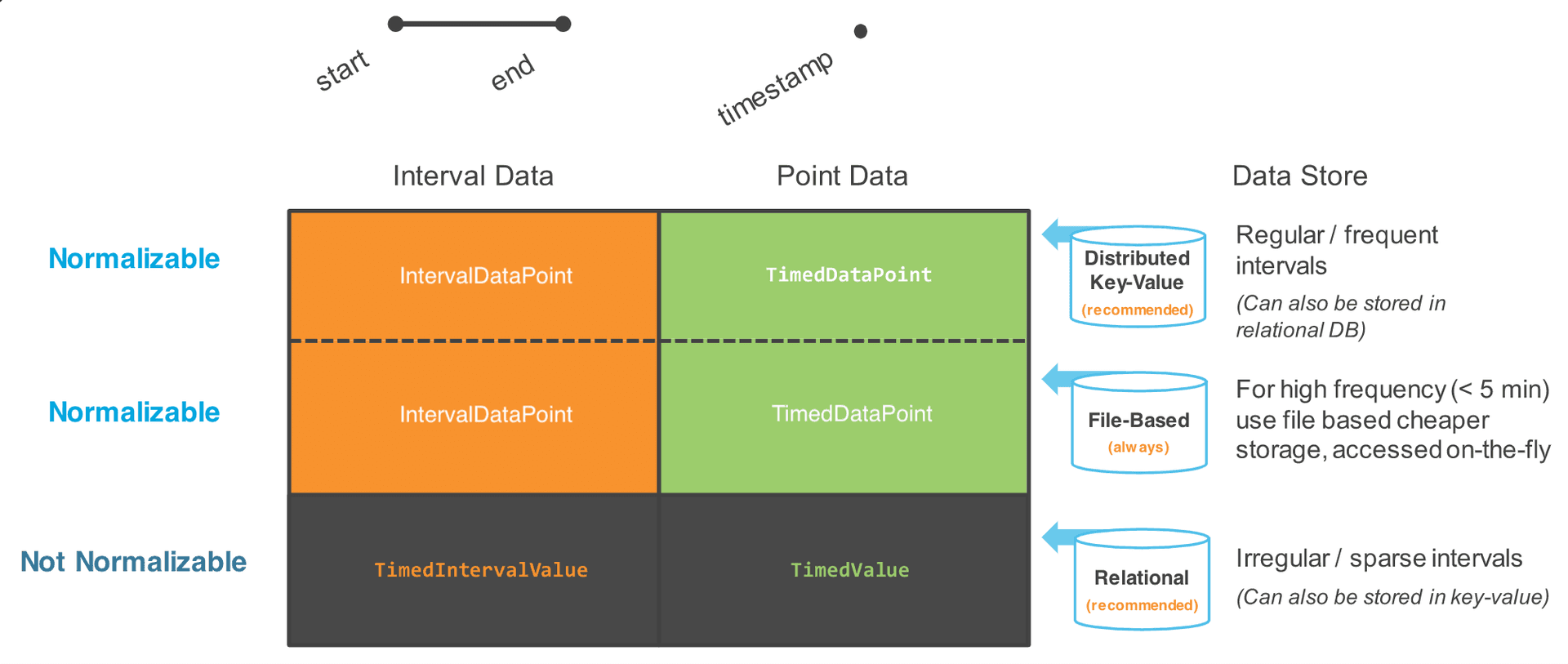
If the data is irregular or infrequent, it is recommended that you do not perform normalization upon ingestion. Instead, perform normalization during your analysis.
See Normalization Engine for more information about normalization.
Data that cannot be normalized
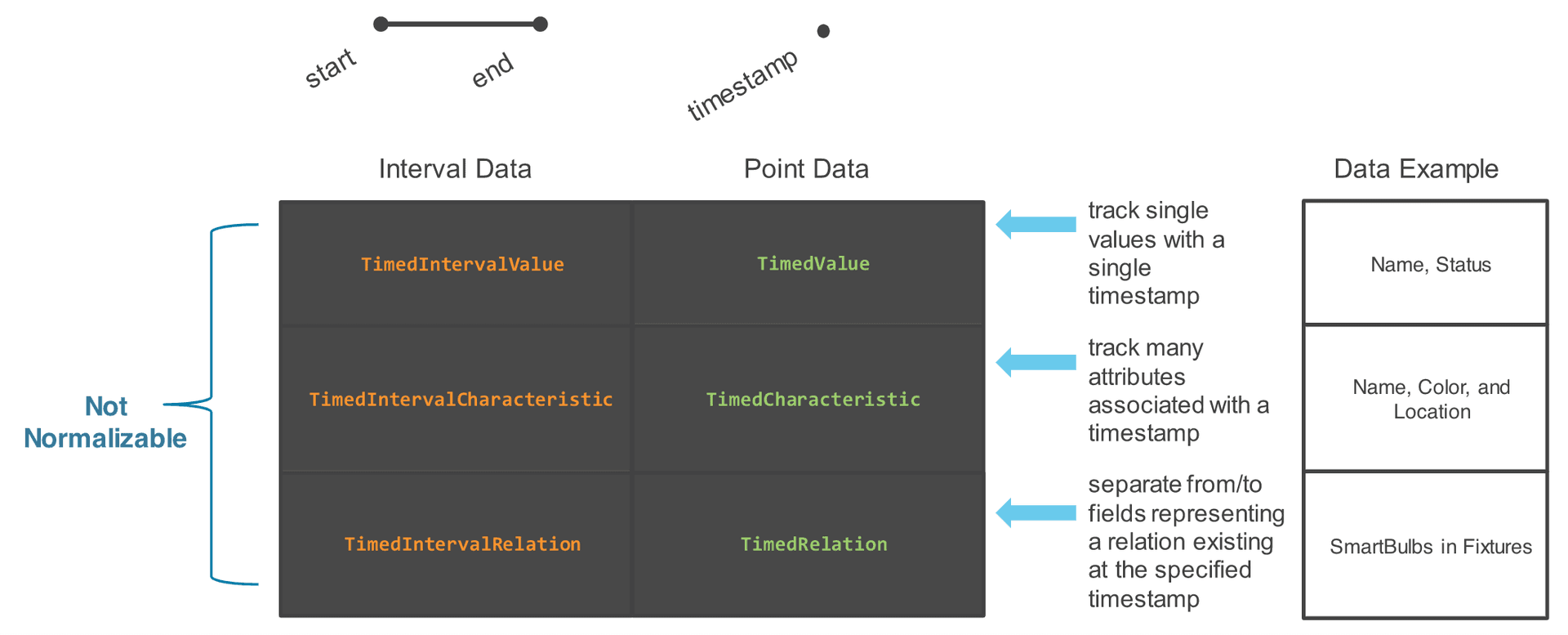
TimedValue is a unique mixin when modeling time series because it is used to model time series that are not normalizable.
Mixin the TimedValue mixin Types (TimedIntervalValue and TimedValue) when the data is sparse or changing.
In addition to using TimedValue mixin types, you can track multiple attributes and relations for data that you can't normalize using the choices summarized in the following table.
TimedIntervalRelation example
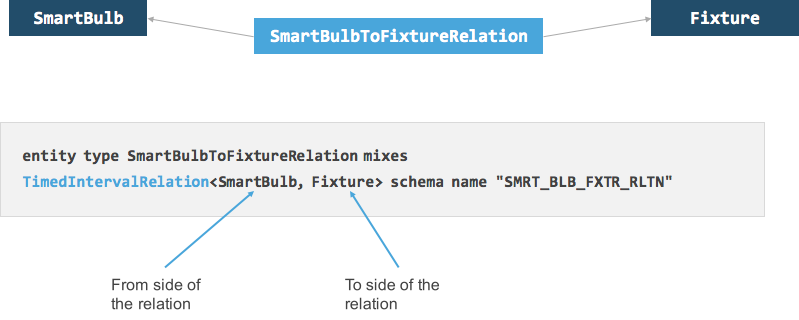
To define a timed interval relation, create a Type (for example, SmartBulbToFixtureRelation) that mixes TimedIntervalRelation. In the example of SmartBulbToFixtureRelation below, the parametrized type TimedIntervalRelation represents the relation from the SmartBulb to the Fixture. A SmartBulb is installed in a fixture for a certain duration; this physical relationship is being represented by this SmartBulbToFixtureRelation Type. For semantic purposes, it is helpful to define a From and To relationship between the objects.
Choosing a Header Type
After you have determined the data point Type necessary to model your specific time series data, it is easy to the determine the necessary header Type. Use the diagram below to select the correct header type:
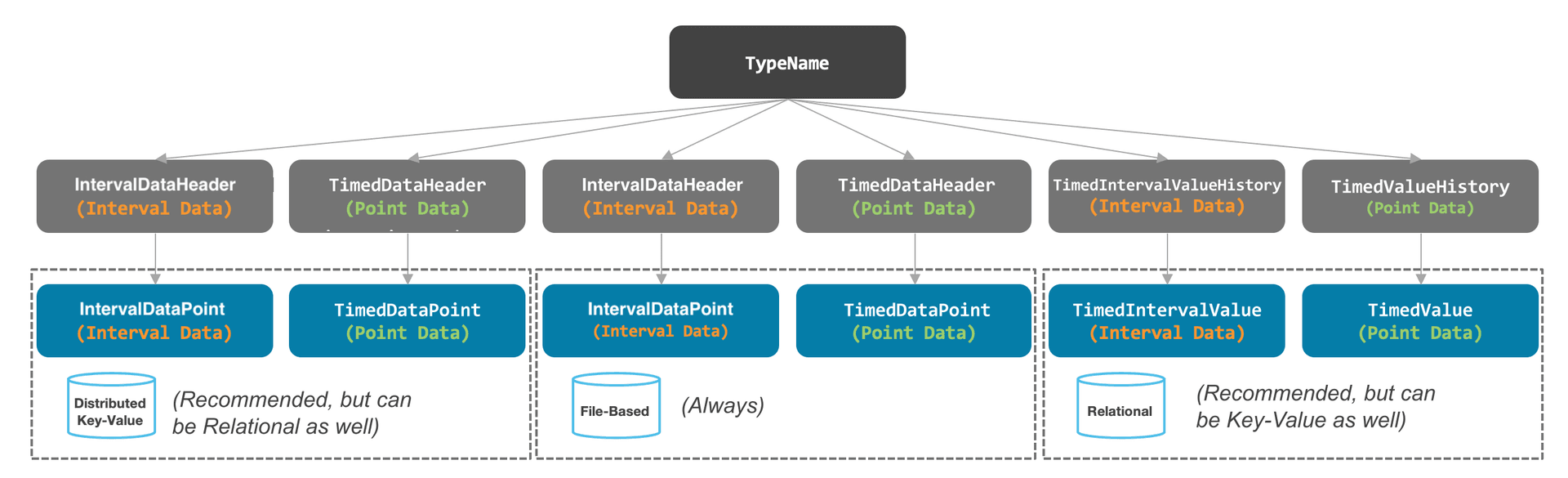
While there is a recommended or assigned database Type associated with headers and data points, in some cases they can be stored in different databases. File-based data points are always stored in file-based databases.
Example
A SmartBulb transmits information about its status. The data arrives every hour (at regular intervals) and the point is in an interval format - the bulb was on or off for an hour. To model this SmartBulbMeasurement time series data, create both a header and a data point type.
Step 1: Determine types needed
To model this data appropriately in the C3 Agentic AI Platform, determine which Types can be used:
- Is this interval data (time series data)?
- Can you normalize the data upon ingestion?
- Is the data recorded with a regular frequency?
Referring to the above diagram, we can see that the Type you need to mixin to model our data is the TimedIntervalValue Type. The header Type associated with TimedIntervalValue is TimeseriesHeaderInfo.
Step 2: Create the header Type
To create the header Type, create a Type called SmartBulbMeasurement that mixes in our header Type, TimeseriesHeader. Note that since this Type is going to be persisted as a table, it is given a schema name. The field that is present is the reference to the SmartBulb to which the data pertains.
Another key is that the TimeseriesHeader takes a parameter: SmartBulbMeasurement Type. This data point Type is created next. This header Type must point to the data point Type, and is specified as shown below.
/**
  * A series of measurements taken from a single SmartBulb Type.
  */
 entity type SmartBulbMeasurementSeries mixes TimeseriesHeader<SmartBulbMeasurement> schema name "SMRT_BLB_MSRMNT_SRS" {

   // The SmartBulb Type for which measurements were taken.
   smartBulb: SmartBulb
}Step 3: Create the data point Type
The next step is to create the data point Type that mixes in {@ link IntervalDataPoint}, similar to how the header Type mixes in TimeseriesHeader.
Since Types are persisted into a Postgres datastore, you must specify the use of a key-value datastore within the Type definition. Use a database annotation similar to the example below to specify that this data can be persisted on Cassandra. Remember that key-value databases are recommended for storing regular interval time series data.
Note: When you mix in the IntervalDataPoint, include the parameter that points to the header Type, SmartBulbMeasurementSeries.
/**
  * A single measurement taken from a single SmartBulb Type.
  */
 @db(datastore="kv",
  partitionKeyField='parent',
  persistenceOrder='start',
  persistDuplicates=false,
  compactType=true,
  shortIdReservationRange=100000)
 entity type SmartBulbMeasurement mixes IntervalDataPoint<SmartBulbMeasurementSeries> schema name 'SMRT_BLB_MSRMNT' {

 }
A more detailed explanation of annotations can be found in the Type System Reference Guide.
Step 4: Store data
The data point Type must be able to store data. To do that, you create fields that represent the quantities of measurement.
In the SmartBulbMeasurement Type, the fields defined include lumens, power, temperature, voltage, and status. The annotations above each of these fields are the time series normalization treatments that can be applied to each of the fields. See Normalization Engine and Time Series Data Treatments for more information.
entity type SmartBulbMeasurement mixes IntervalDataPoint<SmartBulbMeasurementSeries>  schema name 'SMRT_BLB_MSRMNT' {
   // The measured number of lumens.
   @ts(treatment='avg')
   lumens: double

  // The measured power consumption.
   @ts(treatment='avg')
   power: double

  // The measured temperature.
   @ts(treatment='avg')
   temperature: double

  // The measured voltage.
   @ts(treatment='avg')
   voltage: double

  // The status of the smart bulb (on or off).
   @ts(treatment='previous')
   status: int
 }
At this point, we have successfully modeled time series lumens data, time series power data, time series temperature data, time series voltage data, and time series status data. You can think of all this data on the data point Type as being stored as a table of values all dependent on time.
Note:
- We have not created any time series objects yet.
- If there were other fields on our SmartBulb Type that should be modeled as point data, we would have to define a TimedDataHeader header Type and a TimedDataPoint Type to model those fields as time series.