Version 7 to Version 8 Differences and Improvements
Version 8 is a substantial overhaul of the C3 Agentic AI Platform. This reference is designed to provide users with more details about the changes from Version 7 to Version 8.
Notable version 8 changes
Here are some Version 7 to Version 8 changes you need to account for in your Version 8 package.
High-level architectural changes
Tenants and tags
The Tenant/Tag nomenclature has been changed to Environment/Application respectively.
Refer to the Env and App Type for more information.
VanityUrl replacement
Vanity URLs are deprecated and are no longer required. Use App URL instead.
Type System
Immutability
C3 AI objects and C3 AI collections are immutable in Version 8.
Immutable objects
Assigning values to properties of a C3 AI object no longer works. In Version 8 use the autogenerated with...() methods:
v7 - Assign values to properties
var o = MyType.make({ ... });
o.name = 'newName';
o = o.putField('otherField', 'newValue');
o = o.putFields({
  name: 'newName',
  otherField: 'otherValue'
});
v8 - Use with...()
NOTE: You cannot create new methods with the name .withX() where X is a field.
var o = MyType.make({ ... });
o = o.withName('newName');
o = o.withField('otherField', 'newValue');
o = o.withFields({
  name: 'newName',
  otherField: 'otherValue'
});
An alternate method to make objects is to use builders. For example, an equivalent to the withFields example is:
o = o.toBuilder().v('name', 'newName').v('otherField', 'otherValue')See the ObjBuilder Type.
Immutable collections
C3 AI collections (such as arrays and maps) are also immutable. Operations that modify collections are replaced by methods that return new instances:
v7
var a = c3Make('[int]', [3, 4]);
a[0] = 1;
a.push(2);
var b = a.pop();
a.concat(b);


var m = c3Make('map<string, string>', { a: 'b', c: 'd' });
m.key = 'value';
m.set('otherKey', 'otherValue');
m.unset('otherKey');
v8
var a = C3.Array.ofInt(3, 4);
a = a.replace(0, 1);
a = a.with(2);
var b = a.slice(-1);
a = a.withAll(b);

var m = C3.Map.ofStrToStr('a', 'b', 'c', 'd');
m = m.with('key', 'value');
m = m.with('otherKey', 'otherValue');
m = m.withoutKey('otherKey');
Standard JavaScript array and object accessors like a[0] and m.key can be used with C3 AI collections for reading values. Use C3.Array and C3.Map to access those C3 AI Types, since Array and Map are used by native JavaScript.
TypeMeta
Type information that was previously part of Type has been moved to a new Type named TypeMeta. For example, Unit.mixins() changes to Unit.meta().mixins(). From a Type instance, type() returns the Type, so type().meta() returns the TypeMeta information.
Global variables
Global variables are not supported. Variables should be declared in the scope(s) in which the variable is used.
Utility functions
Utility functions like c3Make and various items from C3.typesys are not available in Version 8.
v7
var a = c3Make('[string]', ['a', 'b']);
var m = c3Make('map<,string, MyType>', { a: mt0, b: mt1 });
var aa = c3Make('[[string]]', [['a'], ['b', 'c']]);
var t = c3Type('MyType');
var log = C3.logger('loggerName');
var doubleType = C3.typesys.PrimitiveType.Double;
v8
var a = C3.Array.ofStr(['a', 'b']);
var m = C3.Array.ofStrTo(MyType, 'a', mt0, 'b', mt1);
var aa = ValueType.fromString('[[string]]').convertValue([['a'], ['b', 'c']], true);
var t = C3.type('MyType');
var log = Logger.for('loggerName');
var doubleType = PrimitiveType.ofDbl();External libraries
Lodash and Underscore are popular JavaScript libraries that provide a range of utility functions for operations on arrays, objects, strings, and other data types, without extending built-in objects. They make tasks like iteration, filtering, and transformation easier and more convenient.
Lodash
Version 8 is using Lodash instead of Underscore.js. Some Underscore.js functions do not have corresponding Lodash functions.
These include:
v7
_.times(10, function (i) { ... });
var r = _.range(10);
v8
Repeat.call(function (i) { ... }).times(10).collect();
var r = C3.Array.ofIntInRange(0, 5);
As with Version 7, most Lodash/Underscore.js functions are defined on C3 AI collections. For example, a.map(...) is preferred to _.map(a, ...) if a is a C3 AI collection.
Python function arguments
In Version 8, an additional first argument is passed to Python methods: either the class (if a static method) or the instance (if a member method).
As a result, when defining the function's Python body, you need to include this parameter in the functions signature. By convention, this is called cls for static methods and this for member methods.
Version 7
def static_function(arg1, arg2):
    # method implementation logic

def member_function(arg1, arg2):
    # method implementation logic
Version 8
def static_function(cls, arg1, arg2):
    # method implementation logic

def member_function(this, arg1, arg2):
    # method implementation logic
Another example:
def lifeSpanInYearsPythonMethod(bulbId):
    # method implementation logic
Becomes:
def lifeSpanInYearsPythonMethod(this, bulbId):
# method implementation logicTesting
There are changes from Version 7 to Version 8 in how the testing frameworks Jasmine and pytest are used in the C3 AI Platform.
Python testing
Python tests must have the following path:
/<pkg>/test/<runtime-name>/**/test_*.py
<pkg>denotes your test's package name.<runtime-name>denotes the name of the runtime. If you do not know what runtime you would like to use, py is a fine default value./**/implies you can have any sub-path directory structure
In addition to the above change, test functions no longer take the c3 parameter. Python tests can be run from VSCE after they have been put in the appropriate directory.
Jasmine testing
In Version 7, Jasmine tests can assign values to properties of the this object in an it() block and refer to these values in later it() blocks:
describe('example', function () {
  it('step 1', function () {
    this.value = 1;
  });

  it('step 2', function () {
    expect(this.value).toEqual(1);
  });
});
This is not how this is supposed to work in Jasmine, and does not work in Version 8. this.value is undefined in step 2. See the official Jasmine documentation.
Values set to properties of this in a beforeAll() or beforeEach() are still available in subsequent it() blocks.
Refer to the topic on Write tests with Jasmine for more information.
Upserting seed data
Seed data must be explicitly upserted. If you need to upsert seed data for a test please use the code snippet below:
C3.pkg().upsertAllSeed()Security role changes
In Version 8.2, users and groups are persisted only in the Type Idp, external to C3 AI. For more detailed documentation please refer to the Security Guide.
Metadata
Metadata can no longer be entity Types. Types in Version 7 that are both entity Types and mixin Metadata have not yet been migrated. If you have an instance in your package, it is at your discretion on whether they should be an entity or Metadata Type. If you expect instances of this Type to be manipulated at runtime, they should be entity Types. Otherwise, make them Metadata Types.
If you decide that the Type should be Metadata and it has data in the seed directory of your package, you need to move them to the metadata directory. See Metadata.c3typ on how to properly mixin and use Metadata.
MetadataStore file system differences
In Version 7 MetadataStore.tag().files() was used to access the files of a package.
In Version 8 you must use C3.pkg().files/resource/contents() to do this. What is the difference between these methods? The MetadataStore Type is deprecated in Version 8. The Pkg Type documentation explains in more detail what the application metadata for a C3 AI package
FileSourceSystem differences
In Version 7, the default FileSourceSystem was the Legacy Type. In Version 8 (8.2+) it is now called Canonical.
In Versions 8.0 and 8.1 it was the Default Type. If applications still use the Legacy or Default SourceSystem, there could be null pointer exceptions. In that case, they either need to define their own SourceSystem with the respective name, or convert to using Canonical.
Timeseries
The TimeseriesDataHeader Type in Version 7 is now IntervalDataHeader in Version 8.
Mixin this Type to provide meta information about the Timeseries being stored in IntervalDataPoint.
The TimeseriesDataPoint Type in Version 7 is now IntervalDataPoint.
The FileTimeseriesHeader, FileTimeseriesDataPoint, and FileTimedDataPoint Types are not available Version 8.
Timeseries#missing returns [false, false, true, true] unless no data is missing, in which case it returns null.
Timeseries.data() returns [] if the data is all 0s.
Data science and data integration
Workflow changes
The Workflow Type exist in both version 7 and version 8.
However, in version 8 the Workflow Type is re-architected.
For instance:
- Workflow execution is now isolated from its authoring/representation
- Version 8 supports multiple executors for workflow that can be chosen through a newly introduced spec, WorkflowExecutionSpec
- There have been changes in the workflow terminology from version 7 to version 8. For example, in version 7 the nodes representing a Workflow were called steps, in version 8, these are now vertices.
Please refer to the document on Workflow for more information about the workflow API changes.
Machine learning (data, feature store, ML pipelines, and model pps)
Related guides for this section include:
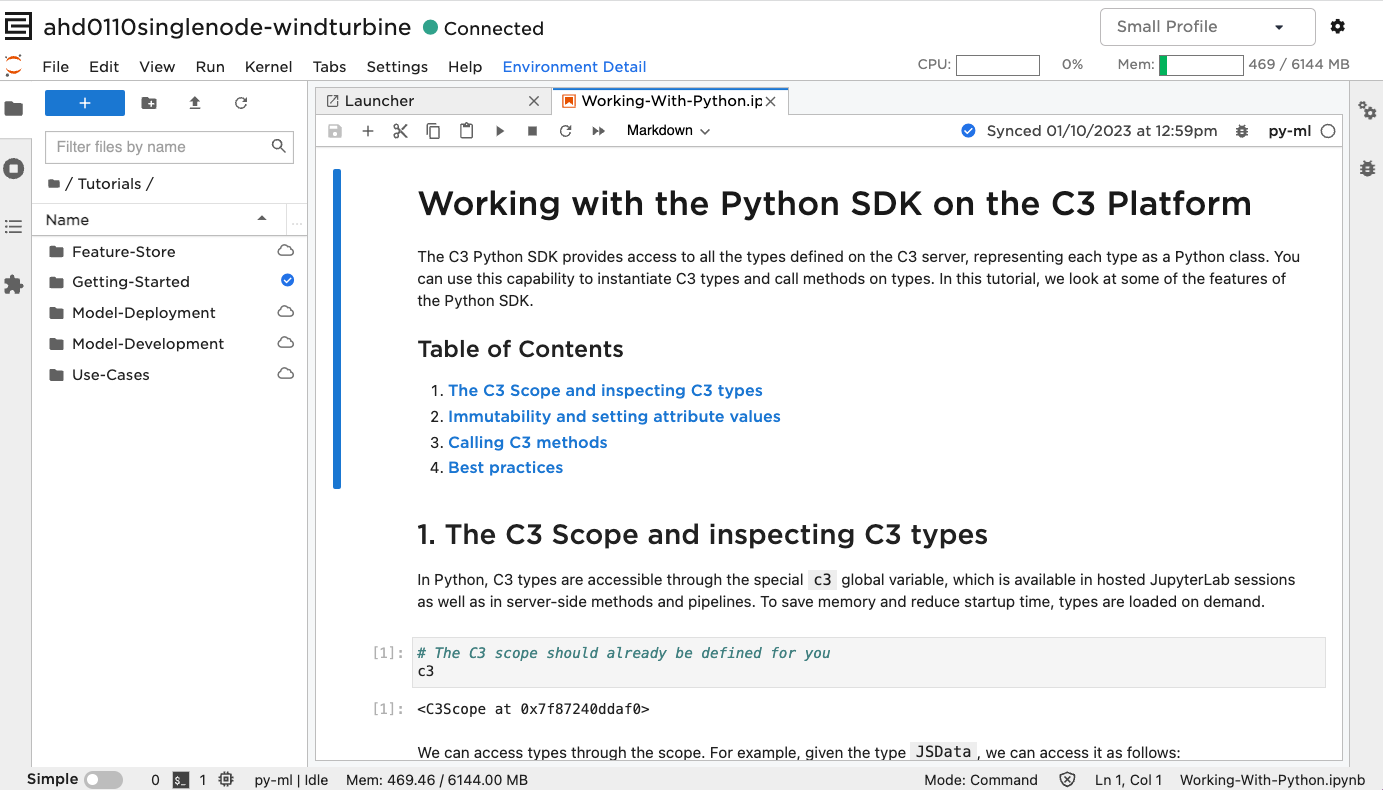
Viewing seeded tutorials in your Jupyter service
These notebooks are seeded under the tutorials package in c3server. In order to have the seeded tutorials appear in your Jupyter service make sure to include the tutorials package as a dependency. Here is an example of how to add this dependency in your package.json file (from the windTurbine package):
{
  "name": "windTurbine",
  "dependencies": [
    "tutorials"
  ],
  "description": "Wind turbine predictive maintenance",
  "author": "platform"
}
After this step, you see the Tutorials folder upon starting your Jupyter service:
Data
The abstract Data interface now completely replaces the Version 7 Dataset, DataSourceSpec, and MLDataSourceSpec, as well as all the NLP data types such as TextCollection and TextCollectionList.
Note: There is currently no Version 8 equivalent for Version 7’s Tensor.
Metrics
Related guides for this section include:
Note: Metrics in a *.json file should not be declared the same as in Version 7:
{
  type: SimpeMetric,
  values:[<Metric1JSON>, <Metric2JSON>]
}
Instead insert [<Metric1JSON>, <Metric2JSON>].
ML pipeline differences
ML Pipelines has changed dramatically from Version 7 to Version 8 in terms or architecture (for example, support of Directed Acyclic Graphs, separation of authoring from execution) as well as user APIs (for example, functional-style authoring of pipelines, async ML operation APIs). The best way to understand the changes, if the public guide above is not enough, is to run through the tutorial notebook (the MlDynamicPipe and MlLambdaPipe notebooks are also worth a look).
JSON
In Version 8, instances of JSON passed into or returned from js-rhino functions become immutable JsonType. This can be transformed into native JS JSON using Js.toNativeObject. Native js JSON can be converted to C3 AI JSON (Immutable JsonType) using Jsn.make(). The Jsn Type has functions for manipulating C3 AI JSON.
Empty required function arguments
In Version 8, required function arguments (for example, args declared with !) cannot be empty lists or empty objects. Examples of lists or objects include arrays, maps, json, non-persistable Type (for instance, a spec Type). If empty lists or empty objects are allowed for the arg, use !? instead. You can use the regex function.*\(.*!(json|Obj|map|\[).*[,\)].*\) on *.c3typ files in your package to search for affected function declarations.
UiSdl seed files
Version 7 seed files for UiSdlRoute, UiSdlDensityTemplate, and UiSdlThemeTemplate are automatically migrated from the seed folder to the metadata folder in V8.