Deploy Your Application
A deployment is a copy of your application that runs on its own. A deployment keeps running after you close your workspace, so other people can use the application whenever they need it.
Every application gets two deployments. Staging is where you and your colleagues check the application, and your users never see staging. Production is the copy your users use.
Deploy to staging first, review the result, then send the same code to production. Every deploy stamps a version, so you can always tell which code is running.
When to use staging and when to use production
Deploying to staging first lets you see the application working before your users do. Send a change to staging, review the result, ask a colleague to review it, then send the same code to production.
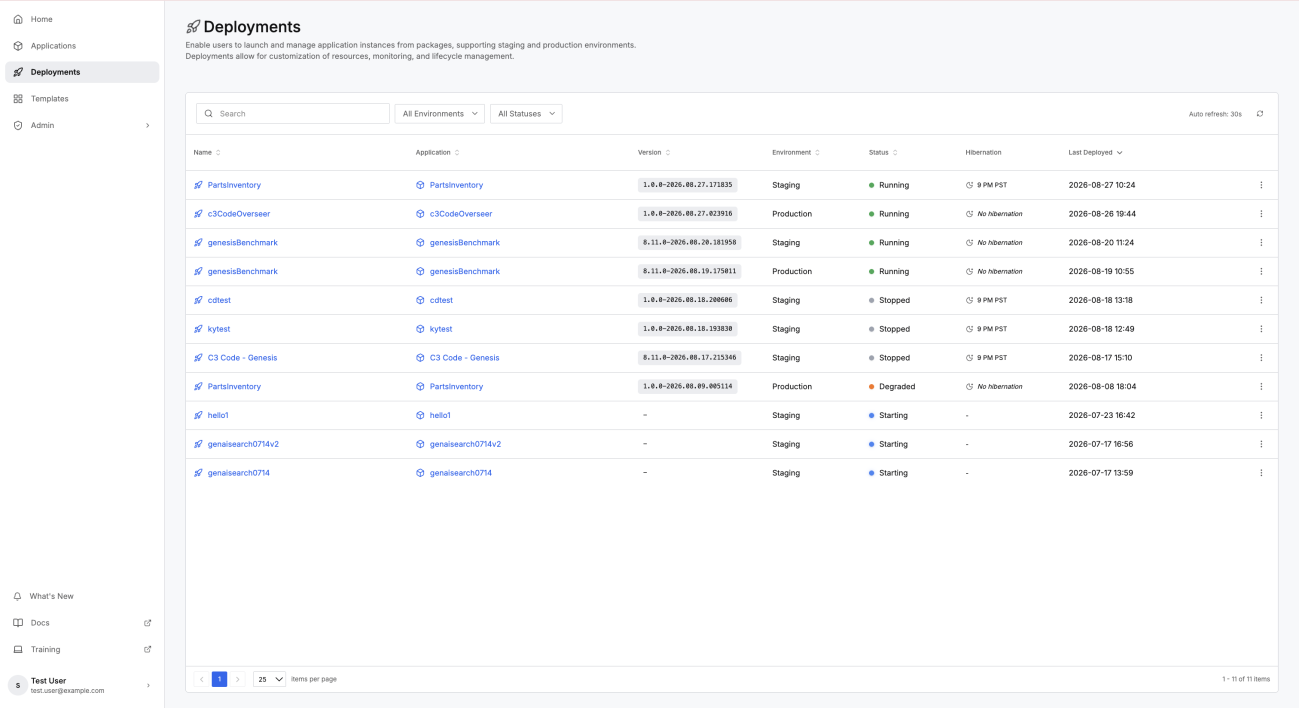
Each application has one staging deployment and one production deployment, so deploying again replaces the running version. Two workspaces deploying to staging still give you one staging, and the most recent deploy is what everyone sees.
For what each deployment is for and how the two differ, see Deploy to Staging and Production.
Deploy by hand or from a branch
Two routes put your code into a deployment.
Deploy by hand from a workspace: C3 Code takes that workspace exactly as it stands, including edits you have not saved to GitHub, and sends the result. Use this route while the application is still yours to change.
Deploy from a branch on a schedule: C3 Code checks a branch on GitHub and rebuilds the deployment whenever the branch has new work. Only work you have saved and pushed reaches the deployment this way. Use this route once colleagues depend on the application staying current.
Each deployment takes one route at a time. Setting up a schedule for staging turns off the manual Deploy action for staging, and leaves production unchanged.
Every deploy makes a new version
Each deploy stamps a version. A deploy from a workspace records which workspace the code came from, and a build pipeline records the branch it built. The new version replaces what is running, and every earlier version remains in the version history.
The Deployments page is where you stop, resume, and diagnose a deployment. See Manage Your Deployments.
What happens after production
Staging and production are the two deployments C3 Code manages for you. Running an application on a customer cluster, or upgrading an application when the platform moves to a new version, happens outside C3 Code and usually involves your C3 AI services team.
The platform documentation covers that work. See Build and Release Management and Upgrade Your Environment and Application.
Where to go next
These pages cover each deployment route in detail: