Review Code and Manage Branches
The agent writes code into your workspace as it works. That code is yours to read, to save, and to share with your team.
You can ask the agent to handle all of that in plain language, or use the Git status control in the workspace header and do the work yourself. Both routes do the same job.
To submit a finished change for review, ask the agent to save the work, put it on a branch, and open a pull request. Read the code yourself first, so your colleague reviews work you have already checked.
Your application needs a connected GitHub repository before this work reaches your team. See Connect GitHub.
Ask the agent to save and share your work
Plain requests work. Each of the following is a complete instruction:
Create a coverage-matrix branch for this feature so it isn't on main.Commit the outstanding work and push this branch to the remote.Create a PR for this against main and give me the link. Keep the branch afterward, don't delete it.Pull the latest changes from the remote repository on branch "main".The agent reports each step, including which files it saved and which files it left out. That report tells you more than the Git status control, which shows the current state and no history.
Additionally, the agent may be queried about the current repository state. For example, it can report which branch you are on, and whether two branches hold the same work.
The agent also checks a request before running it. Ask the agent to push a branch holding no work of its own, and the agent explains why that sends nothing, then offers to save your changes first.
Read what the agent wrote
Select Code in the workspace header to open the file tree and the editor.
Read a change when any of the following is true:
- The change touched a file that other pages use.
- The agent reported changing a file outside what you asked for.
- The result looks right, and you plan to build further work on that result.
The agent already checks its own work. A complete report confirms that the build and the code checks pass, that each page shows real data with no errors, and that the application has no outstanding issues.
Those checks confirm the code runs. Reading the code yourself confirms the code does what you asked for.
Understand the code you are reading
Most work never needs these references. When you are investigating a problem and the code itself is the fastest route to an answer, the platform documentation explains the parts the agent wrote:
- The records and the code behind them: Type File Syntax explains how a record is declared, and Define Methods explains how behavior attaches to it. The implementations are described in Type Methods, Python Methods, and JavaScript Methods.
- Where files are stored: Package Structure Reference explains the folder layout of your application.
- Work that runs on a schedule: Create Long-Running Jobs, Implement Parallel Batch Jobs, Schedule a Job with CronJob, and Orchestrate Workflows explain the jobs behind a slow or stuck operation.
- Testing what you changed: C3 AI Testing Overview covers the test frameworks, with Pytest and Jasmine.
- Calling your application from outside: External SDKs covers reaching your application from another system.
Reading these is optional. The agent writes and checks this code, and a prompt fixes most of what you find.
Save your work yourself
Nothing saves automatically. A generated application stays in your workspace until you commit that application to the repository. One exception applies: when you switch branches with unsaved changes, C3 Code saves the changes first, so you keep the work.
To save your work:
- Select the Git status control in the workspace header.
- Review the Changes list. Each entry names a file and what happened to that file.
- Enter a Summary, which C3 Code requires. Add an optional Description for longer context.
- Select Commit to the current branch.
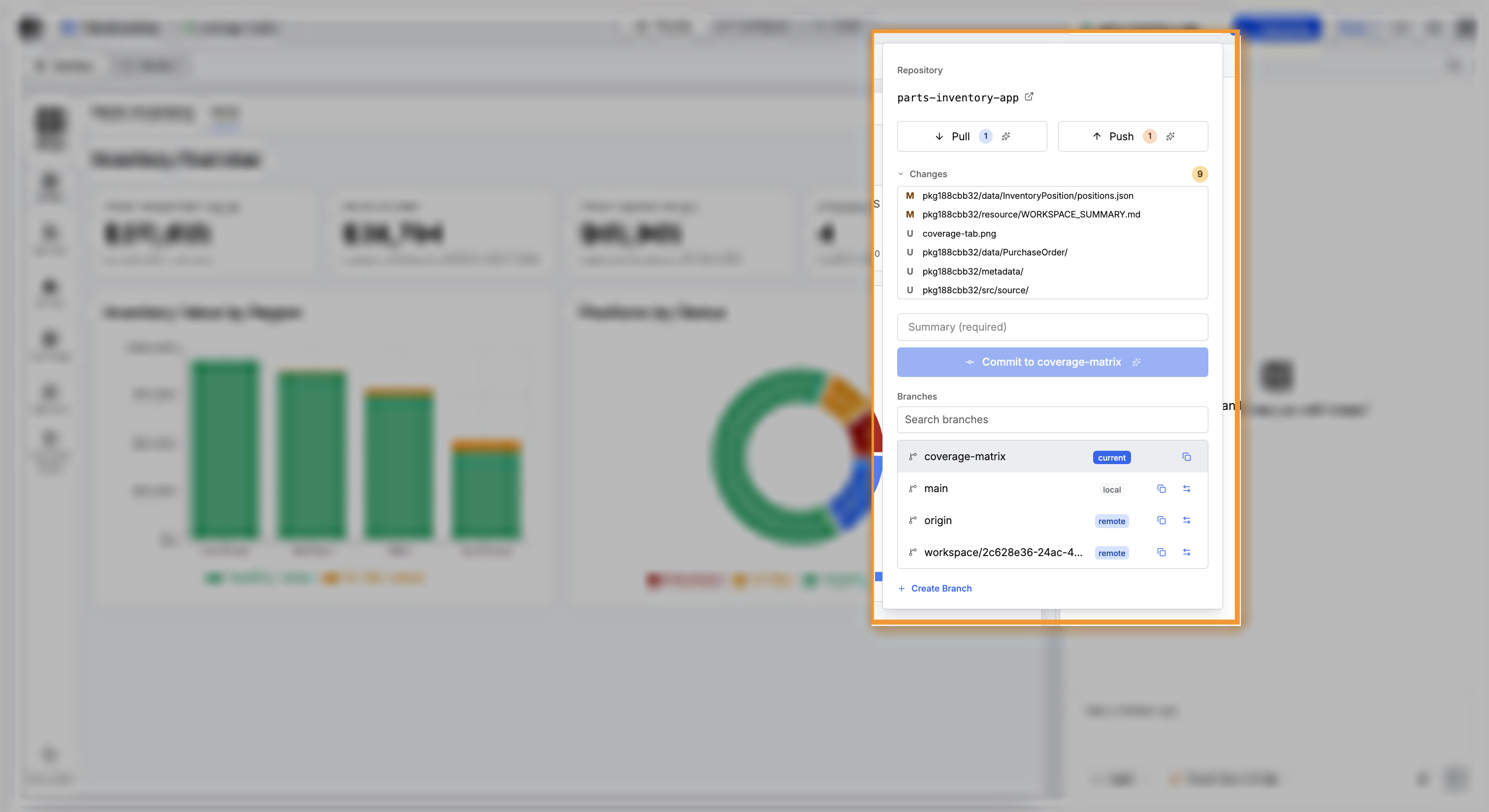
Select Push afterward to send those changes to the repository, where your team can reach the changes.
Resolve a conflict
A conflict happens when your work and a colleague's work change the same lines. The Git status control reports the conflict, and a conflict banner takes the place of the commit form.
Select Resolve Conflicts to pass the files to the agent. Describe what you want kept in the chat panel when both sides hold work you need.
Say so explicitly when both sides should survive. A conflict between two features often needs a combination of both features, and without that instruction the agent picks one side.
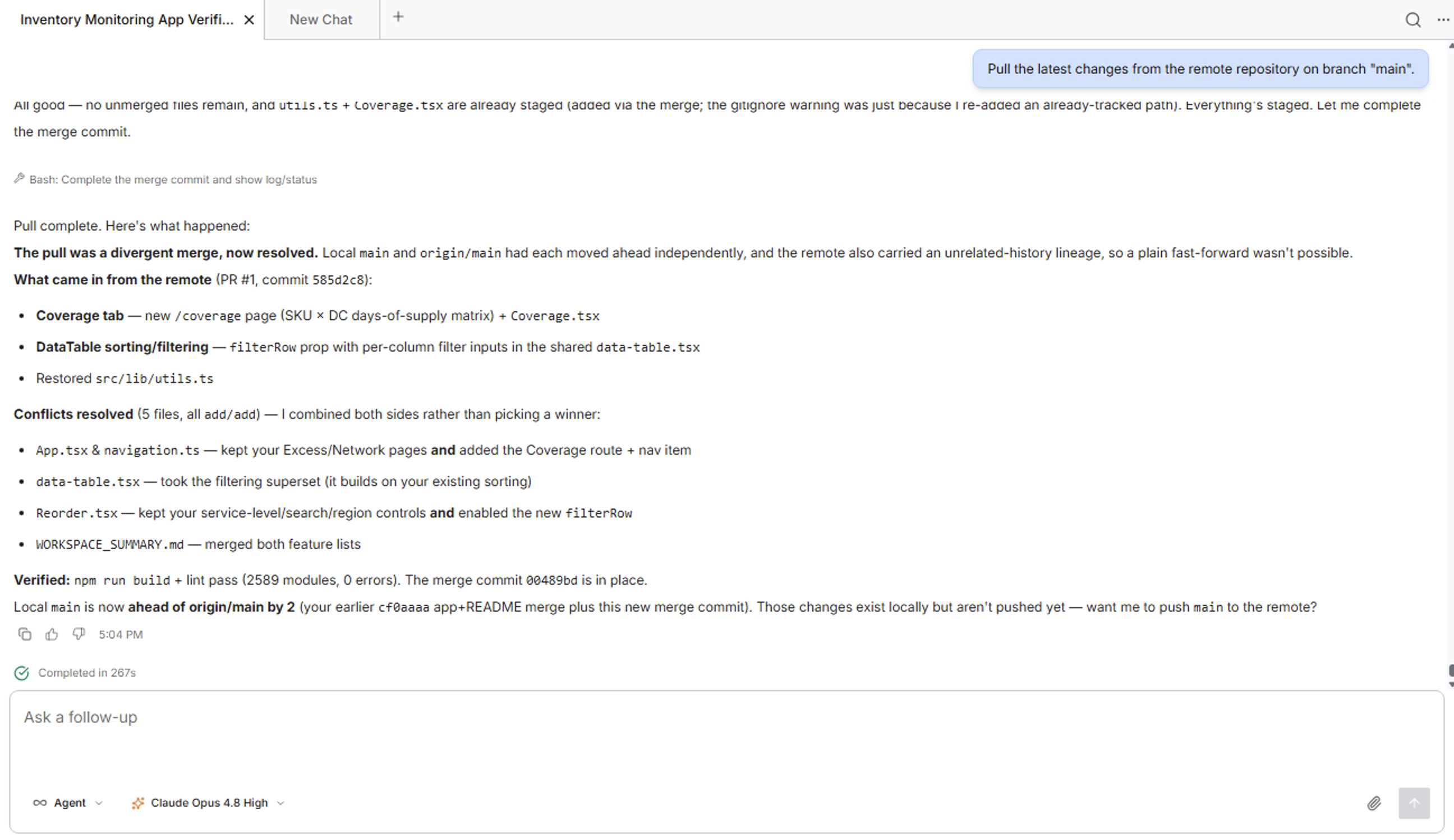
The agent reports each file resolved and the choice it made, then confirms the build passes. Read that list, because the list records what happened to your code.
Move a change to your main branch
The full path for a feature built on a branch of its own runs in this order:
- Save the work on the feature branch.
- Push the branch to the repository.
- Open a pull request against your main branch.
- Merge the pull request.
- Pull the merged work into any workspace that needs the work.
Ask the agent to run all five steps in one request. State whether to keep or delete the branch afterward, or the agent stops to ask.
When your application builds in your workspace and fails after a colleague pulls the application, a file the build needs was probably left out of the repository. Ask the agent to find that file and include it.
Where to go next
These pages cover branches, workspaces, and getting the code to your users: