Connect Application to Spark Cluster through Databricks
The C3 Agentic AI Platform has a built-in Java Database Connectivity (JDBC) connector for integrating with Databricks.
C3 AI Studio offers Data Fusion, a visual tool for building data pipelines. Data Fusion configures data sources and connects them to C3 Canonicals and Entities. For more information, see Data Fusion Overview. In Data Fusion, the Databricks connector is the Delta Lake tile. No tile is named Databricks.
To connect to Databricks from your application:
- Add a SqlSourceSystem modeling the Databricks source system to your package.
- Configure the JdbcCredentials authorizing the connection to the external Databricks table.
- Add a SqlSourceCollection modeling the target Databricks table to your package.
- Create an External Type modeling the schema of the external Databricks table.
The following sections use Azure Databricks as the example.
For more information on configuring the JDBC driver, see the Databricks documentation.
Model the source system
Create a SqlSourceSystem and set the name field as the identifier for the external database system.
For example, add the following DatabricksSourceSystem.json to the \metadata\SqlSourceSystem directory of your package:
{
    "name": "DatabricksSourceSystem"
}Configure the credential used to authorize the JDBC connection
Create a JdbcCredentials Type instance to configure the connection to the external Databricks table, passing the following fields to the JdbcCredentials.fromServerEndpoint() method:
serverEndpoint: Databricks server hostnameport: 443datastoreType: Specifies that theJdbcCredentialsauthorizes a connection to Databricksdatabase: The name of the schema within the databaseschemaName:nullusername: The account with authorization to access the Databricks table. If you use an access token, setusernametotoken.password: Databricks personal access token for your workspace userhttpPath: The HTTP path of the Databricks cluster or SQL warehouse. SethttpPathin thepropertiesfield after the method call, as the example shows.
For example, run the following code in the console to configure the JdbcCredentials to connect to an Azure Databricks instance:
creds = JdbcCredentials.fromServerEndpoint("SERVER_HOSTNAME",
                        443,
                        DatastoreType.DATABRICKS,
                        "default",
                        null,
                        "token",
                        "PERSONAL_ACCESS_TOKEN");

creds = creds.withField("properties", {"httpPath" : "HTTP_PATH"});

SqlSourceSystem.forName("DatabricksSourceSystem").setCredentials(creds);Model the table containing the data
To model the external Databricks table in your application, create a SqlSourceCollection and set the following fields:
name: Identifier for the Databricks tablesource: Name of the External Type that models the schema of the external Databricks tablesourceSystem: Name of the Databricks SqlSourceSystem
For example, to model a table called iris, add the following DatabricksIrisTable.json to the \metadata\SqlSourceCollection directory of your package:
{
    "name" : "Iris",
    "source" : "Iris",
    "sourceSystem" : {
      "type" : "SqlSourceSystem",
      "name" : "DatabricksSourceSystem"
    }
}Model the table schema
To model the schema of the Databricks table in your application, create an External entity Type. Give the entity Type a schema name that matches the name of the Databricks table exactly. The schema name is case sensitive.
Tables outside the connection's catalog are named catalog.schema.table. Quote names that are not plain identifiers with backticks, such as a schema that starts with a digit: `03_reporting`.my_view. Jdbc#listTableNames returns a result whose namesByCatalogSchema field groups tables by schema for the connection's catalog (sessionCatalog) and by catalog.schema for other catalogs.
Start by adding the following Iris.c3typ file to the \src directory of your package:
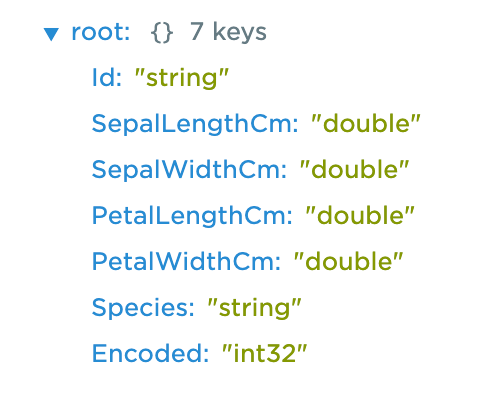
entity type Iris mixes External, NoSystemCols schema name 'default.iris'For the iris table, the schema name is a qualified name: the schema name and the table name, separated by a dot. Use the inferSourceType() method to see the C3 AI data types that the platform infers from the source data types of the table:
var schema = SqlSourceCollection.forName("Iris").inferSourceType().declaredFieldTypes;

var myObject = {};
for (let i = 0; i < schema.length; i++) {
        schemaName = schema[i].schemaName;
        myObject[schemaName] = schema[i].valueType.name;
    }
The platform maps Azure Databricks data types to C3 AI data types according to the following table. See also PrimitiveType.
| Azure Databricks Data Types | C3 AI Data Types |
|---|---|
| TINYINT, SMALLINT, INT | int32 |
| BIGINT | int |
| DECIMAL | decimal |
| FLOAT | float |
| DOUBLE | double |
| DATE, TIMESTAMP, TIMESTAMP_NTZ | datetime |
| BINARY | binary |
| BOOLEAN | boolean |
| INTERVAL | Not Supported |
| STRING | string |
| VOID | Not Supported |
| ARRAY, MAP, STRUCT | json |
To validate the type inference, view the source data types:
SqlSourceCollection.forName("Iris").connect().columns;
Complete the External entity Type definition:
entity type Iris mixes External, NoSystemCols schema name 'default.iris' {

  id: ~ schema name "Id"

  sepalLengthCm: double schema name "SepalLengthCm"

  sepalWidthCm: double schema name "SepalWidthCm"

  petalLengthCm: double schema name "PetalLengthCm"

  petalWidthCm: double schema name "PetalWidthCm"

  species: string schema name "Species"

  encoded: int schema name "Encoded"
}
The id field is required. If your table has no column called id, change the schema name for the corresponding id field with the following annotation:
@db(dataTypeOverride="ID_FIELD_DATA_TYPE")
id: ~ schema name "ID_FIELD"Read data from the table
After you set the credential, validate the configuration. Fetch the External Type data from the Databricks table:
c3Grid(Iris.fetch());
Metric views
A Unity Catalog metric view exposes dimensions and measures. A measure is an aggregate that only has a value at the grain chosen by the query, so it must be selected with MEASURE().
- SqlSourceSystem#previewTable detects metric views and previews them as
SELECT <dimensions>, MEASURE(<measure>) AS <measure> ... GROUP BY ALL, one row per distinct dimension combination. - A SqlSourceCollection can't load a metric view directly. Inferring its source type fails with an error naming the view. Create a regular view over the metric view and load that view instead:
CREATE VIEW my_schema.my_metrics_flat AS
SELECT <dimension columns>,
       MEASURE(total_shipped_tons) AS total_shipped_tons -- one MEASURE() per measure column
FROM my_schema.my_metric_view
GROUP BY ALL;
Detection runs the tableTypeQuery configured under sql.semanticView in the Databricks SqlEngine config, which reads the information_schema.tables of the view's own catalog. That needs no grants beyond reading the view, so detection doesn't depend on access to the system catalog. Measure columns are then identified by selecting each column on its own: Databricks rejects a bare measure, while a dimension returns a row.