Metrics
Metrics are instructions for how to transform data that is modeled as time series, into Time series data. Metrics are used to produce Time series objects in the C3 Agentic AI Platform.
A Timeseries object is an instance of the Timeseries Type, and contains time series data. Refer to the Timeseries Type for more information.
Consider a time series data model for one SmartBulb object below:
time | lumens | power | temperature | voltage | status |
|---|---|---|---|---|---|
| 12:00 | 0 | 0 | 0 | 0 | OFF |
| 12:15 | 20 | 36 | 95 | 15 | ON |
| 12:30 | 24 | 36 | 96 | 17 | ON |
| 12:45 | 0 | 0 | 70 | 0 | OFF |
Properties of a SmartBulb object, such as lumens, status and power, can be modeled as a Timeseries object.
time | lumens | time | status | time | power | time | voltage | time | temperature |
|---|---|---|---|---|---|---|---|---|---|
| 12:00 | 0 | 12:00 | OFF | 12:00 | 0 | 12:00 | 0 | 12:00 | 0 |
| 12:15 | 20 | 12:15 | ON | 12:15 | 36 | 12:15 | 15 | 12:15 | 95 |
| 12:30 | 24 | 12:30 | ON | 12:30 | 36 | 12:30 | 17 | 12:30 | 96 |
| 12:45 | 0 | 12:45 | OFF | 12:45 | 0 | 12:45 | 0 | 12:45 | 70 |
Metrics are declarative, and they can reuse the metrics in various contexts. Metrics are the fundamental building blocks for downstream use cases: they are the trigger for analytics, can be displayed in the User Interface, and are crucial inputs for feature vectors in Machine Learning classifiers.
How metrics work
There are two categories of metrics: simple and compound.
- Simple metrics create an instance of a prepared Timeseries object out of (modeled) data. See Simple Metrics for more information.
- Compound metrics allow manipulation of an existing Time series object. By applying logical or mathematical operations, compound metrics can be a combination of one or many simple and compound metrics to create unique logic based on one or more time series. See the topic Compound Metrics for more information.
| Simple Metric | Compound Metric |
|---|---|
| A SimpleMetric defines a way to access data | A CompoundMetric defines a wat to manipulate the existing time series info into new metrics by applying logical or mathematical operations |
| Transforms raw data into time series | The number of compound metrics created are typically much more than the number of simple metrics |
You can access the list of simple metrics present on the environment by using SimpleMetric.fetch() | You can access the list of compound metrics present on the environment by using ComoundMetric.fetch() |
Metrics are considered metadata, meaning they describe the application and can be changed by developers. Metrics defined in JSON files are expression-based, and live in the metadata folder.
For more information about the anatomy of a package, see Package Management Overview.
Feature workflow
The workflow for metrics begins with data integration. This is the raw data coming into the environment, which is often from an external location like a file or a database.
This raw data is then moved into a C3 Database, modeled as time series, and processed by the C3 Normalization Engine, where the raw data is cleaned and transformed.
Developers then create simple metrics with this normalized data and create one or many Time series. The simple metrics can either be evaluated or fed into compound metrics.
The result can be visualized and inspected after the feature is evaluated. The feature is then deployed and debugged if it is confirmed to work as expected.
See Visualizing Metrics and the MetricInspector Type for more information.
Metrics can be created and deployed using JavaScript. Metrics can also be created on-the-fly in the console, or by using Python in Jupyter Notebooks.
Combining metrics
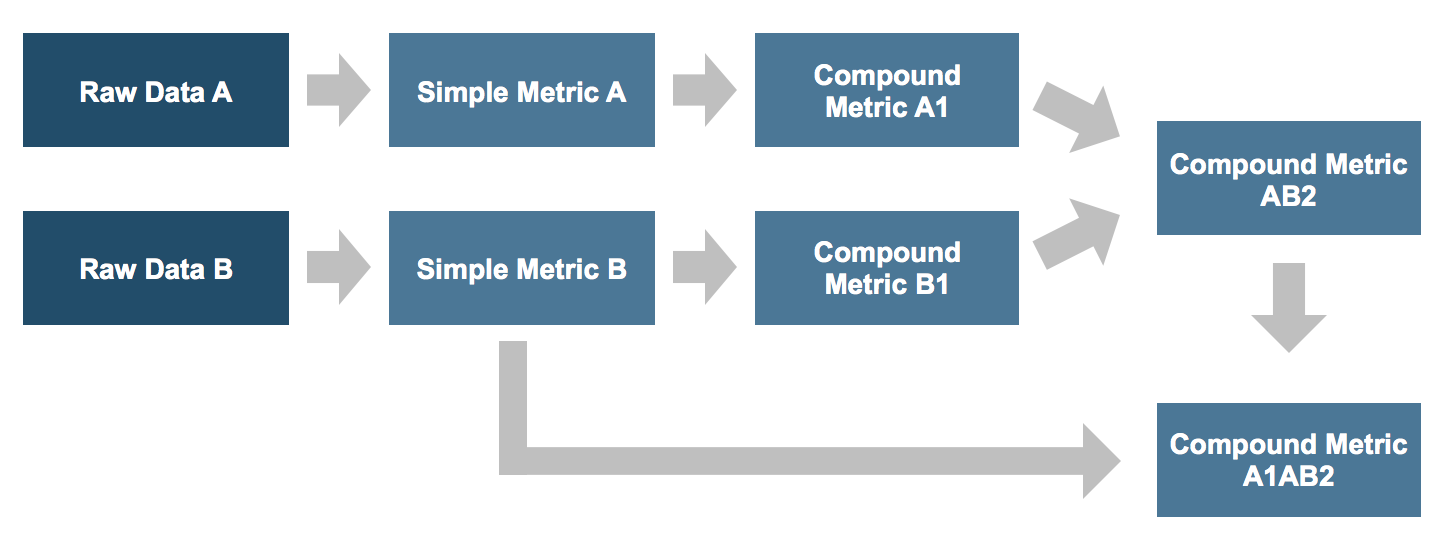
Metrics can be combined to create complex logic. SimpleMetrics are the building blocks. CompoundMetrics can combine any number of SimpleMetrics and other CompoundMetrics to create unique logic, based on one or more Time series.
Example: Beginning with raw data (Raw Data A and Raw Data B), the data is converted into time series by creating two separate simple metrics: Simple Feature A, and Simple Feature B.
Compound metrics (A1 and B2) are created using Simple Feature A and Simple Feature B. It's also possible to again create compound metrics using Compound Feature A1 and Compound Feature B1, called Compound Feature AB2.
Feature creation can be taken even further. It is possible to create compound metrics using Simple Feature B and Compound Feature AB2, called Compound Feature A1AB2.