View Build Details for a Specific Branch in C3 AI Release Management
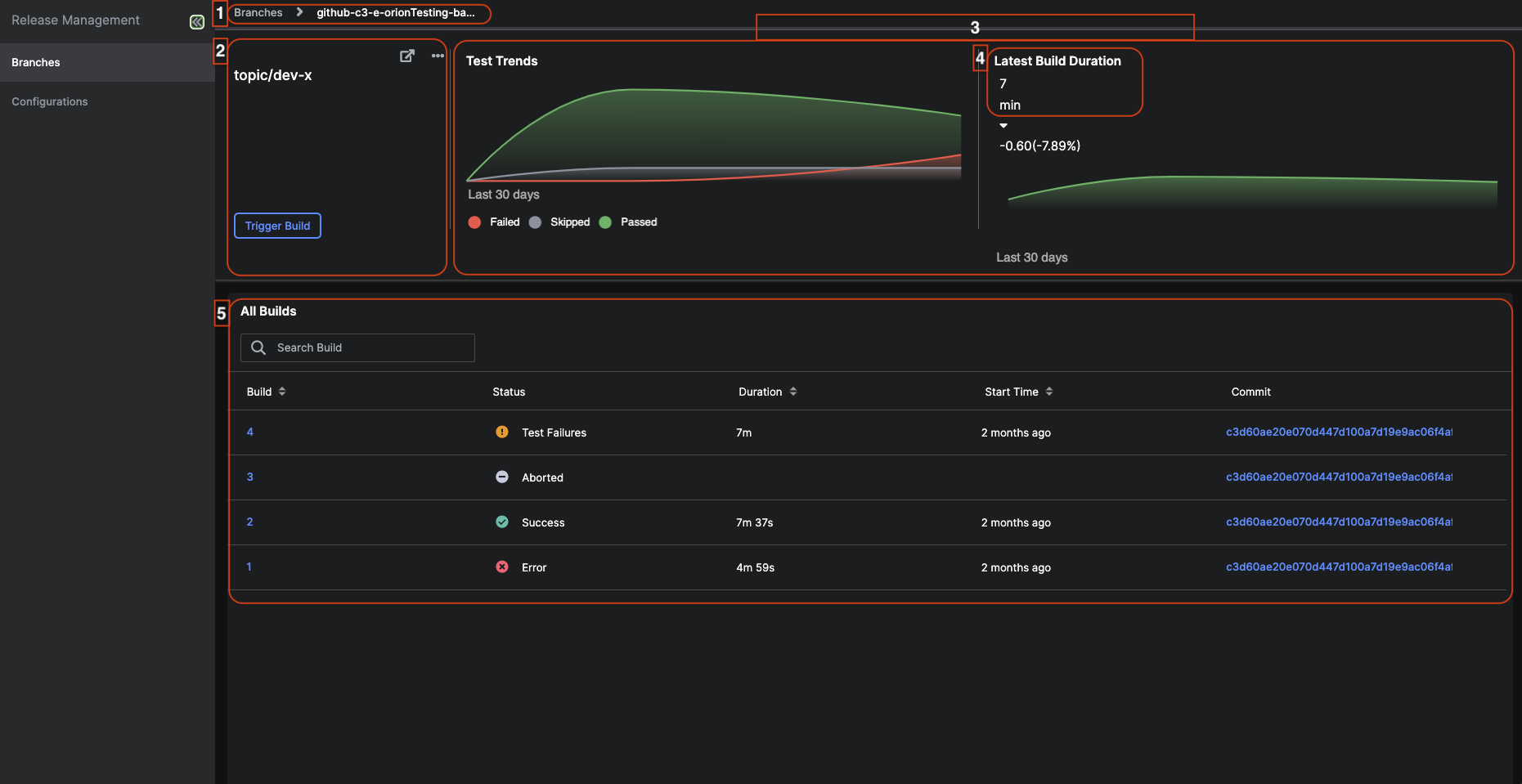
- Select Releases and then Branches on the left sidebar of C3 AI Studio.
- On Branches tab for Release Management, there is the list of registered branches.
- Select the branch name to be redirected to the specific branch details page.
- On the this page, you can:
- Navigate between previous pages.
- View the details about the branch.
- View the graphs showcasing test trends and build durations of the branch.
- View how long the latest build took.
- View the details about the builds associated with that branch.
Note: You can abort a build by hovering over the desired build row and selecting the circle icon.
 |
|---|
| A page about a specific branch (this example showcases branch topic/dev-x) |
View the details about the branch
You can:
- De-active(stop future builds) or active(start future builds) the branch by selecting the ellipse icon and the desired action.
- Go to the source control by selecting the
 icon.
icon. - Manually trigger (manually start the build) for this branch by selecting the Trigger build button.
View the graphs showcasing test trends and build durations of the branch
You can view the graphs that showcase the trends of the test and how long the build took to complete. Hover over the graphs to see more information like the number of failed, skipped, and passed tests. The Latest Build Duration indicates how long the last build took to complete.
View the details about the builds associated with that branch
The following tables describes the table shown under All Builds.
| Labels | Description |
|---|---|
| Build | The name of the build |
| Status | The status of the build. The following status are: Success which means the build has successful finished, Error which means the build has failed and may indicate the program is not in a runnable state, Aborted which means the build has been terminated (the build may have been manually terminated), Test Failures which means the test has failed (Go to Monitor Application Builds Across Branches in C3 AI Release Management to find the test associated with the build) |
| Duration | How long the build took to complete |
| Start Time | When the build started |
| Commit | At what commit did the build end |