Register, Update, and Delete a Group of Branches
C3 AI Release Management allows you to set configurations across a group of version control branches. Use these groups of branches to collect updates that belong in specific releases or patches. By using C3 AI Release Management, you can create continuous integration testing pipelines.
Consider these settings pre-configurations for any individual build. If you want to override the branch settings on any one build, see Create and View Build Configurations for C3 AI Release Management for more information on configuring the settings on an individual build.
This topic covers the following branch group actions:
- Register groups of branches.
- Create a schedule for your builds.
- Specify the desired conditions for triggering your builds to avoid unnecessary build executions.
- Update a registered group of branches.
- Delete a registered group of branches.
Pre-requisites for your repository structure
Ensure that you have a directory that contains your packages like the following example:
   LocalWorkspace/
   ├─ pkga/
   ├─ pkgb/
Inside the package folder, ensure that you have <packageName>.c3pkg.json file with the value of the name field set to the name of the package. The following is an example of pkga.c3pkg.json file for pkga package:
{
    "author" : "user",
    "name" : "pkga",
    "description" : "Describe the purpose of this package.",
    "version": "1.0.0",
    "dependencies": {
        "uiDemo": "8.6.0",
        "uiComponentLibraryReact": "8.6.0"
    }
}
Your package does not need to list uiDemo or uiComponentLibraryReact as dependencies. However, if you want to use C3 AI UI Component Types, your package must include uiComponentLibraryReact.
See also Develop a C3 AI Application.
Register groups of branches
- In C3 AI Studio, select Releases > Branches.
- Select Register your first branch or the plus (+) icon to register a group of branches.
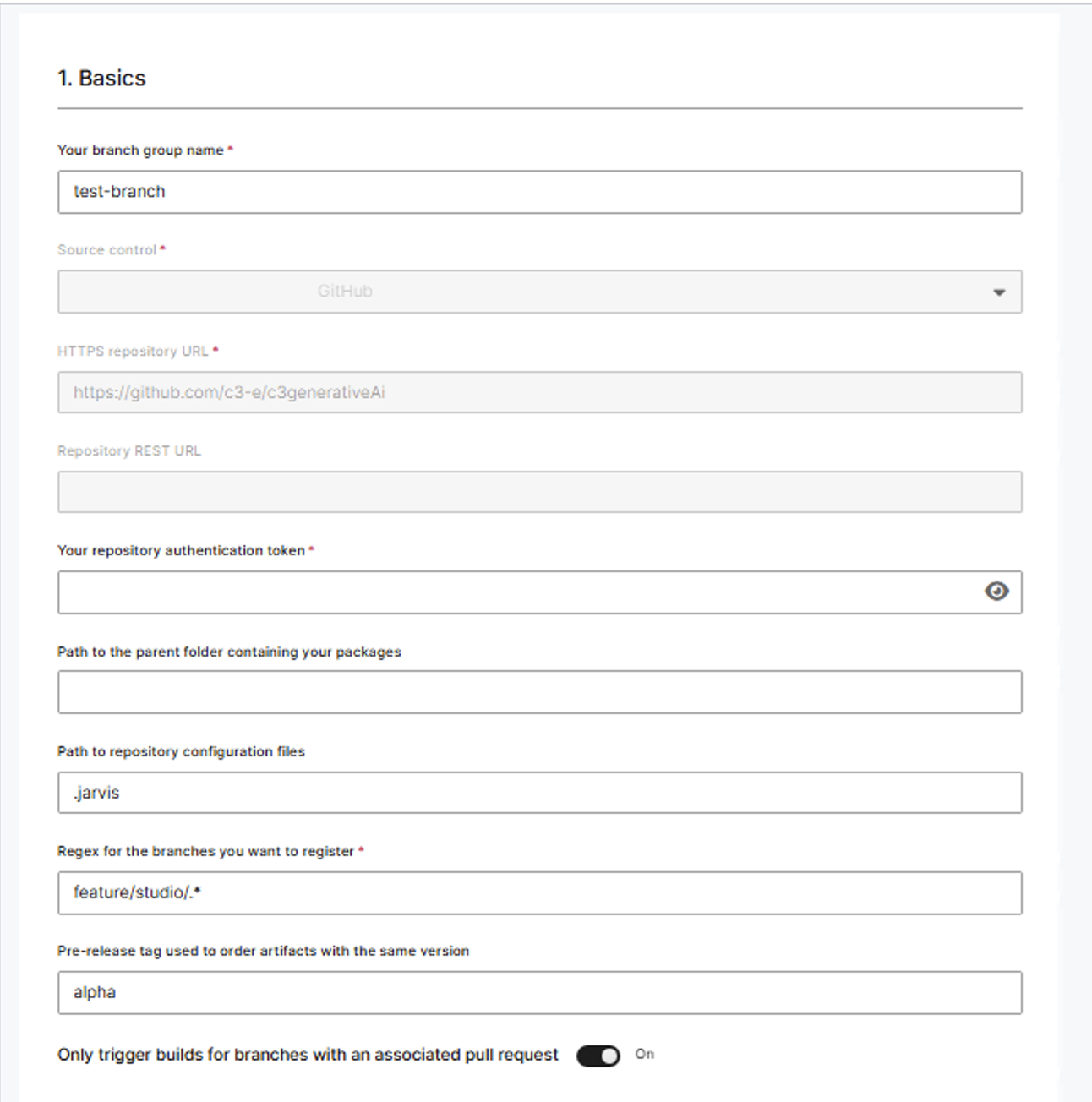
- Fill out the form to register the branches and select Save.
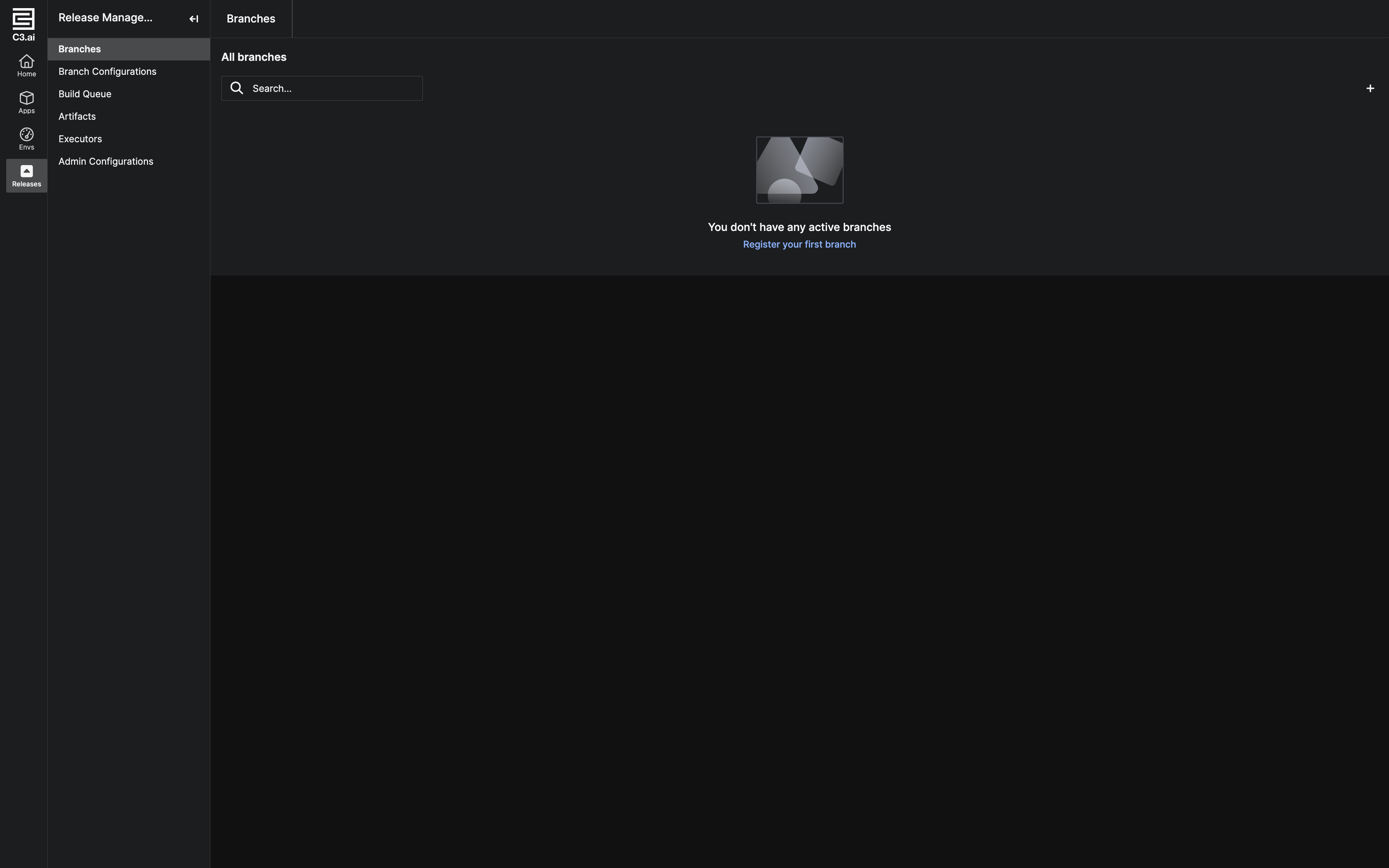 |
|---|
| Branches page in C3 AI Release Management when there are no registered branches. |
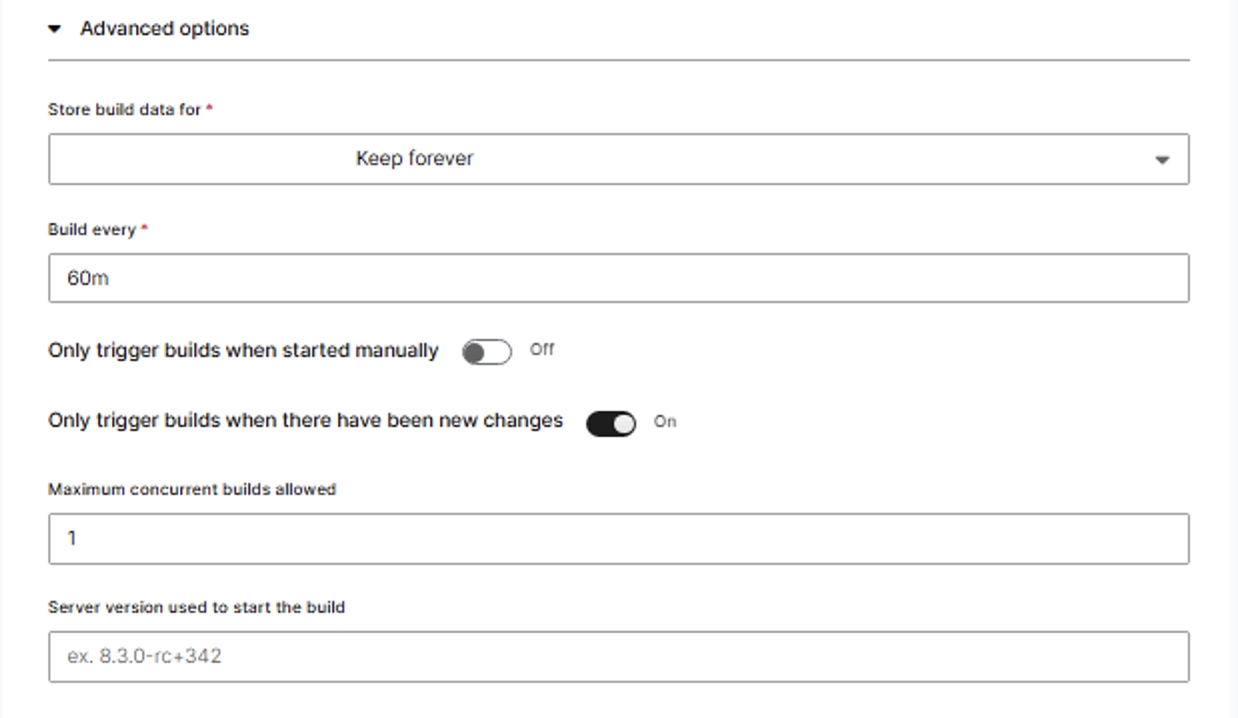
The table below describes the configuration options for registering your branches.
| Label | Description | Required |
|---|---|---|
| Your branch group name | Enter a name for the group that represents the set of branches you want to register together. This can be a single branch or multiple branches that you want to group. | Yes |
| Source Control | Select the source control tool where your branches are located, like GitHub. | Yes |
| HTTPS Repository URL | Enter the HTTPS URL of your repository (without the suffix .git). For example, GitHub's HTTPS URL, https://github.com/user/repo. | Yes |
| Your repository authentication token | Enter your repository token. To retrieve your repository token from GitHub, follow GitHub's instructions in Managing your personal access tokens. To retrieve your repository token from GitLab, follow the instructions from GitLab in Personal access tokens. If you use SAML single sign-on for GitHub, you might need to authorize your token. You can find more information in Authorizing a personal access token for use with single sign-on. | Yes |
| Path to the parent folder containing your packages | Enter the path to the parent folder that contains the packages you want to build. You must have a parent folder for your packages; entering / for the path is invalid. For example, if your packages are located in server/demoPackages, enter server/demoPackages. Ensure that you have no spaces in the path and that the folder and file names are valid (/ and . are invalid characters in file or folder names). C3 AI Release Management looks for packages based on this path. If you do not have packages based on this path, the Discovering packages step fails in the pipeline. | Yes |
| Regex for the branches you want to register | Enter the regular expression for the branches you want to register. For example, if you want to register all branches with the prefix release/v1.2.3/, enter release/v1.2.3/*. If you want to register a single branch, enter the exact branch name like feature/login-page. Find more information about regular expressions from RexEgg's Quick-Start: Regex Cheat Sheet. | Yes |
| Pre-release tag used to order artifacts with the same version | Enter the name for the tag. A pre-release tag sets the priority on which build is used when users specify dependencies that are not in their local workspace. See Semantic Versioning for more information. | Optional |
| Only trigger builds for the branches with an associated pull request | Toggle on if you want to run a build on the branches with the associated pull requests. This means that builds will only be triggered for branches that have a corresponding pull request. Toggle off if you want to run a build on the branches even without associated pull requests. | Yes |
| Store build data for | Select how long all the data related to the build should be stored for. | Yes |
| Build every (mins) | Select how often you want the builds to run. | Yes |
| Only trigger builds when there have been new changes | When the scheduled build time comes, toggle the switch on if you want the build to trigger when there are new changes in your codebase. This means that the builds are only triggered if there are new commits or changes on your branches. Toggle off if you want the build to always trigger, regardless of whether there are new changes or not. | Yes |
| Maximum concurrent builds allowed | Enter the maximum number of builds to run concurrently. The default is 1. | Optional |
| Server version used to start the build | Enter the server version you would like the build to start on | Optional |
| Path to repository configuration files | Enter the path to the folder containing your build configuration files. This should point to the location where your build configuration files are stored. Refer to Create and View Build Configurations for C3 AI Release Management for more information on creating and configuring build settings. Available configuration options vary by server version; see the Build configuration options section for v8.9+ options. | Optional |
| Branch group configs | If necessary, select + icon to enter a key-value pair to store in this branch group's configuration. Refer to the next table for configs that are actively used during builds. | Optional |
| Branch group secrets | If necessary, select + icon to enter a secret key-value pair to store in this branch group's configuration. | Optional |
| Manual trigger only | When enabled, builds on this branch group will only start when explicitly triggered by a user action, rather than automatically triggering on code commits. This is useful for branches that require careful control over when builds run. | Optional |
If you enable both Only trigger builds for the branches with an associated pull request and Only trigger builds when there have been new changes, the build only runs when branches satisfy both conditions. If there are new changes on a branch without an open pull request, the build does not run.
You can create your own branch group configuration keys and values, which is useful when customizing your own build pipeline. Refer to Customize the Build Pipeline in C3 AI Release Management for more details.
The table below lists the branch group configuration keys and values that are checked for and used in the default build pipeline.
| Config Key | Default Value | Description |
|---|---|---|
failIfPkgIssues | true | If true, fails the build if there are any compilation issues. Otherwise, allows the build to continue for all packages without compilation issues. Packages with compilation issues do not generate artifacts and are not tested. |
skipPkgIssues | false | Only applicable when failIfPkgIssues is false. If false, does not generate artifacts for and does not test packages with compilation issues. If true, forces the build to continue for all packages including those with compilation issues. |
shouldGenerateDevBundles | true | If true, the build generates development UI bundles. If false, development UI bundles are not generated. |
devBundleTimeout | 60 | Defines how many minutes to allow for generating development UI bundles before aborting the process. |
shouldGenerateProdBundles | true | If true, the build generates production UI bundles. If false, the build does not generate production UI bundles. |
prodBundleTimeout | 90 | Defines how many minutes to allow for generating production UI bundles before aborting the process. |
restartAppOnFailure | false | If false, continue using the same app for testing even if a test fails. If true, terminate the running app after a test failure and start a new one for the next test. Although this ensures greater isolation between tests, it can lead to slower and less stable behavior. |
restartExecutorBetweenSteps | true | The build runs steps using executors. If true, a build restarts an executor after it the executor completes a step and before it picks up another, regardless of the status of the step. If false, the build does not restart an executor between steps. Although this speeds up the build, it can lead to less stable behavior. |
restartExecutorOnError | true | If true, the build restarts executors after encountering an error even if restartExecutorBetweenSteps is false. If false, the build does not restart the executor even after encountering an error. Although this speeds up the build, it can lead to less stable behavior. |
enableJsServerCoverage | false | Whether to enable and collect code coverage data for JavaScript server files. |
enableC3UiCoverage | false | Whether to enable and collect code coverage data for UI files. Even if you toggle Get code coverage reports when creating a branch group, you must manually set this field to true to get coverage for UI files. |
enablePythonCoverage | false | Whether to enable and collect code coverage data for Python files. |
enableJepCoverage | false | Whether to enable and collect Python coverage data for JEP. Even if you toggle Get code coverage reports when creating a branch group, you must manually set this field to true to get coverage for JEP. If you turn on this feature, you may introduce instability. |
enableCodeGenTypeValidation | false | If true, verifies all the types declared in the package and whether all packages are valid for runtime code-gen. When turned on, runtime code-gen issues will be thrown as Pkg.Issue during type validations. |
Example of registering a branch from GitHub
Consider the following example where you kick off builds for a specific branch in the devproject repository.
Do the following:
- Go to GitHub to obtain:
- The packages path in the
devprojectrepository; verify that the packages are up-to-date - The repository's HTTPS Repository URL
- The name of the branch for the builds
- The packages path in the
- Fill out the form in the Branches page in C3 AI Release Management.
| Label | User Input |
|---|---|
| Your branch group name | devgroup |
| Source Control | GitHub |
| HTTPS Repository URL | https://github.com/democompany/devproject |
| Your repository authentication token | <repository authentication token> |
| Path to the parent folder containing your packages | devproject/demo/packages |
| Regex for the branches you want to register | develop or /feature* |
| Pre-release tag used to order artifacts with the same version | N/A |
| Only trigger builds for the branches with an associated pull request | On |
| Store build data for | 15d |
| Build every (mins) | 15m |
| Only trigger builds when there have been new changes | On |
| Get code coverage report | Off |
| Maximum concurrent builds allowed | 1 |
| Server version used to start the build | <most recent server version> |
Based on the example form:
- The user creates a branch group named
devgroupand registers the branch asappdev. - C3 AI Release Management runs build for packages located in
devproject/demo/packages. If C3 AI Release Management finds no packages under this path, the Discovering packages node fails in the pipeline. - The build data for this branch group exists for 15 days.
- Every 15 minutes, C3 AI Release Management checks for new changes in the codebase for the desired packages.
- If both of the toggled conditions are true and the previous build completed, a new build triggers.
- Since the maximum concurrent build is 1, if the previous build is still processing, the build does not start.
Build configuration options
For builds running on server version 8.9 and later, the following new build configuration options are available. These are configured in your build configuration files in the repository. To specify the path to these files, use the "Path to repository configuration files" field in the branch group registration form. Refer to Create and View Build Configurations for C3 AI Release Management for more information on creating and configuring build settings.
skipUnlistedTests
Type: boolean
Location: Inside configValues (not nested in testStrategies)
Default: false
Availability: v8.9+
When set to true, the build pipeline will only run tests for packages explicitly listed in the testStrategies configuration. All other tests in the repository will be skipped.
Example:
{
  "configValues": {
    "skipUnlistedTests": true,
    "testStrategies": [
      {
        "tests": [".*/myPackageA/.*"],
        "strategy": "SERIAL"
      },
      {
        "tests": [".*/myPackageB/.*"],
        "strategy": "SERIAL"
      }
    ]
  }
}
In this example, only tests from myPackageA and myPackageB will run; all other package tests are skipped.
splitBEandFETests
Type: string[] (array of package names)
Location: Inside configValues
Default: [] (empty array, feature disabled)
Availability: v8.9+
When packages are listed in this array, their backend tests (js-rhino, node, Python) will run in parallel with UI bundling rather than waiting for bundling to complete. This is particularly useful for packages that require UI bundling but also have a significant number of backend tests.
Example:
{
  "configValues": {
    "splitBEandFETests": ["studioBase", "myCustomPackage"]
  }
}
In this example, when building studioBase and myCustomPackage, their backend tests will not wait for UI bundling to finish, both will run concurrently.
Troubleshoot the package not found error
Verify the error message. The following error message
Error invoking Java method <generating package method name>: Found no packages to register in <step of the process>indicates that C3 AI Release Management cannot find a package.Verify that the Path to the parent folder containing your packages field has the correct path. Leaving this field blank can cause a package not found error.
Verify that the package has the updated format of
<packageName>.c3pkg.json. An outdated format can cause a package not found error.
Update the configuration for a registered branch group
You can update the following configurations:
Basic options
- Your branch group name
- Your repository authentication token — If you need to change permissions or replace an expired token
- Path to the parent folder containing your packages
- Regex for the branches you want to register
- Pre-release tag used to order artifacts with the same version
Advanced options
- Store build data for
- Build every
- Only trigger builds when there have been new changes
- Maximum concurrent builds allowed
- Server version used to start the build
- Branch group configs — Your branch group configs may include the following:
- Code coverage reports
- Configurations of builds
- Your custom key-value pairs
- Branch group secrets
- Select Releases > Branch Configurations in C3 AI Studio from the menu that includes Home, Apps, Envs, and Notifications.
- Select a branch configuration to edit.
- Select the edit icon on the top right of the page to edit branch group.
- Fill out the form to update the configurations, and select Save to save your changes.
Delete a branch group
- Select Releases > Branch Configurations in C3 AI Studio. On Branch Configurations tab for C3 AI Release Management, find the list of registered branches.
- Hover over the row that corresponds to the desired branch.
- Select the trash icon to delete the desired branch.
- Enter the name of the branch in the confirmation form.
A notification banner appears at the top of the screen indicating that you deleted the group branch.
 |
|---|
| The Configuration page |