Connect Secrets
A secret is an encrypted key/value pair, such as an API token, a webhook URL, or a database connection string, that you store once in C3 AI Agentix and an agent's session can then read at runtime. Connect one when an agent's skill or script needs a credential like these. Pasting the credential into a chat prompt or embedding it in a skill is both insecure, since it ends up in transcripts and source, and unmaintainable, since rotating the credential then means editing every place it was pasted.
A secret solves both problems: C3 AI Agentix injects its value into the session as an environment variable, so a skill can reference it by name, for example $GITHUB_TOKEN, and the actual value never appears in a prompt, a transcript, or the skill's own files. Agents and automation jobs both read secrets this way. See How a secret reaches an agent for the full mechanism.
Manage secrets on the Connect page (the Connect item in the left navigation), under the Secrets tab. Like every credential C3 AI Agentix stores, a secret is encrypted at rest and write-only: once you save it, the value is never rendered back in the UI or returned over the API. To change one, you save a new value over it.
How a secret reaches an agent
Inside an agent's session, C3 AI Agentix exposes each secret as an environment variable, ready for any skill, script, or tool the agent runs. That's why a secret's key must be a valid environment-variable name—letters, digits, and underscores, not starting with a digit.
C3 AI Agentix injects the value only into the running session. The agent can reference the variable, but the plaintext never passes through the model's prompt or the chat transcript. A skill references it the way any program references an environment variable, for example $GITHUB_TOKEN in a shell script or os.environ["GITHUB_TOKEN"] in Python.
File secrets for SSH keys
Use a file secret when a tool needs a credential as a file rather than an environment variable, such as an SSH private key for cloning a private GitHub repository. File secrets are personal: they're written under ~/.ssh/ in your sessions and automation jobs, with file permissions set to 0600. They're not exposed as environment variables. The secret name remains visible in the Secrets list, but its content remains encrypted and write-only like other secrets.
To add one, choose a secret name, set its path to a single file directly under ~/.ssh/ (for example, ~/.ssh/id_ed25519), and paste the private-key content in the value field. SSH uses keys named id_ed25519, id_ecdsa, or id_rsa automatically; a key under another name must be passed to ssh explicitly. File-secret paths can't include additional directories, the file name can't start with ., two file secrets can't use the same path, and content is limited to 64 KB. The vault owns ~/.ssh/ in a session: files that aren't file secrets aren't kept when a session stops and resumes. Add the matching public key to GitHub's SSH keys or the repository's deploy keys. Never paste a private key into a chat, skill, or command.
Credentials for automations
Automations run unattended, so use credentials limited to the task and resources they need. For GitHub, prefer a fine-grained personal access token restricted to selected repositories and read-only permissions, such as repository metadata and pull requests when those are the only data needed. For SSH cloning, use a dedicated read-only deploy key where possible. For Jira, use a dedicated account with browse-only access to the required project; its API token inherits that account's permissions. Don't use a broad personal token or grant write access unless the automation's task requires it.
Store tokens as ordinary personal secrets (for example, GH_TOKEN, JIRA_EMAIL, JIRA_API_TOKEN, and JIRA_BASE_URL). Store SSH private keys as file secrets. The agent reads credentials at run time; never include their values in prompts, automation instructions, or logs.
Personal and Global scope
Each secret has a scope that decides whose sessions receive it.
- Personal: only you receive it, in your own chats and automation jobs. You manage it yourself.
- Global: every user's sessions across the cluster receive it. Only administrators can manage it.
Any user can add personal secrets for their own sessions. Creating or changing a global secret requires the Agentix.AppAdmin role, because it affects everyone.
When a personal and a global secret share the same key, the personal value wins in your sessions, so you can override a shared default with your own credential without an administrator's involvement.
Add a secret
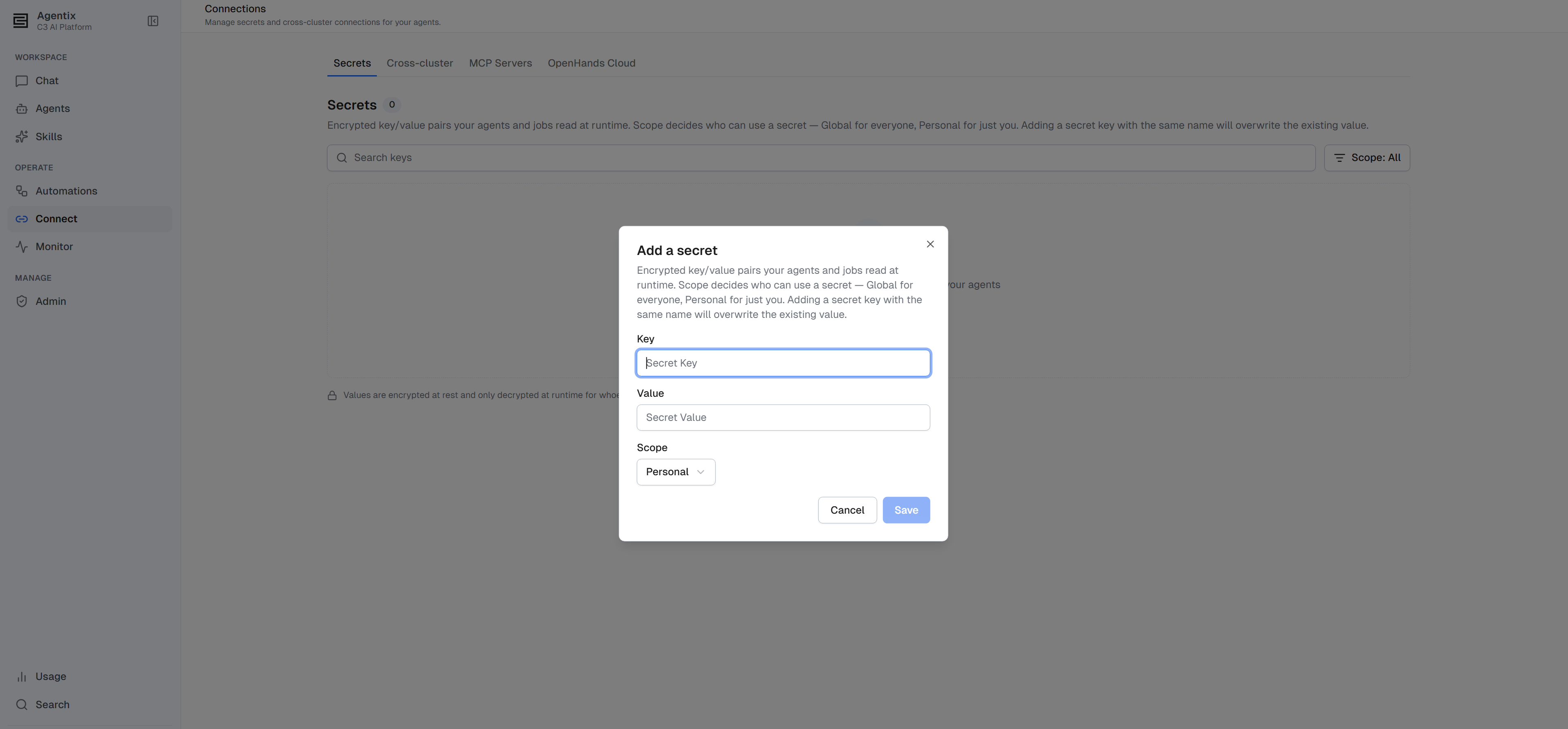
Add a secret from the Connect page, choosing a scope if you have the admin role:
- Open Connect from the left navigation and select the Secrets tab.
- Select Add a secret.
- Enter the key (a valid environment-variable name) and its value.
- If you are an administrator, choose the scope: Personal or Global. Without the admin role there is no scope selector; the secret is always personal.
- Select save. The secret joins the list, showing its key and scope but never its value.
Rotate or remove a secret
Rotating and removing a secret both work from the same list on the Connect page:
- Rotate: save a new value under an existing key. Saving over a key overwrites its value, which is exactly how you rotate a credential. The new value reaches every session that can see it, including one already running.
- Remove: delete the secret from the list. Without the admin role, you can only remove your own personal secrets; the list never shows other users' personal secrets, and removing a global secret requires the
Agentix.AppAdminrole.
Permissions
Two roles gate what you can do with secrets:
Agentix.User: add, rotate, and remove personal secrets, which reach only your own sessions and jobs.Agentix.AppAdmin: also add, rotate, and remove global secrets, which reach every user's sessions across the cluster.
For the full role ladder, see Roles and Permissions.
Where to go next
- Build an Agent: Overview: what a connection is and when an agent needs one.
- Connect Apps on Other Clusters: reach a C3 application on a different cluster with a service-account token.
- Connect MCP Servers: extend an agent's tools to an outside service such as Jira or GitHub.
- Create and Attach a Skill: where a skill or script reads the secret at runtime.
- Roles and Permissions: who can manage personal and global secrets.