Overview
C3 AI Agentix is the C3 Agentic AI Platform's Agentic Service, with an out-of-the-box chat interface. Your teams talk to deployed C3 applications in everyday language: ask a question, get an answer drawn from live data, and have an AI assistant carry out tasks — with your approval before anything changes. You do not need to write code or re-platform your data estate.
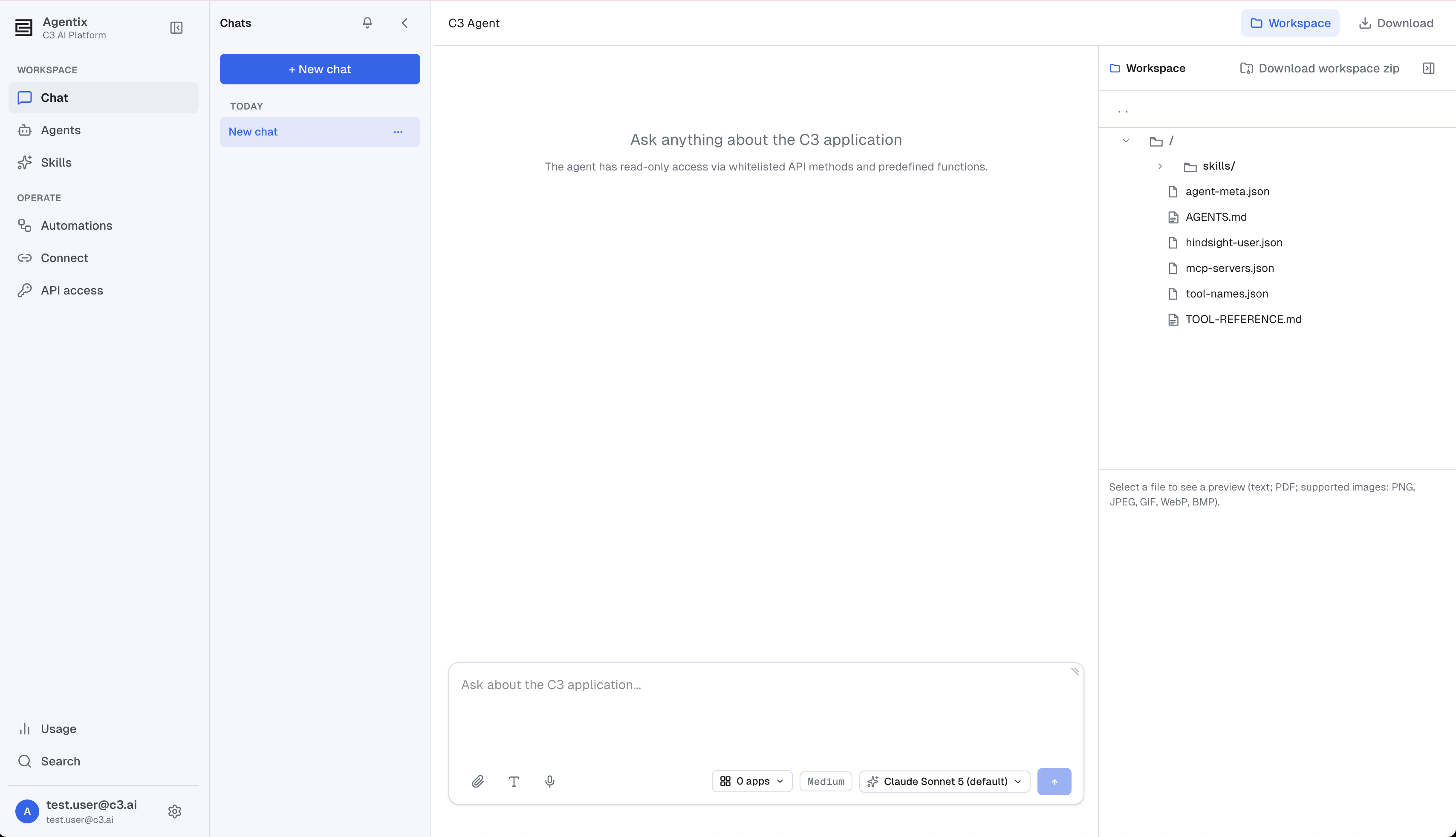
What C3 AI Agentix delivers
C3 AI Agentix rests on four pillars:
- Live app grounding: Every answer draws on your application's live types, data, and APIs, not a copied snapshot.
- Governed autonomy: The agent reads and reasons on its own, and stops for your approval before it changes anything.
- Operational visibility: Every conversation is traceable, sliced by agent, user, and application, with spend and latency alongside it.
- Deploy anywhere: Cloud, on-premises, or air-gapped, wherever your data has to stay.
Unlike a general-purpose chat window, C3 AI Agentix inherits your application's data model and access controls, so agents operate where the work already happens.
Run a typical session
A typical C3 AI Agentix session follows four steps:
- Pick or build an agent. Start with the built-in C3 Agent, a general-purpose C3 assistant, or create your own with a custom prompt and a curated set of skills.
- Connect an application. Point the agent at a deployed C3 application by its App ID. The agent discovers the application's types, data, and APIs through that connection, so every answer that follows is grounded in that application's live data.
- Have a conversation. Ask questions in plain language. The agent reasons step by step, calling tools (shell commands, REST calls to the application, and skills) and streams its progress back to you as it works.
- Approve any change. Reading data is automatic. Any action that changes data pauses for your approval before it runs, so the agent stays an advisor until you say otherwise.
An example conversation
This example uses a reliability application that tracks equipment and the alerts it raises. After you connect the agent to that application, a conversation might go like this:
- You: "What types are in this app?" The agent inspects the application and replies with a list of its data types, so you can see what's there.
- You: "How many alerts were created last month?" It counts the records and answers with a number, no query-writing required.
- You: "Plot daily alert counts for the last 30 days." It builds the chart and shows it right in the chat.
- You: "Which asset had the most alerts?" It finds the answer and shows you the evidence behind it.
- You: "Create a maintenance work order for that asset." Because this changes data, the agent pauses and asks you to approve. You select Allow, and it creates the work order and confirms it's done.
The pattern is the same whatever your application does: ask in plain language, refine with follow-up questions, and let the agent take action only when you say so.
Core building blocks
C3 AI Agentix is assembled from a small number of concepts. Understanding these is enough to use and build agents effectively; the pages linked below cover each one in depth.
Agents
An agent is a named, reusable configuration: a system prompt, a set of attached skills, a default LLM model, and the applications it is allowed to connect to.
Your environment ships with the C3 Agent, an out-of-the-box, general-purpose C3 assistant for data analysis, application inspection, and operations on live C3 applications. You can use it as-is, duplicate it as a starting point, or create a new agent from scratch. Learn more in Agents Overview.
Skills
A skill is a reusable bundle of instructions and supporting files (and optionally scripts) that teaches an agent how to perform a repeatable task, for example querying unstructured documents, building visualizations, or inspecting an application's batch jobs.
Skills come in three scopes: bundled skills shipped with C3 AI Agentix, global skills shared across everyone in the cluster, and user skills private to you. When you start a chat, the agent's attached skills are resolved and frozen onto the session, then combined with your own enabled skills. Learn more in Skills Overview.
The chat page
The chat page is where everything happens. It pairs a conversation stream with a live view of the agent's work: you watch it reason, run tools, and produce results in real time, and you approve or deny any action that changes data. A workspace panel on the side exposes the agent's session files, such as its instructions (AGENTS.md) and tool reference, and lets you preview files and attach your own. Learn more in The Chat Page.
Agent services
Behind each conversation is an agent service, a per-user runtime (a container) that hosts the agent and its chat sessions. Services move through a lifecycle (ready, active, stopped, terminated) and preserve their workspace so a stopped session can resume where it left off. Most users never think about services directly; operators manage them on the Agent Service Management page.
Connect your applications
Every deployed C3 application, including customer-built and customized ones, becomes a source C3 AI Agentix can query and act on the moment you connect it. From then on, every answer grounds in that application's live types, data, and APIs, not a copied snapshot. You connect an agent to an application from the chat page using the application's App ID.
Applications running on other clusters are reachable too, so your estate can span clusters without a separate integration: an administrator provisions a service-account token for the remote application, after which it can be targeted from chat like any local app. See Connect Apps from Other Clusters.
Governance and operations
C3 AI Agentix is built for governed, production use, with the surfaces a team needs to operate it safely:
- Roles and permissions gate who can use C3 AI Agentix, who can author and share skills, and who can manage services. Administrative surfaces such as Monitor and Agent Service Management are hidden from ordinary users. See Roles and Permissions.
- Monitoring shows how your team's agents are being used (tokens, spend, latency, and errors), sliced by agent, application, user, and time range, with a path to trace-level detail. See Monitor.
See also
Get started:
- Quick Start — Open C3 AI Agentix, pick an agent, connect to your application, and have your first conversation in under ten minutes.
Build and configure agents:
- Agents Overview — What an agent is, and how to create, configure, or duplicate one.
- Skills Overview — What a skill is, how scope works, and how skills attach to agents.
Use and operate C3 AI Agentix:
- Monitor — Usage, spend, latency, and error analytics across your agent fleet.
- Agent Service Management — View, resume, stop, and terminate the agent services running in your environment.
- Roles and Permissions — Control who can use C3 AI Agentix, author skills, and manage services.