Connectors Reference
You are adding a connector, or an agent asked about one. You need the details of its type: what it connects to, what its form asks for, and which secret names it writes. Each entry on this page covers one of the 13 connector types in the Add a connector list, in the order the list shows them.
A connector writes each field as a secret named after the type's prefix and the field, such as POSTGRES_HOST. The agent service, OpenHands, runs each agent in a sandbox, an isolated computing environment. It passes every secret into each sandbox under the same name, as an environment variable: a named value that programs in the sandbox can read. To add a connector, see Connectors.
Connector types at a glance
Find the service you want to connect, then read its entry. The last column says whether an agent has written steps for that service in this release, and what those steps do:
| Connector | Connects to | Secret name prefix | Agent steps in this release |
|---|---|---|---|
| GitHub | GitHub repositories and workflows | GITHUB_ | No |
| OpenAI | OpenAI models | OPENAI_ | Yes, image reading |
| Anthropic | Anthropic Claude models | ANTHROPIC_ | Yes, image reading |
| Azure OpenAI | An OpenAI deployment hosted on Azure | AZURE_OPENAI_ | Yes, image reading |
| Postgres | A PostgreSQL database | POSTGRES_ | No |
| Snowflake | A Snowflake warehouse | SNOWFLAKE_ | No |
| AWS | AWS services | AWS_ | Yes, image reading |
| Google Cloud | Google Cloud APIs | GCP_ | No |
| Google Cloud Storage | Google Cloud Storage buckets | GCS_ | Yes, DI Engine file reads |
| Hugging Face | Hugging Face | HUGGINGFACE_ | No |
| Gurobi | A Gurobi solver license | GRB_ | Yes, Alchemist solving |
| Microsoft Fabric | Microsoft Fabric and OneLake | AZURE_ | Yes, orchestrator data access |
| C3 Application | Another C3 application's data | C3_APP_ | Yes, read-only data access |
For a type marked No, agents still receive the secrets and can use those secrets when your request calls for that service.
Every connector shares these rules:
- One per type: you can have one connector of each type. Picking a type you already set up opens that connector to edit.
- Saved values stay hidden: C3 Intelligence never shows a saved value again. A field you leave blank when you edit keeps its value.
- Agents ask first: agents ask before they use a stored credential, and they offer an alternative that needs none.
- Reachability: agents call the service from their sandboxes on the agent service, so the service must accept connections from there.
GitHub
The GitHub connector stores a personal access token for repository and workflow access.
| Field | Required | Secret name |
|---|---|---|
| Personal access token | Yes | GITHUB_TOKEN |
| Default org (optional) | No | GITHUB_DEFAULT_ORG |
The form offers Where do I get this?, which opens GitHub's token page.
Agents receive both secrets. No agent has GitHub steps in this release, so name the repository and the task in your request.
OpenAI
The OpenAI connector stores an OpenAI API key for chat, embeddings, and images.
| Field | Required | Secret name |
|---|---|---|
| API key | Yes | OPENAI_API_KEY |
| Organization ID (optional) | No | OPENAI_ORG_ID |
The form offers Where do I get this?, which opens OpenAI's API keys page.
Agents use OPENAI_API_KEY to read images, such as a chart or a diagram in an agent's workspace, when you ask about one. The image reader tries the model providers in this order: OpenAI, Azure OpenAI, Anthropic, then AWS. It uses the first one that has credentials.
Anthropic
The Anthropic connector stores an Anthropic API key for Claude models.
| Field | Required | Secret name |
|---|---|---|
| API key | Yes | ANTHROPIC_API_KEY |
The form offers Where do I get this?, which opens Anthropic's API keys page.
Agents use ANTHROPIC_API_KEY to read images when no OpenAI or Azure OpenAI credentials exist. See the provider order under OpenAI.
Azure OpenAI
The Azure OpenAI connector stores the connection to an OpenAI deployment hosted on Azure.
| Field | Required | Secret name | Example format |
|---|---|---|---|
| Endpoint | Yes | AZURE_OPENAI_ENDPOINT | https://my-resource.openai.azure.com |
| API key | Yes | AZURE_OPENAI_API_KEY | |
| Deployment name | Yes | AZURE_OPENAI_DEPLOYMENT | gpt-4o |
Agents use these secrets to read images when no OpenAI key exists. See the provider order under OpenAI.
Postgres
The Postgres connector stores the connection to a PostgreSQL database.
| Field | Required | Secret name | Example format |
|---|---|---|---|
| Host | Yes | POSTGRES_HOST | db.example.com |
| Port | No | POSTGRES_PORT | 5432 |
| Database | Yes | POSTGRES_DATABASE | |
| User | Yes | POSTGRES_USER | |
| Password | Yes | POSTGRES_PASSWORD |
Agents receive the five secrets. No agent has Postgres steps in this release, so name the database and the tables or questions in your request.
Snowflake
The Snowflake connector stores the connection to a Snowflake warehouse.
| Field | Required | Secret name | Example format |
|---|---|---|---|
| Account | Yes | SNOWFLAKE_ACCOUNT | xy12345.us-east-1 |
| User | Yes | SNOWFLAKE_USER | |
| Password | Yes | SNOWFLAKE_PASSWORD | |
| Warehouse | Yes | SNOWFLAKE_WAREHOUSE | |
| Database | Yes | SNOWFLAKE_DATABASE |
Agents receive the five secrets. No agent has Snowflake steps in this release, so name the warehouse data you want in your request.
AWS
The AWS connector stores an access key pair for AWS APIs.
| Field | Required | Secret name | Example format |
|---|---|---|---|
| Access key ID | Yes | AWS_ACCESS_KEY_ID | AKIA… |
| Secret access key | Yes | AWS_SECRET_ACCESS_KEY | |
| Default region (optional) | No | AWS_REGION | us-east-1 |
Agents use the key pair to read images through Amazon Bedrock when no other model provider has credentials. The image reader uses the region you set. See the provider order under OpenAI.
Google Cloud
The Google Cloud connector stores a service account key for Google Cloud APIs.
| Field | Required | Secret name |
|---|---|---|
| Service account JSON | Yes | GCP_SERVICE_ACCOUNT_JSON |
Paste the full contents of the service account's key file, a JSON file that starts with { "type": "service_account".
Agents receive the secret. No agent has Google Cloud steps in this release, so name the service and the task in your request.
Google Cloud Storage
The Google Cloud Storage connector stores HMAC keys, a key pair for S3-compatible access to Google Cloud Storage buckets.
| Field | Required | Secret name |
|---|---|---|
| Access Key | Yes | GCS_ACCESS_KEY |
| Secret | Yes | GCS_SECRET |
The form offers Where do I get this?, which opens Google's page about HMAC keys.
The DI Engine, the data agent, uses these keys to query files in a bucket directly, such as Parquet or CSV files at a gs:// address. If the keys are missing, it asks you to configure this connector.
Hugging Face
The Hugging Face connector stores a Hugging Face API token.
| Field | Required | Secret name | Example format |
|---|---|---|---|
| API token | Yes | HUGGINGFACE_API_TOKEN | hf_… |
The form offers Where do I get this?, which opens Hugging Face's token page.
Agents receive the secret. No agent has Hugging Face steps in this release, so name the model or dataset in your request.
Gurobi
The Gurobi connector stores the credentials for a Gurobi solver license, either a named-user license or a license on WLS, Gurobi's Web License Service.
| Field | Required | Secret name |
|---|---|---|
| License ID | No | GRB_LICENSEID |
| WLS access ID | No | GRB_WLSACCESSID |
| WLS secret | No | GRB_WLSSECRET |
Every field is optional in the form. The Alchemist reads all three when it sets up a WLS license, so enter all three for a WLS license. The form offers Where do I get this?, which opens Gurobi's license manager.
The Alchemist, the optimization agent, uses the license to solve optimization models. It tests the license, reports any limits, and asks before it uses it, with an open-source solver as the alternative. See Optimize Decisions.
Microsoft Fabric
The Microsoft Fabric connector stores an Azure service principal, an application identity, for Fabric and OneLake data access.
| Field | Required | Secret name |
|---|---|---|
| Tenant ID | Yes | AZURE_TENANT_ID |
| Client ID | Yes | AZURE_CLIENT_ID |
| Client Secret | Yes | AZURE_CLIENT_SECRET |
The Tenant ID is the Azure AD (Entra ID) tenant, and the client fields come from the app registration. The form offers Where do I get this?, which opens Microsoft's OneLake access page.
The secret names start with AZURE_, not MICROSOFT_FABRIC_. The orchestrator uses them to work with Fabric data: OneLake files, SQL and semantic model queries, and SharePoint documents. It can also post results to Microsoft Teams channels.
C3 Application
The C3 Application connector gives agents read-only access to the data of another C3 application, through its REST API and its MCP server. MCP, the Model Context Protocol, is a standard way for an AI agent to discover what a service offers. With it, you ask about your C3 application's records in plain words, without exporting or uploading any data.
Connecting a C3 application takes three steps:
- Generate a token and copy the MCP server address in C3 AI Studio.
- Add the C3 Application connector in C3 Intelligence.
- Ask about the application's data in a conversation.
Get a token from C3 AI Studio
The token lets C3 Intelligence read the application's data on your behalf. To generate it:
- In C3 AI Studio, open the application, then select MCP SERVER > Access in its sidebar. The MCP server must show Enabled.
- On the My Tokens tab, select Generate Token.
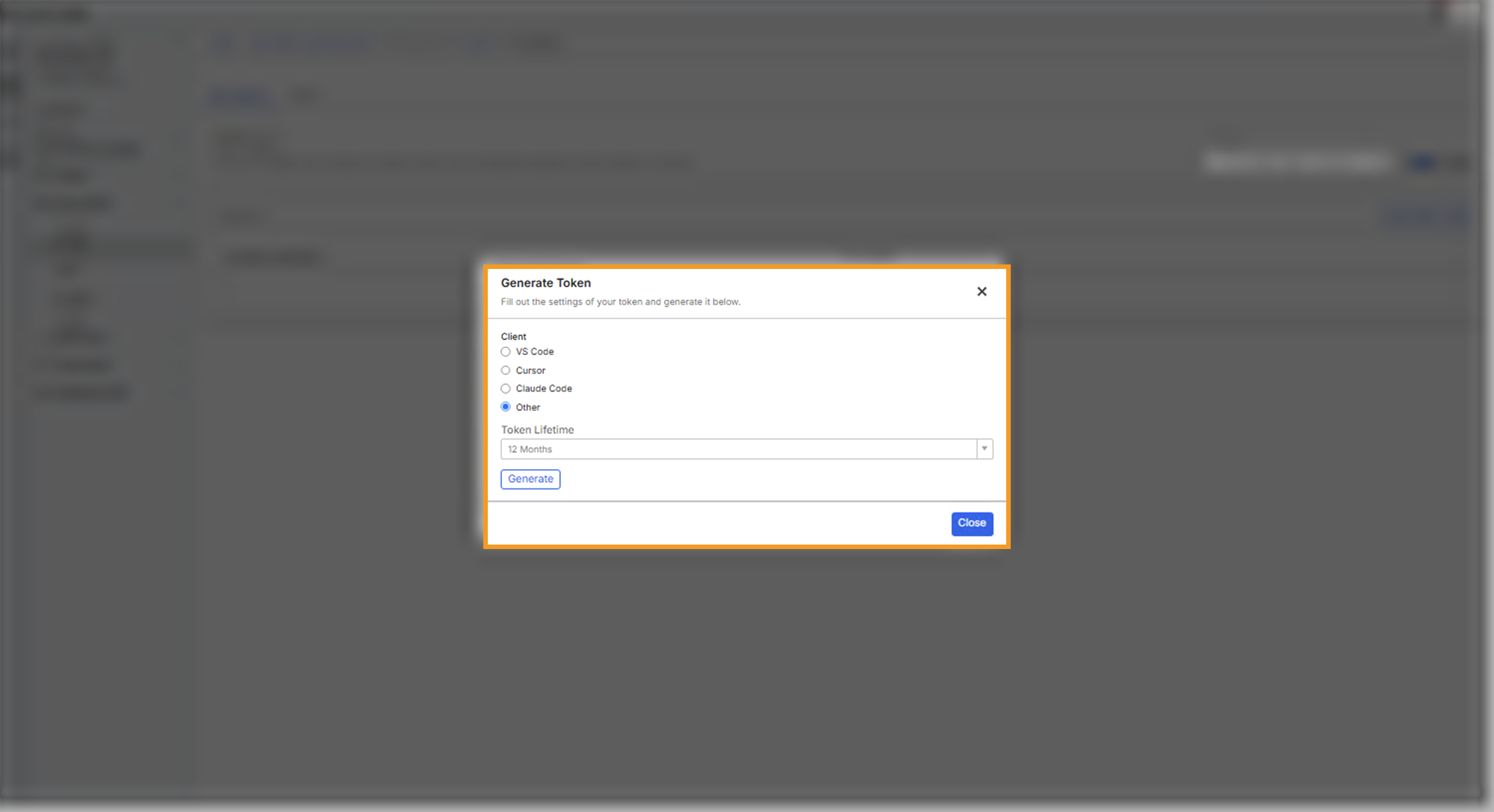
- Under Client, select Other, and choose a Token Lifetime. Then select Generate.
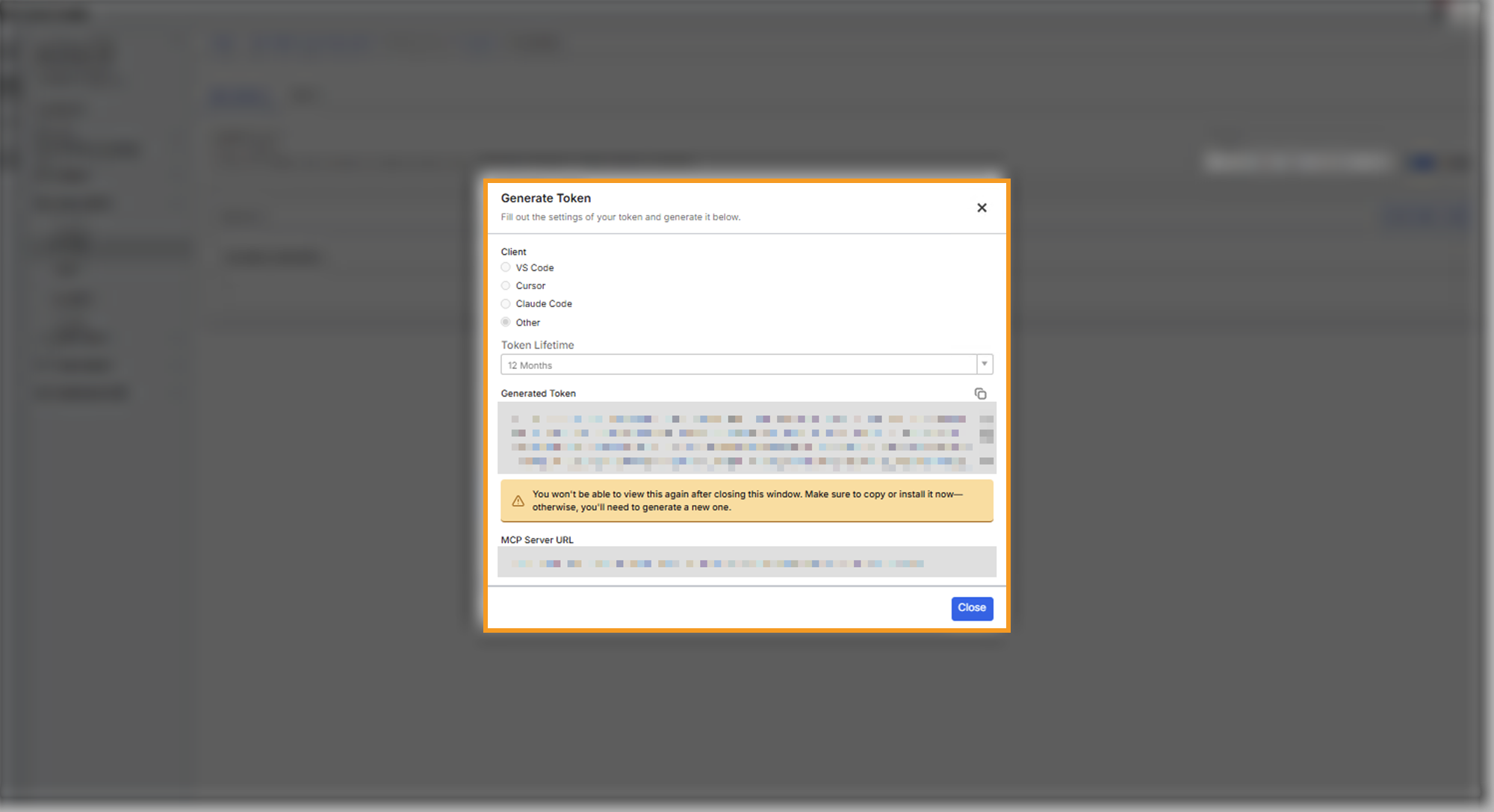
The dialog then shows the Generated Token and the MCP Server URL. Copy both now: the token appears only once, and closing the dialog without copying it means generating a new one.
Add the C3 Application connector
In C3 Intelligence, open the Connectors page, select Add connector, and pick C3 Application. Fill in its two fields, then select Add connector:
| Field | Required | Secret name | What to enter |
|---|---|---|---|
| MCP Server URL | Yes | C3_APP_MCP_SERVER | The MCP Server URL you copied, pasted as is |
| Authorization Header | Yes | C3_APP_MCP_AUTH | C3Bearer , a space, then the token you copied |
C3 Intelligence derives the application's REST address from the MCP address, so you enter only one address. To learn how to open the Connectors page and check the connection, see Connectors.
Ask about the application's data
Ask for the data in plain words in any conversation. For example:
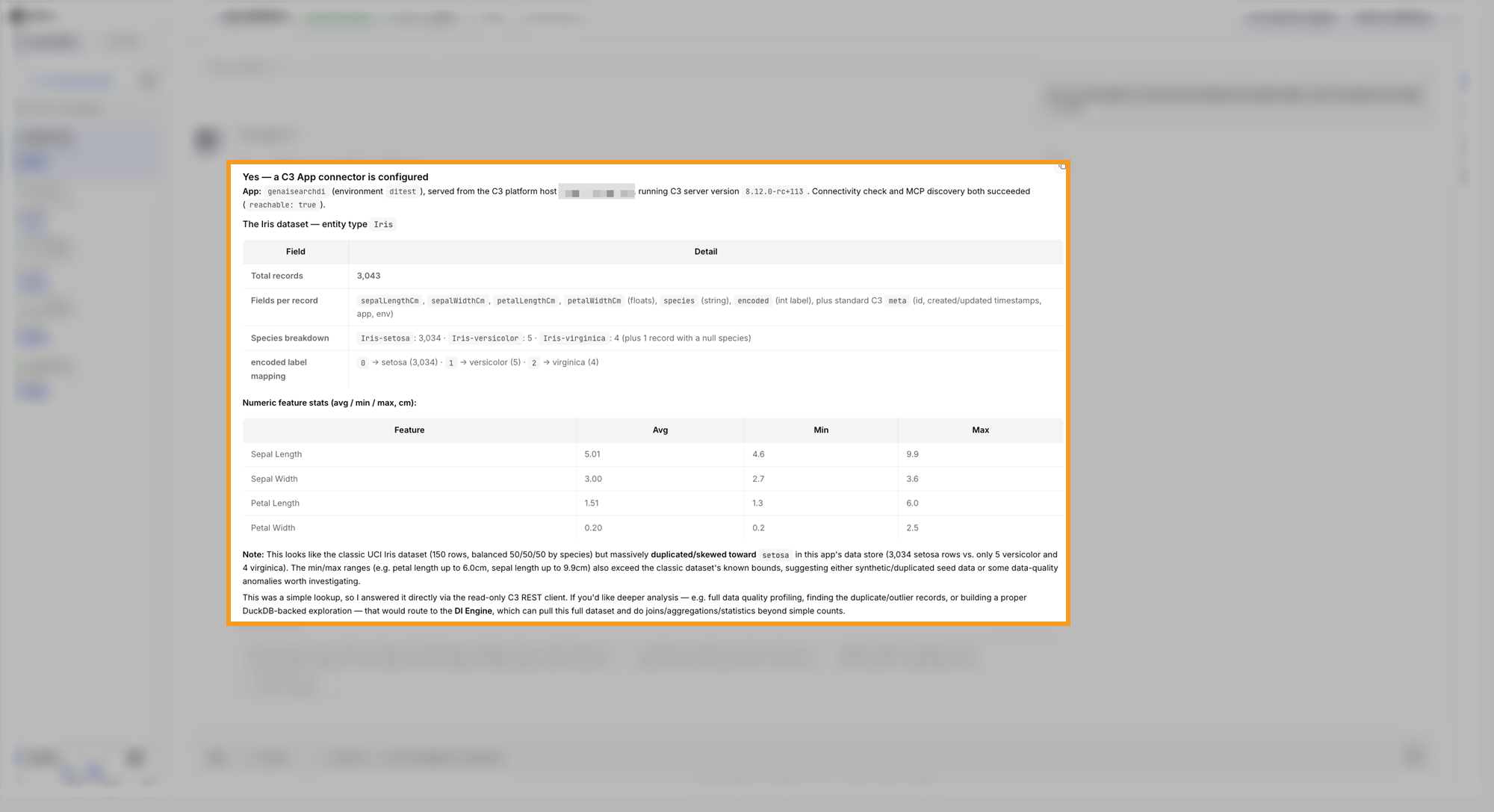
Are you connected to a C3 App? Name that app and give details on the Iris dataset the app has.In the example, the orchestrator confirmed the connection and named the application. It then described the Iris records: the record count, the fields, the species breakdown, and statistics per measurement. It answered this lookup directly and offered to hand deeper analysis, such as data quality profiling, to the DI Engine:
How agents use the connector
Agents use the connector as follows:
- The orchestrator checks the connection from its sandbox, then answers simple lookups, such as a count or a list of recent records of one Type.
- The DI Engine handles analysis of the application's data, such as aggregations, joins, and statistics.
- Access is read-only: agents never write to, change, or delete data in the connected application.
- If the application rejects the credentials, the agent asks you to check this connector.
The application must accept requests from the agent service's network. See Connectors for the reachability check.